IAM Roles with Terraform: Trust Policies and Assume Role for an App Service
Terraform for the IAM role an application service runs as: a trust policy with confused deputy conditions, a scoped inline policy, a shared managed policy, a permissions boundary, exclusive policy management to catch console drift, and a cross-account role the service assumes, plus how Encore handles service roles.

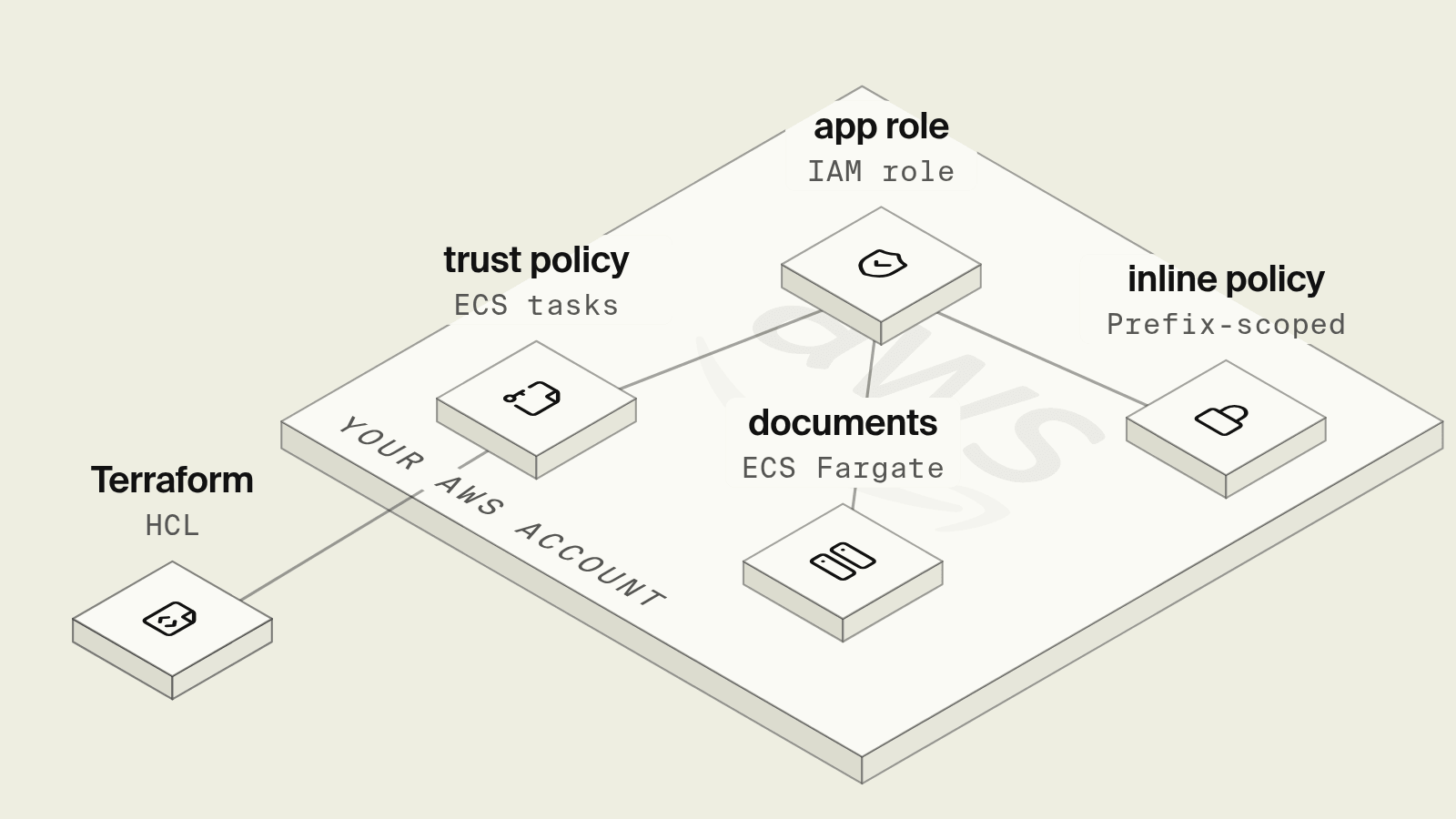
An application service on AWS should run as an IAM role that can do exactly what the service does and nothing else. Getting there in Terraform means writing two policies per role, one saying who can assume it and one saying what it can do, and then keeping them that way while people add permissions in the console during incidents and new code needs access to new resources.
This guide builds the role for a documents service on ECS with the AWS provider 6.x: the trust policy, an inline policy scoped to one bucket prefix, one KMS key and one secret, a shared managed policy, a permissions boundary, drift protection, and a role in a second account that the service assumes. It ends with how Encore handles service roles from code.
What an IAM role for an app service is made of
Providers and inputs
The second provider block assumes an admin role in the analytics account, where the reporting role is created. The bucket, key and secret come in as variables because they usually live in other stacks:
terraform {
  required_providers {
    aws = {
      source                = "hashicorp/aws"
      version               = "~> 6.0"
    }
  }
}

provider "aws" {
  region = "eu-central-1"
}

# Second account that holds the reporting data the service reads.
provider "aws" {
  alias  = "analytics"
  region = "eu-central-1"
  assume_role {
    role_arn = var.analytics_admin_role_arn
  }
}

variable "analytics_admin_role_arn" { type = string }
variable "documents_bucket_arn" { type = string }
variable "documents_kms_key_arn" { type = string }
variable "esign_secret_arn" { type = string }

data "aws_caller_identity" "current" {}
data "aws_region" "current" {}

locals {
  account_id = data.aws_caller_identity.current.account_id
  region     = data.aws_region.current.region
}
The trust policy and the role
The trust policy lets ECS tasks assume the role, and the two conditions stop another account's tasks from using the ECS service principal to reach it. The ECS task IAM role docs recommend aws:SourceAccount or aws:SourceArn here and note that a condition on one specific cluster ARN is not supported, which is why aws:SourceArn uses a wildcard on the account's ECS resources:
# Trust policy: only ECS tasks in this account may assume the role.
data "aws_iam_policy_document" "documents_trust" {
  statement {
    actions = ["sts:AssumeRole"]
    principals {
      type        = "Service"
      identifiers = ["ecs-tasks.amazonaws.com"]
    }
    condition {
      test     = "StringEquals"
      variable = "aws:SourceAccount"
      values   = [local.account_id]
    }
    condition {
      test     = "ArnLike"
      variable = "aws:SourceArn"
      values   = ["arn:aws:ecs:${local.region}:${local.account_id}:*"]
    }
  }
}

# Ceiling for anything attached to the role later, even by mistake.
resource "aws_iam_policy" "app_boundary" {
  name = "app-service-boundary"
  policy = jsonencode({
    Version = "2012-10-17"
    Statement = [
      {
        Effect   = "Allow"
        Action   = ["s3:*", "secretsmanager:GetSecretValue", "kms:Decrypt", "kms:GenerateDataKey", "cloudwatch:PutMetricData", "sts:AssumeRole"]
        Resource = "*"
      },
      {
        Effect   = "Deny"
        Action   = ["iam:*", "organizations:*", "account:*"]
        Resource = "*"
      }
    ]
  })
}

resource "aws_iam_role" "documents" {
  name                 = "documents-service"
  assume_role_policy   = data.aws_iam_policy_document.documents_trust.json
  permissions_boundary = aws_iam_policy.app_boundary.arn
  max_session_duration = 3600
}
A permissions boundary grants nothing on its own and caps the role instead, so the effective permissions are the overlap between the boundary and the role's policies, as the permissions boundaries docs explain. A wide AdministratorAccess attachment added by hand during an incident still cannot touch IAM or Organizations from this role. Platform teams often require a boundary on every role created by application stacks, enforced with an iam:PermissionsBoundary condition on the CI role that creates them.
Inline and managed policies
The inline policy holds what belongs to the documents service alone, and the managed policy holds the CloudWatch permission that every app service gets:
# Inline policy: permissions only this service should ever have.
data "aws_iam_policy_document" "documents" {
  statement {
    sid       = "ListOwnPrefix"
    actions   = ["s3:ListBucket"]
    resources = [var.documents_bucket_arn]
    condition {
      test     = "StringLike"
      variable = "s3:prefix"
      values   = ["contracts/*"]
    }
  }
  statement {
    sid       = "ReadWriteOwnPrefix"
    actions   = ["s3:GetObject", "s3:PutObject"]
    resources = ["${var.documents_bucket_arn}/contracts/*"]
  }
  statement {
    sid       = "BucketKeyViaS3Only"
    actions   = ["kms:Decrypt", "kms:GenerateDataKey"]
    resources = [var.documents_kms_key_arn]
    condition {
      test     = "StringEquals"
      variable = "kms:ViaService"
      values   = ["s3.${local.region}.amazonaws.com"]
    }
  }
  statement {
    sid       = "OneSecret"
    actions   = ["secretsmanager:GetSecretValue"]
    resources = [var.esign_secret_arn]
  }
  statement {
    sid       = "AssumeReportingRole"
    actions   = ["sts:AssumeRole"]
    resources = [aws_iam_role.reporting_reader.arn]
  }
}

resource "aws_iam_role_policy" "documents" {
  name   = "documents"
  role   = aws_iam_role.documents.name
  policy = data.aws_iam_policy_document.documents.json
}

# Managed policy: shared by every app service, versioned in one place.
resource "aws_iam_policy" "app_metrics" {
  name = "app-metrics"
  policy = jsonencode({
    Version = "2012-10-17"
    Statement = [{
      Effect    = "Allow"
      Action    = "cloudwatch:PutMetricData"
      Resource  = "*"
      Condition = { StringEquals = { "cloudwatch:namespace" = "App" } }
    }]
  })
}

resource "aws_iam_role_policy_attachment" "documents_metrics" {
  role       = aws_iam_role.documents.name
  policy_arn = aws_iam_policy.app_metrics.arn
}

# Make Terraform the only source of policies on this role: anything added
# in the console shows up as drift and is removed on the next apply.
resource "aws_iam_role_policies_exclusive" "documents" {
  role_name    = aws_iam_role.documents.name
  policy_names = [aws_iam_role_policy.documents.name]
}

resource "aws_iam_role_policy_attachments_exclusive" "documents" {
  role_name   = aws_iam_role.documents.name
  policy_arns = [aws_iam_policy.app_metrics.arn]
}
A few details carry most of the least-privilege weight:
s3:ListBuckettargets the bucket ARN with ans3:prefixcondition, while object actions targetbucket/contracts/*. Putting both on one ARN is the most common reason a scoped S3 policy returnsAccessDenied.kms:ViaServicelimits the key to calls made through S3 in this region, so the role can read encrypted objects without being able to decrypt arbitrary data with the key directly. The condition is described in the AWS KMS condition keys docs.- One secret ARN rather than
secret:*. Secrets Manager appends six random characters to secret ARNs, so passing the full ARN from the stack that created the secret avoids guessing. - Inline for one role, managed for many. An inline policy has a strict one-to-one relationship with its identity and is deleted with it, per the managed vs inline policies docs. The metrics policy is managed because ten services attach the same version of it.
aws_iam_role_policies_exclusive and aws_iam_role_policy_attachments_exclusive make Terraform the only owner of the role's policies. An inline policy or attachment added in the console appears in the next terraform plan and is removed on apply, which turns hand-made exceptions into a visible diff.
Assuming a role in another account
To read reports from the analytics account without an access key stored as a secret, the documents service relies on a role in that account that trusts the documents role, while the documents role's inline policy (the AssumeReportingRole statement above) allows the call:
# In the analytics account: a read-only role the documents service may assume.
data "aws_iam_policy_document" "reporting_trust" {
  statement {
    actions = ["sts:AssumeRole"]
    principals {
      type        = "AWS"
      identifiers = [aws_iam_role.documents.arn]
    }
  }
}

resource "aws_iam_role" "reporting_reader" {
  provider             = aws.analytics
  name                 = "documents-reporting-reader"
  assume_role_policy   = data.aws_iam_policy_document.reporting_trust.json
  max_session_duration = 3600
}

resource "aws_iam_role_policy" "reporting_reader" {
  provider = aws.analytics
  name     = "read-reports"
  role     = aws_iam_role.reporting_reader.name
  policy = jsonencode({
    Version = "2012-10-17"
    Statement = [{
      Effect   = "Allow"
      Action   = ["s3:GetObject"]
      Resource = "arn:aws:s3:::analytics-reports/documents/*"
    }]
  })
}
The trust policy alone lets nobody in, and the sts:AssumeRole permission alone fails with AccessDenied. The task already runs on temporary credentials from its own role, so assuming the reporting role is role chaining, and the IAM docs on using roles limit a chained session to one hour regardless of max_session_duration. AWS SDKs refresh assumed-role credentials automatically when the client is built with an assume-role credential provider. A long-running job that fetches credentials once and caches them stops working after an hour.
The configuration passes terraform validate with Terraform 1.13 and the AWS provider 6.x.
What still takes work after the first apply
- The policy follows the code by hand. When the service starts writing to a second prefix or reading another secret, someone edits
policies.tf, usually after the firstAccessDeniedin staging. - Roles multiply per service and per environment. Ten services in three environments is thirty roles, each with its own trust policy and inline policy to review.
- Local development uses different credentials. A developer's SSO session has far more access than the task role, so missing permissions only show up once the code runs in AWS.
- Access Analyzer findings and unused permissions need a review routine, or the role slowly grows past what the code uses.
How does Encore handle IAM roles for a service?

Encore brings infrastructure from code to TypeScript and Go backends. Buckets, secrets and Pub/Sub topics are declared in the service that uses them, and the Encore platform provisions them in your own AWS or GCP account. When the app deploys to AWS, Encore provisions an IAM role for the service, as described in the AWS infrastructure docs.

Set up the app
Run in your terminal to get started locally.
The migration that sits next to this service creates the contracts table:
-- documents/migrations/1_contracts.up.sql
CREATE TABLE contracts (
    id         TEXT PRIMARY KEY,
    owner_uid  TEXT NOT NULL,
    created_at TIMESTAMPTZ NOT NULL DEFAULT now()
);
Here is the documents service from the Terraform example, written in Go, where the contracts bucket and the e-sign API key are declared at package level and the two endpoints use the app's auth handler. Create records owner_uid when the contract is opened, and both later endpoints load that row and refuse the request unless auth.UserID matches:
// documents/documents.go
package documents

import (
	"bytes"
	"context"
	"encoding/json"
	"errors"
	"fmt"
	"net/http"
	"time"

	"encore.dev/beta/auth"
	"encore.dev/beta/errs"
	"encore.dev/storage/objects"
	"encore.dev/storage/sqldb"
)

var db = sqldb.NewDatabase("contracts", sqldb.DatabaseConfig{
	Migrations: "./migrations",
})

// S3 on AWS, Cloud Storage on GCP, local disk with `encore run`.
var Contracts = objects.NewBucket("contracts", objects.BucketConfig{Versioned: true})

var secrets struct {
	ESignAPIKey string // set per environment with `encore secret set`
}

type URLResponse struct {
	URL string `json:"url"`
}

type CreateResponse struct {
	ID string `json:"id"`
}

// Create opens a contract owned by the authenticated caller.
//
//encore:api auth method=POST path=/contracts
func Create(ctx context.Context) (*CreateResponse, error) {
	uid, ok := auth.UserID()
	if !ok {
		return nil, &errs.Error{Code: errs.Unauthenticated, Message: "unauthenticated"}
	}
	id := fmt.Sprintf("%d", time.Now().UnixNano())
	if _, err := db.Exec(ctx, `INSERT INTO contracts (id, owner_uid) VALUES ($1, $2)`, id, string(uid)); err != nil {
		return nil, err
	}
	return &CreateResponse{ID: id}, nil
}

func requireOwner(ctx context.Context, id string) error {
	uid, ok := auth.UserID()
	if !ok {
		return &errs.Error{Code: errs.Unauthenticated, Message: "unauthenticated"}
	}
	var owner string
	err := db.QueryRow(ctx, `SELECT owner_uid FROM contracts WHERE id = $1`, id).Scan(&owner)
	if errors.Is(err, sqldb.ErrNoRows) {
		return &errs.Error{Code: errs.NotFound, Message: "contract not found"}
	}
	if err != nil {
		return err
	}
	if owner != string(uid) {
		return &errs.Error{Code: errs.NotFound, Message: "contract not found"}
	}
	return nil
}

// UploadURL lets the browser upload a contract PDF straight to the bucket.
//
//encore:api auth method=POST path=/contracts/:id/upload-url
func UploadURL(ctx context.Context, id string) (*URLResponse, error) {
	if err := requireOwner(ctx, id); err != nil {
		return nil, err
	}
	u, err := Contracts.SignedUploadURL(ctx, key(id), objects.WithTTL(10*time.Minute))
	if err != nil {
		return nil, err
	}
	return &URLResponse{URL: u.URL}, nil
}

// SendForSignature gives the e-sign provider a short-lived link to the file.
//
//encore:api auth method=POST path=/contracts/:id/send
func SendForSignature(ctx context.Context, id string) error {
	if err := requireOwner(ctx, id); err != nil {
		return err
	}
	if _, err := Contracts.Attrs(ctx, key(id)); err != nil {
		return &errs.Error{Code: errs.FailedPrecondition, Message: "contract PDF not uploaded"}
	}
	link, err := downloadLink(ctx, objects.BucketRef[objects.SignedDownloader](Contracts), id)
	if err != nil {
		return err
	}
	body, _ := json.Marshal(map[string]string{"document_url": link, "external_id": id})
	req, err := http.NewRequestWithContext(ctx, http.MethodPost,
		"https://esign.example.com/v1/envelopes", bytes.NewReader(body))
	if err != nil {
		return err
	}
	req.Header.Set("Authorization", "Bearer "+secrets.ESignAPIKey)
	req.Header.Set("Content-Type", "application/json")
	req.Header.Set("Idempotency-Key", "envelope-"+id) // provider dedupes resends
	resp, err := http.DefaultClient.Do(req)
	if err != nil {
		return err
	}
	defer resp.Body.Close()
	if resp.StatusCode >= 300 {
		return fmt.Errorf("e-sign provider returned %d", resp.StatusCode)
	}
	return nil
}

// downloadLink only receives the permission it needs: signing download URLs.
func downloadLink(ctx context.Context, b objects.SignedDownloader, id string) (string, error) {
	u, err := b.SignedDownloadURL(ctx, key(id), objects.WithTTL(15*time.Minute))
	if err != nil {
		return "", err
	}
	return u.URL, nil
}

func key(id string) string { return "contracts/" + id + ".pdf" }
The bucket in this file becomes an S3 bucket in each AWS environment and a directory on local disk under encore run, and the object storage docs cover signed upload and download URLs. objects.BucketRef[objects.SignedDownloader] hands downloadLink a reference that can sign download URLs and do nothing else, so a helper written later cannot delete or overwrite contracts through it. The API key is set per environment with encore secret set --type prod ESignAPIKey, and the secrets docs describe how values are stored and injected at runtime. Secret values are not stored in the repository, so a coding agent working in this code sees the name ESignAPIKey and never the key.
The browser upload and the e-sign call can be tried locally from the local development dashboard before anything touches AWS. When a coding agent later adds a second bucket to this service, the change is a declaration in a Go file that shows up in code review, and the next deploy provisions the bucket and the role's access to it. Cloud access sits with Encore's IAM role, not the agent.
Best fit: TypeScript and Go teams on AWS who want each service's IAM role to follow the resources declared in its code, in every environment.
Good to know
max_session_durationaccepts one to twelve hours, and chained sessions stay capped at one hour whatever it is set to.- Whoever registers the ECS task definition, including the CI role, needs
iam:PassRoleon the task role, and scopingiam:PassRoleto specific role ARNs is one of the more effective guardrails in a shared account. - Changing
nameonaws_iam_rolereplaces the role, and every trust policy that names it by ARN, such as the reporting role's in the other account, has to be updated in the same apply.
Related guides
Frequently asked questions
How do I create an IAM role for an ECS service in Terraform?
Write the trust policy with an aws_iam_policy_document data source that allows sts:AssumeRole for the ecs-tasks.amazonaws.com service principal, pass its json to assume_role_policy on aws_iam_role, and attach permissions with aws_iam_role_policy or aws_iam_role_policy_attachment. Add aws:SourceAccount and an ArnLike aws:SourceArn condition on arn:aws:ecs:region:account:* to limit which tasks can use it.
Should I use an inline or a managed policy for an IAM role?
Use an inline policy, aws_iam_role_policy, for permissions that belong to one role only, such as access to that service's bucket prefix and secret, since an inline policy lives and dies with its role. Use a customer managed policy, aws_iam_policy plus aws_iam_role_policy_attachment, for permissions shared by many roles, such as publishing metrics to one CloudWatch namespace.
How do I let one IAM role assume another role in a different account with Terraform?
Create the target role in the other account, through a provider alias, with a trust policy whose AWS principal is the calling role's ARN, and give the calling role an inline policy that allows sts:AssumeRole on the target role's ARN. A session obtained this way is role chaining and lasts at most one hour.
How does Encore handle IAM roles for a Go service on AWS?
When the app deploys to your AWS account, Encore provisions an IAM role for the service. A Go service declares its bucket with objects.NewBucket and its secrets in a secrets struct, and objects.BucketRef[objects.SignedDownloader] passes a reference that can only sign download URLs to helper code.
Deploy to your cloud on AWS and Google Cloud
without managing infrastructure
Encore lets developers and agents define application infrastructure directly in code, then automatically provisions it from local development to production in your AWS or GCP account.
