ECS Fargate with Terraform: Cluster, Service, Load Balancer and Autoscaling
A complete Terraform setup for an API on Amazon ECS Fargate behind an Application Load Balancer, with security groups, logs, deployment rollback and CPU autoscaling, the settings that cause failed deployments, and how Encore deploys to Fargate from code.

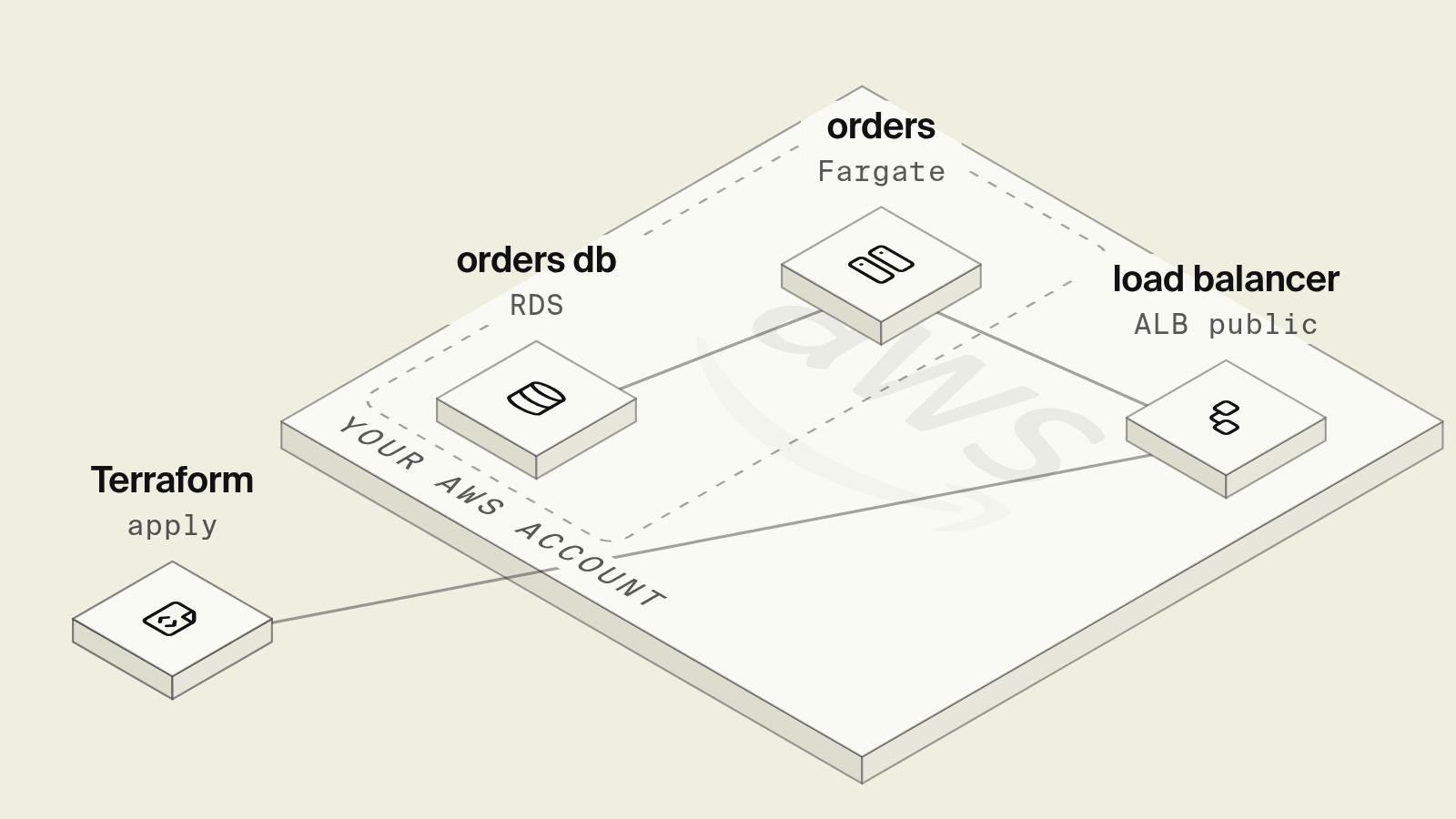
Running one container on ECS Fargate takes a cluster, a task definition and a service. Running an API that takes traffic adds a load balancer, a target group, a listener with a certificate, two security groups, a log group, rollback on failed deployments and autoscaling, and each of those has a setting that fails quietly when it is wrong. The first deployment that hangs for half an hour with tasks cycling between starting and stopping usually traces back to one of them.
This guide builds the setup in Terraform with the AWS provider 6.x, explains the settings that cause stuck deployments, and shows how Encore deploys the same kind of service to Fargate from application code.
What an ECS Fargate Terraform setup needs
The VPC, subnets and NAT gateway are passed in as variables here, and the AWS VPC with Terraform guide covers them. The two IAM roles are explained in ECS task role vs execution role.
Cluster, logs and task definition
resource "aws_ecs_cluster" "main" {
  name = "main"
  setting {
    name  = "containerInsights"
    value = "enabled"
  }
}

resource "aws_cloudwatch_log_group" "api" {
  name              = "/ecs/api"
  retention_in_days = 30
}

resource "aws_ecs_task_definition" "api" {
  family                   = "api"
  requires_compatibilities = ["FARGATE"]
  network_mode             = "awsvpc"
  cpu                      = "512"
  memory                   = "1024"
  execution_role_arn       = var.execution_role_arn
  task_role_arn            = var.task_role_arn

  runtime_platform {
    operating_system_family = "LINUX"
    cpu_architecture        = "ARM64"
  }

  container_definitions = jsonencode([{
    name         = "api"
    image        = var.image
    essential    = true
    portMappings = [{ containerPort = 8080, protocol = "tcp" }]
    logConfiguration = {
      logDriver = "awslogs"
      options = {
        awslogs-group         = aws_cloudwatch_log_group.api.name
        awslogs-region        = data.aws_region.current.region
        awslogs-stream-prefix = "api"
      }
    }
  }])
}

data "aws_region" "current" {}
Fargate only accepts certain CPU and memory pairs: 512 CPU units allows 1 to 4 GB, for example, and other combinations are rejected when the task definition is registered. ARM64 runs on Graviton at a lower price per vCPU, as long as the image is built for linux/arm64, otherwise tasks stop with exec format error. Creating the log group in Terraform also sets its retention, while log groups created any other way keep logs forever by default.
Load balancer and security groups
resource "aws_security_group" "alb" {
  name   = "api-alb"
  vpc_id = var.vpc_id
}

resource "aws_vpc_security_group_ingress_rule" "alb_https" {
  security_group_id = aws_security_group.alb.id
  cidr_ipv4         = "0.0.0.0/0"
  from_port         = 443
  to_port           = 443
  ip_protocol       = "tcp"
}

resource "aws_vpc_security_group_egress_rule" "alb_to_tasks" {
  security_group_id            = aws_security_group.alb.id
  referenced_security_group_id = aws_security_group.tasks.id
  from_port                    = 8080
  to_port                      = 8080
  ip_protocol                  = "tcp"
}

resource "aws_security_group" "tasks" {
  name   = "api-tasks"
  vpc_id = var.vpc_id
}

resource "aws_vpc_security_group_ingress_rule" "tasks_from_alb" {
  security_group_id            = aws_security_group.tasks.id
  referenced_security_group_id = aws_security_group.alb.id
  from_port                    = 8080
  to_port                      = 8080
  ip_protocol                  = "tcp"
}

resource "aws_vpc_security_group_egress_rule" "tasks_out" {
  security_group_id = aws_security_group.tasks.id
  cidr_ipv4         = "0.0.0.0/0"
  ip_protocol       = "-1" # image pulls, AWS APIs, databases
}

resource "aws_lb" "api" {
  name               = "api"
  load_balancer_type = "application"
  subnets            = var.public_subnet_ids
  security_groups    = [aws_security_group.alb.id]
}

resource "aws_lb_target_group" "api" {
  name                 = "api"
  port                 = 8080
  protocol             = "HTTP"
  target_type          = "ip" # required for awsvpc tasks
  vpc_id               = var.vpc_id
  deregistration_delay = 30

  health_check {
    path    = "/healthz"
    matcher = "200"
  }
}

resource "aws_lb_listener" "https" {
  load_balancer_arn = aws_lb.api.arn
  port              = 443
  protocol          = "HTTPS"
  ssl_policy        = "ELBSecurityPolicy-TLS13-1-2-2021-06"
  certificate_arn   = var.certificate_arn

  default_action {
    type             = "forward"
    target_group_arn = aws_lb_target_group.api.arn
  }
}
target_type = "ip" is required because each Fargate task has its own network interface in awsvpc mode. The task security group only accepts traffic from the load balancer's security group, so tasks in private subnets are reachable only through the ALB. deregistration_delay defaults to 300 seconds, which makes every deployment wait five minutes per batch of old tasks, so lower it to what your longest request needs.
Service and autoscaling
resource "aws_ecs_service" "api" {
  name                              = "api"
  cluster                           = aws_ecs_cluster.main.id
  task_definition                   = aws_ecs_task_definition.api.arn
  desired_count                     = 2
  launch_type                       = "FARGATE"
  health_check_grace_period_seconds = 30

  network_configuration {
    subnets          = var.private_subnet_ids
    security_groups  = [aws_security_group.tasks.id]
    assign_public_ip = false
  }

  load_balancer {
    target_group_arn = aws_lb_target_group.api.arn
    container_name   = "api"
    container_port   = 8080
  }

  deployment_circuit_breaker {
    enable   = true
    rollback = true
  }

  lifecycle {
    ignore_changes = [desired_count] # leave room for autoscaling
  }

  depends_on = [aws_lb_listener.https]
}

resource "aws_appautoscaling_target" "api" {
  service_namespace  = "ecs"
  resource_id        = "service/${aws_ecs_cluster.main.name}/${aws_ecs_service.api.name}"
  scalable_dimension = "ecs:service:DesiredCount"
  min_capacity       = 2
  max_capacity       = 10
}

resource "aws_appautoscaling_policy" "api_cpu" {
  name               = "api-cpu"
  service_namespace  = aws_appautoscaling_target.api.service_namespace
  resource_id        = aws_appautoscaling_target.api.resource_id
  scalable_dimension = aws_appautoscaling_target.api.scalable_dimension
  policy_type        = "TargetTrackingScaling"

  target_tracking_scaling_policy_configuration {
    target_value = 60
    predefined_metric_specification {
      predefined_metric_type = "ECSServiceAverageCPUUtilization"
    }
  }
}
The configuration in this guide passes terraform validate with Terraform 1.13 and the AWS provider 6.x. The settings that matter most here:
deployment_circuit_breakerwithrollback = truestops a deployment whose tasks keep failing and returns to the previous task definition, as described in the deployment circuit breaker docs. Without it, ECS keeps launching failing tasks.health_check_grace_period_secondskeeps the ALB health check from killing tasks that are still starting. Set it to more than your slowest startup.ignore_changes = [desired_count]keeps Terraform from undoing autoscaling on every apply.assign_public_ip = falsemeans tasks need a NAT gateway or VPC endpoints for ECR, CloudWatch Logs and Secrets Manager. Without either, tasks fail withCannotPullContainerErrororResourceInitializationError.
What still takes work after the first apply
- Image builds and deploys: Terraform registers a task definition but does not build images. CI has to build, push to ECR and update the service, and the image tag in Terraform state drifts from what is running unless one tool owns it.
- More services: each new service repeats the task definition, target group, listener rule, security group rules, roles and autoscaling, typically through a module that grows options over time.
- Service-to-service calls need Service Connect or Cloud Map on top, plus security group rules between services.
- Local development runs the containers with Docker Compose, which has no ALB, no IAM and no SNS or SQS.
How does Encore deploy to Fargate from code?

Encore follows an infrastructure-from-code approach for TypeScript and Go: services, databases and queues are declared in the application, and the Encore platform creates the AWS resources for them in your own account. According to the AWS infrastructure docs, that includes a VPC across two availability zones, an Application Load Balancer in the public subnet, ECR for images and Fargate tasks in private compute subnets that only accept traffic from the ALB, with rolling deployments.

Set up the app
Run in your terminal to get started locally.
An orders API that stores an order and publishes an event, and a receipts service that consumes it. On AWS these become two Fargate services, an RDS database, an SNS topic and an SQS queue with a dead-letter queue:
// orders/orders.ts
import { api } from "encore.dev/api";
import { Topic } from "encore.dev/pubsub";
import { SQLDatabase } from "encore.dev/storage/sqldb";

// RDS PostgreSQL and an SNS topic on AWS; both run locally with `encore run`.
const db = new SQLDatabase("orders", { migrations: "./migrations" });

export interface OrderPlaced {
  orderId: number;
  email: string;
  totalCents: number;
}

export const orderPlaced = new Topic<OrderPlaced>("order-placed", {
  deliveryGuarantee: "at-least-once",
});

interface PlaceParams {
  email: string;
  totalCents: number;
}

export const place = api(
  { expose: true, method: "POST", path: "/orders" },
  async ({ email, totalCents }: PlaceParams): Promise<{ orderId: number }> => {
    const row = await db.queryRow<{ id: number }>`
      INSERT INTO orders (email, total_cents) VALUES (${email}, ${totalCents}) RETURNING id
    `;
    await orderPlaced.publish({ orderId: row!.id, email, totalCents });
    return { orderId: row!.id };
  },
);
// receipts/receipts.ts
import { Subscription } from "encore.dev/pubsub";
import { orderPlaced } from "../orders/orders";

// An SQS queue with a dead-letter queue on AWS, subscribed to the topic.
const _ = new Subscription(orderPlaced, "send-receipt", {
  handler: async (event) => {
    // Idempotent: skip if a receipt for event.orderId was already sent.
    console.log("sending receipt", event.orderId, "to", event.email);
  },
});
encore run starts Postgres locally, applies the migrations and runs the topic and subscription, so the whole flow can be called and traced from the local development dashboard. The Pub/Sub docs cover retries and dead letters, and the database docs cover migrations.
Encore provisions an IAM role for the service, or a service account on GCP. Each service also gets its own database role with access only to the databases it uses, so the receipts service can consume its queue but cannot query the orders database. When a coding agent adds a third service, the Fargate service and permissions for it come from the code in the pull request, and the environments docs describe how the same change rolls out to staging and production.
Best fit: TypeScript and Go teams who want each service on Fargate in their own AWS account, deployed from the code that defines it.
Good to know
- Fargate tasks get 20 GiB of ephemeral storage by default, configurable up to 200 GiB with
ephemeral_storagein the task definition. - Every task definition change creates a new revision that Terraform points the service at, and old revisions stay registered until you deregister them.
- Fargate Spot capacity costs less and can be interrupted with a two-minute warning, which suits workers better than an API behind an ALB.
Related guides
Frequently asked questions
Why must the target group type be ip for ECS Fargate?
Fargate tasks use the awsvpc network mode, so each task gets its own elastic network interface and private IP address instead of a port on a host instance. The load balancer has to register those IP addresses, which requires target_type = "ip" on the aws_lb_target_group. The default instance type fails when the service is created.
How do I make an ECS service roll back a failed deployment in Terraform?
Add deployment_circuit_breaker { enable = true, rollback = true } to aws_ecs_service. When new tasks keep failing to start or failing health checks, ECS stops the deployment and returns to the last completed one instead of retrying forever.
Why does Terraform keep resetting desired_count on my autoscaled ECS service?
Application Auto Scaling changes desired_count outside Terraform, so the next plan wants to set it back. Add lifecycle { ignore_changes = [desired_count] } to the aws_ecs_service resource and let the autoscaling target own the number of tasks.
How do I deploy a TypeScript or Go service to ECS Fargate from application code?
With Encore, you write TypeScript or Go services and connect your AWS account. On deploy, Encore builds the images, pushes them to ECR and runs each service on Fargate behind an Application Load Balancer in a VPC it creates, along with the databases and queues the code declares.
Deploy to your cloud on AWS and Google Cloud
without managing infrastructure
Encore lets developers and agents define application infrastructure directly in code, then automatically provisions it from local development to production in your AWS or GCP account.
