ECS Task Role vs Execution Role: What Each One Is For
Which IAM role on an Amazon ECS task definition does what, which permissions belong on each, the errors you get when they are swapped, and Terraform that sets both up for a Fargate service.

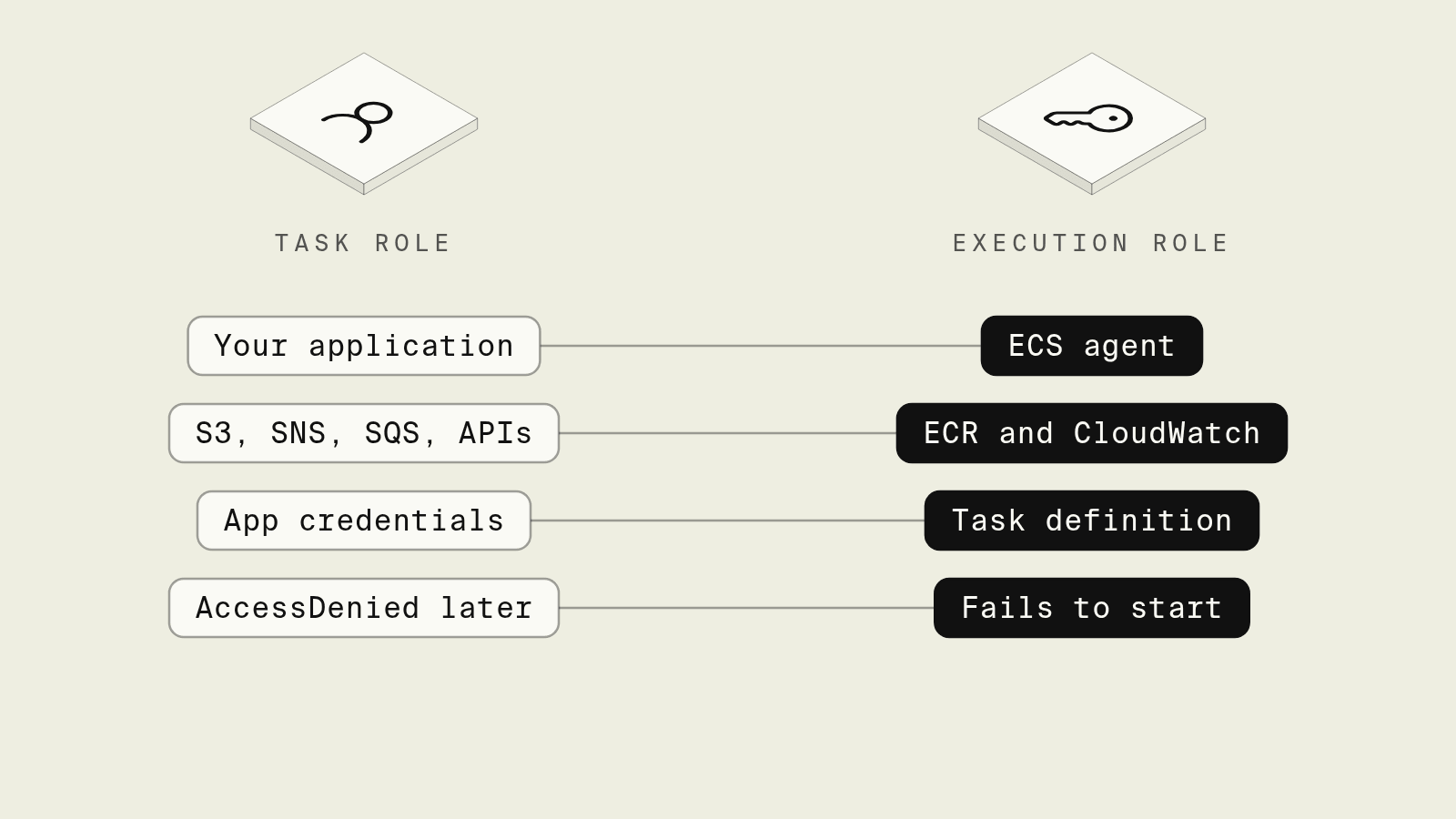
Every Amazon ECS task definition has two IAM role slots, executionRoleArn and taskRoleArn, and the names are close enough that people regularly put permissions on the wrong one. The result is either a task that fails to start with ResourceInitializationError, or a task that starts fine and then gets AccessDenied the first time the code touches S3.
The split comes down to who uses each role, and this guide explains it, lists which permissions go where, shows the errors each mistake produces, and ends with Terraform for both roles on a Fargate service, plus how Encore handles service permissions.
Task role vs execution role at a glance
Both roles trust the same service principal, ecs-tasks.amazonaws.com, which is why the console offers the same "Elastic Container Service Task" use case for either one.
What the task execution role does
The task execution role docs describe it as granting the ECS and Fargate agents permission to make AWS API calls on your behalf, with credentials that are not directly accessible by the containers. On Fargate you need it when the task:
- pulls an image from a private ECR repository,
- sends logs to CloudWatch through the
awslogsdriver, - references Secrets Manager secrets or Parameter Store parameters in the container definition's
secretsblock, - pulls from a private registry outside AWS with
repositoryCredentials.
The managed AmazonECSTaskExecutionRolePolicy covers the ECR and log permissions. Secrets are not included, so each secret or parameter the task definition references needs an extra statement, plus kms:Decrypt if it is encrypted with a customer managed key.
What the task role does
The task role is the identity of your running code. ECS delivers temporary credentials for it through a local endpoint whose path is in AWS_CONTAINER_CREDENTIALS_RELATIVE_URI, and the default credential chain in every AWS SDK picks that up without configuration, as the task IAM role docs explain. Nothing else in the container needs AWS access keys.
The task role deserves the tightest policy, since an invoices service that only uploads PDFs needs s3:PutObject on one prefix, and has no use for s3:DeleteObject or access to other buckets. Each ECS service can have its own task definition and therefore its own task role, so a compromised container can do only what that one role allows.
Errors that point to the wrong role
ResourceInitializationError: unable to pull secrets or registry auth: the execution role is missingsecretsmanager:GetSecretValueorssm:GetParametersfor a secret in the task definition, or the task cannot reach the Secrets Manager endpoint from its subnet. The task stops before your code runs.CannotPullContainerErrorwith an access denied message: the execution role lacks ECR permissions, or no execution role is set.AccessDeniedfrom the AWS SDK inside your app: the permission is on the execution role, or the task definition has notaskRoleArn, so the SDK either has no credentials or the wrong ones.- Logs never appear in CloudWatch: the execution role lacks
logs:CreateLogStreamandlogs:PutLogEvents, or the log group does not exist andawslogs-create-groupis not set.
Terraform for both roles
A trust policy that both roles share, limited to your account with the aws:SourceAccount condition that AWS recommends against confused deputy issues:
data "aws_iam_policy_document" "ecs_tasks_trust" {
  statement {
    actions = ["sts:AssumeRole"]
    principals {
      type        = "Service"
      identifiers = ["ecs-tasks.amazonaws.com"]
    }
    condition {
      test     = "StringEquals"
      variable = "aws:SourceAccount"
      values   = [data.aws_caller_identity.current.account_id]
    }
  }
}
The two roles and a Fargate task definition that uses them. The execution role resolves the RENDERER_API_KEY secret, and the task role lets the code write to one bucket prefix:
# Used by ECS and the Fargate agent before and around your container:
# pull the image, ship logs, resolve `secrets` in the task definition.
resource "aws_iam_role" "invoices_execution" {
  name               = "invoices-execution"
  assume_role_policy = data.aws_iam_policy_document.ecs_tasks_trust.json
}

resource "aws_iam_role_policy_attachment" "invoices_execution" {
  role       = aws_iam_role.invoices_execution.name
  policy_arn = "arn:aws:iam::aws:policy/service-role/AmazonECSTaskExecutionRolePolicy"
}

resource "aws_iam_role_policy" "invoices_execution_secrets" {
  role = aws_iam_role.invoices_execution.id
  policy = jsonencode({
    Version = "2012-10-17"
    Statement = [{
      Effect   = "Allow"
      Action   = ["secretsmanager:GetSecretValue"]
      Resource = [var.renderer_key_arn]
    }]
  })
}

# Assumed by your application code inside the container.
resource "aws_iam_role" "invoices_task" {
  name               = "invoices-task"
  assume_role_policy = data.aws_iam_policy_document.ecs_tasks_trust.json
}

resource "aws_iam_role_policy" "invoices_task" {
  role = aws_iam_role.invoices_task.id
  policy = jsonencode({
    Version = "2012-10-17"
    Statement = [{
      Effect   = "Allow"
      Action   = ["s3:PutObject"]
      Resource = ["${var.invoice_bucket_arn}/issued/*"]
    }]
  })
}

resource "aws_ecs_task_definition" "invoices" {
  family                   = "invoices"
  requires_compatibilities = ["FARGATE"]
  network_mode             = "awsvpc"
  cpu                      = "256"
  memory                   = "512"
  execution_role_arn       = aws_iam_role.invoices_execution.arn
  task_role_arn            = aws_iam_role.invoices_task.arn

  container_definitions = jsonencode([{
    name      = "invoices"
    image     = var.image
    essential = true
    secrets = [{
      name      = "RENDERER_API_KEY"
      valueFrom = var.renderer_key_arn
    }]
    logConfiguration = {
      logDriver = "awslogs"
      options = {
        awslogs-group         = "/ecs/invoices"
        awslogs-region        = data.aws_region.current.region
        awslogs-stream-prefix = "invoices"
      }
    }
  }])
}
This configuration passes terraform validate with the AWS provider 6.x. Every new AWS API the service starts calling means another statement on invoices_task, and every new secret means one on invoices_execution, often in a separate repository from the code that needs them.
How does Encore handle service roles on ECS?

Encore brings infrastructure from code to TypeScript and Go backends: buckets, topics and secrets are declared in the service that uses them, and the Encore platform provisions them, along with the compute and IAM, in your own AWS or GCP account. On Fargate, Encore provisions an IAM role for the service, or a service account on GCP, as the AWS infrastructure docs describe.

Set up the app
Run in your terminal to get started locally.
The invoices service from the Terraform example, written in Go. The bucket, topic and secret are package-level declarations, so Encore knows from the code which resources this service touches:
// invoices/invoices.go
package invoices

import (
	"bytes"
	"context"
	"fmt"

	"encore.dev/pubsub"
	"encore.dev/storage/objects"
)

// The S3 bucket, SNS topic and Secrets Manager secret below are created per
// environment, and the IAM role for this service is granted access to them.
var PDFs = objects.NewBucket("invoice-pdfs", objects.BucketConfig{})

type InvoiceIssued struct {
	InvoiceID string
	Key       string
}

var Issued = pubsub.NewTopic[*InvoiceIssued]("invoice-issued", pubsub.TopicConfig{
	DeliveryGuarantee: pubsub.AtLeastOnce,
})

var secrets struct {
	RendererAPIKey string // key for the third-party PDF renderer
}

type IssueParams struct {
	InvoiceID string
	HTML      string
}

type IssueResponse struct {
	Key string
}

//encore:api private method=POST path=/invoices/issue
func Issue(ctx context.Context, p *IssueParams) (*IssueResponse, error) {
	pdf, err := render(ctx, secrets.RendererAPIKey, p.HTML)
	if err != nil {
		return nil, err
	}
	key := "issued/" + p.InvoiceID + ".pdf"
	// A reference with upload permission only: this service never needs to
	// delete or list invoices, so it does not ask for those permissions.
	if err := store(ctx, objects.BucketRef[objects.Uploader](PDFs), key, pdf); err != nil {
		return nil, err
	}
	if _, err := Issued.Publish(ctx, &InvoiceIssued{InvoiceID: p.InvoiceID, Key: key}); err != nil {
		return nil, err
	}
	return &IssueResponse{Key: key}, nil
}

func store(ctx context.Context, b objects.Uploader, key string, pdf []byte) error {
	w := b.Upload(ctx, key, objects.WithUploadAttrs(objects.UploadAttrs{ContentType: "application/pdf"}))
	if _, err := w.Write(pdf); err != nil {
		w.Abort(err)
		return err
	}
	return w.Close()
}

// render calls the PDF renderer; stubbed here.
func render(ctx context.Context, apiKey, html string) ([]byte, error) {
	if apiKey == "" {
		return nil, fmt.Errorf("renderer API key not set")
	}
	var buf bytes.Buffer
	buf.WriteString("%PDF-1.7\n")
	return buf.Bytes(), nil
}
objects.BucketRef[objects.Uploader] narrows what the service asks for: per the object storage docs, a reference pre-declares the permissions it needs and those are the ones assumed for the service. The secret is set per environment with encore secret set --type prod RendererAPIKey, and the secrets docs cover how values are stored and injected. Secret values stay out of the repository, where a coding agent working in the code sees the secret's name but not its value.
encore run stores bucket objects on local disk and runs the topic locally, so the Issue endpoint can be exercised from the local development dashboard before anything touches AWS. When a coding agent later adds a call that publishes to a second topic, the permission arrives with the next deploy instead of a separate IAM pull request, and the Pub/Sub docs describe how topics and subscriptions map to SNS and SQS.
Best fit: TypeScript and Go teams on Fargate who want each service's IAM role to follow the resources it uses in code.
Good to know
- On Fargate with ECR and CloudWatch Logs you need an execution role in practice, since image pulls and log shipping both depend on it.
- On the EC2 launch type, containers can also reach the instance profile through the instance metadata service unless you block it, which gives them the host's permissions. Fargate has no instance profile.
- Whoever registers the task definition, including your CI pipeline, needs
iam:PassRoleon both roles.
Related guides
Frequently asked questions
What is the difference between an ECS task role and a task execution role?
The task execution role is used by the ECS container agent and the Fargate agent to start your task: pull the image from ECR, send logs to CloudWatch with the awslogs driver and fetch secrets referenced in the task definition. The task role is assumed by your application code inside the container and holds the permissions it needs to call AWS, such as writing to S3 or publishing to SNS.
Does my app need a task role if it reads secrets from the task definition?
Secrets listed in the secrets block of a container definition are fetched by the agent with the execution role and injected as environment variables before your process starts, so the task role does not need access to them. Your code only needs secretsmanager:GetSecretValue on the task role if it calls the Secrets Manager API itself, for example to reload a rotated value.
Why does my ECS app get AccessDenied when calling S3 even though the execution role has S3 access?
Your application code never sees the execution role's credentials, because the AWS SDK inside the container uses the task role, delivered through the endpoint in AWS_CONTAINER_CREDENTIALS_RELATIVE_URI, so the S3 permissions have to be on the role set as task_role_arn.
Can Encore set up ECS IAM roles for me?
When an Encore app deploys to Fargate in your AWS account, Encore provisions an IAM role for the service, or a service account on GCP.
Deploy to your cloud on AWS and Google Cloud
without managing infrastructure
Encore lets developers and agents define application infrastructure directly in code, then automatically provisions it from local development to production in your AWS or GCP account.
