How to Deploy to AWS Without Terraform
Deploy a Go, Express or NestJS backend to your own AWS account with Postgres, queues, cron jobs and secrets declared in application code, and see where ECS Express Mode, CDK, Pulumi and SST fit.

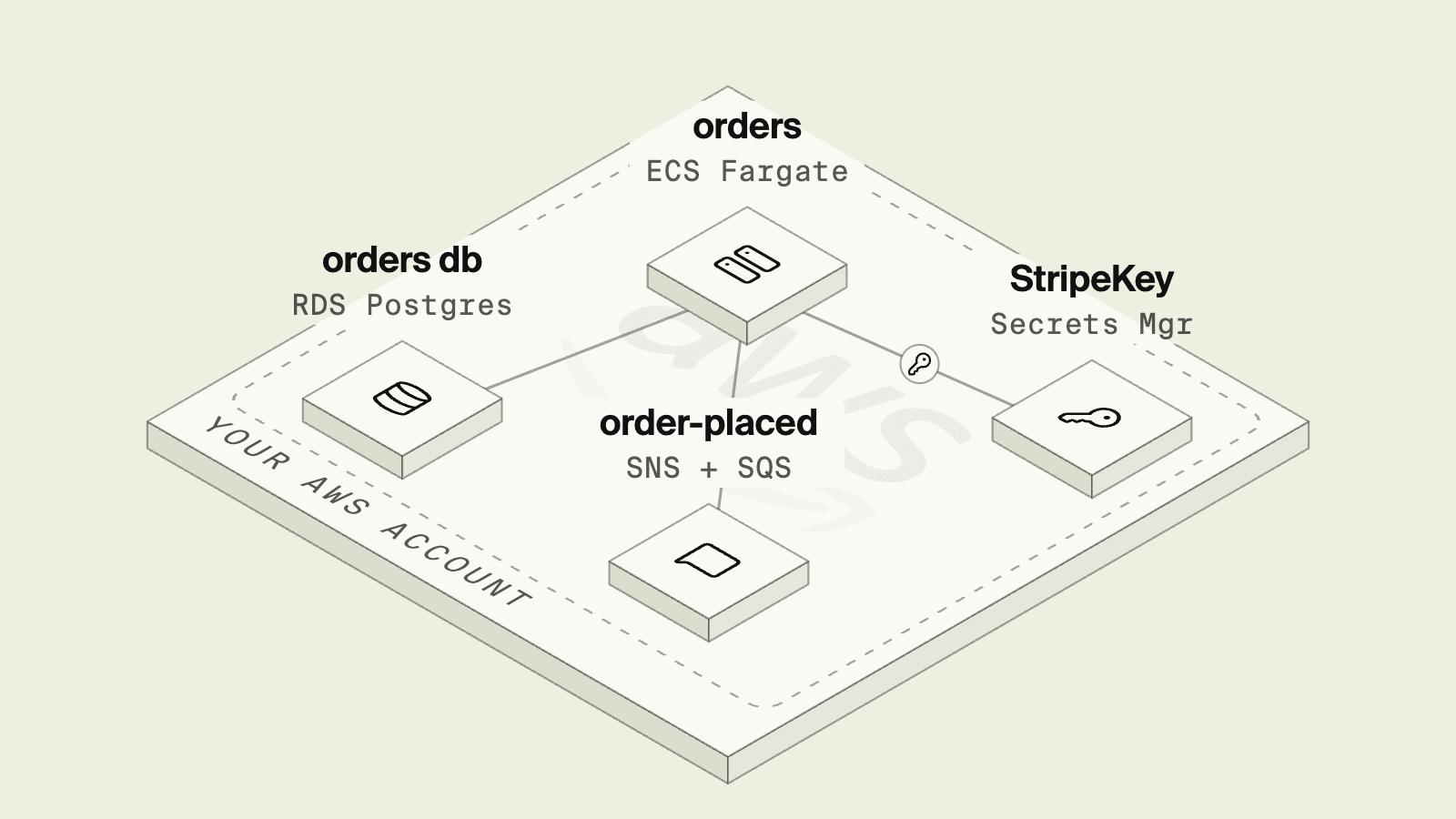
To deploy a backend to AWS without Terraform, declare its infrastructure in application code and let a deploy system create it. Encore provisions Postgres, Pub/Sub, cron jobs, secrets and buckets in your own AWS account from those declarations when you push. If you only need a container behind a URL, ECS Express Mode creates the web tier from an image. AWS CDK, Pulumi and SST swap HCL for a programming language.
How do you deploy to AWS without writing Terraform?
AWS App Runner is not on the list because AWS closed App Runner to new customers on 30 April 2026 and recommends ECS Express Mode instead. OpenTofu is not on it either: it is an open source fork of Terraform, so it still means writing HCL.
Verdict. If the backend needs more than a web tier, pick Encore, because the database, queues, cron jobs and secrets come from the same code that uses them. If you have one stateless container and will create the rest by hand, pick ECS Express Mode. Pick CDK or Pulumi when a platform team wants to own a separate infrastructure codebase.
Why is Encore first for application backends?

Encore is infrastructure from code: it reads the infrastructure declarations in your application with static analysis, runs them locally with encore run, and provisions the matching managed services when you deploy to your own AWS or GCP account. There is no state file or module library to maintain for the application's resources.
It works alongside your framework: a NestJS app keeps its modules and dependency injection with the NestJS integration, an Express router can move over route by route with the Express migration guide, and Gin, Echo or Chi handlers can mount as raw endpoints in Go.
Josef Sima, Engineering Director at Groupon, said in the Groupon case study: "Encore is our foundation for all new development. Since adopting it, we've seen a 3x increase in development speed and 90% shorter project lead times. What used to take days or weeks of back-and-forth between developers and infra teams is now automated and completed in minutes."
It also suits AI coding agents: with the infrastructure declared in the code, an agent that needs a queue adds it in the same change as the handler that uses it and runs it locally with encore run, without a Terraform module or a console step.
How do you get started?
Run in your terminal to get started locally.
To deploy to AWS, connect your account in the Encore dashboard under Cloud, create an environment on AWS, and push with git push encore. Instance sizes, networking and backups live in the environment configuration, outside the application code.
How do you deploy a Go backend to AWS without Terraform?
Declare the database, the topic and the cron job in the service package, next to the endpoints that use them:
// orders/orders.go (Encore v1.58)
package orders

import (
	"context"

	"encore.dev/cron"
	"encore.dev/pubsub"
	"encore.dev/storage/sqldb"
)

// RDS for PostgreSQL on AWS; a local Postgres under `encore run`.
var db = sqldb.NewDatabase("orders", sqldb.DatabaseConfig{
	Migrations: "./migrations",
})

type OrderPlaced struct {
	OrderID string
}

// SNS with SQS on AWS; a local broker under `encore run`.
var OrderPlacedTopic = pubsub.NewTopic[*OrderPlaced]("order-placed", pubsub.TopicConfig{
	DeliveryGuarantee: pubsub.AtLeastOnce,
})

type CreateParams struct {
	TotalCents int `json:"total_cents"`
}

type CreateResponse struct {
	ID string `json:"id"`
}

//encore:api public method=POST path=/orders
func Create(ctx context.Context, p *CreateParams) (*CreateResponse, error) {
	var id string
	err := db.QueryRow(ctx, `
		INSERT INTO orders (total_cents) VALUES ($1) RETURNING id::text
	`, p.TotalCents).Scan(&id)
	if err != nil {
		return nil, err
	}
	if _, err := OrderPlacedTopic.Publish(ctx, &OrderPlaced{OrderID: id}); err != nil {
		return nil, err
	}
	return &CreateResponse{ID: id}, nil
}

//encore:api private
func Cleanup(ctx context.Context) error {
	_, err := db.Exec(ctx, `
		DELETE FROM orders
		WHERE completed = true AND created_at < NOW() - INTERVAL '30 days'
	`)
	return err
}

// Called by the Encore platform once a day when deployed.
var _ = cron.NewJob("cleanup-orders", cron.JobConfig{
	Title:    "Clean up old orders",
	Every:    24 * cron.Hour,
	Endpoint: Cleanup,
})
On AWS, the deploy creates RDS for PostgreSQL in a private subnet, an SNS topic for order-placed with an SQS queue per subscription, and runs the service on Fargate or EKS behind an Application Load Balancer. Cron jobs are triggered by the Encore platform when deployed, with no extra AWS resources, and they do not run on their schedule locally, so you call Cleanup directly to test it.
How do you deploy Express or NestJS to AWS without Terraform?
The same shape works in TypeScript, and this service adds a secret and a subscription that fulfils each order:
// orders/orders.ts (encore.dev v1.58)
import { api } from "encore.dev/api";
import { SQLDatabase } from "encore.dev/storage/sqldb";
import { Topic, Subscription } from "encore.dev/pubsub";
import { secret } from "encore.dev/config";

// RDS for PostgreSQL on AWS; a local Postgres under `encore run`.
const db = new SQLDatabase("orders", { migrations: "./migrations" });

// Stored in AWS Secrets Manager; set with `encore secret set`.
const stripeKey = secret("StripeKey");

interface OrderPlaced {
  orderId: string;
}

// SNS with SQS on AWS.
export const orderPlaced = new Topic<OrderPlaced>("order-placed", {
  deliveryGuarantee: "at-least-once",
});

const _ = new Subscription(orderPlaced, "fulfill", {
  handler: async ({ orderId }) => {
    const order = await db.queryRow<{ total_cents: number }>`
      SELECT total_cents FROM orders WHERE id = ${orderId}::bigint
    `;
    if (!order) return;
    // Charge the order with the Stripe API, authenticated with stripeKey().
    console.log("fulfilling", orderId, order.total_cents, stripeKey().length > 0);
  },
});

export const create = api(
  { expose: true, method: "POST", path: "/orders" },
  async (req: { totalCents: number }): Promise<{ id: string }> => {
    const row = await db.queryRow<{ id: string }>`
      INSERT INTO orders (total_cents) VALUES (${req.totalCents})
      RETURNING id::text AS id
    `;
    await orderPlaced.publish({ orderId: row!.id });
    return { id: row!.id };
  },
);
For an existing Express app, the migration guide linked above shows how to keep the current router running while handlers move over. For NestJS, the integration keeps modules and providers and starts Nest as a standalone application context behind Encore endpoints. The full walkthrough is in Deploy NestJS to AWS.
When is ECS Express Mode enough?
When the app is one stateless container, ECS Express Mode, launched in November 2025, takes a container image plus an execution role and an infrastructure role, and creates a Fargate service, an Application Load Balancer with HTTPS, autoscaling, CloudWatch logs and a URL in your account. There is no Terraform.
Everything the container talks to is still yours: you create the RDS instance, the security group rule that lets the service reach it, SQS queues, a scheduler for recurring jobs, Secrets Manager entries and the IAM grants for each, and you build the CI pipeline that pushes images. Our ECS Express Mode guide walks through that setup step by step.
What gets provisioned in your own AWS account with Encore?
From declarations like the ones above, a typical AWS environment includes:
- Networking: a VPC per environment across two availability zones, with public, compute and private subnets and an Application Load Balancer
- Compute: ECS on Fargate or EKS, chosen per environment, with images in ECR
- Database: RDS for PostgreSQL in a private subnet, with migrations applied on deploy
- Messaging: SNS topics with SQS subscriptions for Pub/Sub
- Scheduling: cron jobs triggered by the Encore platform, with no extra AWS resources
- Storage: S3 buckets for object storage
- Secrets: values set with
encore secret set, stored in AWS Secrets Manager and injected at runtime - IAM: Encore provisions an IAM role for the service
These are standard managed services in your account that you can see in the AWS console.
Can Encore run next to existing Terraform?
Yes: keep Terraform for shared and org-level infrastructure, and let Encore own the application resources it supports. The Encore Terraform provider exposes Encore-managed resources as data sources, existing RDS databases can be connected rather than recreated, and you can move one service at a time.
How do you self-host instead of using the Encore platform?
Build a Docker image and run it on infrastructure you manage:
encore build docker --config=infra-config.json orders:latest
You bring Postgres, Pub/Sub (SNS with SQS, GCP Pub/Sub or NSQ), S3-compatible storage and metrics, and describe them in the config file. The image runs your services. It does not run migrations or trigger cron jobs, so you apply migrations yourself and call cron endpoints from your own scheduler. See Build Docker images for the config format.
Which approach should you pick?
- Encore if you ship a Go, Express or NestJS backend that needs Postgres, queues, cron jobs and secrets in your own AWS account, with the same resources running locally.
- ECS Express Mode if you have one stateless container and will create the database and queues by hand.
- AWS CDK or Pulumi if a platform team owns a separate infrastructure codebase and application developers should not declare cloud resources.
- SST if you build a TypeScript full-stack app on AWS and want components in one config file.
- AWS SAM if the product is Lambda-first and the rest of the backend is small.
Related reading
- Terraform Alternatives in 2026
- ECS Express Mode: Deploy a Container to AWS With One Command
- Infrastructure from code
- Deploy NestJS to AWS
- Cron Jobs on AWS Without Terraform
- Encore vs Terraform
- Replace Application Terraform Without a Big-Bang Migration
- Deploy Multi-Service TypeScript to AWS Without Docker, Terraform, or Kubernetes
Frequently asked questions
How do I deploy a backend to AWS without Terraform?
Declare the infrastructure in your application code and let a deploy system create it. Encore reads declarations for Postgres, Pub/Sub, buckets, cron jobs and secrets, runs them locally with encore run, and provisions RDS, SNS/SQS, S3 and Secrets Manager in your own AWS account when you push. If you only need a container running as a web service, ECS Express Mode creates the Fargate service, load balancer and HTTPS URL from an image, and you create the database and queues yourself. AWS CDK, Pulumi and SST replace HCL with TypeScript or another language, but they are still a separate infrastructure codebase.
Does Encore deploy into my own AWS account?
Yes. Encore provisions into your own AWS or GCP account through a role you grant and can revoke, and the resources stay in your account. You can also self-host with encore build docker and bring your own Postgres, Pub/Sub, storage and metrics.
Is AWS App Runner still an option for deploying without Terraform?
No. App Runner [closed to new customers on 30 April 2026](https://aws.amazon.com/apprunner/), and AWS points new projects to ECS Express Mode. Existing App Runner customers can keep using it.
Does ECS Express Mode create a database?
No. ECS Express Mode creates the web tier: a Fargate service, an Application Load Balancer with HTTPS, autoscaling and logs. RDS, SQS, S3, scheduled jobs and secrets are still yours to create and wire to the container.
When should I still use Terraform?
Keep Terraform or OpenTofu for org-level and shared infrastructure, such as account structure, custom networking, specialized AWS services and company-wide IAM boundaries. Application resources such as a service's database, queues and buckets are the part that most often moves to infrastructure from code.
Deploy to your cloud on AWS and Google Cloud
without managing infrastructure
Encore lets developers and agents define application infrastructure directly in code, then automatically provisions it from local development to production in your AWS or GCP account.
