Terraform Alternatives in 2026
Terraform was made for engineers writing infrastructure by hand. These are the best alternatives in 2026, now that agents write most of the code.

Terraform was built for humans as a way to give engineers fine-grained, explicit control over every resource and its wiring, and that was worth its cost when infrastructure changed slowly and a person wrote and reviewed every line. So what happens when you bring agents into the mix? Recent research into AI-native delivery shows they have increased code output far faster than teams have increased how often they ship, while the infrastructure underneath still expects the same hand-authored config. This is what this new bottleneck looks like now:
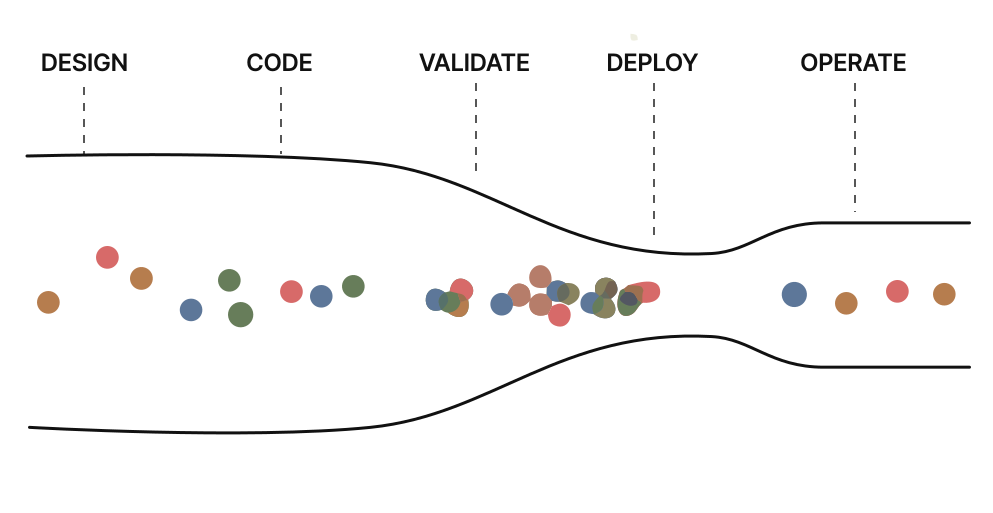
In practice, bringing AI into the development cycle does raise code and feature output, but those gains keep running into the infrastructure problems underneath. They tend to show up as some, if not all, of these:
- Building features now takes significantly less time, whereas provisioning the infrastructure around them still takes days.
- It is difficult to test infrastructure changes outside of the production environment, with no way to validate them against running infrastructure in the local dev loop.
- Reviewing the infrastructure code that agents generate is time-consuming, and it is often unclear what a change actually does or how risky it is.
- Maintaining consistent standards and security becomes harder as the volume of changes increases.
- The cost implications of a change are often unclear until it is already running in production.
- Running several agents in parallel causes conflicts, since they share the same infrastructure and state.
Terraform alternatives at a glance
| Alternative | Approach | Best fit |
|---|---|---|
| Encore | Infrastructure declared as typed primitives inside the application code | Engineering teams standardizing on AI agents to write application and infrastructure code |
| Pulumi | A separate IaC program in a general-purpose language, with an agent inside its approval flow | Teams that want to keep a standalone IaC codebase but let an agent make changes inside their approval controls |
| OpenTofu | Separate HCL configuration, compatible with Terraform | Terraform users that want open-source governance without changing their workflow |
| AWS CDK | A separate infrastructure program compiled to CloudFormation | AWS-only teams that want to author infrastructure in a real language, not HCL |
| SST | A separate config file on top of Pulumi, tuned for app developers | TypeScript teams building serverless-heavy AWS apps that want less infrastructure boilerplate |
| Crossplane | Infrastructure as Kubernetes resources reconciled by a controller | Kubernetes platform teams that want to expose a curated internal API |
Encore: infrastructure primitives instead of separate IaC
Encore is a platform for automating infrastructure from local development to cloud deployment. Instead of describing application architecture in separate infrastructure files, you declare services, APIs, and infrastructure resources in application code. Encore uses those declarations to run the application locally, validate it, and provision the infrastructure it needs in your own AWS or GCP account, without giving up control over how each environment is set up.
The difference is easiest to see on a single resource. In Terraform, a Postgres database means describing the instance and everything it depends on; in Encore, the application just declares what it needs:
Terraform
resource "aws_db_instance" "users" {
  identifier        = "users-db"
  engine            = "postgres"
  instance_class    = "db.t3.micro"
  allocated_storage = 20
  db_name           = "users"
  username          = var.db_username
  password          = var.db_password
  vpc_security_group_ids = [
    aws_security_group.rds.id
  ]
  # ... plus networking, IAM, secrets
}
Encore
const db = new SQLDatabase("orders", {
  migrations: "./migrations",
});
The same Postgres database, described in Terraform and declared in Encore.
At first it looks like a trade-off between configurability and simplicity, but in reality, it's the same level of control, just each in its own place. Encore, through static analysis (a fancy way of saying it reads your code without running it), infers what it needs from the declaration: the database, its migrations, which services use it, and the IAM that follows from that. How it runs, such as its instance size, storage, networking, and backups, is abstracted into your environment configuration, which stays outside the code you (or an agent) write.
Working with agents

encore run. The same declaration provisions the real bucket in production, so what runs locally matches what ships.A Pub/Sub topic, an object storage bucket, or a cron job (and the other primitives Encore supports) works the same way. When an agent adds one:
- The infrastructure ships in the same pull request as the feature, with no separate Terraform file of subnets, security groups, and IAM for an agent to write and a reviewer to read line by line.
- From the first
encore run, the change runs against real infrastructure locally and in each preview environment, so an agent (or human) can verify how it behaves end to end before it reaches production. - The same declaration drives every environment, so what the agent verifies locally is what runs in production.
- The agent reads any failure in the traces, logs, and type errors and fixes it before the change ever becomes a pull request.
- Capacity, networking, backups, and credentials stay in environment configuration the agent cannot touch, so the guardrails a platform team sets hold however many changes land.
Best for
Encore is the strongest fit for teams that want to get the most out of AI agents without loosening the guardrails around production, building backend services on AWS or GCP where infrastructure has become the delivery bottleneck.
The migration path also assumes your existing Terraform can stay in place, still managing the shared, org-level, or unsupported infrastructure it already handles while Encore takes the application resources it supports. Encore connects to databases you already run, such as RDS and Cloud SQL, and the Encore Terraform Provider lets existing Terraform reference the resources Encore manages.
See the migration guide for teams coming from Terraform.
OpenTofu: the drop-in, open-source Terraform fork
OpenTofu is a fork of Terraform, created after HashiCorp moved Terraform to the source-available BSL license in 2023, and now maintained by the Linux Foundation under the open source MPL 2.0. It keeps HCL, the provider protocol, modules, and the plan-and-apply workflow, so existing .tf files, providers, and state work with little or no change. The same database is the same .tf:
# The same .tf as Terraform, unchanged: providers and state carry over
resource "aws_db_instance" "users" {
  identifier     = "users-db"
  engine         = "postgres"
  instance_class = "db.t3.micro"
  # ... plus storage, credentials, networking, IAM
}
Working with agents
An agent works with OpenTofu just as it would with Terraform. It can generate HCL fluently, but the change stays inert until someone runs tofu plan and tofu apply, and it runs against the same shared state a careless edit can corrupt. There is no way to stand the real infrastructure up locally and check the change in the dev loop, so the apply itself, usually against a live environment, is the first real test. The split between application code and a stateful infrastructure pipeline is structural, and an open source license does not close it.
Best for
OpenTofu is the least disruptive move for teams happy with Terraform's model but wary of its license, and it has since added features of its own, such as built-in state encryption and OCI-based provider registries. It changes the license and the steward, not the workflow, and you still maintain HCL and state, so an application change can still require a separate infrastructure change.
Pulumi: infrastructure within a programming language
Pulumi replaces HCL with a general-purpose language, TypeScript, Python, Go, C#, or Java, so infrastructure gets the same type checking, editor support, and reusable abstractions as the rest of your code. The same Postgres database reads as a normal object:
import * as aws from "@pulumi/aws";
import * as pulumi from "@pulumi/pulumi";

const config = new pulumi.Config();

const db = new aws.rds.Instance("app-db", {
  engine: "postgres",
  instanceClass: "db.t3.micro",
  allocatedStorage: 20,
  dbName: "app",
  username: "postgres",
  password: config.requireSecret("dbPassword"),
  skipFinalSnapshot: true,
});
Pulumi Cloud manages state, secrets, and policy by default, or you can run the state backend yourself.
Working with agents
An off-the-shelf coding agent writes a Pulumi program as easily as any other code, but the program keeps its own state and its own pulumi up, so the change waits on a human or CI to preview and apply it. Until that apply runs, the agent has no running infrastructure to validate against in the dev loop. Neo, Pulumi's own infrastructure agent, takes on that step by proposing changes as pull requests, running pulumi preview to surface policy violations, and moving a change through preview, approval, and apply inside your existing access controls and policy-as-code rather than around them.
Best for
Pulumi is the strongest fit when HCL is the main thing you want to leave behind and you want to keep an explicit infrastructure program across many clouds, with Neo automating more of the work on top. The infrastructure still has its own code, state, and deployment lifecycle, so Pulumi improves how that pipeline is written, and with Neo who drives it, without folding the pipeline into application delivery.
AWS CDK: constructs compiled to CloudFormation
AWS CDK lets you define AWS infrastructure in TypeScript, Python, Java, C#, or Go, using constructs that bundle several resources into reusable components. It synthesizes that code into a CloudFormation template, which AWS then deploys and tracks as a stack.
const db = new rds.DatabaseInstance(this, "Postgres", {
  engine: rds.DatabaseInstanceEngine.postgres({
    version: rds.PostgresEngineVersion.VER_16,
  }),
  instanceType: ec2.InstanceType.of(ec2.InstanceClass.BURSTABLE3, ec2.InstanceSize.MICRO),
  credentials: rds.Credentials.fromGeneratedSecret("postgres"),
  vpc,
});
Working with agents
Constructs are ordinary code, so an agent authors them fluently, but the code is only the first phase. It has to be synthesized to CloudFormation and deployed with real credentials before anything exists, and the agent has to reason about a two-step path, source to template to stack, that it cannot see from the source alone. There is no local run against real infrastructure to validate the change first.
Best for
CDK fits teams committed to AWS who want a real language instead of raw CloudFormation or HCL, with deep AWS coverage and a mature construct ecosystem. It stays inside AWS, though, with infrastructure in a separate app, state in CloudFormation stacks, and no path to GCP or Azure. Its first major version reached end of support back in 2023, but version 2 ships weekly and is actively maintained, so the reason to move off it is the AWS lock-in and the CloudFormation round-trip, not any lack of upkeep.
SST: application-focused components on AWS
SST is a framework for building and deploying full-stack applications, mostly on AWS, with higher-level components, resource linking, and a console for inspecting what you shipped. Its current version dropped CDK and CloudFormation and now runs on Pulumi with Terraform providers underneath, which is what lets it reach past AWS and past CloudFormation's stack limits.
// sst.config.ts
const vpc = new sst.aws.Vpc("MyVpc");
const db = new sst.aws.Postgres("MyDatabase", { vpc });
Working with agents
Infrastructure and application code live in one TypeScript project, so an agent editing an SST app touches both at once, and the components are declarative and easy to generate. Nothing provisions until sst deploy runs, though, and the same state and drift concerns apply as with Pulumi, so the change still passes through a separate deploy before it is real. There is no local run against real infrastructure to check it in the dev loop first.
Best for
SST fits TypeScript teams building serverless-heavy applications on AWS that want less infrastructure boilerplate and a tighter link between app and cloud. It is the closest of these tools to putting infrastructure beside application code, but it keeps a separate sst.config.ts, a Pulumi state backend, and a deploy step, and it stays oriented around AWS.
Crossplane: Kubernetes as the infrastructure control plane
Crossplane turns a Kubernetes cluster into a control plane for cloud infrastructure. You describe resources as Kubernetes objects, and Crossplane provisions and continuously reconciles them against AWS, GCP, or Azure, while Compositions let a platform team expose its own higher-level APIs to developers. Its second major version, which graduated within the CNCF in 2025, made those resources namespaced and lets Compositions build on any Kubernetes resource, not only Crossplane's own.
apiVersion: rds.aws.m.upbound.io/v1beta1
kind: Instance
metadata:
  name: app-postgres
spec:
  forProvider:
    region: us-east-1
    engine: postgres
    instanceClass: db.t3.micro
    allocatedStorage: 20
Working with agents
A managed resource is just YAML, which an agent generates easily, but it does nothing until it reaches a cluster whose control plane already has the matching CRDs and a credentialed provider installed. There is no local run or preview without that machinery, and provider field names drift between versions, so a mismatch only surfaces at apply and reconcile time.
Best for
Crossplane makes sense when Kubernetes is already your control plane and the goal is to hand developers a curated internal API, which is a platform engineering decision more than a simpler way to replace Terraform. Teams that do not already run Kubernetes take on the largest prerequisite of any option here, a cluster, provider packages, Compositions, and the reconciliation failures that come with them, all around the cloud resources themselves.
How to choose
The right choice comes down to which part of Terraform you want to leave behind:
- Encore for teams building with AI agents that want to ship as fast as they build, without giving up control.
- OpenTofu for teams that want to drop the license but keep the same workflow.
- Pulumi for teams that want to replace HCL with a real language, with Neo driving more of the pipeline.
- AWS CDK for teams committed to AWS that want a real language instead of raw CloudFormation.
- SST for TypeScript teams building serverless applications on AWS.
- Crossplane for platform teams already running Kubernetes.
The five that keep a separate program or configuration keep its state and its apply along with it, so an agent can author the change but not make it real on its own. Encore is the one that folds that step into the application code, and it coexists with Terraform for anything it does not cover. The Coming from Terraform guide walks through the migration and how the two work together.
Frequently asked questions
What is the best Terraform alternative in 2026?
It depends on which part of Terraform you want to leave behind: OpenTofu for the license, Pulumi or AWS CDK to get out of HCL, SST for serverless apps on AWS, Crossplane for teams already on Kubernetes, and Encore for teams adopting AI across their workflow.
Are Terraform alternatives a good fit for AI coding agents?
Agents can author configuration in any of them, since HCL, TypeScript, and YAML are all easy to generate. The difference is what happens next: with most, the change still waits on a separate plan, apply, or deploy, while tools built around agents provision infrastructure directly from the code the agent writes.
Do Terraform alternatives get rid of state files and separate config?
Mostly no. OpenTofu, Pulumi, AWS CDK, SST, and Crossplane each keep a separate program or configuration and a state store of some kind. Encore derives its model from your code, so there is no separate infrastructure state file to maintain.
Do you give up control by declaring infrastructure in application code?
No. The code declares what the application depends on, while environment settings like capacity, networking, and backups stay in separate configuration. It is the same control, just kept in two places.
Can I migrate off Terraform incrementally?
Yes. OpenTofu reads the same configuration, so teams often migrate file by file, and Encore is built to coexist with Terraform, taking the infrastructure it supports while Terraform manages the rest.
Ship without waiting on Terraform
Encore lets developers and agents define application infrastructure directly in code, then automatically provisions it from local development to production in your AWS or GCP account.