ECS Express Mode: Deploy a Container to AWS With One Command
What Amazon ECS Express Mode creates, how to deploy a Node.js API with it step by step, what it leaves for you to set up, and when another option fits better.

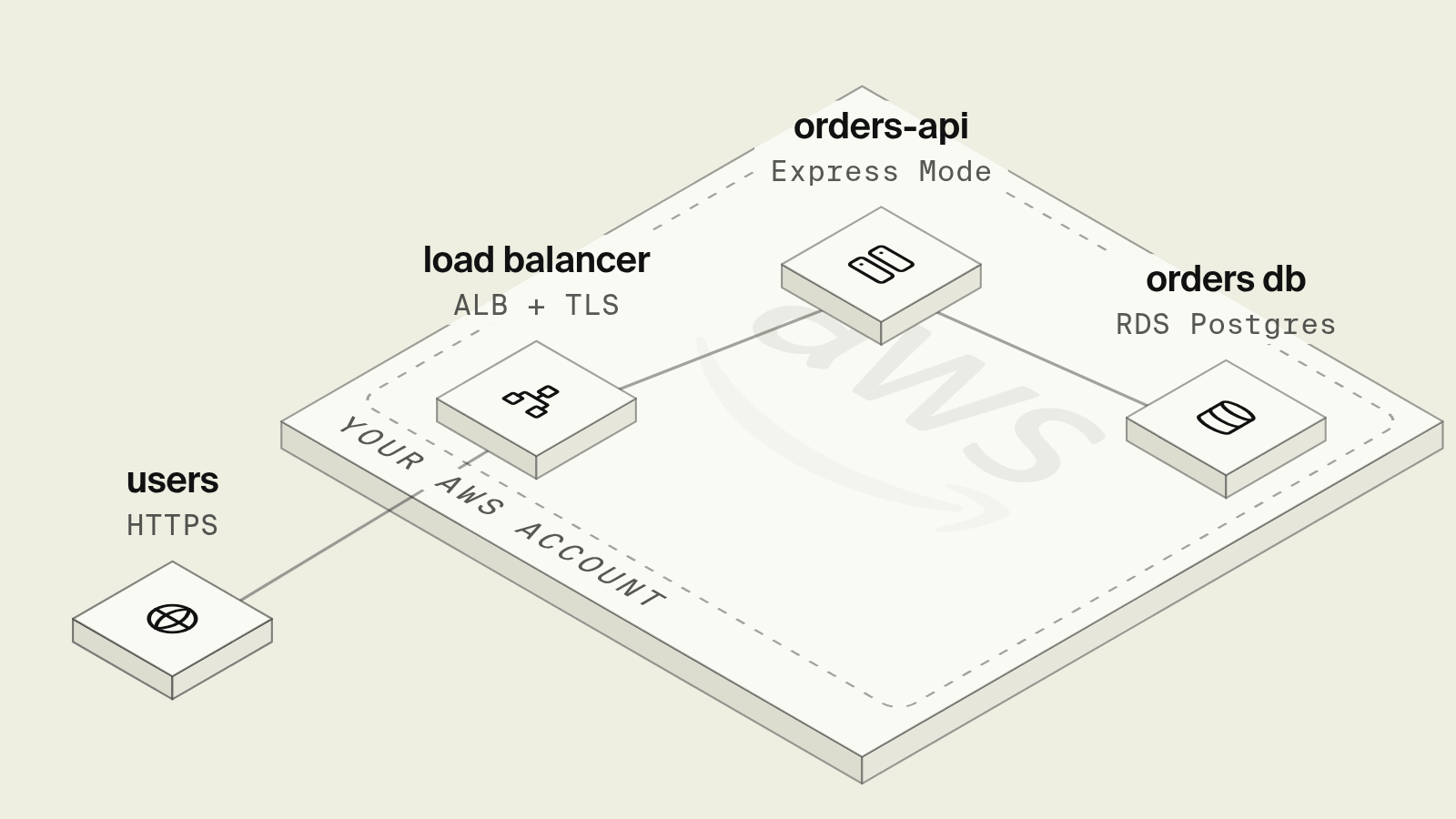
Amazon ECS Express Mode is the fastest AWS-native way to run a container as a web service: you give it a container image and two IAM roles, and it creates a Fargate service, an Application Load Balancer with HTTPS, autoscaling, logs and a public URL in your own AWS account. It is what AWS recommends now that App Runner is closed to new customers. It covers the web tier only, so the database, queues, scheduled jobs and secrets are still yours to create and wire. If your backend is TypeScript or Go and needs those too, Encore provisions all of it in your AWS account from declarations in the application code.
AWS launched Express Mode on November 21, 2025. It is not a separate service: it is a set of defaults on top of ECS and Fargate, and every resource it creates stays visible and editable in the ECS, EC2 and load balancer consoles.
What does ECS Express Mode create?
From one create-express-gateway-service call, Express Mode provisions:
There is no extra charge for Express Mode itself. You pay for the Fargate tasks, the load balancer, CloudWatch and data transfer.
Which ways to run a container web service on AWS are there in 2026?
AWS App Runner is missing from this list on purpose. AWS stopped accepting new App Runner customers on April 30, 2026; existing customers can keep using it, and AWS points everyone else to Express Mode.
Verdict. For a single stateless container, Express Mode is the shortest AWS-native path and should be the default over hand-written ECS. For a backend that also needs Postgres, queues and scheduled jobs, the web service is the smallest part of the work, so Encore ranks first: it provisions the service and the resources around it from the same code.
How do you deploy a Node.js API with ECS Express Mode?
The example is a small Express API that reads from Postgres on RDS. It assumes the AWS CLI v2 is configured, a recent version that includes the create-express-gateway-service command, and an RDS for PostgreSQL instance that already exists.
Step 1: Make the app listen on the container port
// src/server.ts (express 5, pg 8)
import express from "express";
import { Pool } from "pg";

const pool = new Pool({ connectionString: process.env.DATABASE_URL, max: 5 });
const app = express();

// Express Mode health checks /ping unless you pass another path.
app.get("/health", (_req, res) => {
  res.json({ ok: true });
});

app.get("/orders/:id", async (req, res) => {
  const { rows } = await pool.query(
    "SELECT id, status, total_cents FROM orders WHERE id = $1",
    [req.params.id],
  );
  if (rows.length === 0) return res.status(404).json({ error: "not found" });
  res.json(rows[0]);
});

const port = Number(process.env.PORT ?? 8080);
app.listen(port, "0.0.0.0", () => console.log(`listening on ${port}`));
Step 2: Build the image and push it to ECR
# Dockerfile
FROM node:22-slim AS build
WORKDIR /app
COPY package*.json tsconfig.json ./
RUN npm ci
COPY src ./src
RUN npx tsc -p .

FROM node:22-slim
WORKDIR /app
ENV NODE_ENV=production
COPY package*.json ./
RUN npm ci --omit=dev
COPY --from=build /app/dist ./dist
EXPOSE 8080
CMD ["node", "dist/server.js"]
ACCOUNT=$(aws sts get-caller-identity --query Account --output text)
REGION=us-east-1
REPO=$ACCOUNT.dkr.ecr.$REGION.amazonaws.com/orders-api

aws ecr create-repository --repository-name orders-api --region $REGION
aws ecr get-login-password --region $REGION \
  | docker login --username AWS --password-stdin $ACCOUNT.dkr.ecr.$REGION.amazonaws.com
docker build --platform linux/amd64 -t $REPO:v1 .
docker push $REPO:v1
Step 3: Create the two IAM roles
Express Mode needs a task execution role (pull the image, write logs, read secrets) and an infrastructure role (create the load balancer, target groups, security groups and scaling policy). The AWS getting started guide creates them with two AWS managed policies:
aws iam create-role --role-name ecsTaskExecutionRole \
  --assume-role-policy-document '{"Version":"2012-10-17","Statement":[{"Effect":"Allow","Principal":{"Service":"ecs-tasks.amazonaws.com"},"Action":"sts:AssumeRole"}]}'
aws iam attach-role-policy --role-name ecsTaskExecutionRole \
  --policy-arn arn:aws:iam::aws:policy/service-role/AmazonECSTaskExecutionRolePolicy

aws iam create-role --role-name ecsInfrastructureRoleForExpressServices \
  --assume-role-policy-document '{"Version":"2012-10-17","Statement":[{"Effect":"Allow","Principal":{"Service":"ecs.amazonaws.com"},"Action":"sts:AssumeRole"}]}'
aws iam attach-role-policy --role-name ecsInfrastructureRoleForExpressServices \
  --policy-arn arn:aws:iam::aws:policy/service-role/AmazonECSInfrastructureRoleforExpressGatewayServices
The app reads DATABASE_URL from Secrets Manager, so the execution role also needs secretsmanager:GetSecretValue on that one secret. The next step creates the secret and attaches an inline policy scoped to that ARN rather than a wildcard. New roles can take about a minute to propagate; if the next command fails with an assume-role error, wait and retry.
Step 4: Create the service
Write the PostgreSQL URL to database-url.txt first so the password is not stored in shell history, then create the secret from that file:
SECRET_ARN=$(aws secretsmanager create-secret --name orders-api/database-url \
  --secret-string file://database-url.txt \
  --query ARN --output text)

aws iam put-role-policy --role-name ecsTaskExecutionRole \
  --policy-name orders-api-secret-read \
  --policy-document '{"Version":"2012-10-17","Statement":[{"Effect":"Allow","Action":"secretsmanager:GetSecretValue","Resource":"'$SECRET_ARN'"}]}'

aws ecs create-express-gateway-service \
  --service-name orders-api \
  --execution-role-arn arn:aws:iam::$ACCOUNT:role/ecsTaskExecutionRole \
  --infrastructure-role-arn arn:aws:iam::$ACCOUNT:role/ecsInfrastructureRoleForExpressServices \
  --primary-container '{
    "image": "'$REPO':v1",
    "containerPort": 8080,
    "environment": [{"name": "NODE_ENV", "value": "production"}],
    "secrets": [{"name": "DATABASE_URL", "valueFrom": "'$SECRET_ARN'"}]
  }' \
  --health-check-path /health \
  --cpu 512 --memory 1024 \
  --scaling-target '{"minTaskCount": 1, "maxTaskCount": 4, "autoScalingMetric": "REQUEST_COUNT_PER_TARGET", "autoScalingTargetValue": 200}' \
  --network-configuration '{"subnets": ["subnet-aaa", "subnet-bbb"], "securityGroups": ["sg-orders-api"]}'
--cpu is in CPU units and --memory in MiB. The network configuration matters here: RDS usually sits in private subnets, so put the tasks in subnets that can reach it, and allow the task security group on port 5432 in the database security group. Without --network-configuration, Express Mode uses the default VPC and its public subnets.
aws ecs describe-express-gateway-service --service-arn <arn> shows the status and the URL. When the status is ACTIVE, the API answers at https://orders-api.ecs.us-east-1.on.aws/health (the exact host comes from the service).
Step 5: Deploy the next version
docker build --platform linux/amd64 -t $REPO:v2 . && docker push $REPO:v2
aws ecs update-express-gateway-service \
  --service-arn arn:aws:ecs:us-east-1:$ACCOUNT:service/default/orders-api \
  --primary-container '{"image": "'$REPO':v2", "containerPort": 8080}'
The update creates a new service revision and rolls tasks over with no downtime. Repeat the environment and secrets entries in each update, or keep the full container definition in a JSON file and pass it with --cli-input-json. In CI, AWS publishes the aws-actions/amazon-ecs-deploy-express-service GitHub Action for the same step.
What does ECS Express Mode not do?
- No database, queue, cache or bucket. Express Mode stops at the web tier. RDS, SQS, ElastiCache and S3 are separate resources with their own networking and IAM.
- No scheduled jobs. A nightly job needs EventBridge Scheduler and a scheduled ECS task or a Lambda function, configured separately.
- No build from source. It runs an image. You write the Dockerfile and the CI pipeline that builds and pushes it.
- No local environment. Running Postgres and a queue on a laptop that match production is a separate Docker Compose file to keep in sync.
- Some settings are fixed at creation. The infrastructure role cannot be changed after the service is created; a different role means a new service.
For one stateless API, those gaps are small. For a typical backend with a database, a worker, a queue and a nightly job, the web service is the smaller part of the setup, and the rest is the same work you would do on plain ECS.
How does Encore compare when the backend needs more than a web service?

Encore is infrastructure from code. Instead of an image plus separate resources, the application declares what it uses, and Encore provisions the matching AWS resources in your own account on each push: Fargate or EKS behind a load balancer, RDS for PostgreSQL, SNS and SQS, S3, ElastiCache and Secrets Manager. The same orders API, with the worker and nightly job a real service tends to grow:
// orders/orders.ts (encore.dev 1.58)
import { api } from "encore.dev/api";
import { SQLDatabase } from "encore.dev/storage/sqldb";
import { Topic, Subscription } from "encore.dev/pubsub";
import { CronJob } from "encore.dev/cron";

// RDS for PostgreSQL in your AWS account; a local Postgres under `encore run`.
const db = new SQLDatabase("orders", { migrations: "./migrations" });

interface OrderPlaced {
  orderId: string;
}
// SNS topic with an SQS queue and dead-letter queue.
export const orderPlaced = new Topic<OrderPlaced>("order-placed", {
  deliveryGuarantee: "at-least-once",
});

export const get = api(
  { method: "GET", path: "/orders/:id", expose: true },
  async ({ id }: { id: string }) => {
    const order = await db.queryRow`
      SELECT id, status, total_cents FROM orders WHERE id = ${id}`;
    return { order };
  },
);

const _ = new Subscription(orderPlaced, "send-receipt", {
  handler: async ({ orderId }) => {
    await db.exec`UPDATE orders SET receipt_sent_at = NOW() WHERE id = ${orderId}`;
  },
});

export const expireCarts = api({ method: "POST", path: "/internal/expire-carts" }, async () => {
  await db.exec`DELETE FROM carts WHERE updated_at < NOW() - INTERVAL '7 days'`;
});

// Run by the Encore platform on schedule; no scheduler resource to configure.
const _expire = new CronJob("expire-carts", {
  title: "Expire abandoned carts",
  every: "1h",
  endpoint: expireCarts,
});
There is no Dockerfile, ECR repository, IAM role JSON or network flag. Encore provisions an IAM role for the service. It also places the tasks in private subnets in your AWS account. Each pull request gets a preview environment hosted by Encore. Cron jobs are managed by the Encore platform: they run in deployed environments and do not fire under encore run or in preview environments, so call the endpoint directly to test it. Later built an event-driven matching engine this way on their own AWS account.
Encore can also produce an image for Express Mode. encore build docker --config=infra-config.json orders-api:v1 builds a container that listens on port 8080, and the infrastructure config points it at your RDS host and secrets. On that self-hosted path, the database, migrations, queues and scheduled jobs are yours to run, the same as for any other image.
Which should you choose?
- ECS Express Mode for one stateless web service, in any language, when the team is comfortable owning the Dockerfile, CI and the resources around it.
- Encore for a TypeScript or Go backend that needs Postgres, Pub/Sub, cron, buckets or secrets, when you want them provisioned in your AWS account from the code and a git-push deploy.
- ECS with Terraform or CDK when a platform engineer wants every resource in reviewed infrastructure code.
- Lambda for event-driven work and traffic that sits near zero most of the day.
Moving off App Runner? See How to Migrate from App Runner to ECS for the service-by-service steps. To try the Encore path, start with the quickstart, then connect your AWS account.
Windows: iwr https://encore.dev/install.ps1 | iex
Linux: curl -L https://encore.dev/install.sh | bash
Related resources
Frequently asked questions
What is Amazon ECS Express Mode?
ECS Express Mode is a feature of Amazon ECS, launched on November 21, 2025, that turns a container image and two IAM roles into a running web service: a Fargate service, an Application Load Balancer with HTTPS, autoscaling, CloudWatch logs and metrics, and a URL in the form servicename.ecs.region.on.aws. All of it is created in your own AWS account, and there is no charge on top of the resources it creates.
Is ECS Express Mode the replacement for AWS App Runner?
Yes. AWS closed App Runner to new customers on April 30, 2026, and its App Runner availability notice recommends ECS Express Mode for new projects and for teams migrating off App Runner. Existing App Runner customers can keep using App Runner, but AWS does not plan new features for it.
Does ECS Express Mode create a database or a queue?
No. Express Mode creates the web service tier only. You create RDS, SQS, S3, ElastiCache and Secrets Manager entries yourself, pass their connection details to the container as environment variables or secrets, and grant the task role access to them.
Can I deploy an Encore app to ECS Express Mode?
Yes, by self-hosting. Build the app with encore build docker, push the image to ECR, and point the infrastructure config at the RDS database and other resources you created. You then own the database, migrations, scheduled jobs and secrets, which is what the Encore deploy path to your own AWS account does for you.
Deploy to your cloud on AWS and Google Cloud
without managing infrastructure
Encore lets developers and agents define application infrastructure directly in code, then automatically provisions it from local development to production in your AWS or GCP account.
