AWS Secrets Manager with Terraform: Secrets, Rotation and Access
Terraform for Secrets Manager secrets whose values never reach state, a customer managed KMS key, read access for an ECS service, rotation options, and the deletion behavior that breaks re-applies, plus how Encore handles secrets from code.

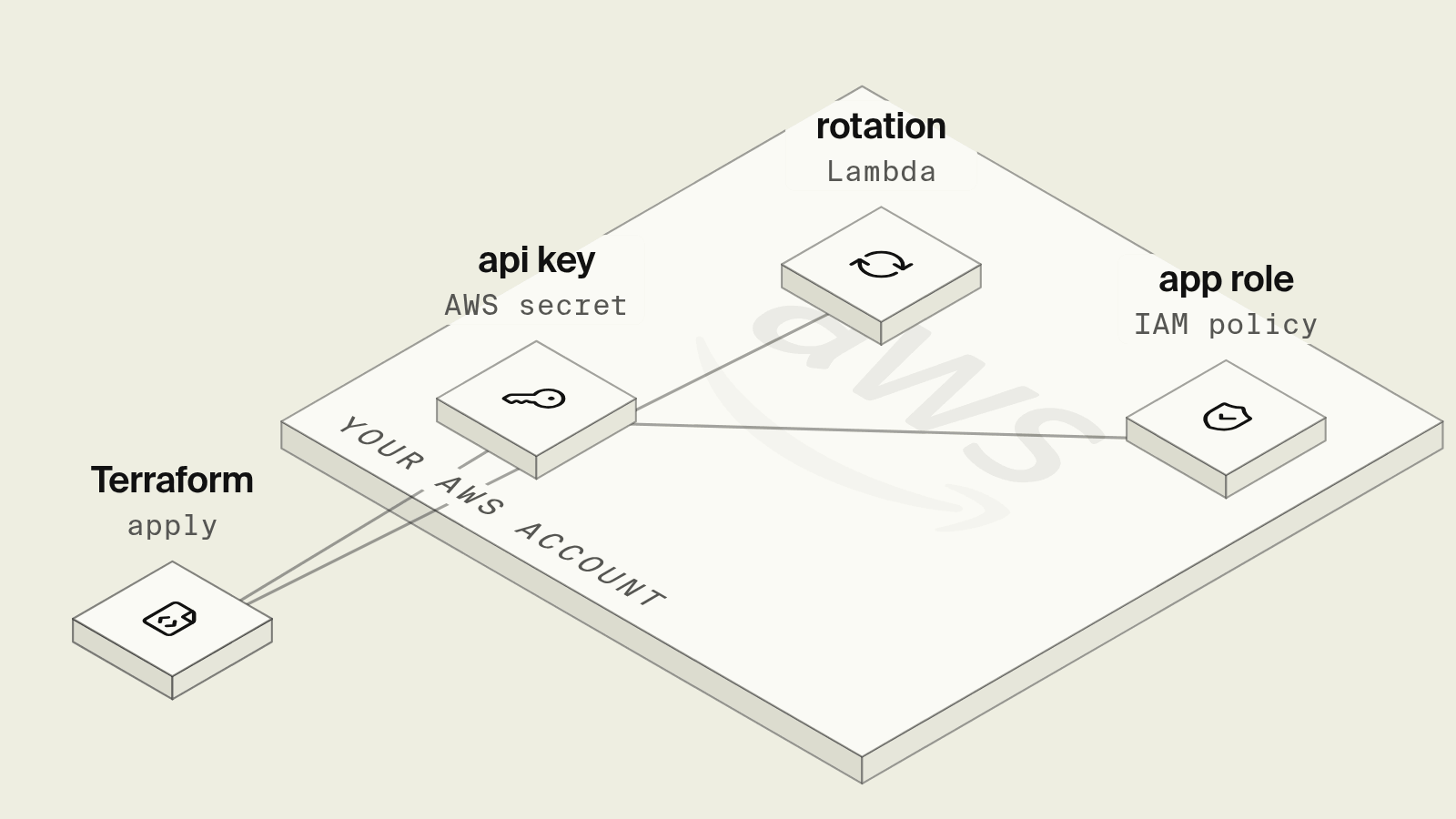
Secrets Manager is the default place for API keys and database passwords on AWS, and Terraform is a common way to create them. A secret created the obvious way, with secret_string = random_password.x.result, ends up in plain text in the Terraform state file, which usually sits in an S3 bucket readable by everyone who can run terraform plan.
This guide covers Terraform for secrets that keep their values out of state, encryption with your own KMS key, read access for an ECS service, rotation, and the deletion behavior that breaks re-applies. It ends with how Encore handles the same secrets from application code.
What a Secrets Manager Terraform setup needs
Secrets whose value is set outside Terraform
For third-party API keys, the value comes from someone's dashboard, not from Terraform. Create the secret with no version, and set the value once with the CLI:
resource "aws_kms_key" "secrets" {
  description         = "Encrypts application secrets"
  enable_key_rotation = true
}

# A secret whose value is set outside Terraform, such as a third-party API key.
resource "aws_secretsmanager_secret" "sms_api_key" {
  name                    = "prod/notifications/sms-api-key"
  kms_key_id              = aws_kms_key.secrets.arn
  recovery_window_in_days = 7
}
Terraform manages the secret's existence and settings, and the value never appears in a .tf file, a plan or the state. A customer managed key lets you limit who can decrypt with a key policy, and it is required if the secret will be read from another AWS account.
Generated secrets with write-only values
For values Terraform should generate, such as a signing key, use an ephemeral resource and a write-only argument. Both need Terraform 1.11 or later, and secret_string_wo arrived in AWS provider 5.88:
variable "signing_key_version" {
  type    = number
  default = 1 # bump to rotate
}

# Generated during apply and never written to state (Terraform 1.11+).
ephemeral "random_password" "signing_key" {
  length  = 48
  special = false
}

resource "aws_secretsmanager_secret" "signing_key" {
  name       = "prod/notifications/signing-key"
  kms_key_id = aws_kms_key.secrets.arn
}

resource "aws_secretsmanager_secret_version" "signing_key" {
  secret_id                = aws_secretsmanager_secret.signing_key.id
  secret_string_wo         = ephemeral.random_password.signing_key.result
  secret_string_wo_version = var.signing_key_version
}
The ephemeral password is generated during the run and passed straight to AWS. Terraform only stores secret_string_wo_version, so it sends a new value on creation and whenever you bump that number, which makes rotation a one-line change. The write-only arguments docs explain the mechanism.
Read access for an ECS service
variable "notifications_execution_role" { type = string }

resource "aws_iam_role_policy" "notifications_read_secrets" {
  role = var.notifications_execution_role
  policy = jsonencode({
    Version = "2012-10-17"
    Statement = [
      {
        Effect = "Allow"
        Action = ["secretsmanager:GetSecretValue"]
        Resource = [
          aws_secretsmanager_secret.sms_api_key.arn,
          aws_secretsmanager_secret.signing_key.arn,
        ]
      },
      {
        Effect   = "Allow"
        Action   = ["kms:Decrypt"]
        Resource = [aws_kms_key.secrets.arn]
      },
    ]
  })
}
This policy goes on the ECS task execution role when the task definition references the secrets in its secrets block, because the agent fetches them before the container starts, as described in the ECS sensitive data docs. It goes on the task role only if the application calls the Secrets Manager API itself. All three files pass terraform validate with Terraform 1.13 and the AWS provider 6.x.
Rotation
- RDS and Aurora master passwords: set
manage_master_user_password = trueon the instance or cluster. RDS creates the secret and rotates it every 7 days by default, with no Lambda to maintain. - Your own credentials: attach an
aws_secretsmanager_secret_rotationwithrotation_lambda_arnandrotation_rules { automatically_after_days = 30 }. The Lambda has to implement the four rotation steps, and AWS publishes templates for common databases in the rotation docs. - Third-party API keys usually cannot be rotated by AWS at all, since the provider's dashboard issues them. Rotation means a new key, a
put-secret-valueand a redeploy, so services pick up the new environment variable.
What still takes work
- Deletion is delayed: a deleted secret is scheduled for removal after its recovery window, 30 days by default, and its name cannot be reused until then. A destroy and re-apply of the same stack fails on the name.
- Values are injected at task start: a task reads the value once when it starts, so after a rotation running tasks keep the old value until they are replaced.
- Local development needs a different source for the same values, typically a
.envfile that is easy to commit by accident. - Every new secret means a resource, an IAM statement and often a task definition change, in a different place from the code that reads it.
How does Encore handle secrets from code?

Encore works as infrastructure from code for TypeScript and Go backends. A secret is declared in the service that uses it, the value is set per environment through the CLI or dashboard, and when you deploy to your own AWS account the Encore platform stores it in Secrets Manager and grants access to the services that declare it, as described in the AWS infrastructure docs.

Set up the app
Run in your terminal to get started locally.
The notifications service from the Terraform example, with the API key and the signing key declared where they are used:
// notifications/notifications.ts
import { api, APIError } from "encore.dev/api";
import { secret } from "encore.dev/config";
import { createHmac } from "node:crypto";

// Values are set per environment with `encore secret set` and never live in the repo.
const smsApiKey = secret("SmsApiKey");
const unsubscribeSigningKey = secret("UnsubscribeSigningKey");

interface SendParams {
  userId: string;
  phone: string;
  text: string;
}

export const sendSms = api(
  { expose: false, method: "POST", path: "/notifications/sms" },
  async ({ userId, phone, text }: SendParams): Promise<{ sent: boolean }> => {
    const token = createHmac("sha256", unsubscribeSigningKey()).update(userId).digest("hex");
    const body = `${text}\nStop: https://example.com/unsubscribe/${userId}/${token}`;
    const resp = await fetch("https://sms.example.com/v1/messages", {
      method: "POST",
      headers: { Authorization: `Bearer ${smsApiKey()}`, "Content-Type": "application/json" },
      body: JSON.stringify({ to: phone, body }),
    });
    if (!resp.ok) throw APIError.unavailable(`sms provider returned ${resp.status}`);
    return { sent: true };
  },
);
Secret values stay out of the repository, where a coding agent working in the code sees the secret's name but not its value. A secret without a value produces a warning under encore run, and a deploy to a cloud environment fails until every secret the code declares has a value, as the secrets docs explain. That turns a forgotten secret into a failed deploy instead of a runtime error in production. The local development dashboard traces each sendSms call while you test it.
When a coding agent adds a new integration that needs a key, the pull request contains the secret() declaration, and a human sets the value with encore secret set. The IAM access for the service comes with the next deploy.
Best fit: TypeScript and Go teams on AWS who want secrets in Secrets Manager with access limited to the services that read them, declared next to the code that reads them.
Good to know
- Secrets Manager stores up to 64 KB per secret, so larger blobs such as certificate bundles belong in an encrypted S3 object.
- Each
GetSecretValuecall is billed, so cache values in the process instead of reading them per request. - Parameter Store
SecureStringparameters are a lower-cost option for configuration that does not need rotation or cross-account access.
Related guides
Frequently asked questions
How do I keep secret values out of Terraform state with Secrets Manager?
On Terraform 1.11 or later with AWS provider 5.88 or newer, set secret_string_wo on aws_secretsmanager_secret_version instead of secret_string, and bump secret_string_wo_version whenever the value should change. Generate values with an ephemeral random_password, or create the secret without a version and set the value with the AWS CLI.
Why does Terraform fail to recreate a Secrets Manager secret with the same name?
Deleting a secret schedules it for deletion after a recovery window of 7 to 30 days, 30 by default, and the name stays taken until then. Set recovery_window_in_days = 0 on secrets that are recreated often, such as in test environments, or restore the secret with aws secretsmanager restore-secret and import it.
What IAM permissions does an ECS task need to read a secret?
If the secret is referenced in the task definition's secrets block, the task execution role needs secretsmanager:GetSecretValue on the secret ARN, plus kms:Decrypt on the key when the secret uses a customer managed KMS key. If the application calls the Secrets Manager API itself, the same permissions go on the task role instead.
How do I use AWS Secrets Manager from TypeScript or Go application code?
With Encore, declare the secret in code, for example const apiKey = secret("SmsApiKey") in TypeScript, and set its value per environment with encore secret set. When you deploy to your AWS account, Encore stores the value in Secrets Manager and grants the service that declares it access.
Deploy to your cloud on AWS and Google Cloud
without managing infrastructure
Encore lets developers and agents define application infrastructure directly in code, then automatically provisions it from local development to production in your AWS or GCP account.
