How AI Agents Deploy Encore Apps to Your AWS Account
The safe way from an agent's pull request to RDS, SNS, SQS and Fargate in an AWS account you own, without giving the agent cloud credentials.

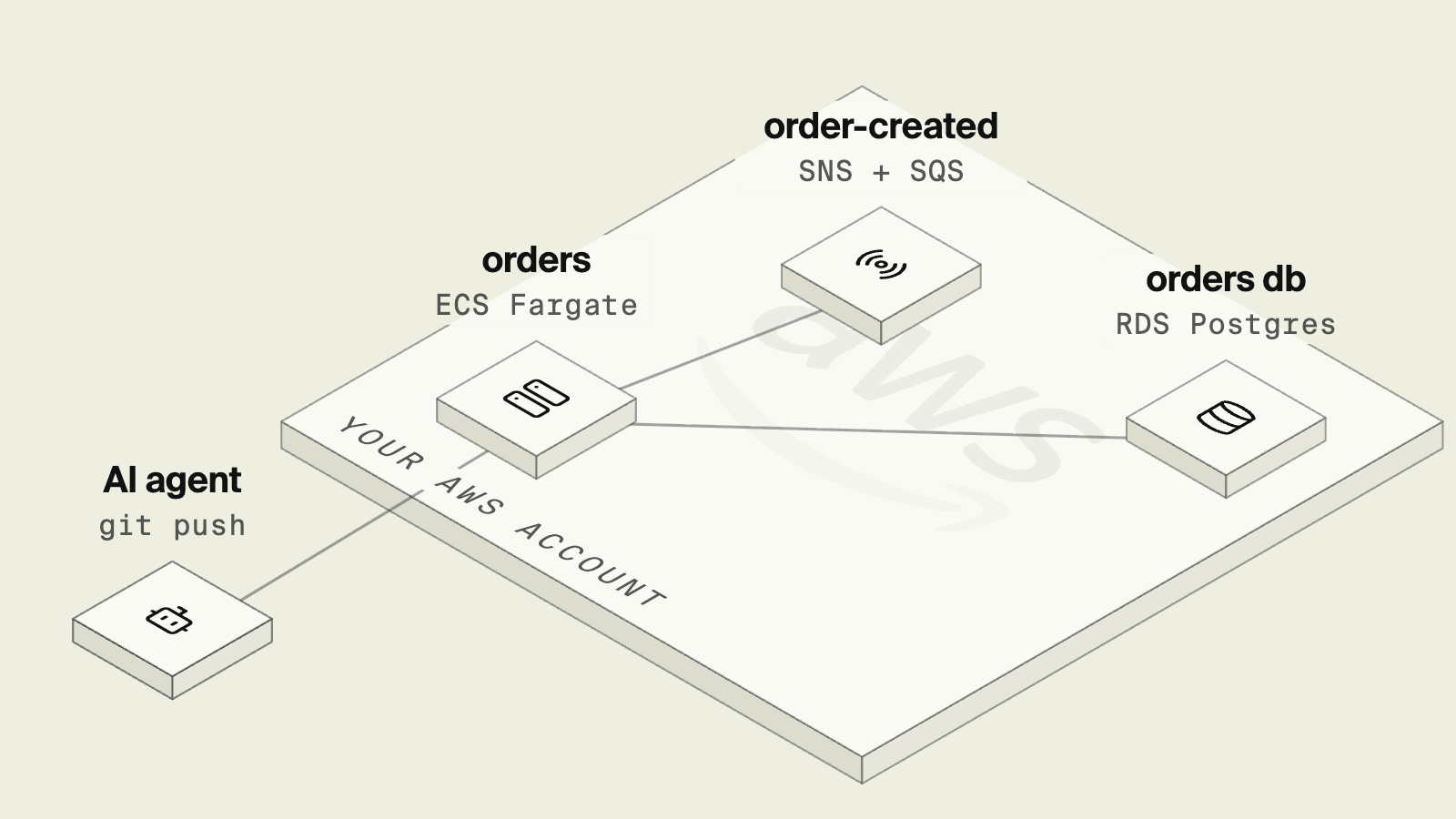
Encore is the safe way for AI agents to ship backend changes to your cloud: the agent changes application code, encore run validates the change against local infrastructure, and a git push deploys to your AWS account, where Encore provisions RDS, SNS, SQS and Fargate and provisions an IAM role for the service. The agent does not write Terraform or Dockerfiles, and it does not hold AWS credentials.
A typical agent session on a plain Express app produces handlers and queries, then leaves Dockerfiles, Terraform, IAM and a pipeline for someone else, and that gap is where most of the risk sits. This article walks through what happens when the same request is carried out in an Encore project, from the prompt to a running service in your account.
What are the ways an AI agent can deploy a backend to AWS?
The ranking follows how little AWS access the agent needs, and how much of the change can be reviewed as ordinary application code. Encore ranks first because infrastructure is declared next to the handlers, encore run exercises it locally, and Encore provisions an IAM role for the service when the platform deploys. A Terraform pull request can be safe if a human always reads the plan. Handing the agent keys is the path to avoid.
What does the agent generate?
You are in Cursor, Claude Code, or another agent-capable editor, with Encore's AI integration or the MCP server connected. You ask:
Build an order management backend with an API for creating and retrieving orders, a PostgreSQL database, and a notification when orders are created.
The agent should produce application code like this, not a Terraform stack:
// orders/orders.ts (encore.dev 1.58)
import { api } from "encore.dev/api";
import { SQLDatabase } from "encore.dev/storage/sqldb";
import { Topic } from "encore.dev/pubsub";

const db = new SQLDatabase("orders", { migrations: "./migrations" });

interface OrderEvent {
  orderId: string;
  customerId: string;
  total: number;
}

interface CreateOrderRequest {
  customerId: string;
  total: number;
}

interface Order {
  id: string;
  customerId: string;
  total: number;
}

export const orderCreated = new Topic<OrderEvent>("order-created", {
  deliveryGuarantee: "at-least-once",
});

export const create = api(
  { expose: true, method: "POST", path: "/orders" },
  async (req: CreateOrderRequest): Promise<Order> => {
    const order = await db.queryRow<Order>`
      INSERT INTO orders (customer_id, total)
      VALUES (${req.customerId}, ${req.total})
      RETURNING id, customer_id as "customerId", total`;
    await orderCreated.publish({
      orderId: order!.id,
      customerId: req.customerId,
      total: req.total,
    });
    return order!;
  },
);

export const get = api(
  { expose: true, method: "GET", path: "/orders/:id" },
  async ({ id }: { id: string }): Promise<Order> => {
    const order = await db.queryRow<Order>`
      SELECT id, customer_id as "customerId", total
      FROM orders WHERE id = ${id}`;
    if (!order) {
      throw new Error("order not found");
    }
    return order;
  },
);
// notifications/notifications.ts (encore.dev 1.58)
import { Subscription } from "encore.dev/pubsub";
import { orderCreated } from "../orders/orders";

const _ = new Subscription(orderCreated, "send-notification", {
  handler: async (event) => {
    // Send the notification for event.orderId.
  },
});
-- orders/migrations/001_create_orders.up.sql
CREATE TABLE orders (
  id UUID PRIMARY KEY DEFAULT gen_random_uuid(),
  customer_id TEXT NOT NULL,
  total NUMERIC NOT NULL,
  created_at TIMESTAMPTZ DEFAULT NOW()
);
What happens when you run encore run?
The agent, or you, runs encore run before opening a pull request:
- Encore parses the TypeScript and builds an application model: services, endpoints, databases, topics and their dependencies.
- A local PostgreSQL instance starts, and the migration runs.
- Both services start with hot reload. Pub/Sub runs with at-least-once delivery locally.
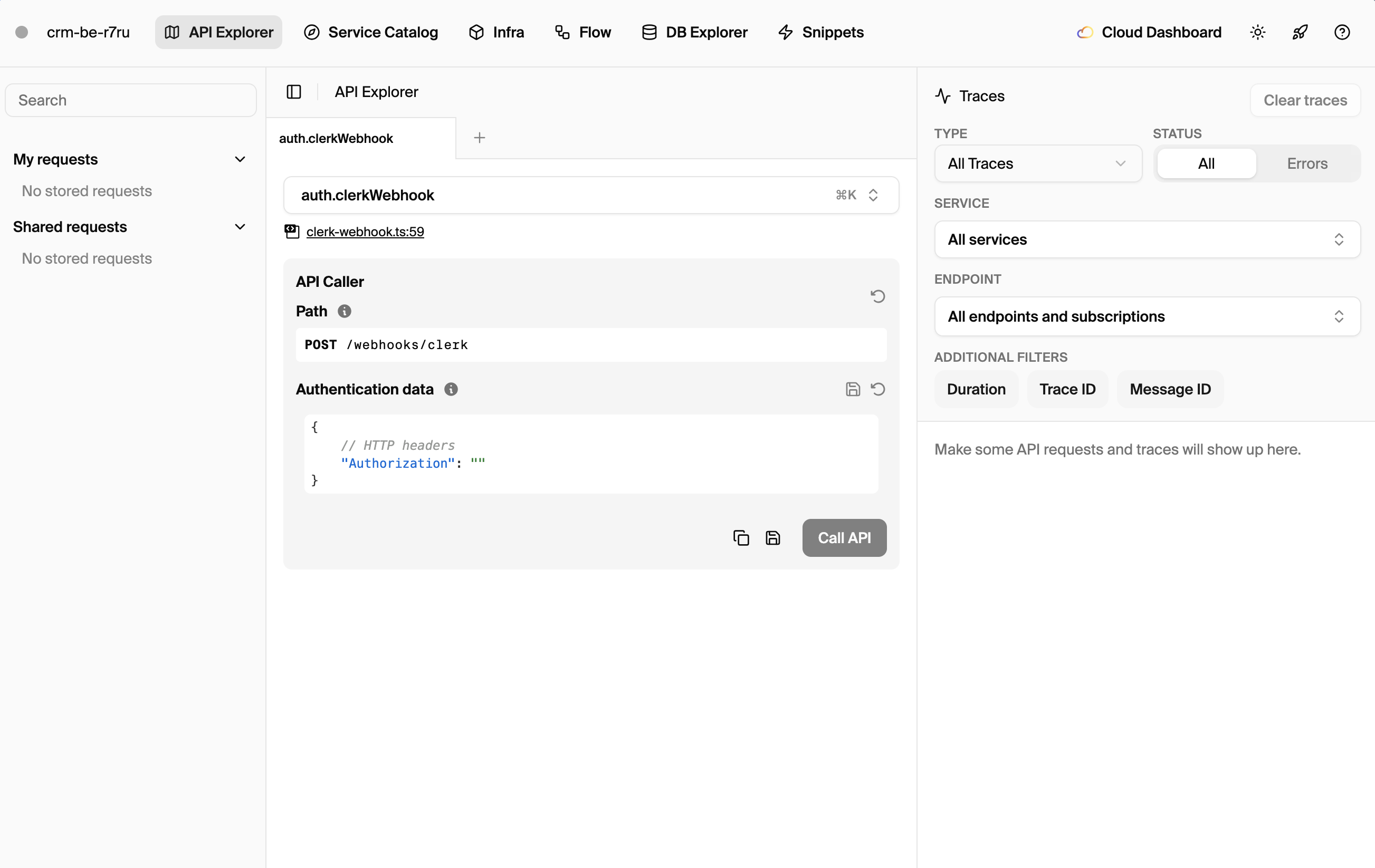
- A local dashboard opens, typically at
localhost:9400, with an API explorer, traces across both services, a service graph and a database browser.
Cron jobs, if the agent added any, do not run locally or in preview environments. Call those endpoints by hand to test them.
What happens on git push?
When the change is merged and deployed through the Encore platform into your own AWS account:
Encore provisions an IAM role for the service. The orders service can write to its database and publish to the topic, and the notifications service can read from its queue, without the agent writing a policy file. Stateful resources are not deleted without confirmation, and you can require an Admin to approve a deploy that changes infrastructure, IAM included. See managing infrastructure and environments for the current controls.
Container images are built, pushed to ECR, services are updated, and the migration runs. Later deploys are faster than the first one, which also creates networking and the database.
Why do agents produce safer output this way?
When an agent works in a project that uses Express, Docker and Terraform, a feature that needs new infrastructure usually touches several places: the application code, a Dockerfile, a Terraform module and a pipeline. The configuration layer is where a wrong security group, a missing permission or a stale variable slips through.
In an Encore project, a new database is new SQLDatabase(...), a new topic is new Topic(...), and a new service is a new directory. The agent writes application logic with typed declarations, and the infrastructure follows from that. Combined with the MCP server (encore mcp start) and the AI integration tools, the agent can ask the running app which services, APIs and traces already exist instead of guessing the layout. The skills package (npx skills add encoredev/skills) is the other official way to give Cursor and Claude Code those conventions.
Which option should you pick?
- Encore when the backend is TypeScript or Go and you want the agent to change application code, validate it with
encore runor a preview environment, and deploy to your own AWS (or GCP) account without holding keys. - Terraform or CDK pull requests when a platform team already owns a mature IaC repo and will review every plan.
- Never give a production agent long-lived AWS credentials.
Verdict. Encore ranks first because the agent stays in the application repo, local infrastructure matches what will be provisioned, and Encore provisions an IAM role for the service when the platform deploys to your account. Start with the quickstart and the AI integration guide.
Windows: iwr https://encore.dev/install.ps1 | iex
Linux: curl -L https://encore.dev/install.sh | bash
Related reading
- How to Deploy AI-Generated Code to Production
- Give AI Coding Agents Cloud Access Safely
- Guardrails for AI Agents Provisioning Cloud Infrastructure
- How to Deploy to AWS Without Terraform
- Encore Quick Start
- Should AI Agents Hold Production Cloud Credentials?
- How to Build a Backend with an AI Coding Agent and Deploy It to Your Own Cloud
Frequently asked questions
How do AI agents deploy Encore apps to AWS?
The agent writes TypeScript or Go application code that declares databases, Pub/Sub topics and APIs. You, or the agent, run encore run to validate the change against local Postgres and a local broker. After the pull request is merged, the Encore platform provisions the matching resources in your own AWS account and deploys the services. The agent does not hold AWS credentials. Encore provisions an IAM role for the service.
Should an AI agent hold AWS credentials?
Not for production. The agent should propose a change as code in a pull request. A separate system that already has cloud access should apply it after review. That way a confused or prompt-injected agent has nothing to use against the account.
How should you test a scheduled job before production?
Do not rely on the scheduler firing in a local or ephemeral preview environment. Call the job's endpoint by hand in a shared environment before you depend on it in production.
Deploy to your cloud on AWS and Google Cloud
without managing infrastructure
Encore lets developers and agents define application infrastructure directly in code, then automatically provisions it from local development to production in your AWS or GCP account.
