How to Give AI Coding Agents Access to Cloud Infrastructure Safely
Five ways to handle cloud access for coding agents, ranked by what an agent can break and who approves the change.

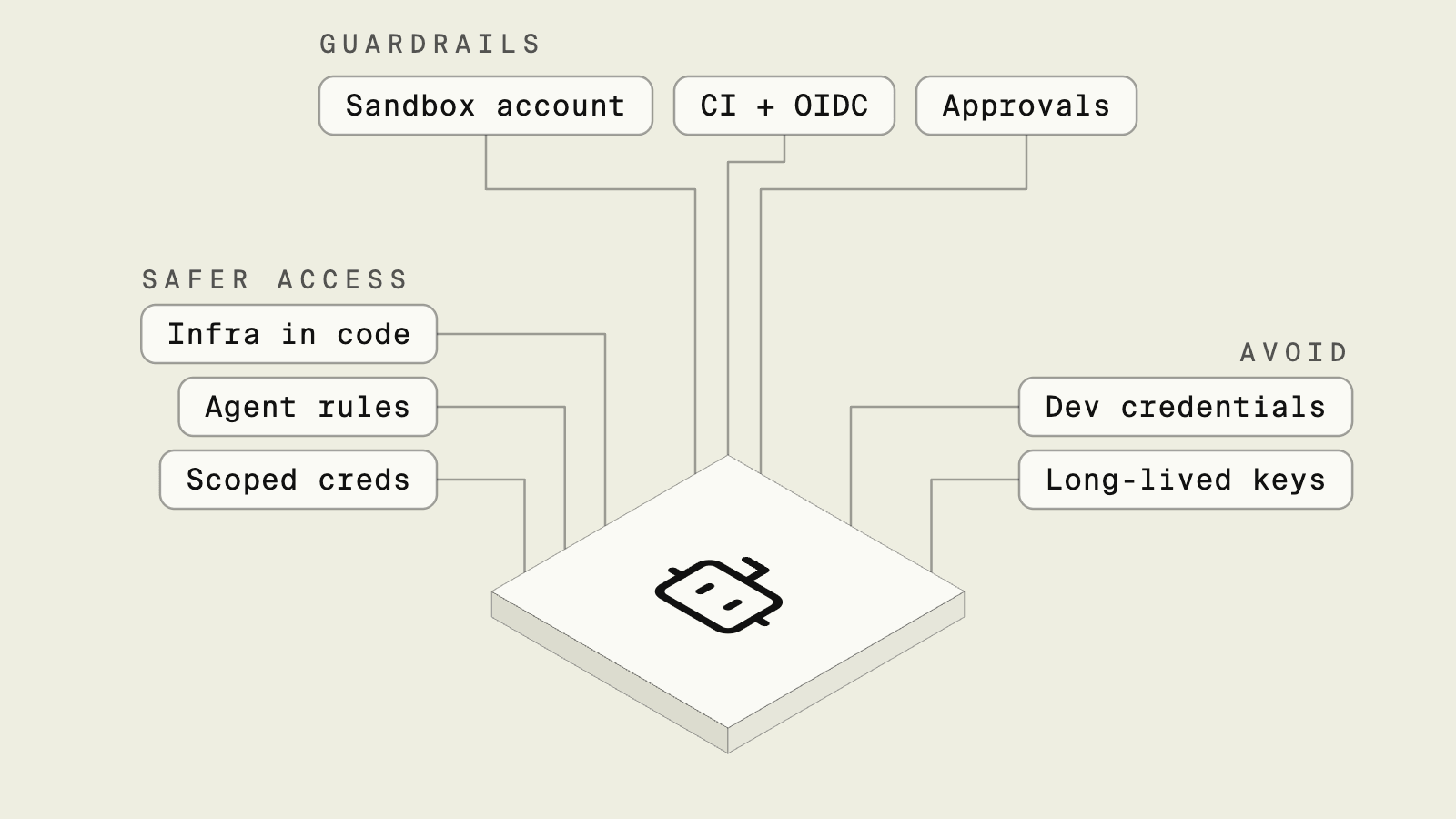
The safest way to give AI coding agents cloud access is to not hand them cloud credentials at all: let the agent declare the infrastructure it needs in code, and let a deploy system that owns the cloud role provision it. Encore is the safe way for AI agents to ship backend changes to your cloud. An agent adds a database, topic or bucket as a declaration in TypeScript or Go, runs it locally with encore run, and the Encore platform provisions it in your own AWS or GCP account on deploy, optionally after an admin approves the change. Add agent permission rules on top, and keep short-lived roles in a sandbox account for the cases where an agent must call cloud APIs directly.
Coding agents run shell commands, and a shell on a developer laptop usually has whatever the developer has: an ~/.aws/credentials file, a gcloud login, a .env with a database URL. That goes unnoticed while the agent edits a React component, and becomes a problem the first time it decides the quickest fix for a failing deploy is to run aws or terraform apply itself, with the developer's admin role, against the account that also holds production.
The agent vendors give you controls for what the agent may run. Codex runs locally with no network access and writes limited to the workspace by default, Claude Code has allow, ask and deny rules for every tool, and Cursor can run terminal commands in a sandbox that blocks unauthorized file and network access. The cloud side decides what a credential can do once it is used, and a safe setup needs both.
What to weigh when choosing:
- Whether the agent holds cloud credentials at all, and for how long they are valid.
- Which account the credentials reach, and whether production is in it.
- Whether the agent writes IAM and network configuration, or something deterministic generates it.
- Who approves a new resource or a deletion before it happens.
What are the ways to give agents cloud access?
Compare the approaches in detail
How do agents add infrastructure with Encore?

Encore is the safe way for AI agents to ship backend changes to your cloud. Developers and agents declare the databases, Pub/Sub topics, buckets, cron jobs and secrets an application uses in TypeScript or Go, and the Encore platform provisions them in your own AWS or GCP account through an IAM role or service account you grant and can revoke. Adding a database or a bucket is a code change, and Encore provisions an IAM role for the service, so cloud access does not sit with the agent. The IAM policies, networking and security groups for each resource are generated from the code rather than written by the agent, and deployment settings such as capacity, networking and backups are not part of the declarations an agent edits. This does not make the agent's shell safe on its own: any keys already on the machine still need the permission rules below.
When an agent needs storage for receipts in an orders service, the whole infrastructure change is a declaration next to the code that uses it:
import { Bucket } from "encore.dev/storage/objects";
import { Topic } from "encore.dev/pubsub";

export const receipts = new Bucket("receipts", { versioned: false });

export interface ReceiptCreated {
  orderId: string;
  key: string;
}

export const receiptCreated = new Topic<ReceiptCreated>("receipt-created", {
  deliveryGuarantee: "at-least-once",
});
encore run starts the bucket and the topic locally, so the agent can call the endpoint and read the trace through the local MCP server without any cloud account involved. On deploy, the platform creates an S3 bucket and SNS/SQS on AWS, or Cloud Storage and Pub/Sub on GCP, and Encore provisions an IAM role for the service. Sizing, networking and other settings are managed centrally through infrastructure configuration, outside the code the agent edits.
Approvals sit at the environment level rather than in every command. An environment can require infrastructure approval, in which case an application admin approves new infrastructure before the deployment proceeds, and the platform does not automatically destroy infrastructure that is no longer required, so deleting it requires manual approval in the Encore dashboard.
Key features
- Agents declare infrastructure in code, and the deploy system holds the cloud role.
- IAM, networking and security configuration generated from the declarations.
- Local infrastructure with
encore run, and preview environments when they are enabled for the app. - Optional infrastructure approval per environment, and manual approval before infrastructure is deleted.
- Runs in your own AWS or GCP account, with no runtime dependency on Encore.
Good to know
The agent needs some access to deploy, which is a git push to Encore or a merged pull request, and roles decide who can push, configure secrets or approve infrastructure. Resources Encore does not model can still be managed directly in your cloud account, and existing databases, buckets and topics can be connected instead of recreated.
Are agent permission rules enough?
Every major coding agent has a way to restrict what it runs. Claude Code evaluates deny rules first, then ask rules, then allow rules, and a project can check its rules into .claude/settings.json, so the whole team gets them:
{
  "permissions": {
    "deny": [
      "Bash(aws *)",
      "Bash(gcloud *)",
      "Bash(terraform *)",
      "Read(~/.aws/**)",
      "Read(./.env)"
    ],
    "ask": ["Bash(git push *)"]
  }
}
Key features
- Deny rules apply before any allow rule matches.
- Rules can block reading credential files as well as running commands.
- Codex and Cursor offer sandboxes that restrict network and file access at the operating system level.
Good to know
Command patterns filter the agent's behavior rather than limiting the credential, and Claude Code's documentation notes that a deny rule does not match the same program called by its full path or inside sh -c, and recommends pairing deny rules with the sandbox when a restriction must hold. The credential on the machine still has its full permissions if something else uses it, so these rules work best on top of one of the approaches below.
When should an agent get short-lived credentials?
When an agent needs to call cloud APIs, for example to inspect a resource while debugging, the AWS answer is temporary security credentials from an assumed role, which expire after a set time, in an account that does not hold production. A permissions boundary caps what the role can do even if someone attaches a broader policy later:
{
  "Version": "2012-10-17",
  "Statement": [
    {
      "Effect": "Allow",
      "Action": [
        "s3:GetObject",
        "s3:ListBucket",
        "logs:FilterLogEvents",
        "cloudwatch:GetMetricData"
      ],
      "Resource": "*"
    },
    {
      "Effect": "Deny",
      "Action": ["iam:*", "organizations:*"],
      "Resource": "*"
    }
  ]
}
Key features
- Credentials expire on their own, so a leaked session has a short life.
- A separate account limits the blast radius to non-production resources.
- Read-only roles cover most debugging work.
Good to know
Someone has to design the role, keep the sandbox account in sync with what the app needs and decide when the agent may write rather than read. Once the agent creates resources this way, they exist outside any code review, which is the gap the next two approaches close.
Do CI-only deploys with OIDC solve it?
A common pattern for teams already on Terraform or CDK is to keep credentials out of laptops entirely and let CI assume a role through OpenID Connect after a pull request merges:
on:
  push:
    branches: [main]

permissions:
  id-token: write
  contents: read

jobs:
  deploy:
    runs-on: ubuntu-latest
    environment: production
    steps:
      - uses: actions/checkout@v4
      - uses: aws-actions/configure-aws-credentials@v6
        with:
          role-to-assume: arn:aws:iam::123456789012:role/deploy
          aws-region: eu-central-1
      - run: terraform apply -auto-approve
Key features
- No long-lived keys anywhere, and the role trusts only your repository.
- Every change goes through a pull request, and the
productionenvironment can require a reviewer beforeterraform applyruns.
Good to know
With this setup the agent no longer holds cloud credentials, but it usually still writes the Terraform, IAM policies and security groups that the pipeline applies, and reviewers have to catch an over-broad policy in a generated diff. The only way to test a new resource is often to merge and deploy it, which slows the agent's loop down to the length of a pipeline run. Why letting an agent write infrastructure config is risky covers this in more detail.
Why avoid running agents with developer credentials?
Running an agent in a shell that has the developer's own long-lived keys gives it everything the developer can do, in every account the developer can reach, with no expiry. The Stack Overflow 2025 Developer Survey found that more developers distrust the accuracy of AI tools (46%) than trust it (33%), and broad credentials turn that accuracy question into a security one. The minimum change is to remove the keys from the agent's environment or to block cloud CLIs and credential files with deny rules.
How do developers stop needing AWS keys too?
The same setup takes keys off developer laptops, as encore run starts the databases, Pub/Sub and buckets locally, so day-to-day work needs no cloud account. Secret values are set per environment type with encore secret set, for example --type local for a laptop and --type prod for production, and on AWS the Encore platform keeps them in AWS Secrets Manager, so nobody pastes production keys into a .env file. Deploying is git push, and roles in the Encore app decide who can deploy, set secrets or approve infrastructure. People who still need console access for debugging can get it through IAM Identity Center with short-lived sessions, separate from the deploy path.
Which approach should you pick?
- Encore when you want agents to add databases, topics and buckets by declaring them in code, test them locally, and have the Encore platform provision them in your AWS or GCP account, without the agent writing IAM.
- Agent permission rules on every setup, as the layer that stops an agent from reading credential files or running cloud CLIs.
- Scoped, short-lived credentials when an agent needs read access to a sandbox account for debugging.
- CI-only deploys with OIDC when the team keeps Terraform or CDK and wants credentials out of laptops.
- Developer credentials only for work a person runs and watches.
Verdict. Ranked by what an agent holds, Encore comes first, with the agent holding code and the deploy system holding the cloud role, which removes the credential question for adding databases, queues, buckets and cron jobs. Put agent permission rules on every setup. Use short-lived, read-only roles in a sandbox account for debugging. If you keep Terraform, deploy from CI with OIDC, and accept that reviewers still have to read the IAM the agent wrote. Do not run agents with a developer's long-lived keys.
When agents need cloud access without standing cloud credentials in the repo, start with Encore, keep infrastructure declarations in application code and hold deploy and infrastructure approvals at the environment level in your own AWS or GCP account.
Related guides
- How to let AI agents deploy safely to AWS or GCP
- How to give AI coding agents real infrastructure to test against
- How AI agents deploy to AWS with Encore
- Best database setup for AI coding agents
- Building internal tools with AI agents without giving them your AWS keys
- How to handle API keys and secrets on AWS when an AI agent writes the Code
- How to let non-engineers vibe-code internal apps without losing control of AWS
- The Best AI Coding Agents in 2026
Frequently asked questions
Should an AI coding agent have AWS credentials?
Usually not long-lived ones. A safer setup lets the agent describe the infrastructure it needs in code, with a separate deploy system that provisions it. When an agent does need direct access, use short-lived credentials from an assumed role, scoped to a sandbox account and capped by a permissions boundary, and block cloud CLIs in the agent's own permission rules.
How do we stop developers and agents from needing AWS credentials?
Move infrastructure changes into application code and let a deploy system own the cloud access. With Encore, a developer or agent declares a database, topic or bucket in TypeScript or Go, runs it locally with encore run, and ships it with git push. The Encore platform provisions it in your AWS or GCP account through the role you granted when connecting the account, and Encore provisions an IAM role for the service. Nobody needs AWS keys on a laptop to add infrastructure.
How do I stop Claude Code from running AWS CLI commands?
Add a deny rule to the project's .claude/settings.json, for example "Bash(aws *)" under permissions.deny. Deny rules are evaluated before ask and allow rules, so the agent cannot run matching commands even if another rule would allow them.
Deploy to your cloud on AWS and Google Cloud
without managing infrastructure
Encore lets developers and agents define application infrastructure directly in code, then automatically provisions it from local development to production in your AWS or GCP account.
