How to Handle API Keys and Secrets on AWS When an AI Agent Writes the Code
When Claude Code or Cursor adds a Stripe or OpenAI integration, the key has to live somewhere other than the repo or the agent's context. Here is the Secrets Manager route on AWS and the Encore route for a Go backend.

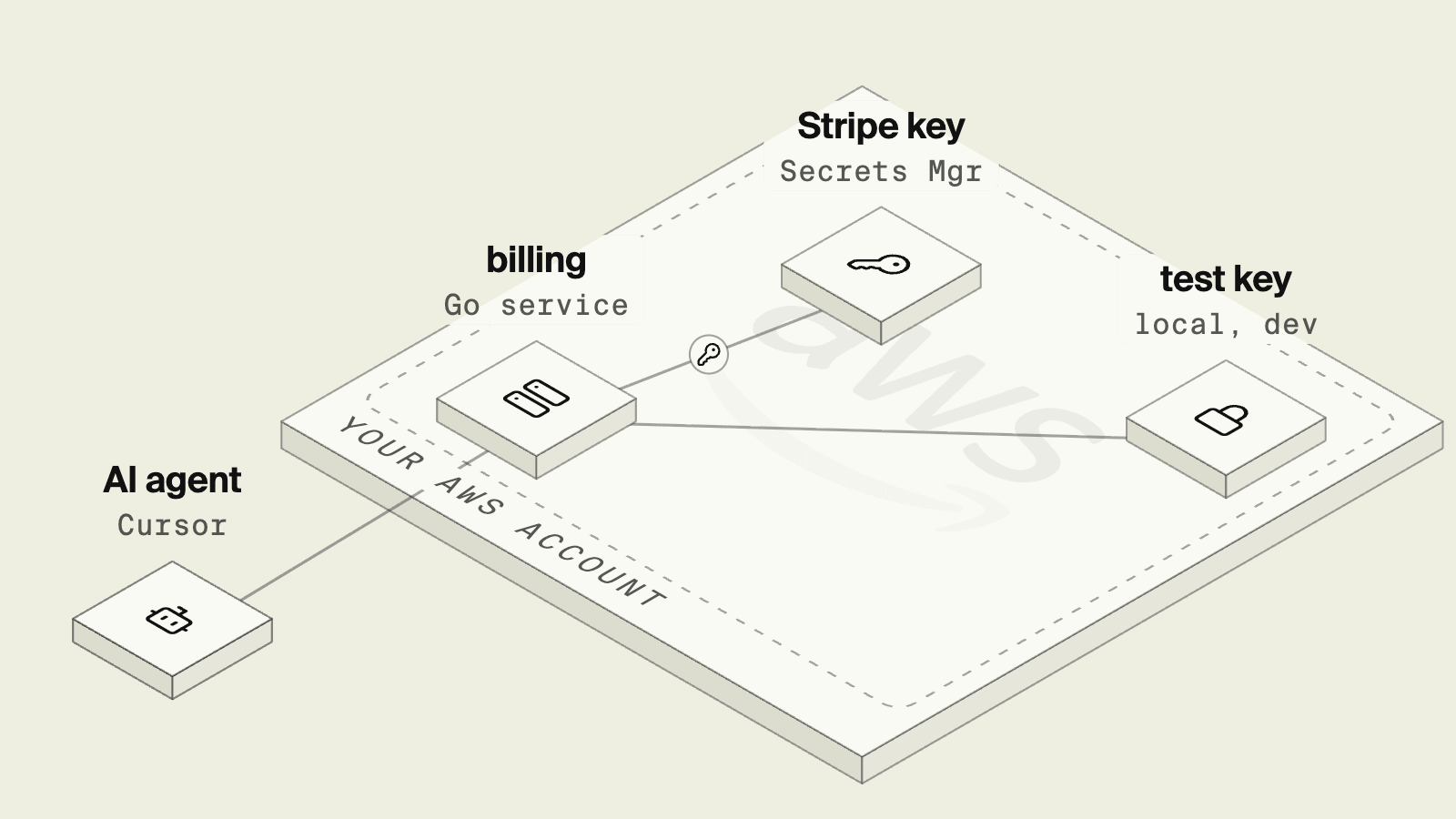
A coding agent adding a Stripe refund endpoint needs exactly one thing from the secret: its name, so the code can read it at runtime. It does not need the production value, and the worst outcomes come from giving it one anyway. A key pasted into a chat ends up in the agent's context and sometimes in a commit, and a key in a .env file the agent can read is one tool call away from a log line.
The Twelve-Factor App stated the rule years before agents existed: config that varies between deploys belongs in the environment, with strict separation from code.
This guide shows two ways to follow that rule in a Go backend on AWS, so the agent writes the integration and a person sets the value.
Secrets with an agent at a glance
AWS Secrets Manager with the Go SDK
AWS Secrets Manager stores the value encrypted and returns it to callers whose IAM role allows secretsmanager:GetSecretValue on that secret. In Go, the service loads it at startup:
package plain

import (
	"context"
	"os"

	"github.com/aws/aws-sdk-go-v2/aws"
	"github.com/aws/aws-sdk-go-v2/config"
	"github.com/aws/aws-sdk-go-v2/service/secretsmanager"
)

// Loads the Stripe key at startup. The task role needs
// secretsmanager:GetSecretValue on this secret's ARN.
func StripeKey(ctx context.Context) (string, error) {
	cfg, err := config.LoadDefaultConfig(ctx)
	if err != nil {
		return "", err
	}
	client := secretsmanager.NewFromConfig(cfg)
	out, err := client.GetSecretValue(ctx, &secretsmanager.GetSecretValueInput{
		SecretId: aws.String(os.Getenv("STRIPE_SECRET_ARN")),
	})
	if err != nil {
		return "", err
	}
	return aws.ToString(out.SecretString), nil
}
This is a solid setup and works with rotation. The agent has to add the IAM statement scoped to the secret's ARN and find a different source for local development, since the code above needs AWS credentials even on a laptop. That last point is where agents tend to cut corners, either by asking for credentials to reach the dev secret or by writing a fallback that reads a plaintext key from a file. The OWASP Secrets Management Cheat Sheet recommends keeping secrets out of source code and limiting who can read them, which both of those shortcuts work against.
Secrets as part of the service

Encore, the safe way for AI agents to ship backend changes to your cloud, combines an open source SDK, where a service declares the secrets and other infrastructure it uses, with a platform that supplies them in each environment and provisions the rest in your own AWS account. With the secrets primitive, the agent adds a field to a struct and uses it like a variable:
package billing

import (
	"context"
	"fmt"
	"net/http"
	"net/url"
	"strings"
)

// Values are set per environment with `encore secret set`, never in the repo.
var secrets struct {
	StripeSecretKey string
}

type RefundParams struct {
	PaymentIntent string `json:"payment_intent"`
}

type RefundResponse struct {
	Status int `json:"status"`
}

//encore:api private method=POST path=/billing/refunds
func Refund(ctx context.Context, p *RefundParams) (*RefundResponse, error) {
	form := url.Values{"payment_intent": {p.PaymentIntent}}
	req, err := http.NewRequestWithContext(ctx, http.MethodPost,
		"https://api.stripe.com/v1/refunds", strings.NewReader(form.Encode()))
	if err != nil {
		return nil, err
	}
	req.Header.Set("Authorization", "Bearer "+secrets.StripeSecretKey)
	req.Header.Set("Content-Type", "application/x-www-form-urlencoded")
	resp, err := http.DefaultClient.Do(req)
	if err != nil {
		return nil, fmt.Errorf("stripe refund: %w", err)
	}
	defer resp.Body.Close()
	return &RefundResponse{Status: resp.StatusCode}, nil
}
The values are set per environment type, outside the repo. A developer sets a Stripe test key for local and development use, and someone with production access sets the live key:
encore secret set --type dev,local StripeSecretKey
encore secret set --type prod StripeSecretKey
The agent can run the service with encore run and test refunds against Stripe's test mode using the local value. When it inspects the app through the local MCP server, the secret metadata tool reports which secrets exist and does not return their values.
Asked to "add Stripe refunds," the agent writes the struct field and the endpoint, and the review shows a secret name rather than a key.
Encore stores the values encrypted and, when you deploy to your own AWS account, replicates them to Secrets Manager in that account, with each service allowed to read only the secrets it declares. Who can set or pull secret values is controlled by roles in Encore. The agent references secrets by name, and cloud access sits with Encore's IAM role, not the agent.
Good to know
Developers with the right role can pull development secret values to their machine, so an agent running on that machine can read the local values. Keep production values on the production type only, and use test-mode keys for local work. Secrets that must stay in an existing vault can be read from it directly in code.
Run in your terminal to get started locally.
How to choose
- Encore when you want the agent to add integrations by referencing secret names and test with local values, without writing IAM statements.
- Secrets Manager by hand when secrets are shared across many systems and a security team manages rotation and access centrally.
Related guides
- How to let AI agents deploy to AWS
- Multiple environments without Terraform
- How to build a REST API in Go
- How to give AI coding agents access to cloud infrastructure safely
- Building internal tools with AI agents without giving them your AWS keys
- How to Deploy a Discord Bot to AWS
- What Is AWS Secrets Manager? Rotation, IAM and App Access
Frequently asked questions
How do I let an AI agent use an API key without seeing the production value?
Have the agent reference the secret by name in code and set the production value yourself. With Encore, the agent declares a field in a secrets struct, you run encore secret set --type prod StripeSecretKey, and Encore makes the value available to the service at runtime in your AWS account. With plain AWS, the agent writes a GetSecretValue call and an IAM policy, and you create the secret in Secrets Manager.
Where does Encore store secret values on AWS?
Encore stores secret values encrypted, and when you deploy to your own AWS account it replicates them to AWS Secrets Manager in that account, where each service can read only the secrets it uses.
Should an AI agent ever hold production secrets?
In most teams, no. The agent needs the secret's name and a development value to test with. Production values are set by a person with the right role, and cloud access sits with Encore's IAM role, not the agent.
Deploy to your cloud on AWS and Google Cloud
without managing infrastructure
Encore lets developers and agents define application infrastructure directly in code, then automatically provisions it from local development to production in your AWS or GCP account.
