How to Deploy AI-Generated Code to Production in Your Own Cloud
Taking a backend written with Cursor, Claude Code, Copilot or Codex to production on AWS or GCP: five deploy paths ranked, and a walkthrough from prompt to a reviewed deploy in your own account.

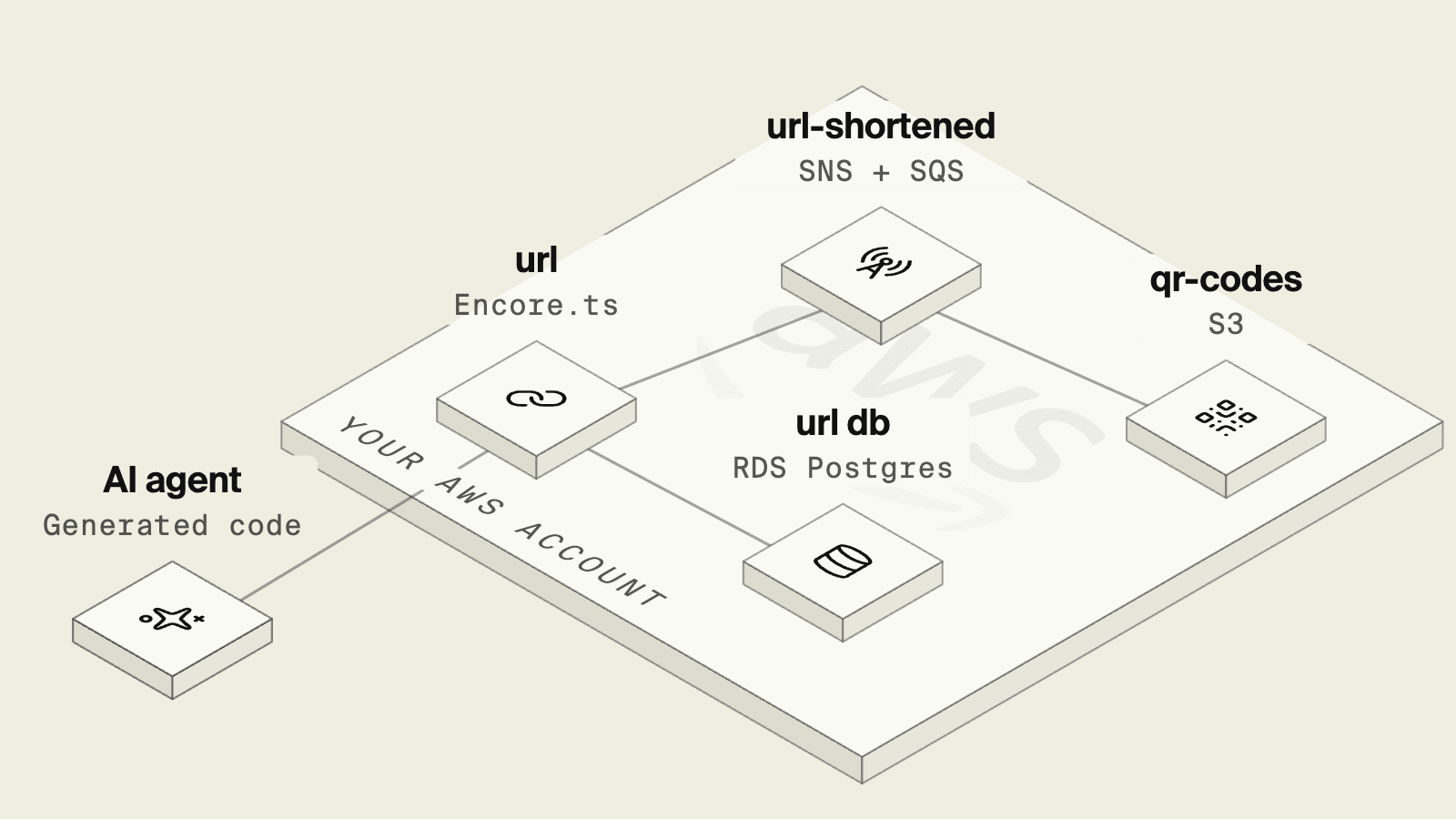
To deploy a backend that Cursor, Claude Code, Copilot or Codex wrote to production in your own AWS or GCP account, have the agent write the API and declare the infrastructure it needs in the same code, run it locally, and ship it through a reviewed merge to a deploy system that holds the cloud access. Encore is the safe way for AI agents to ship backend changes to your cloud: the agent declares the database, Pub/Sub topic, cron job or bucket next to the endpoint that uses it, and a merge deploys the change into your own account, with an optional Admin approval for infrastructure changes. If your infrastructure already lives in Terraform, the alternative is to let the agent write HCL in a pull request and have a pipeline plan, check and apply it. Letting the agent run cloud CLIs from its own session is fine for a sandbox and wrong for production.
Agents are good at application code: ask for a URL shortener with click tracking and you get handlers, a schema and tests in a few minutes. The gap shows up when that code has to run somewhere: a Postgres instance, a migration step, a secret, a scheduled cleanup, networking, a container build and a role that is allowed to do all of it. If none of that exists, the agent either stops or improvises it, and improvised cloud configuration is the part you least want to review in a hurry. This guide ranks the ways to close that gap and walks through one of them end to end.
What are the ways to deploy AI-generated backend code to your own cloud?
AWS App Runner used to sit in row 3, and AWS closed it to new customers on April 30, 2026, pointing to ECS Express Mode instead.
Why is infrastructure the hard part of deploying AI-generated code?
A backend that does anything useful needs more than a process. The URL shortener below needs a Postgres database with a migration, a scheduled job that purges dead links, and a way to reach both in every environment. On AWS by hand that is an RDS instance, a subnet group, security groups, a secret for the password, an ECS service with a task role, a scheduler with its own role and a target, and a pipeline that builds and ships the image.
An agent can generate all of that, and then you review two diffs that have to agree: the handler that queries a table, and the HCL that creates the database and grants access to it. The usual failure is a security group open to 0.0.0.0/0, an IAM policy with "Resource": "*", or a queue the code publishes to under a different name, rather than a syntax error. The paths that rank highest are the ones where the agent writes less configuration and a reviewer sees the code and its infrastructure together.
How do you build and deploy a backend with an AI agent using Encore?

Encore declares infrastructure in TypeScript or Go code. A SQLDatabase, Topic, Bucket, CronJob or secret in a service becomes a local resource under encore run and a cloud resource in your own AWS or GCP account when you deploy. That gives an agent one pattern to follow for every kind of resource, and gives a reviewer one diff to read.
Run in your terminal to get started locally.
Step 1: Create the app and load the conventions
encore llm-rules init asks which tool you use and writes its rule file, such as CLAUDE.md or .cursorrules, and for Cursor and Claude Code it also configures the local MCP server (AI integration docs). If you would rather start from a finished version of this example, encore app create --example=ts/url-shortener clones one.
Step 2: Prompt for the feature, infrastructure included
Build a URL shortener service with Encore. POST /shorten takes a URL and returns a short code, GET /r/:code returns the original URL and counts the click. Store links in a Postgres database with a migration. Add a daily cron job at 03:00 UTC that deletes links with zero clicks older than 90 days. Validate the URL in the request type.
The agent produces something close to this, and every line that becomes infrastructure is a declaration you can see in review:
// url/url.ts (encore.dev 1.58)
import { randomBytes } from "node:crypto";
import { api, APIError } from "encore.dev/api";
import { CronJob } from "encore.dev/cron";
import log from "encore.dev/log";
import { SQLDatabase } from "encore.dev/storage/sqldb";
import { IsURL, MaxLen } from "encore.dev/validate";

// A Postgres database: Docker locally, RDS or Cloud SQL in your own cloud.
const db = new SQLDatabase("url", { migrations: "./migrations" });

interface ShortenRequest {
  // Validated at runtime from the type: requests with a non-URL get a 400.
  url: string & IsURL & MaxLen<2048>;
}

interface ShortenResponse {
  code: string;
}

export const shorten = api(
  { expose: true, method: "POST", path: "/shorten" },
  async ({ url }: ShortenRequest): Promise<ShortenResponse> => {
    if (!/^https?:$/.test(new URL(url).protocol)) {
      throw APIError.invalidArgument("only http and https links");
    }
    const code = randomBytes(5).toString("base64url");
    await db.exec`INSERT INTO urls (code, original_url) VALUES (${code}, ${url})`;
    return { code };
  },
);

export const resolve = api(
  { expose: true, method: "GET", path: "/r/:code" },
  async ({ code }: { code: string }): Promise<{ url: string }> => {
    const row = await db.queryRow<{ original_url: string }>`
      UPDATE urls
      SET clicks = clicks + 1, last_clicked_at = now()
      WHERE code = ${code}
      RETURNING original_url
    `;
    if (!row) throw APIError.notFound("unknown code");
    return { url: row.original_url };
  },
);

// Private endpoint for the cron job: callable inside the app, not from the internet.
export const purgeStale = api({ expose: false }, async (): Promise<void> => {
  const res = await db.queryRow<{ n: number }>`
    WITH gone AS (
      DELETE FROM urls
      WHERE clicks = 0 AND created_at < now() - INTERVAL '90 days'
      RETURNING 1
    )
    SELECT count(*)::int AS n FROM gone
  `;
  log.info("purged stale links", { count: res?.n ?? 0 });
});

// 03:00 UTC every day. Runs in deployed environments, not under encore run.
const _purge = new CronJob("purge-stale-links", {
  title: "Delete links nobody clicked in 90 days",
  schedule: "0 3 * * *",
  endpoint: purgeStale,
});
-- url/migrations/1_create_urls.up.sql
CREATE TABLE urls (
  id BIGSERIAL PRIMARY KEY,
  code TEXT UNIQUE NOT NULL,
  original_url TEXT NOT NULL,
  clicks INTEGER NOT NULL DEFAULT 0,
  created_at TIMESTAMPTZ NOT NULL DEFAULT now(),
  last_clicked_at TIMESTAMPTZ
);
The service also needs an encore.service.ts file that exports new Service("url"), which agents following the rule file add on their own.
Step 3: Let the agent check its own work locally
encore run starts Postgres in Docker, applies the migration and serves the API, so the agent can call /shorten and /r/:code and see the rows change. With the local MCP server connected, it can also query the database and read the trace of each request it made. encore test sets up the same infrastructure in test mode before running your tests, per the testing docs. Cron jobs do not run locally, so the agent tests purgeStale by calling the endpoint.
Step 4: Review and deploy into your own account
- An Admin connects your AWS or GCP account once. On AWS that is an IAM role with an external ID that the Encore platform assumes (own cloud docs).
- Connect GitHub and set the production environment to deploy on pushes to
main, with branch protection onmainso changes land through reviewed pull requests. - Each pull request gets a preview environment with its own URL, hosted on the Encore platform, so the reviewer can call the agent's endpoints before merging.
- Turn on infrastructure approval for production. An Admin then approves any deployment that includes infrastructure changes, IAM changes included, before it proceeds (managing infrastructure).
- Merge. The deploy runs build and test, infrastructure provisioning and deployment (deploying docs). On the first deploy, provisioning creates the database in your account, and the platform starts calling
purgeStaleon schedule.
If you would rather keep deploys in your own pipeline, encore build docker --config infra-config.json builds a container image for the same app, and you supply the Postgres, Pub/Sub and storage it connects to (self-hosting docs). In that setup you apply migrations and trigger cron jobs yourself; because purgeStale is private, self-hosting requires a separate public, authenticated wrapper endpoint and a scheduler configured to call it.
Gradient Labs, founded by three former Monzo engineers to build AI agents, runs its platform on Encore with an 11-person team that has no DevOps engineers.
What checks catch an agent's mistakes before production?
With agents, speed is the easy part, and the checks below make that speed safe to accept, in the order a change meets them:
- Type-checked requests. Encore validates incoming requests against the TypeScript types at runtime, so
url: string & IsURL & MaxLen<2048>rejects bad input with a 400 before the handler runs (validation docs). - Infrastructure declarations that fail the build. Encore parses the declarations when it builds the app. An invalid cron
everyvalue such as"abc"stops the build with a pointer to the offending line instead of failing later in the cloud. - A local run against Postgres and Pub/Sub. Postgres and Pub/Sub run locally under
encore runandencore test, so a wrong column name fails on the agent's machine. - A preview environment per pull request. The reviewer calls the endpoints instead of trusting the agent's summary.
- Infrastructure approval. An Admin sees and approves infrastructure changes separately from the code review.
- Traces in production. Every request is traced, so a regression an agent introduced can be followed across services after the deploy.
How do the other deploy paths compare?
Agent-written Terraform or CDK with CI. This keeps infrastructure in the tool your platform team already uses, and policy engines such as HCP Terraform policy enforcement can stop a plan that breaks a rule. It costs the two-diff review described above, plus the pipeline itself. Our guide to replacing application Terraform covers when that trade is worth it.
A container on ECS Express Mode or Cloud Run. For a single stateless service this is the shortest path that stays in your account: the agent writes a Dockerfile, and a CI job with an OIDC role builds and deploys it. Anything stateful, such as the database, the queue or the schedule, is still created by hand or by another tool.
A PaaS git deploy. Railway and Render are quick for an agent to target, and the app runs in the vendor's cloud. That is the deciding factor when your company needs the backend in its own AWS or GCP account. See Railway alternatives for that comparison.
The agent's own shell. An agent with an AWS profile can deploy anything that profile allows, with no review between the decision and the apply. Keep this to sandbox accounts. The Claude Code and Cursor deploy guide shows the permission rules that keep agents away from cloud CLIs.
Which deploy path should you pick?
- Encore if the backend is TypeScript or Go and you want each feature and its infrastructure in one reviewed diff that deploys to your own AWS or GCP account.
- Agent-written Terraform or CDK with CI if your infrastructure already lives there and you have a pipeline with policy checks.
- ECS Express Mode or Cloud Run from CI for a single stateless service.
- A PaaS when running in your own cloud is not a requirement.
- The agent's shell for sandbox experiments only.
Verdict. The deploy path matters more than the agent, and Encore ranks first because the agent writes infrastructure in the same code and pattern as the feature, the reviewer reads one diff, an Admin can approve infrastructure on its own, and the result runs in your own cloud without a pipeline to maintain. Start with the quickstart and the AI integration docs.
Related reading
- How to Give Claude Code or Cursor a Safe Deploy Path to Production
- Guardrails for AI agents that provision cloud infrastructure
- How to let AI agents deploy to AWS
- How to Build a REST API with TypeScript
- How to Deploy to AWS Without a DevOps Team
- Replit Alternatives in 2026: Where to Build and Run an AI-Built App
- Local Development Dashboard
- The Best GCP Deployment Tools for AI-Built Apps in 2026
Frequently asked questions
Can I deploy code written by an AI coding agent straight to production?
You can, and it is safer to treat it like any other contributor's code: the agent opens a pull request, tests and a preview run against it, a human reviews it, and a deploy system that holds the cloud access ships it after the merge. The part that needs extra care is infrastructure, because agents will invent cloud configuration when the database or queue the code needs does not exist yet.
Should the AI agent write Terraform for the infrastructure?
It can, if your infrastructure already lives in Terraform and a pipeline plans and applies it after review. The cost is two diffs per feature, one for the application and one for the HCL, and a reviewer has to check that they agree. Agents also tend to produce wide IAM policies and public defaults unless policy checks catch them before apply.
What is the easiest way to deploy an AI-built backend to my own AWS account?
Use a tool that provisions the infrastructure from the code the agent already writes, so a feature and its database, queue or cron job arrive in one pull request. With Encore, a merge deploys the change into your own AWS or GCP account through a role you connect once, and you can require an Admin to approve infrastructure changes before they apply.
Which AI coding tools work with this workflow?
Any tool that edits files in a git repository and can run local commands: Cursor, Claude Code, GitHub Copilot, Codex and others. The deploy path does not depend on the tool, because the agent's output is a pull request and the deploy happens after review.
Deploy to your cloud on AWS and Google Cloud
without managing infrastructure
Encore lets developers and agents define application infrastructure directly in code, then automatically provisions it from local development to production in your AWS or GCP account.
