How to Build a REST API with TypeScript in 2026
A practical guide to building type-safe APIs with modern tooling

Building a REST API with TypeScript has never been easier. Modern frameworks handle the boilerplate, type safety catches errors before runtime, and deployment is increasingly automated. This guide walks you through building a complete API from scratch.
What You'll Build
A task management API with:
- CRUD endpoints for tasks
- PostgreSQL database with migrations
- Input validation
- Error handling
- Authentication
We'll use Encore.ts for this tutorial because it removes most infrastructure setup, but the patterns apply to any TypeScript backend.
Prerequisites
- Node.js 18+ installed
- Basic TypeScript knowledge
- A terminal
Project Setup
First, install the Encore CLI. This gives you the encore command for creating projects, running your app locally, and deploying to the cloud. The CLI handles database provisioning, environment management, and more.
Windows: iwr https://encore.dev/install.ps1 | iex
Linux: curl -L https://encore.dev/install.sh | bash
Create a new project. The --example flag starts you with a working hello world template that includes the basic project structure and a sample endpoint.
encore app create task-api --example=ts/hello-world
cd task-api
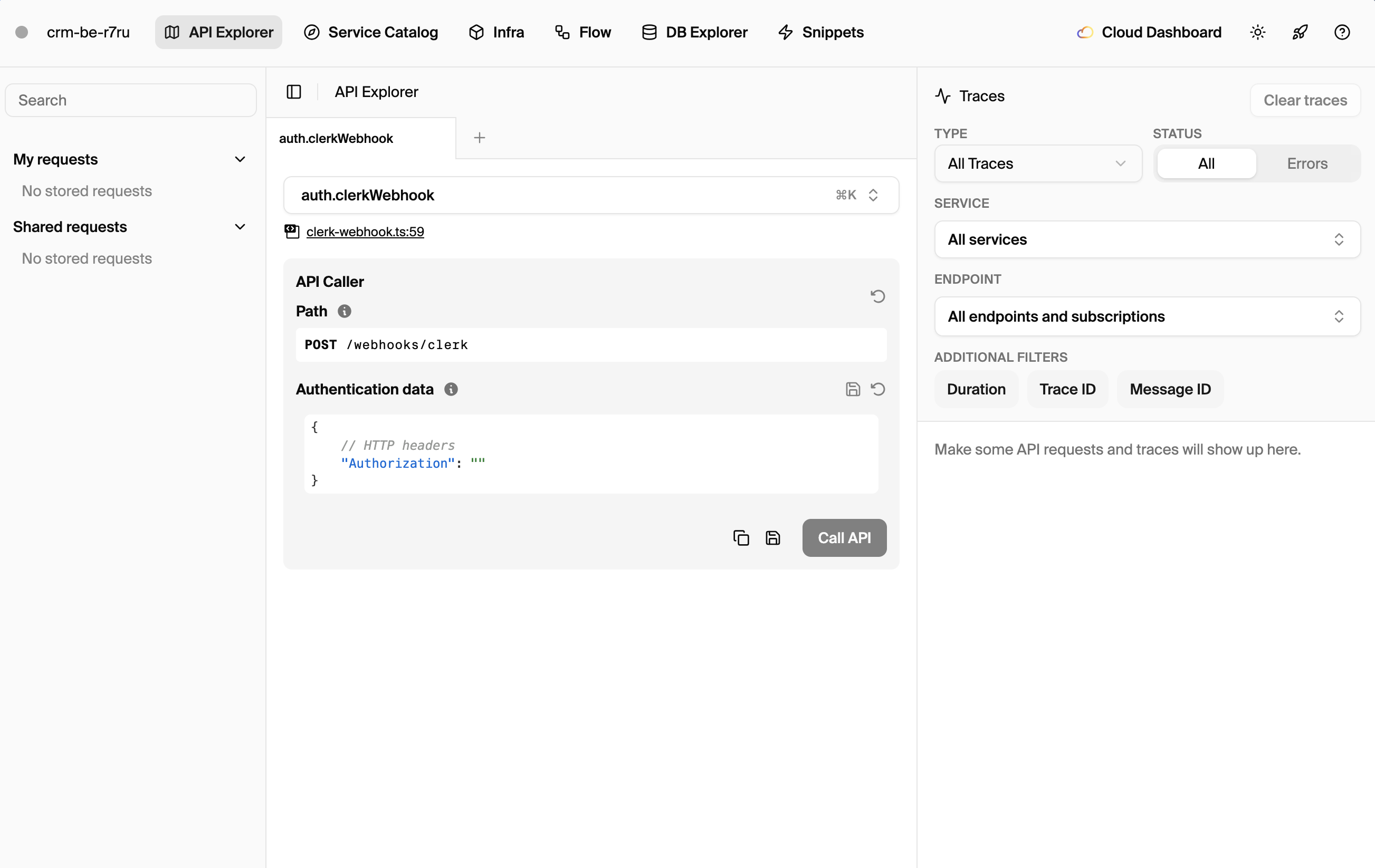
Start the development server. Encore compiles your TypeScript, starts any required infrastructure (like databases), and serves your API. You'll also get a local development dashboard for testing and debugging.
encore run
You now have a running API at http://localhost:4000 with a local development dashboard at http://localhost:9400.
Your First Endpoint
Open hello/hello.ts. You'll see a basic endpoint that demonstrates the core API pattern. Notice how the request and response types are defined as TypeScript interfaces, and the endpoint is created with the api() function.
import { api } from "encore.dev/api";

interface Response {
  message: string;
}

export const world = api(
  { expose: true, method: "GET", path: "/hello/:name" },
  async ({ name }: { name: string }): Promise<Response> => {
    return { message: `Hello, ${name}!` };
  }
);
This demonstrates the core pattern:
- Define request/response interfaces for type safety
- Create an endpoint with
api()that specifies HTTP method and path - TypeScript validates everything at compile time, catching errors before they reach production
Test it by making a request. The endpoint automatically parses the path parameter and returns JSON.
curl http://localhost:4000/hello/world
# {"message":"Hello, world!"}
Creating the Task Service
Now let's build something more substantial. We'll create a dedicated service for managing tasks. In Encore, a service is a directory with an encore.service.ts file that groups related endpoints together.
Create a new directory for the service. Each service can have its own database, endpoints, and business logic, making it easy to organize larger applications.
mkdir tasks
Create tasks/encore.service.ts. This file declares the service to Encore. The service name is used for logging, tracing, and in the service catalog.
import { Service } from "encore.dev/service";

export default new Service("tasks");
Now create tasks/tasks.ts with CRUD endpoints. We'll start with in-memory storage to keep things simple, then add a database in the next section.
import { api, APIError } from "encore.dev/api";

// Types
interface Task {
  id: string;
  title: string;
  description: string;
  completed: boolean;
  createdAt: Date;
}

interface CreateTaskRequest {
  title: string;
  description?: string;
}

interface UpdateTaskRequest {
  title?: string;
  description?: string;
  completed?: boolean;
}

interface ListTasksResponse {
  tasks: Task[];
}

// In-memory storage (we'll add a database next)
const tasks = new Map<string, Task>();

// Create a task
export const create = api(
  { expose: true, method: "POST", path: "/tasks" },
  async (req: CreateTaskRequest): Promise<Task> => {
    const id = crypto.randomUUID();
    const task: Task = {
      id,
      title: req.title,
      description: req.description ?? "",
      completed: false,
      createdAt: new Date(),
    };
    tasks.set(id, task);
    return task;
  }
);

// Get a task by ID
export const get = api(
  { expose: true, method: "GET", path: "/tasks/:id" },
  async ({ id }: { id: string }): Promise<Task> => {
    const task = tasks.get(id);
    if (!task) {
      throw APIError.notFound("task not found");
    }
    return task;
  }
);

// List all tasks
export const list = api(
  { expose: true, method: "GET", path: "/tasks" },
  async (): Promise<ListTasksResponse> => {
    return { tasks: Array.from(tasks.values()) };
  }
);

// Update a task
export const update = api(
  { expose: true, method: "PATCH", path: "/tasks/:id" },
  async ({ id, ...updates }: { id: string } & UpdateTaskRequest): Promise<Task> => {
    const task = tasks.get(id);
    if (!task) {
      throw APIError.notFound("task not found");
    }

    if (updates.title !== undefined) task.title = updates.title;
    if (updates.description !== undefined) task.description = updates.description;
    if (updates.completed !== undefined) task.completed = updates.completed;

    return task;
  }
);

// Delete a task
export const remove = api(
  { expose: true, method: "DELETE", path: "/tasks/:id" },
  async ({ id }: { id: string }): Promise<void> => {
    if (!tasks.delete(id)) {
      throw APIError.notFound("task not found");
    }
  }
);
Test the endpoints to make sure everything works. Each endpoint handles a different CRUD operation with proper error handling for missing resources.
# Create a task
curl -X POST http://localhost:4000/tasks \
  -H "Content-Type: application/json" \
  -d '{"title": "Learn TypeScript", "description": "Build a REST API"}'

# List tasks
curl http://localhost:4000/tasks

# Get a specific task (use the ID from create response)
curl http://localhost:4000/tasks/<task-id>

# Update a task
curl -X PATCH http://localhost:4000/tasks/<task-id> \
  -H "Content-Type: application/json" \
  -d '{"completed": true}'

# Delete a task
curl -X DELETE http://localhost:4000/tasks/<task-id>
Adding a Database
In-memory storage won't survive restarts, and you can't scale to multiple instances. Let's add PostgreSQL for persistent storage. Encore's SQLDatabase handles provisioning, connection pooling, and migrations automatically.
Create tasks/db.ts. This declares a database named "tasks" with migrations in the ./migrations folder. Encore provisions PostgreSQL locally when you run the app, and in your cloud account when you deploy.
import { SQLDatabase } from "encore.dev/storage/sqldb";

export const db = new SQLDatabase("tasks", {
  migrations: "./migrations",
});
Create the migrations folder and first migration. Migrations are SQL files that define your database schema. Encore runs them automatically in order, tracking which have been applied.
mkdir tasks/migrations
Create tasks/migrations/001_create_tasks.up.sql. The naming convention (number prefix, descriptive name, .up.sql suffix) tells Encore this is migration #1. Each migration should be idempotent and create the schema changes needed.
CREATE TABLE tasks (
  id UUID PRIMARY KEY DEFAULT gen_random_uuid(),
  title TEXT NOT NULL,
  description TEXT NOT NULL DEFAULT '',
  completed BOOLEAN NOT NULL DEFAULT false,
  created_at TIMESTAMP WITH TIME ZONE NOT NULL DEFAULT NOW()
);
Now update tasks/tasks.ts to use the database. The db.queryRow and db.query methods execute SQL with automatic parameter binding to prevent SQL injection. Tagged template literals make queries readable while keeping them safe.
import { api, APIError } from "encore.dev/api";
import { db } from "./db";

interface Task {
  id: string;
  title: string;
  description: string;
  completed: boolean;
  createdAt: Date;
}

interface CreateTaskRequest {
  title: string;
  description?: string;
}

interface UpdateTaskRequest {
  title?: string;
  description?: string;
  completed?: boolean;
}

interface ListTasksResponse {
  tasks: Task[];
}

export const create = api(
  { expose: true, method: "POST", path: "/tasks" },
  async (req: CreateTaskRequest): Promise<Task> => {
    const row = await db.queryRow<Task>`
      INSERT INTO tasks (title, description)
      VALUES (${req.title}, ${req.description ?? ""})
      RETURNING id, title, description, completed, created_at as "createdAt"
    `;
    return row!;
  }
);

export const get = api(
  { expose: true, method: "GET", path: "/tasks/:id" },
  async ({ id }: { id: string }): Promise<Task> => {
    const row = await db.queryRow<Task>`
      SELECT id, title, description, completed, created_at as "createdAt"
      FROM tasks WHERE id = ${id}
    `;
    if (!row) {
      throw APIError.notFound("task not found");
    }
    return row;
  }
);

export const list = api(
  { expose: true, method: "GET", path: "/tasks" },
  async (): Promise<ListTasksResponse> => {
    const rows = db.query<Task>`
      SELECT id, title, description, completed, created_at as "createdAt"
      FROM tasks ORDER BY created_at DESC
    `;
    const tasks: Task[] = [];
    for await (const row of rows) {
      tasks.push(row);
    }
    return { tasks };
  }
);

export const update = api(
  { expose: true, method: "PATCH", path: "/tasks/:id" },
  async ({ id, ...updates }: { id: string } & UpdateTaskRequest): Promise<Task> => {
    // Build dynamic update query
    const setClauses: string[] = [];
    const values: any[] = [];

    if (updates.title !== undefined) {
      setClauses.push(`title = $${values.length + 1}`);
      values.push(updates.title);
    }
    if (updates.description !== undefined) {
      setClauses.push(`description = $${values.length + 1}`);
      values.push(updates.description);
    }
    if (updates.completed !== undefined) {
      setClauses.push(`completed = $${values.length + 1}`);
      values.push(updates.completed);
    }

    if (setClauses.length === 0) {
      return get({ id });
    }

    const row = await db.queryRow<Task>`
      UPDATE tasks
      SET ${setClauses.join(", ")}
      WHERE id = ${id}
      RETURNING id, title, description, completed, created_at as "createdAt"
    `;

    if (!row) {
      throw APIError.notFound("task not found");
    }
    return row;
  }
);

export const remove = api(
  { expose: true, method: "DELETE", path: "/tasks/:id" },
  async ({ id }: { id: string }): Promise<void> => {
    const result = await db.exec`DELETE FROM tasks WHERE id = ${id}`;
    if (result.rowsAffected === 0) {
      throw APIError.notFound("task not found");
    }
  }
);
Restart the development server. Encore automatically provisions a local PostgreSQL database, runs your migrations, and connects your application. You can verify the database is working by creating tasks and checking they persist across restarts.
Error Handling
Encore provides built-in error types that map to HTTP status codes. Using these ensures consistent error responses and proper status codes across your API.
import { APIError, ErrCode } from "encore.dev/api";

// 404 Not Found
throw APIError.notFound("task not found");

// 400 Bad Request
throw APIError.invalidArgument("title cannot be empty");

// 401 Unauthorized
throw APIError.unauthenticated("invalid token");

// 403 Forbidden
throw APIError.permissionDenied("not allowed");

// 500 Internal Server Error
throw new APIError(ErrCode.Internal, "something went wrong");
For input validation, add checks at the start of your handlers. This catches bad data early and returns helpful error messages to clients.
export const create = api(
  { expose: true, method: "POST", path: "/tasks" },
  async (req: CreateTaskRequest): Promise<Task> => {
    if (!req.title || req.title.trim().length === 0) {
      throw APIError.invalidArgument("title is required");
    }
    if (req.title.length > 200) {
      throw APIError.invalidArgument("title must be 200 characters or less");
    }
    // ... rest of handler
  }
);
Adding Authentication
For protected endpoints, Encore provides an auth handler pattern. The auth handler runs before any endpoint marked with auth: true, validating credentials and extracting user information.
Create auth/encore.service.ts:
import { Service } from "encore.dev/service";

export default new Service("auth");
Create auth/auth.ts. The auth handler receives request headers and returns user data that's available to all authenticated endpoints. If authentication fails, throw an APIError.unauthenticated() error.
import { authHandler, Header } from "encore.dev/auth";
import { APIError } from "encore.dev/api";

interface AuthParams {
  authorization: Header<"Authorization">;
}

interface AuthData {
  userId: string;
}

export const auth = authHandler<AuthParams, AuthData>(
  async (params) => {
    const token = params.authorization?.replace("Bearer ", "");

    if (!token) {
      throw APIError.unauthenticated("missing authorization header");
    }

    // In production, verify the token (JWT, session, etc.)
    // For this example, we'll use a simple check
    if (token === "valid-token") {
      return { userId: "user-123" };
    }

    throw APIError.unauthenticated("invalid token");
  }
);
Now protect endpoints by adding auth: true. Any request without valid credentials will be rejected before reaching your handler.
export const create = api(
  { expose: true, auth: true, method: "POST", path: "/tasks" },
  async (req: CreateTaskRequest): Promise<Task> => {
    // Handler code
  }
);
Access the authenticated user with getAuthData(). This returns the data your auth handler provided, letting you personalize responses or enforce ownership.
import { getAuthData } from "~encore/auth";

export const create = api(
  { expose: true, auth: true, method: "POST", path: "/tasks" },
  async (req: CreateTaskRequest): Promise<Task> => {
    const auth = getAuthData();
    console.log(`User ${auth.userId} is creating a task`);
    // ...
  }
);
For a complete authentication implementation with JWT tokens, sessions, or API keys, see How to Add Authentication to a TypeScript API.
Testing Your API
Create tasks/tasks.test.ts. Encore lets you call your API handlers directly in tests, without HTTP overhead. Tests run against real infrastructure (databases, etc.) so you're testing actual behavior.
import { describe, expect, test } from "vitest";
import { create, get, list, update, remove } from "./tasks";

describe("tasks", () => {
  test("create and get task", async () => {
    const task = await create({ title: "Test task" });

    expect(task.title).toBe("Test task");
    expect(task.completed).toBe(false);

    const fetched = await get({ id: task.id });
    expect(fetched.id).toBe(task.id);
  });

  test("update task", async () => {
    const task = await create({ title: "Update me" });

    const updated = await update({
      id: task.id,
      completed: true
    });

    expect(updated.completed).toBe(true);
  });

  test("delete task", async () => {
    const task = await create({ title: "Delete me" });

    await remove({ id: task.id });

    await expect(get({ id: task.id })).rejects.toThrow("task not found");
  });
});
Run tests with the Encore CLI. It spins up test databases and runs your test suite with full infrastructure support.
encore test
Observability
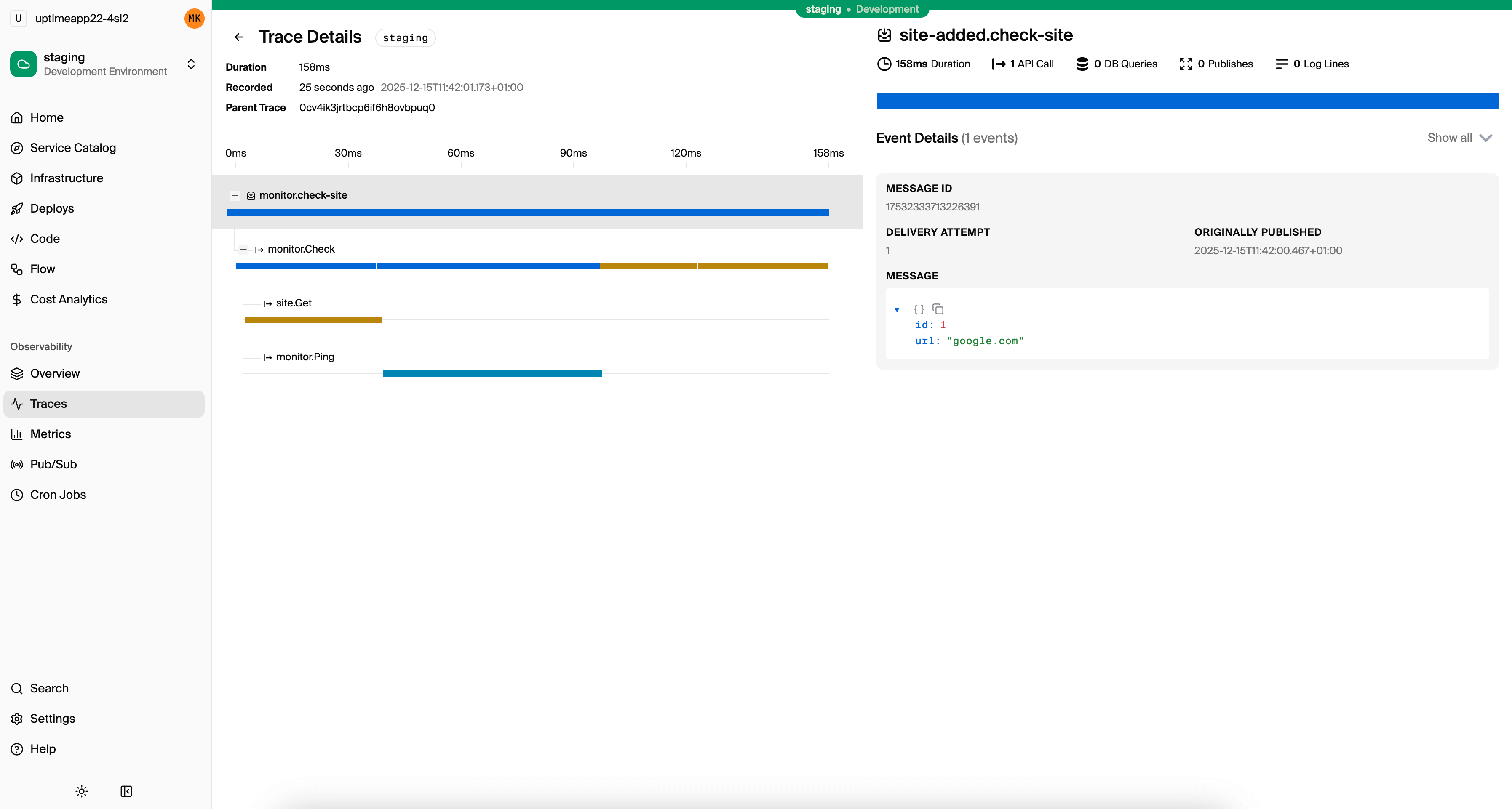
Every request is automatically traced. Open the local dashboard at localhost:9400 to see distributed traces showing exactly what happened during each request, including database queries and their execution times.
Deploying to Production
With Encore, deployment is a git push. Connect your app to the Encore platform, then push to deploy. Encore handles the entire deployment pipeline automatically.
git add -A
git commit -m "Task API"
git push encore
Encore automatically:
- Builds optimized Docker images
- Provisions PostgreSQL on your cloud (AWS RDS or GCP Cloud SQL)
- Sets up networking and security
- Deploys with zero downtime
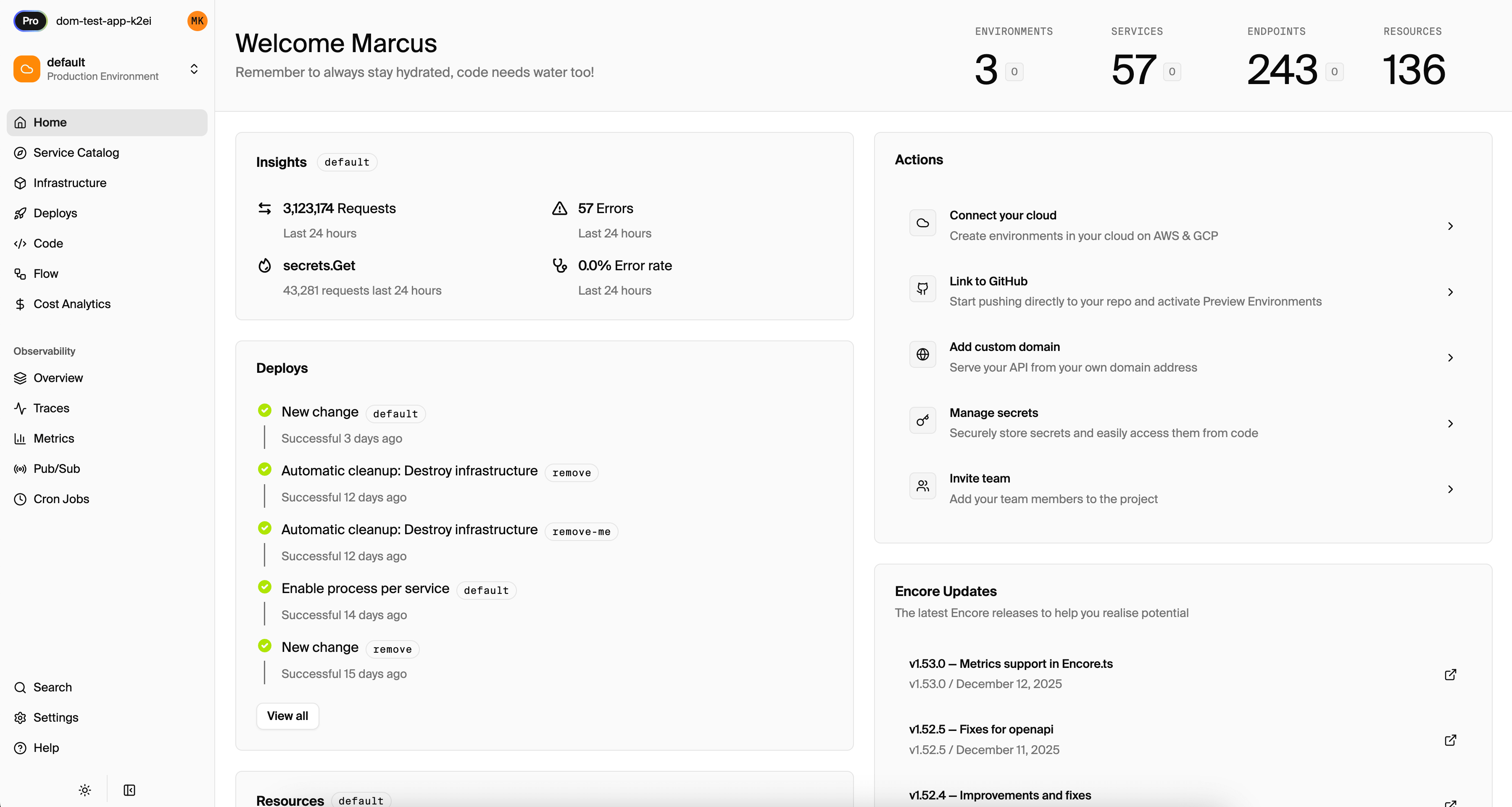
Check deployment status in the Encore platform dashboard. You'll see your architecture diagram, service catalog, and deployment history.
What You've Built
You now have a production-ready REST API with:
- Type-safe endpoints with compile-time validation
- PostgreSQL database with migrations
- Error handling that maps to proper HTTP codes
- Authentication support
- Tests that call your handlers directly
- Local development with automatic infrastructure
- Distributed tracing for debugging
Next Steps
- Add Pub/Sub for background processing
- Set up Cron jobs for scheduled tasks
- Add metrics and monitoring
- Explore the service catalog for API documentation
The patterns in this guide scale from side projects to production systems. Start simple, add complexity as needed.
Deploy a working example and experiment with it live:
Windows: iwr https://encore.dev/install.ps1 | iex
Linux: curl -L https://encore.dev/install.sh | bash
Related Reading
- Express.js vs Encore.ts - How Encore compares to Express
- Best TypeScript Backend Frameworks - Framework comparison
- How to Add Authentication - Deep dive on auth patterns
- How to Build Microservices - Scaling to multiple services
- How to Build a REST API with Go - Go version of this tutorial
Deploy to your cloud on AWS and Google Cloud
without managing infrastructure
Encore lets developers and agents define application infrastructure directly in code, then automatically provisions it from local development to production in your AWS or GCP account.
