How to Build Microservices with TypeScript
A practical guide to building distributed systems that don't fall apart

Microservices promise independent deployment, team autonomy, and better scalability. They also introduce network calls, distributed transactions, and operational complexity. This guide shows you how to build microservices in TypeScript while avoiding common pitfalls.
When to Use Microservices
Before diving in, be honest about whether you need microservices:
Start with a monolith if:
- You're a small team (< 5 developers)
- You're still figuring out domain boundaries
- You want to ship quickly without infrastructure overhead
Consider microservices if:
- Different parts of your system have different scaling needs
- Teams need to deploy independently
- You want fault isolation between components
- Your domain has clear bounded contexts
The good news: with the right framework, you can start simple and split services later without rewriting everything.
Project Setup
We'll use Encore because it handles the infrastructure complexity of microservices automatically. Service discovery, networking, databases per service, and distributed tracing all work out of the box. The patterns apply to other approaches, but you'd need to configure these yourself.
Windows: iwr https://encore.dev/install.ps1 | iex
Linux: curl -L https://encore.dev/install.sh | bash
Then cd into the app and start it with encore run.
Your local development dashboard at localhost:9400 shows all services, their APIs, and how they connect. This becomes invaluable as your system grows.
Defining Services
In Encore, a service is a directory with an encore.service.ts file. Each service can have its own endpoints, database, and business logic. Let's build an e-commerce backend with three services:
/shop-app
├── encore.app
├── users/
│   ├── encore.service.ts
│   ├── users.ts
│   └── db.ts
├── products/
│   ├── encore.service.ts
│   ├── products.ts
│   └── db.ts
└── orders/
    ├── encore.service.ts
    ├── orders.ts
    └── db.ts
Each service owns its domain and database. This isolation means teams can work independently, and a bug in one service can't corrupt another's data.
Users Service
Create the service directory and declaration file. The service name appears in logs, traces, and the service catalog.
mkdir users
Create users/encore.service.ts:
import { Service } from "encore.dev/service";

export default new Service("users");
Create users/db.ts. Each service gets its own database, provisioned automatically. This is the "database per service" pattern that gives you isolation and independent scaling.
import { SQLDatabase } from "encore.dev/storage/sqldb";

export const db = new SQLDatabase("users", {
  migrations: "./migrations",
});
Create users/migrations/001_create_users.up.sql. Migrations run automatically when you start the app or deploy. Encore tracks which migrations have been applied.
CREATE TABLE users (
  id UUID PRIMARY KEY DEFAULT gen_random_uuid(),
  email TEXT UNIQUE NOT NULL,
  name TEXT NOT NULL,
  created_at TIMESTAMP WITH TIME ZONE DEFAULT NOW()
);
Create users/users.ts with the service's API endpoints:
import { api, APIError } from "encore.dev/api";
import { db } from "./db";

export interface User {
  id: string;
  email: string;
  name: string;
}

interface CreateUserRequest {
  email: string;
  name: string;
}

export const create = api(
  { expose: true, method: "POST", path: "/users" },
  async (req: CreateUserRequest): Promise<User> => {
    const row = await db.queryRow<User>`
      INSERT INTO users (email, name)
      VALUES (${req.email}, ${req.name})
      RETURNING id, email, name
    `;
    return row!;
  }
);

export const get = api(
  { expose: true, method: "GET", path: "/users/:id" },
  async ({ id }: { id: string }): Promise<User> => {
    const row = await db.queryRow<User>`
      SELECT id, email, name FROM users WHERE id = ${id}
    `;
    if (!row) {
      throw APIError.notFound("user not found");
    }
    return row;
  }
);
Products Service
Follow the same pattern for products. Each service is self-contained with its own database and endpoints.
Create products/encore.service.ts:
import { Service } from "encore.dev/service";

export default new Service("products");
Create products/db.ts:
import { SQLDatabase } from "encore.dev/storage/sqldb";

export const db = new SQLDatabase("products", {
  migrations: "./migrations",
});
Create products/migrations/001_create_products.up.sql:
CREATE TABLE products (
  id UUID PRIMARY KEY DEFAULT gen_random_uuid(),
  name TEXT NOT NULL,
  price_cents INTEGER NOT NULL,
  inventory INTEGER NOT NULL DEFAULT 0
);
Create products/products.ts. Notice the reserveInventory endpoint doesn't have expose: true, making it an internal API only callable by other services, not external clients.
import { api, APIError } from "encore.dev/api";
import { db } from "./db";

export interface Product {
  id: string;
  name: string;
  priceCents: number;
  inventory: number;
}

interface CreateProductRequest {
  name: string;
  priceCents: number;
  inventory: number;
}

export const create = api(
  { expose: true, method: "POST", path: "/products" },
  async (req: CreateProductRequest): Promise<Product> => {
    const row = await db.queryRow<Product>`
      INSERT INTO products (name, price_cents, inventory)
      VALUES (${req.name}, ${req.priceCents}, ${req.inventory})
      RETURNING id, name, price_cents as "priceCents", inventory
    `;
    return row!;
  }
);

export const get = api(
  { expose: true, method: "GET", path: "/products/:id" },
  async ({ id }: { id: string }): Promise<Product> => {
    const row = await db.queryRow<Product>`
      SELECT id, name, price_cents as "priceCents", inventory
      FROM products WHERE id = ${id}
    `;
    if (!row) {
      throw APIError.notFound("product not found");
    }
    return row;
  }
);

// Internal API for order service to reserve inventory
export const reserveInventory = api(
  { method: "POST", path: "/products/:id/reserve" },
  async ({ id, quantity }: { id: string; quantity: number }): Promise<void> => {
    const result = await db.exec`
      UPDATE products
      SET inventory = inventory - ${quantity}
      WHERE id = ${id} AND inventory >= ${quantity}
    `;
    if (result.rowsAffected === 0) {
      throw APIError.failedPrecondition("insufficient inventory");
    }
  }
);
Orders Service
This is where services start talking to each other. The orders service needs to verify users exist and reserve product inventory before creating an order.
Create orders/encore.service.ts:
import { Service } from "encore.dev/service";

export default new Service("orders");
Create orders/db.ts:
import { SQLDatabase } from "encore.dev/storage/sqldb";

export const db = new SQLDatabase("orders", {
  migrations: "./migrations",
});
Create orders/migrations/001_create_orders.up.sql:
CREATE TABLE orders (
  id UUID PRIMARY KEY DEFAULT gen_random_uuid(),
  user_id UUID NOT NULL,
  product_id UUID NOT NULL,
  quantity INTEGER NOT NULL,
  total_cents INTEGER NOT NULL,
  status TEXT NOT NULL DEFAULT 'pending',
  created_at TIMESTAMP WITH TIME ZONE DEFAULT NOW()
);
Create orders/orders.ts. The magic happens in the imports: ~encore/clients gives you type-safe clients for calling other services. No HTTP boilerplate, no manual serialization, full IDE support.
import { api, APIError } from "encore.dev/api";
import { db } from "./db";
import { users } from "~encore/clients";
import { products } from "~encore/clients";

interface Order {
  id: string;
  userId: string;
  productId: string;
  quantity: number;
  totalCents: number;
  status: string;
}

interface CreateOrderRequest {
  userId: string;
  productId: string;
  quantity: number;
}

export const create = api(
  { expose: true, method: "POST", path: "/orders" },
  async (req: CreateOrderRequest): Promise<Order> => {
    // Verify user exists (throws if not found)
    await users.get({ id: req.userId });

    // Get product and verify it exists
    const product = await products.get({ id: req.productId });

    // Reserve inventory (throws if insufficient)
    await products.reserveInventory({
      id: req.productId,
      quantity: req.quantity,
    });

    // Calculate total
    const totalCents = product.priceCents * req.quantity;

    // Create order
    const row = await db.queryRow<Order>`
      INSERT INTO orders (user_id, product_id, quantity, total_cents, status)
      VALUES (${req.userId}, ${req.productId}, ${req.quantity}, ${totalCents}, 'confirmed')
      RETURNING id, user_id as "userId", product_id as "productId",
                quantity, total_cents as "totalCents", status
    `;

    return row!;
  }
);

export const get = api(
  { expose: true, method: "GET", path: "/orders/:id" },
  async ({ id }: { id: string }): Promise<Order> => {
    const row = await db.queryRow<Order>`
      SELECT id, user_id as "userId", product_id as "productId",
             quantity, total_cents as "totalCents", status
      FROM orders WHERE id = ${id}
    `;
    if (!row) {
      throw APIError.notFound("order not found");
    }
    return row;
  }
);
Notice how clean service-to-service calls are:
import { users } from "~encore/clients";
import { products } from "~encore/clients";

// Call another service like a function
const user = await users.get({ id: req.userId });
const product = await products.get({ id: req.productId });
Encore generates type-safe clients automatically from your service definitions. You get compile-time checking that you're calling APIs correctly.
Adding Pub/Sub for Async Communication
Synchronous calls work for simple cases, but some operations should be async. You don't want order creation to block while sending a confirmation email. Let's add Pub/Sub for event-driven communication.
Create orders/events.ts. Topics are declared at the module level and can be published to from any service. The type parameter ensures all publishers send correctly shaped events.
import { Topic } from "encore.dev/pubsub";

export interface OrderCreatedEvent {
  orderId: string;
  userId: string;
  totalCents: number;
}

export const orderCreated = new Topic<OrderCreatedEvent>("order-created", {
  deliveryGuarantee: "at-least-once",
});
Update orders/orders.ts to publish the event after creating an order. Publishing is async and doesn't block the response to the client.
import { orderCreated } from "./events";

export const create = api(
  { expose: true, method: "POST", path: "/orders" },
  async (req: CreateOrderRequest): Promise<Order> => {
    // ... existing order creation logic ...

    // Publish event for async processing
    await orderCreated.publish({
      orderId: row!.id,
      userId: req.userId,
      totalCents,
    });

    return row!;
  }
);
Create a notifications service to handle emails. Subscriptions process events asynchronously, with automatic retries on failure.
Create notifications/encore.service.ts:
import { Service } from "encore.dev/service";

export default new Service("notifications");
Create notifications/notifications.ts. The subscription handler receives events and processes them independently of the original request.
import { Subscription } from "encore.dev/pubsub";
import { orderCreated } from "../orders/events";
import { users } from "~encore/clients";

// Subscribe to order events
const _ = new Subscription(orderCreated, "send-order-confirmation", {
  handler: async (event) => {
    // Get user details for the email
    const user = await users.get({ id: event.userId });

    // Send confirmation email
    await sendEmail({
      to: user.email,
      subject: "Order Confirmed",
      body: `Your order #${event.orderId} for $${(event.totalCents / 100).toFixed(2)} has been confirmed.`,
    });

    console.log(`Sent confirmation email to ${user.email}`);
  },
});

async function sendEmail(params: { to: string; subject: string; body: string }) {
  // Integrate with SendGrid, Resend, etc.
  console.log(`Email to ${params.to}: ${params.subject}`);
}
Now order creation is fast (synchronous database calls), and email sending happens in the background. If email sending fails, Pub/Sub retries automatically.
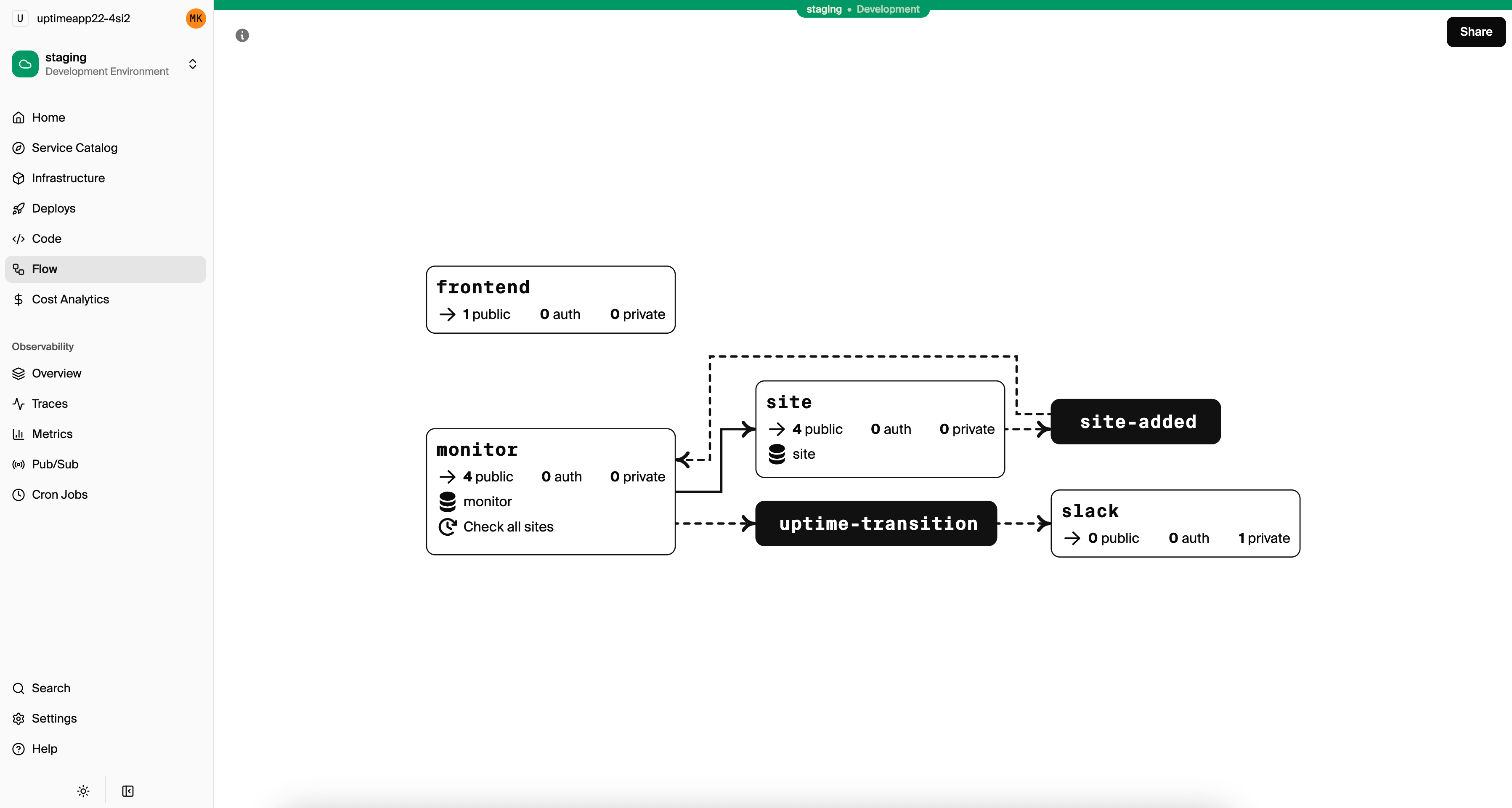
Service Architecture Visualization
After building these services, your architecture looks like this:
┌─────────┐     ┌──────────┐     ┌─────────────────┐
│  Users  │◄────│  Orders  │────►│    Products     │
│ Service │     │ Service  │     │    Service      │
└────┬────┘     └────┬─────┘     └────────┬────────┘
     │               │                    │
     ▼               ▼                    ▼
┌─────────┐     ┌──────────┐     ┌─────────────────┐
│ Users   │     │  Orders  │     │    Products     │
│   DB    │     │    DB    │     │       DB        │
└─────────┘     └──────────┘     └─────────────────┘
                     │
                     ▼ (Pub/Sub)
              ┌──────────────┐
              │ Notifications│
              │   Service    │
              └──────────────┘
Encore generates this diagram automatically from your code. Check the local dashboard at localhost:9400 to see it, or view architecture diagrams in Encore after deploying.
Distributed Tracing
With multiple services, debugging requires tracing requests across service boundaries. Encore handles this automatically with zero configuration.
Every request gets a trace ID that follows it through all service calls. In the dashboard, click any request to see:
- Which services were called
- How long each call took
- Database queries in each service
- Pub/Sub message publishing
- Any errors that occurred
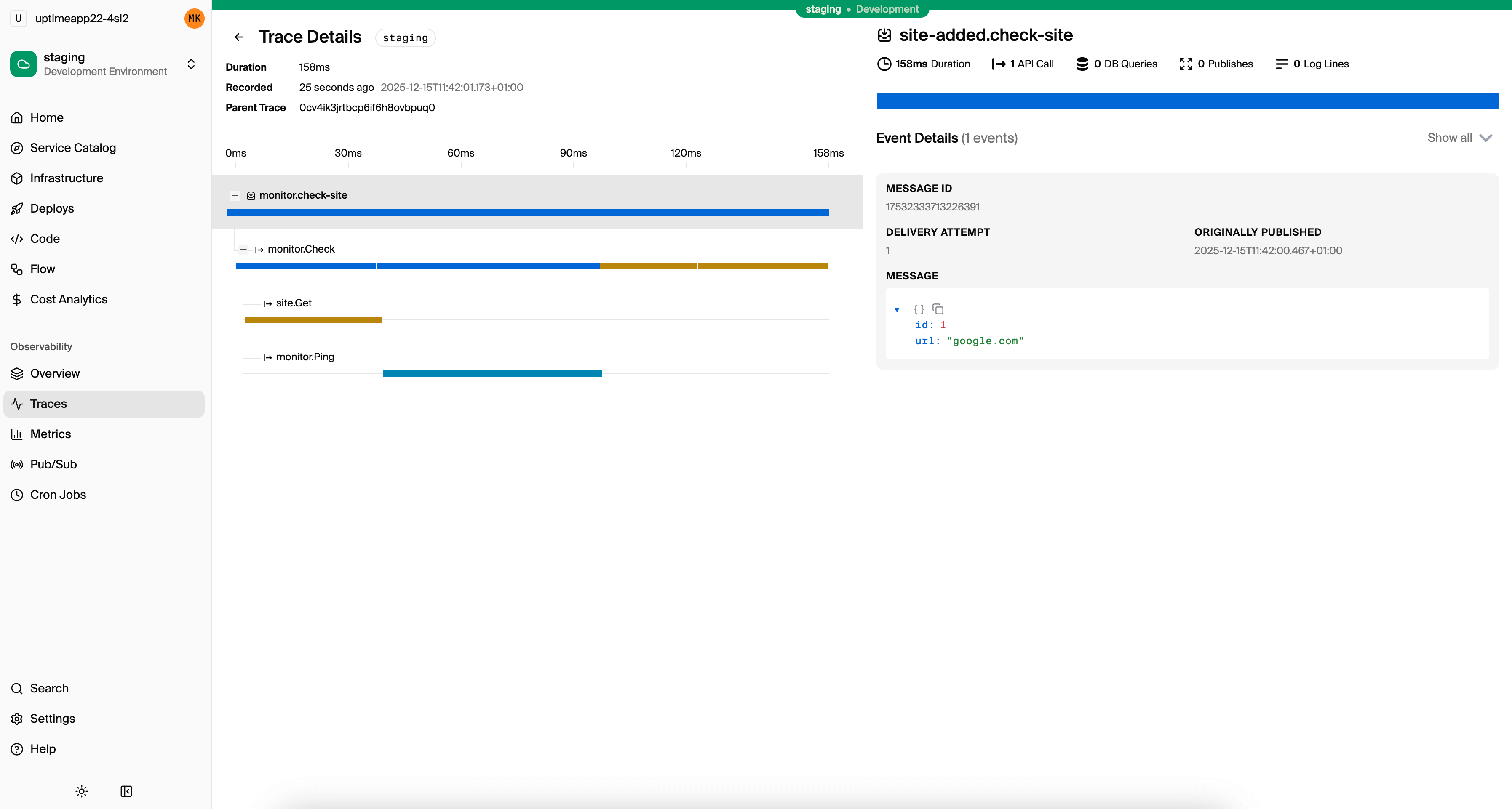
No manual instrumentation needed. Learn more about distributed tracing.
Error Handling Across Services
When service B calls service A and A fails, B gets an error. Handle it appropriately by catching specific error types and returning meaningful errors to your callers.
import { APIError } from "encore.dev/api";
import { users } from "~encore/clients";

export const create = api(
  { expose: true, method: "POST", path: "/orders" },
  async (req: CreateOrderRequest): Promise<Order> => {
    try {
      await users.get({ id: req.userId });
    } catch (error) {
      if (error instanceof APIError && error.code === "not_found") {
        // Convert to a more meaningful error for our callers
        throw APIError.invalidArgument("user does not exist");
      }
      throw error; // Re-throw unexpected errors
    }

    // ... rest of handler
  }
);
Testing Microservices
Test services in isolation by calling their endpoints directly. Encore runs the full infrastructure during tests, so database operations work just like production.
import { describe, expect, test } from "vitest";
import { create, get } from "./users";

describe("users service", () => {
  test("create and get user", async () => {
    const user = await create({
      email: "test@example.com",
      name: "Test User",
    });

    expect(user.email).toBe("test@example.com");

    const fetched = await get({ id: user.id });
    expect(fetched.id).toBe(user.id);
  });
});
For integration tests that span services, Encore runs all services together. You can test the full order flow including service-to-service calls.
import { describe, expect, test } from "vitest";
import { create as createUser } from "../users/users";
import { create as createProduct } from "../products/products";
import { create as createOrder } from "./orders";

describe("order flow", () => {
  test("create order with valid user and product", async () => {
    // Set up test data across services
    const user = await createUser({
      email: "buyer@example.com",
      name: "Buyer",
    });

    const product = await createProduct({
      name: "Widget",
      priceCents: 1000,
      inventory: 10,
    });

    // Test the cross-service order creation
    const order = await createOrder({
      userId: user.id,
      productId: product.id,
      quantity: 2,
    });

    expect(order.totalCents).toBe(2000);
    expect(order.status).toBe("confirmed");
  });
});
Run tests with the Encore CLI:
encore test
Deployment
Deploy all services together with a single command. Encore provisions separate databases for each service, sets up networking, and configures Pub/Sub infrastructure.
git add -A
git commit -m "E-commerce microservices"
git push encore
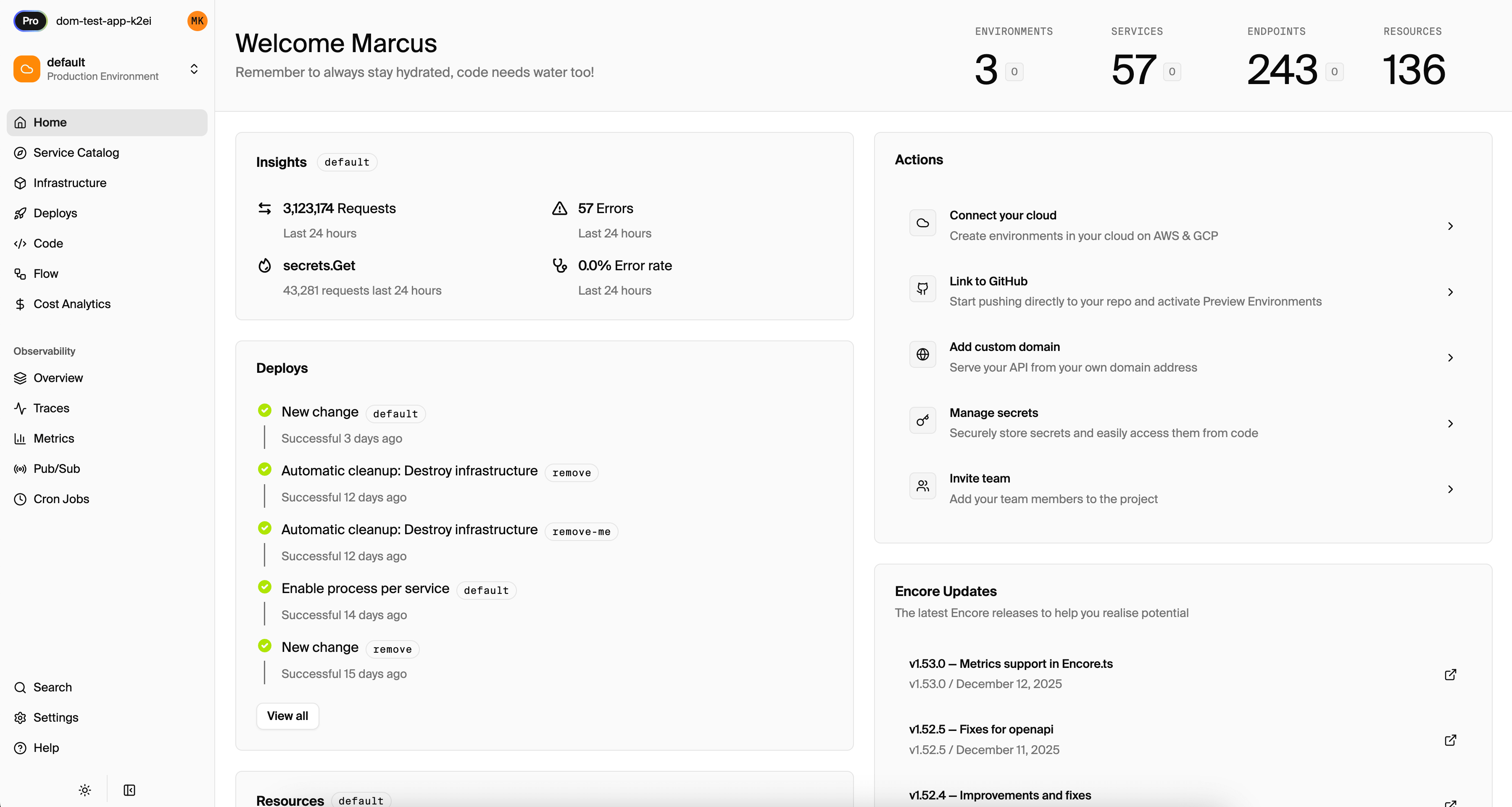
From the Encore dashboard you can connect your AWS or Google Cloud account to deploy there. You can decide if you want to deploy all services together, or a separate independently scalable processes.
Common Patterns
API Gateway
Expose a unified API while keeping services internal. This pattern is useful when you want to aggregate data from multiple services or simplify the external API.
// gateway/gateway.ts
import { api } from "encore.dev/api";
import { users, products, orders } from "~encore/clients";

// Public endpoint that orchestrates internal services
export const checkout = api(
  { expose: true, method: "POST", path: "/checkout" },
  async (req: CheckoutRequest) => {
    const user = await users.get({ id: req.userId });
    const product = await products.get({ id: req.productId });
    const order = await orders.create({
      userId: req.userId,
      productId: req.productId,
      quantity: req.quantity,
    });

    return {
      orderId: order.id,
      userName: user.name,
      productName: product.name,
      total: order.totalCents,
    };
  }
);
Saga Pattern
For operations that span multiple services and need rollback on failure. This ensures consistency even when individual steps can fail.
export const checkout = api(
  { expose: true, method: "POST", path: "/checkout" },
  async (req: CheckoutRequest) => {
    // Step 1: Reserve inventory
    await products.reserveInventory({
      id: req.productId,
      quantity: req.quantity,
    });

    try {
      // Step 2: Charge payment
      await payments.charge({
        userId: req.userId,
        amountCents: totalCents,
      });
    } catch (error) {
      // Rollback step 1 if payment fails
      await products.releaseInventory({
        id: req.productId,
        quantity: req.quantity,
      });
      throw error;
    }

    // Step 3: Create order (only if payment succeeded)
    return orders.create(req);
  }
);
When to Split Services
Start with fewer, larger services. Split when you have a clear reason:
- Team boundaries: Different teams own different services
- Deployment independence: One part changes frequently, another is stable
- Scaling needs: One service needs 10x the resources
- Fault isolation: A failure in one area shouldn't affect others
Don't split just because "microservices are better." Every service boundary adds operational complexity. Start simple, split when the pain of not splitting outweighs the cost.
Try building microservices with a working example:
Windows: iwr https://encore.dev/install.ps1 | iex
Linux: curl -L https://encore.dev/install.sh | bash
Related Reading
Frequently asked questions
How do you build microservices in TypeScript?
You give each service one responsibility and its own database, and have services communicate over the network through APIs or asynchronous events. In practice you either assemble the pieces yourself, routing, validation, service-to-service calls, and infrastructure like databases and queues, or use a framework. Frameworks such as Encore let you declare services and their infrastructure in TypeScript and make the calls between them type-checked.
Do you need a framework to build microservices in TypeScript?
No, but one saves a lot of setup. Without a framework you wire up HTTP servers, a validation layer, service discovery, and your own infrastructure provisioning. A framework like Encore or NestJS gives you structure and handles much of that, so your time goes into the services rather than the plumbing. For a small system, plain Express with your own conventions can be enough.
How do microservices communicate in TypeScript?
Through synchronous calls, usually HTTP or gRPC, when the caller needs an immediate answer, and asynchronous events through a message queue or Pub/Sub topic when it does not. Synchronous calls are simpler to follow but tie services to each other's availability. Asynchronous events keep services independent at the cost of eventual consistency, and most systems use both depending on the interaction.
Should each microservice have its own database?
Yes. Each service owning its database is what keeps services independent, since a shared database recreates the coupling microservices are meant to remove. When one service needs another's data, it calls that service's API or subscribes to its events rather than reading its tables. This is more work up front but avoids schema changes that break several services at once.
How do you test microservices?
Test each service in isolation with unit and integration tests against its own database, then add a smaller set of end-to-end tests for flows that cross services. Contract tests check that a service still matches the shape its callers expect, catching breaking changes without running the whole system. Keeping most tests at the service level keeps the suite fast.
When should you use microservices instead of a monolith?
Use microservices when parts of the system need to scale or deploy independently, or when separate teams keep blocking each other in one codebase. For most new projects a monolith or modular monolith is simpler and ships faster, and you split out a service once you can name a concrete reason, like an uneven scaling need or deploy contention between teams.
Deploy to your cloud on AWS and Google Cloud
without managing infrastructure
Encore lets developers and agents define application infrastructure directly in code, then automatically provisions it from local development to production in your AWS or GCP account.
