Test Coverage
Which lines your tests run, and where new code goes untested
When Encore Cloud runs your tests, it can also record which lines of your code they run. The Coverage page in the Cloud Dashboard shows how much of your application your tests run, which files and services have the least coverage, how coverage changes over time, and whether the lines each commit changes are tested.
Encore.ts applications publish coverage by writing an lcov report, which takes a few lines of test runner configuration. See Measuring coverage.
Coverage builds on Test Statistics: it is recorded for the same test runs, and it's on the same Tests pages.
Measuring coverage
Coverage is measured per line. A line counts when it contains code that can run, and it is covered when at least one test ran it during the run. Blank lines and comments don't count. Encore Cloud also records how many times each line ran.
Your test runner measures coverage. When the tests run in Encore Cloud, the ENCORE_TEST_REPORT_DIR environment variable is set to a directory, the same one you write JUnit reports to. Configure your test runner to write an lcov report into it. Encore Cloud reads every lcov.info and .lcov file in that directory and in its immediate subdirectories.
With Vitest, install the V8 coverage provider, using the same version as Vitest:
Then turn on coverage in your vite.config.ts when ENCORE_TEST_REPORT_DIR is set, next to the JUnit reporter:
vite.config.ts/// <reference types="vitest" />
import { defineConfig } from "vite";
import path from "path";
// Set by Encore Cloud when it runs your tests; unset locally.
const reportDir = process.env.ENCORE_TEST_REPORT_DIR;
export default defineConfig({
resolve: {
alias: {
"~encore": path.resolve(__dirname, "./encore.gen"),
},
},
test: reportDir
? {
reporters: ["default", "junit"],
outputFile: { junit: path.join(reportDir, "junit.xml") },
coverage: {
enabled: true,
provider: "v8",
reporter: ["lcovonly"],
reportsDirectory: path.join(reportDir, "coverage"),
// Publish coverage for runs with failing tests too.
reportOnFailure: true,
// Your services' directories, so files no test imports count as untested.
include: ["monitor/**", "site/**"],
},
}
: {},
});
Some things to know:
reportOnFailure: by default, Vitest writes no coverage when a test fails. Encore Cloud records coverage for failed runs too, so turn it on.include: without it, Vitest only reports the files your tests import. List your services' directories so that files no test touches show up as untested, and leave out code that isn't tested here, such as a frontend.lcovonlywrites just the lcov file. Thelcovreporter also writes an HTML report, which Encore Cloud doesn't use.
Running encore test locally is unaffected: the variable is not set there, so Vitest doesn't measure coverage.
Any test runner that writes lcov works the same way: point its output at ENCORE_TEST_REPORT_DIR. For example, with Jest, set collectCoverage to true, coverageReporters to ["lcovonly"] and coverageDirectory to the value of ENCORE_TEST_REPORT_DIR.
File paths in the report can be absolute or relative to your app's root directory. Files outside your repository, under node_modules, or no longer in the repository are left out.
Limits
A run's coverage is left out if it is larger than 8 MiB compressed, or if it would make the run's test reports larger than 32 MiB. The test results are still recorded. The build log says when coverage was left out.
The Coverage page
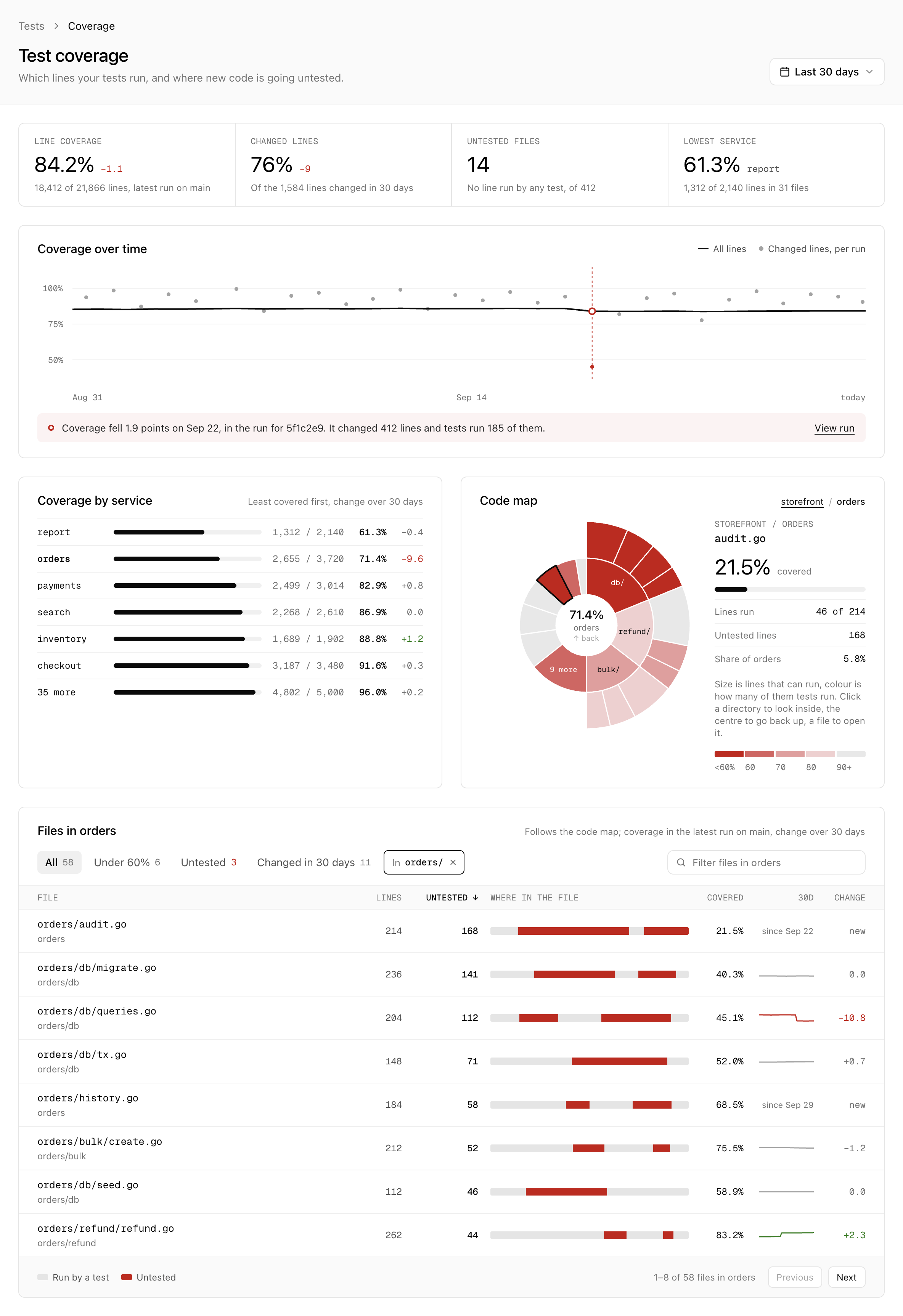
Open Tests in the Cloud Dashboard and select Coverage. The page covers the last 7, 30 or 90 days.
The coverage of your app is the coverage of the latest run on the main line: the runs of builds that were deployed to a production or other persistent environment. If your app has no such environment, every run counts. Only runs where the tests passed count, because a test that fails part-way through, or a package that doesn't build, leaves code looking untested when it isn't.
- Line coverage is the share of your app's lines that tests run, and how it changed over the period.
- Changed lines is the share of the lines changed during the period that tests run. See Changed lines.
- Untested files counts the files where no test runs a single line.
- Lowest service is the service with the least coverage.
Coverage over time charts the coverage of every run on the main line. The dots show the coverage of the lines each run's commit changed. The run after which coverage fell the most is pointed out, when it fell by at least half a point.
Coverage by service lists your services with the least covered first, and how each one's coverage changed over the period. Select a service to see it in the code map.
Code map
The Code map shows your app's code as rings of directories and files. The size of each piece is how many lines it has that can run, and its colour is its coverage, from red below 60% to grey at 90% and above. That makes large, poorly covered parts of your code easy to spot.
Hover over a piece to see its coverage. Select a directory to zoom in on it, and select the centre to go back up. Selecting a file opens it.
Files
The file list follows the code map: it shows the files in the directory you have zoomed in on, or in your whole app. For each file, it shows how many of its lines can run, how many of them are untested, where in the file the untested lines are, and its coverage. The 30d column charts how the file's coverage changed over the period, and Change is the difference. Files added during the period are marked as new.
Narrow the list down to:
- Under 60%: files with less than 60% coverage.
- Untested: files where no test runs a single line.
- Changed in 30 days: files changed on the main line during the period.
Sort the list by file, lines, untested lines or coverage, and filter it by file name. Select a file to open it.
A file's coverage
The page of a file shows its source with the coverage of each line, from the latest run on the main line. When you open it from a test run, it shows that run's coverage instead.
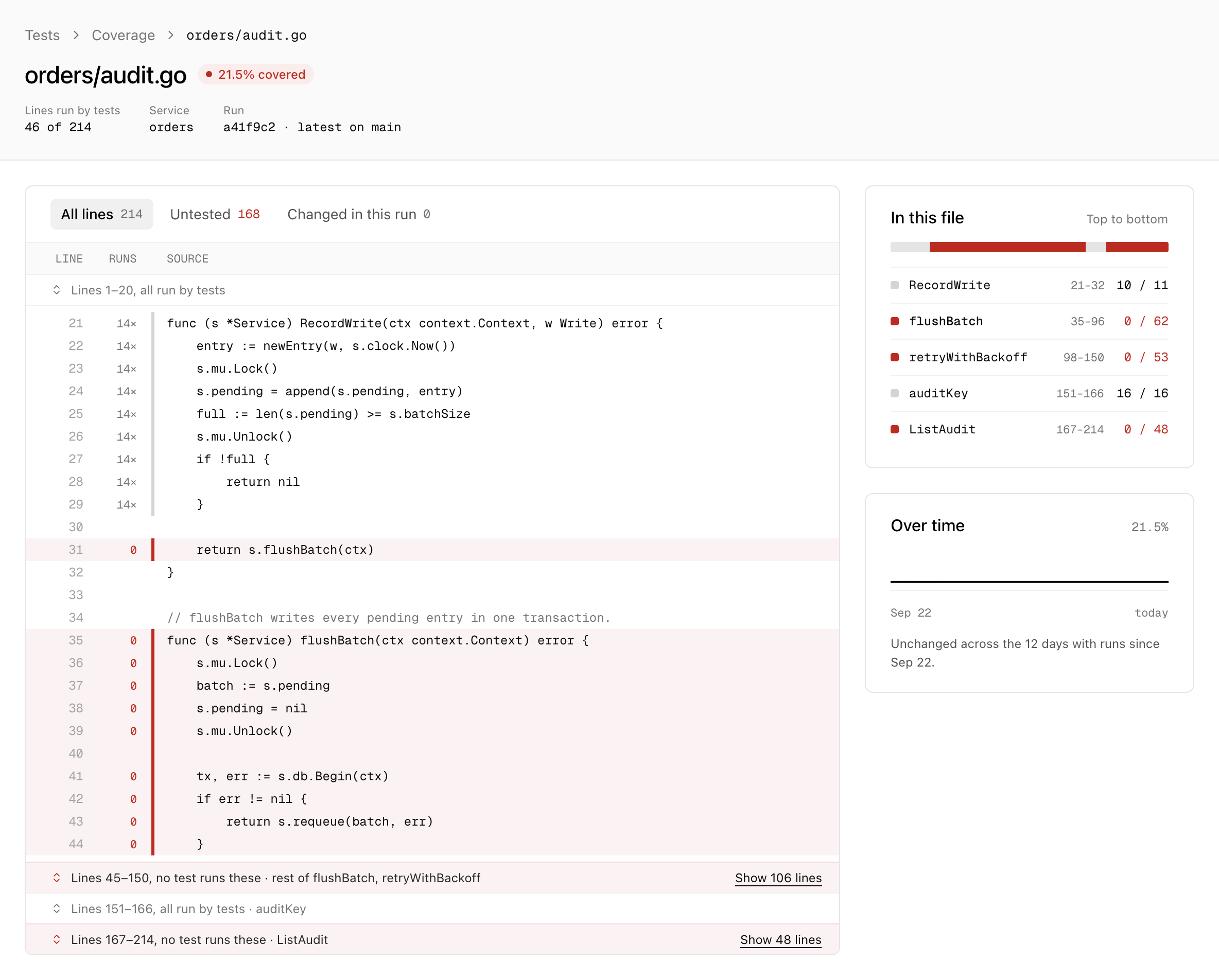
Each line that can run shows how many times tests ran it. Lines no test runs are marked in red. Long stretches of tested lines are folded away, so the untested code is what you see first. Show only the Untested lines, or the lines Changed in this run.
In this file lists the file's functions, top to bottom, with how many of their lines tests run. Over time charts the file's coverage on the main line.
Changed lines
Overall coverage changes slowly, which makes it a poor signal for whether new code is tested. Encore Cloud therefore also measures the coverage of the lines each commit changed, compared with an earlier commit:
- For a build on the main line, the commit of the previous run on the main line, so that the changes of every commit since are counted.
- For other builds, the commit where its branch left the main line, so that a pull request is measured by everything it changes.
If no such commit is found within the last 300 commits, the build's commit is compared with its parent instead. Renamed files are followed. If the repository can't be read, the run is recorded without changed-line coverage.
In a test run
A test run shows its coverage in its header, together with the coverage of the lines its commit changed, and compares its coverage with the earlier run it compares itself with.
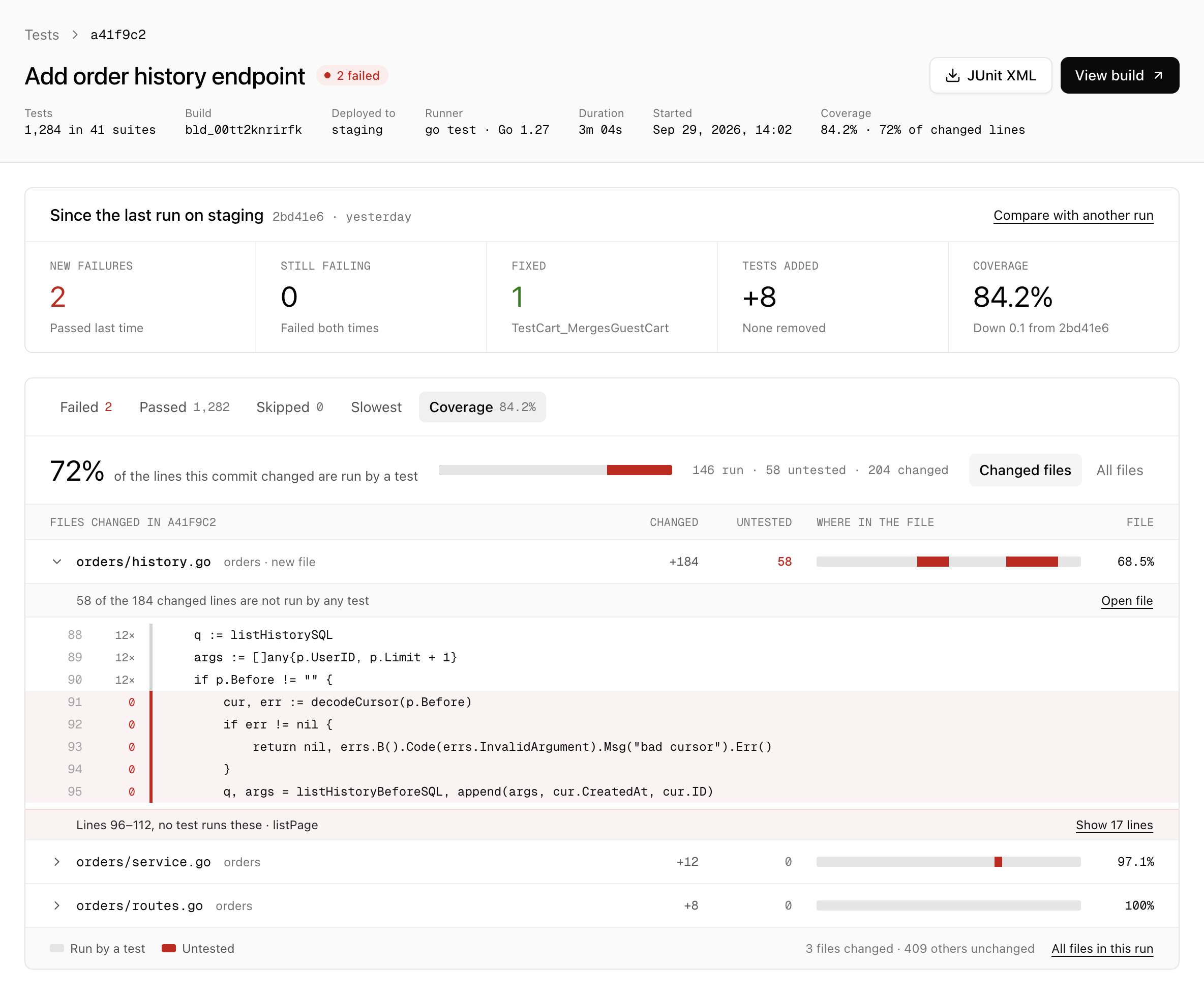
The Coverage tab starts with the files the run's commit changed, the ones with the most untested changed lines first. Expand a file to see its changed lines that no test runs, or select Open file to see the whole file in this run. All files lists every file in the run, the same way as on the Coverage page.
When an app measures coverage, the Tests overview also shows its line coverage, and Recent runs shows the coverage of each run.
Access and retention
Coverage follows the same rules as test results: anyone who can view the app's code can view its coverage. A file's page shows its source code, read from your repository at the run's commit.
Coverage is kept for one year. The history of a single file covers up to the last 90 days.