DigitalOcean App Platform Alternatives in 2026
Where App Platform's ephemeral disks, autoscaling rules and dev databases start to limit a backend, and how Encore, ECS Express Mode, Cloud Run, Render, Railway and Fly.io compare.

DigitalOcean App Platform builds an app from a Git repository or a container image and runs it as web services, workers, cron jobs and deploy-time jobs. For a small API with a database next to it, it is a quick way to get online without managing Droplets.
As the app grows, App Platform's limits start to matter: it has no persistent volumes, and the local filesystem holds up to 4 GiB and is lost on every redeploy. CPU-based autoscaling requires dedicated CPU plans, images must be built for AMD64 Linux, and the cheaper dev databases cannot be moved to another region. Everything also runs in DigitalOcean, which matters once customers or the rest of the company expect workloads in AWS or Google Cloud.
Of the alternatives below, Encore, ECS Express Mode and Cloud Run run your backend on AWS or Google Cloud, while Render, Railway and Fly.io are platforms that run it on their own infrastructure.
DigitalOcean App Platform alternatives at a glance
Encore: App Platform-style deploys into your own AWS or GCP account

Encore combines an open source infrastructure SDK for TypeScript and Go with a platform that provisions and deploys what the code declares into your own AWS or GCP account. Instead of an app spec that lists components, you declare the database, cron jobs, buckets and Pub/Sub topics in the code, and encore run starts the services with a local Postgres next to them.
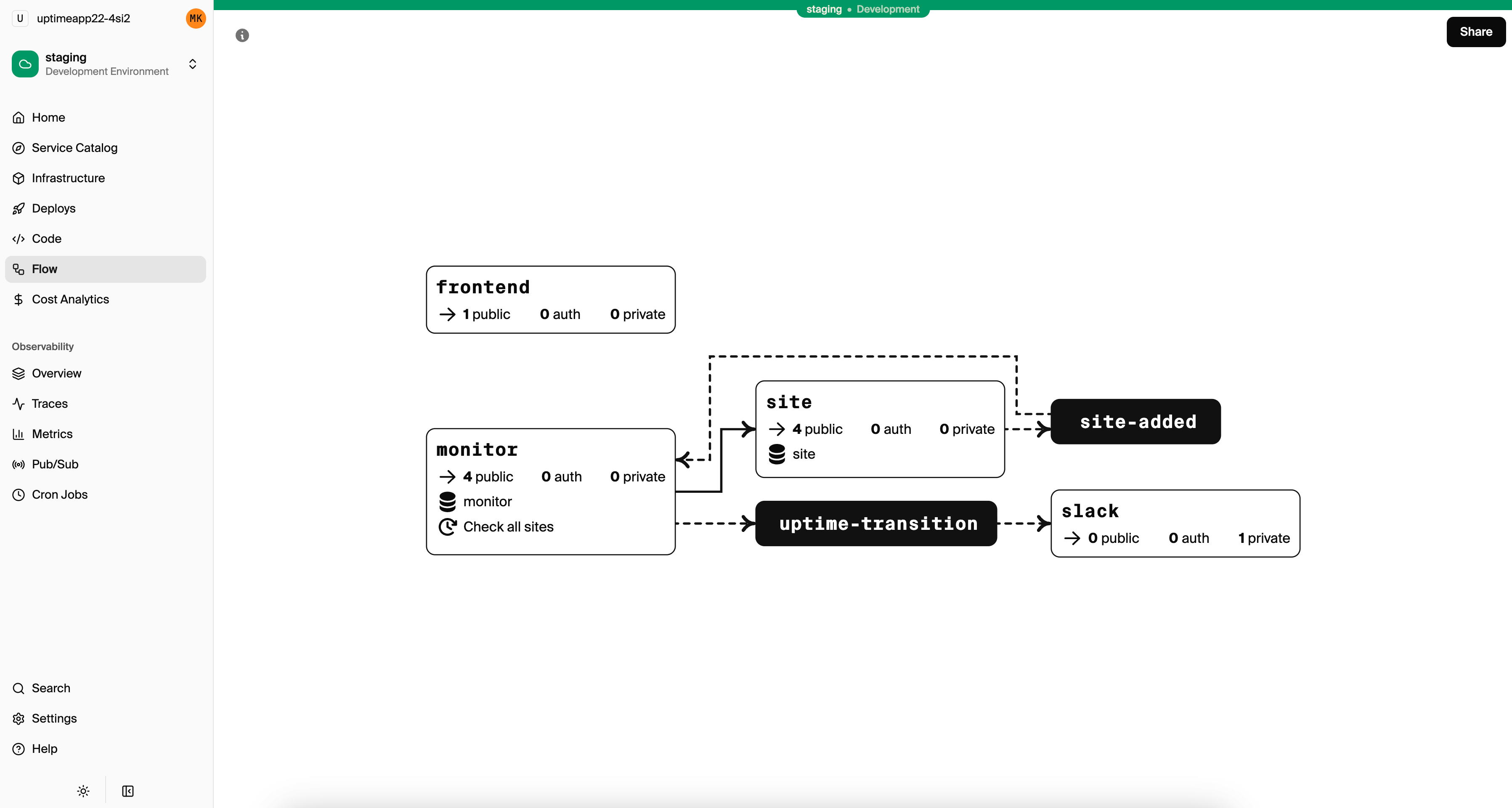
An orders service with its database and the scheduled job that used to be a separate cron component fits in one file:
import { api, APIError } from "encore.dev/api";
import { SQLDatabase } from "encore.dev/storage/sqldb";
import { CronJob } from "encore.dev/cron";

// RDS on AWS, Cloud SQL on GCP, and a local Postgres under `encore run`.
const db = new SQLDatabase("orders", { migrations: "./migrations" });

interface Order {
  id: number;
  customer: string;
  totalCents: number;
  status: string;
}

export const create = api(
  { expose: true, method: "POST", path: "/orders" },
  async (p: { customer: string; totalCents: number }): Promise<Order> => {
    if (!p.customer || p.totalCents <= 0) {
      throw APIError.invalidArgument("customer and totalCents are required");
    }
    const row = await db.queryRow<Order>`
      INSERT INTO orders (customer, total_cents) VALUES (${p.customer}, ${p.totalCents})
      RETURNING id, customer, total_cents AS "totalCents", status`;
    return row!;
  },
);

// Only touches rows that are still pending, so a repeated run is harmless.
export const expirePending = api(
  { expose: false, method: "POST", path: "/orders/expire-pending" },
  async (): Promise<{ cancelled: number }> => {
    const rows = await db.queryAll<{ id: number }>`
      UPDATE orders SET status = 'cancelled'
      WHERE status = 'pending' AND created_at < now() - interval '24 hours'
      RETURNING id`;
    return { cancelled: rows.length };
  },
);

// Replaces the cron job component in the app spec.
const _ = new CronJob("expire-pending", {
  title: "Cancel orders left pending for a day",
  every: "1h",
  endpoint: expirePending,
});
Cron jobs do not run under encore run, and while developing you call the endpoint by hand. Once you connect your AWS or GCP account, a git push deploys the services and creates the database in that account. With the resources declared in the code, AI coding agents such as Cursor or Claude Code can add a bucket or a topic in the same change as the code that uses it, and the infrastructure docs describe what each one becomes in AWS and GCP.
Good to know
Encore needs an AWS or GCP account to deploy into, so it does not replace App Platform for a team that wants to stay on DigitalOcean. It supports TypeScript and Go today. Moving the data is a separate step: you dump the App Platform database with pg_dump and restore it into the database Encore created.
Run in your terminal to get started locally.
ECS Express Mode: one container on AWS
 Amazon ECS
ECS Express Mode takes a container image and creates a Fargate service with its own URL, a load balancer with TLS, auto scaling and monitoring. AWS points new customers here because App Runner is closed to new customers.
Express Mode covers the web service part of an App Platform app. The database, the scheduled jobs and any workers are separate AWS resources that you create and wire up yourself, usually in Terraform or CloudFormation. It fits a team that already has an RDS instance and Terraform modules and only needs somewhere on AWS to run one container.
Google Cloud Run: request-driven containers on GCP
 Google Cloud Run
Cloud Run runs a container per service and scales instances with incoming requests, down to zero when idle. Request timeouts default to 5 minutes and can be raised to 60 minutes, per the Cloud Run timeout docs, and Cloud Run jobs run a container until it exits, which covers the App Platform job components.
Cloud Run is the closest match to App Platform on a large cloud: you hand it a container and it handles scaling and TLS. Postgres runs separately in Cloud SQL, and Cloud Scheduler triggers scheduled work. It fits teams on Google Cloud with spiky HTTP traffic that benefits from scaling to zero. The Cloud Run alternatives guide compares it with other container platforms.
Render: a PaaS with the same shape

Render deploys web services, background workers and cron jobs from a Git repository, with managed Postgres and Key Value next to them, and describes a whole app in a render.yaml Blueprint. The component model is close to an App Platform app spec, so a migration is mostly a translation of one file into another.
Render also offers persistent disks for services that need them, which removes one of the App Platform limits above. It is still a hosted platform, so the workloads run in Render's infrastructure rather than your own cloud account. The Render alternatives guide covers it in more depth.
Railway: usage-based services on a project canvas

Railway deploys services from Git repositories or images onto a project canvas, adds databases from templates, and bills on the CPU, memory and network the services use. Volumes can be attached to a service for data that must survive a redeploy.
Railway fits small teams and side projects that want to see every service on one canvas and pay for usage instead of fixed plan sizes. Like App Platform, everything runs in Railway's own infrastructure. The Railway alternatives guide compares it with similar platforms.
Fly.io: Machines and volumes in regions you pick

Fly.io runs containers as Machines in the regions you choose and attaches volumes to them, so a service can keep files on disk across deploys. Machines can stop when idle and start on the next request, and Fly.io offers Managed Postgres next to them.
Fly.io fits apps that need a persistent disk or need to run close to users in specific regions. You manage more of the setup through fly.toml and the CLI than on App Platform. The Fly.io alternatives guide covers it in more depth.
How to choose
- Encore if you want the database, schedules and services in your own AWS or GCP account, defined in the code and tested locally.
- ECS Express Mode for a single container on AWS when the database already exists.
- Google Cloud Run if you are on GCP and want scale to zero for request-driven containers.
- Render for the closest PaaS replacement with persistent disks.
- Railway for usage-based billing and a visual project canvas.
- Fly.io for volumes and specific regions outside the big clouds.
Related guides
Frequently asked questions
What is the best alternative to DigitalOcean App Platform?
Teams that want the same push-to-deploy experience on another PaaS usually look at Render or Railway. Teams that need persistent volumes in specific regions look at Fly.io. Teams that want to run on AWS or Google Cloud look at ECS Express Mode or Google Cloud Run.
How do I move an App Platform backend to my own AWS account?
With Encore you declare the database, cron jobs and other resources in your TypeScript or Go code, test everything locally with encore run, connect your AWS account, and push. Encore provisions RDS Postgres, Fargate services and the schedules in your account, and you move the data from the App Platform database with pg_dump and pg_restore.
Does DigitalOcean App Platform support persistent storage?
No. According to DigitalOcean's App Platform limits, components have no persistent volumes, and the local filesystem is ephemeral and lost on redeploy. Files that must survive a deploy belong in Spaces object storage or a database.
Deploy to your cloud on AWS and Google Cloud
without managing infrastructure
Encore lets developers and agents define application infrastructure directly in code, then automatically provisions it from local development to production in your AWS or GCP account.
