How to Deploy a Vercel AI SDK Agent to Your Own AWS or GCP Account
Build a tool-calling agent with the AI SDK in a TypeScript service, keep its message history in Postgres, and deploy it to your own cloud with Encore.


The AI SDK from Vercel is the ai package, a TypeScript library for tool calling across model providers. It keeps no state between calls. A demo keeps the conversation in memory, while a deployed agent needs a place to store message history and an API key stored outside a local .env file.
This guide builds a small notes agent with ai 7 and @ai-sdk/openai inside an Encore service. Every model message is stored in Postgres, the agent calls two tools backed by the same database, and the service deploys to your own AWS or GCP account.
What you will build
One service called agent with three endpoints:
POST /threadscreates a thread.POST /threads/:id/messagesloads the thread's messages, runs the tool loop and saves the new messages.GET /threads/:idreturns the text of each message.
The tools, save_note and search_notes, use a notes table. The layout follows the Cursor Agents example, adapted to the AI SDK.
Why self-host the agent backend
The AI SDK is a library and has no hosted agent runtime of its own. The choice is between this library in your own service and a hosted agent product that keeps the conversation and runs the tools for you. Your own service makes sense when the tools need data that already lives in your database, when conversation history should stay in an account you control, or when you want to switch model providers without moving the rest of the backend.
In exchange you run storage, secrets, an HTTP layer and a deploy target, while the model calls still go to the provider you pick. Everything else, including every message the loop produced, sits in a Postgres table you can query.
Set up the project
You need Node 22 or later (ai 7 declares node >=22 in its engines field), Docker for the local database, and the Encore CLI. Install the CLI with the command for your operating system below, then create the app, selecting Empty app as the template when prompted. The new app already has encore.app, package.json with encore.dev and a tsconfig.json, so you only add the agent packages:
Run in your terminal to get started locally.
Then define the service:
// agent/encore.service.ts
import { Service } from "encore.dev/service";

export default new Service("agent");
The agent also needs a database for its state and a secret for the API key, which is where Encore comes in.
How Encore provisions the database and secret
Encore combines an open source infrastructure SDK for TypeScript and Go with a platform that provisions and deploys into your own AWS or GCP account. The message store and the API key are declared in the service, encore run starts Postgres locally with the migration applied, and a deploy creates the same database and secret in your cloud.
encore run starts the database itself, so an AI coding agent can run the app on a fresh checkout with one command and read the request logs to see whether its change worked.
Add the database
Messages are stored one row each as JSONB, in the AI SDK's ModelMessage format, which covers user prompts, assistant text, tool calls and tool results. Keeping tool results in the history lets the model see what a tool returned in earlier turns.
-- agent/migrations/1_create_tables.up.sql
CREATE TABLE threads (
    id          TEXT PRIMARY KEY,
    created_at  TIMESTAMPTZ NOT NULL DEFAULT now()
);

-- Every model message in order: user prompts, assistant replies, tool calls
-- and tool results, stored as the AI SDK's ModelMessage objects.
CREATE TABLE messages (
    id          BIGSERIAL PRIMARY KEY,
    thread_id   TEXT NOT NULL REFERENCES threads(id) ON DELETE CASCADE,
    message     JSONB NOT NULL,
    created_at  TIMESTAMPTZ NOT NULL DEFAULT now()
);
CREATE INDEX messages_thread ON messages (thread_id, id);

CREATE TABLE notes (
    id          BIGSERIAL PRIMARY KEY,
    title       TEXT NOT NULL,
    body        TEXT NOT NULL,
    created_at  TIMESTAMPTZ NOT NULL DEFAULT now()
);
The database is declared in one line, and Encore applies the migrations in ./migrations when encore run starts and on each deploy. The database docs cover the details.
// agent/db.ts
import { SQLDatabase } from "encore.dev/storage/sqldb";

export const db = new SQLDatabase("agent", { migrations: "./migrations" });
Define the tools
tool() takes a description, a Zod inputSchema and an execute function, and the input type of execute is inferred from the schema.
// agent/tools.ts
import { tool } from "ai";
import { z } from "zod";
import { db } from "./db";

export const tools = {
  save_note: tool({
    description: "Save a note with a short title and a body.",
    inputSchema: z.object({ title: z.string(), body: z.string() }),
    execute: async ({ title, body }) => {
      const row = await db.queryRow<{ id: number }>`
        INSERT INTO notes (title, body) VALUES (${title}, ${body}) RETURNING id`;
      return { saved: row!.id };
    },
  }),
  search_notes: tool({
    description: "Find notes whose title or body contains the given text.",
    inputSchema: z.object({ query: z.string() }),
    execute: async ({ query }) => {
      const pattern = `%${query}%`;
      const notes: { id: number; title: string; body: string }[] = [];
      for await (const n of db.query<{ id: number; title: string; body: string }>`
        SELECT id, title, body FROM notes
        WHERE title ILIKE ${pattern} OR body ILIKE ${pattern}
        ORDER BY id DESC LIMIT 20`) {
        notes.push(n);
      }
      return { notes };
    },
  }),
};
Write the endpoints
The OpenAI key comes from an Encore secret and is passed to createOpenAI when a request arrives. generateText runs the tool loop until the model stops calling tools or the stop condition is reached. In ai 7 the step condition is exported as isStepCount, with stepCountIs kept as an alias, and the loop control docs describe the other conditions.
// agent/api.ts
import { randomUUID } from "node:crypto";
import { createOpenAI } from "@ai-sdk/openai";
import { generateText, isStepCount, type ModelMessage } from "ai";
import { api, APIError, type Header } from "encore.dev/api";
import { secret } from "encore.dev/config";
import { db } from "./db";
import { tools } from "./tools";

const openaiApiKey = secret("OpenAIApiKey");

const SYSTEM = `You keep the user's notes with the save_note and search_notes tools.
Search before answering a question about notes, and never make up a note.`;

export const createThread = api(
  { expose: true, method: "POST", path: "/threads" },
  async (): Promise<{ id: string }> => {
    const id = randomUUID();
    await db.exec`INSERT INTO threads (id) VALUES (${id})`;
    return { id };
  },
);

async function loadMessages(threadId: string): Promise<ModelMessage[]> {
  const messages: ModelMessage[] = [];
  for await (const row of db.query<{ message: ModelMessage | string }>`
    SELECT message FROM messages WHERE thread_id = ${threadId} ORDER BY id`) {
    messages.push(typeof row.message === "string" ? JSON.parse(row.message) : row.message);
  }
  return messages;
}

async function saveMessages(threadId: string, messages: ModelMessage[]) {
  for (const m of messages) {
    await db.exec`
      INSERT INTO messages (thread_id, message)
      VALUES (${threadId}, ${JSON.stringify(m)}::text::jsonb)`;
  }
}

interface SendRequest {
  id: string;
  prompt: string;
  // Optional per-user key. Without it, the app's own key is used.
  userKey?: Header<"X-OpenAI-Key">;
}

interface SendResponse {
  reply: string;
  steps: number;
}

export const send = api(
  { expose: true, method: "POST", path: "/threads/:id/messages" },
  async ({ id, prompt, userKey }: SendRequest): Promise<SendResponse> => {
    const thread = await db.queryRow`SELECT id FROM threads WHERE id = ${id}`;
    if (!thread) throw APIError.notFound("thread not found");

    const openai = createOpenAI({ apiKey: userKey || openaiApiKey() });
    const userMessage: ModelMessage = { role: "user", content: prompt };
    const history = await loadMessages(id);

    const result = await generateText({
      model: openai("gpt-5.4-mini"),
      system: SYSTEM,
      messages: [...history, userMessage],
      tools,
      stopWhen: isStepCount(5),
    });

    await saveMessages(id, [userMessage, ...result.responseMessages]);
    return { reply: result.text, steps: result.steps.length };
  },
);

interface HistoryMessage {
  role: string;
  text: string;
}

// API schemas need concrete types, so the history endpoint returns the text
// parts of each message rather than the AI SDK's ModelMessage union.
const textOf = (m: ModelMessage): string =>
  typeof m.content === "string"
    ? m.content
    : m.content.map((part) => (part.type === "text" ? part.text : "")).join("");

export const history = api(
  { expose: true, method: "GET", path: "/threads/:id" },
  async ({ id }: { id: string }): Promise<{ messages: HistoryMessage[] }> => {
    const messages = await loadMessages(id);
    return {
      messages: messages
        .map((m) => ({ role: m.role, text: textOf(m) }))
        .filter((m) => m.text !== ""),
    };
  },
);
After the call, result.responseMessages holds every message the loop produced, including tool calls and tool results, so saving the user message plus those messages gives the next turn the full context. The history endpoint maps messages to plain text because Encore generates API schemas from the response type, and the ModelMessage union uses types such as URL that its parser does not accept. Keeping the endpoint's response in your own interface also keeps the public API stable when the SDK changes its message types.
How state and resume work
The AI SDK keeps no state between calls. Each call to generateText receives the full list of messages and returns the new ones, and what happens to them afterwards is up to you. In this app, loadMessages reads every stored message for the thread in order, the endpoint appends the new user message, and saveMessages writes the user message plus result.responseMessages in one go.
The messages are stored as JSONB, exactly as the SDK produced them. That includes tool calls and tool results, which the model needs on the next turn to know what it already did. Saving only the final text would lose that, and the model would repeat searches it had already run.
With the database as the only state, any instance of the service can serve the next message of any thread, and resuming a thread means reading its rows back from the table.
API key per user or per app
You can pay for the model calls in two ways. With one key per app, the service owns an OpenAI key in a secret, every user's requests are billed to it, and you need your own limits per user. With one key per user, each request brings the user's key, usage lands on their account, and the service stores no key at all.
createOpenAI returns a new provider for each request, so a per-request key never leaks into a concurrent request. The send endpoint here supports both: an optional X-OpenAI-Key header, declared with Encore's Header type, wins over the secret when it is present. Drop the secret if every user brings a key, or drop the header if none of them should. Either way, do not log the header, and do not store a user's key in the threads table.
Run it locally
Set the API key for your local and development environments with the Encore CLI, which prompts for the value:
Encore stores this value and syncs it to everyone working on the app, so use a personal development key, or override it for your machine only in a .secrets.local.cue file in the app root, next to encore.app.
encore run starts Postgres locally, applies the migration and serves the API on port 4000:
The steps field in each reply shows how many model calls the loop made.
Observability in local development
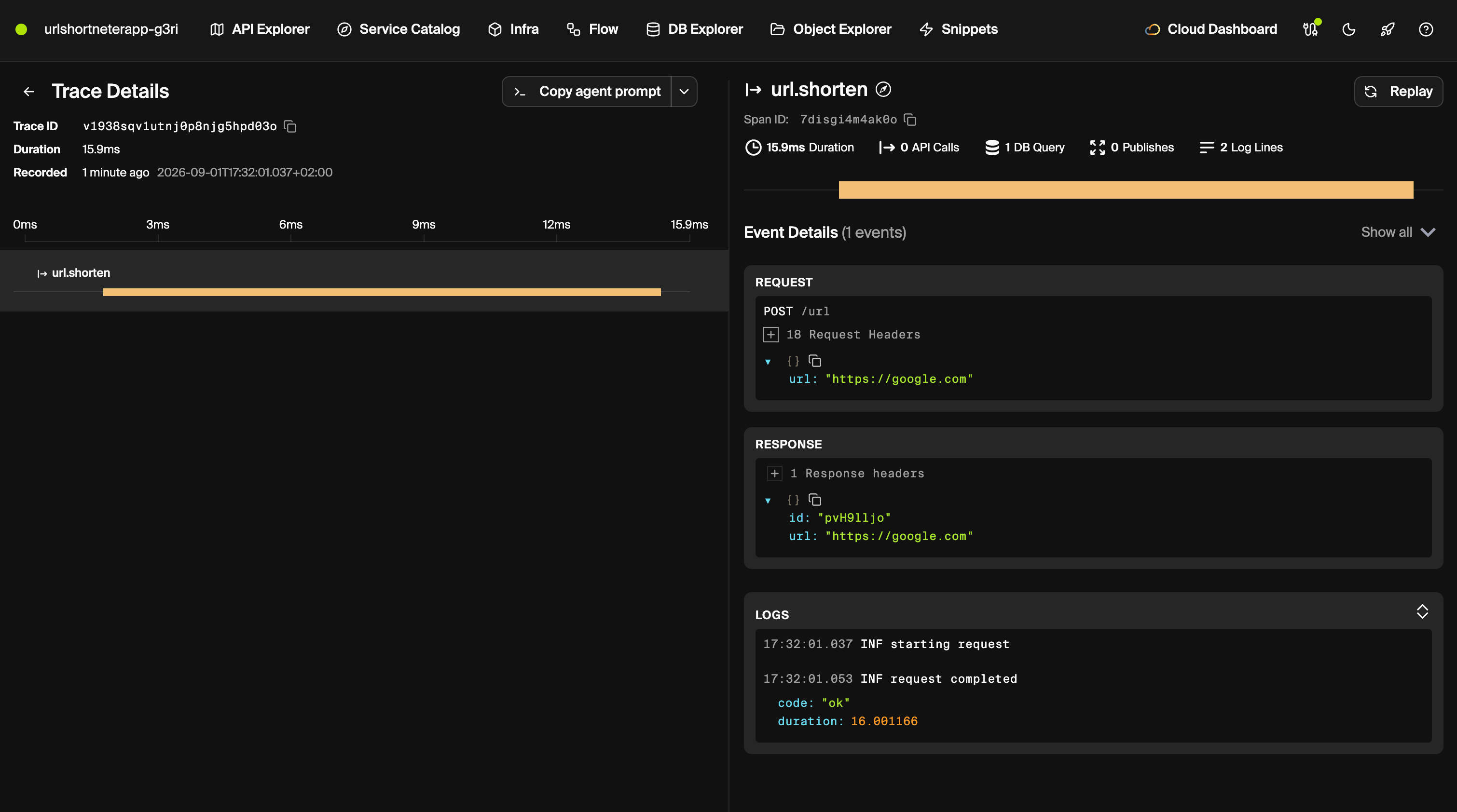
encore run prints a URL on localhost:9400 that serves the Encore Development Dashboard, and it logs a trace id with every request it serves. According to Encore's tracing docs, traces are captured automatically in local development as well as in deployed environments, and include API calls, database queries and structured logs. For an agent, the database queries are the useful part: they show whether a turn called search_notes or answered from nothing.
Deploy to your own AWS or GCP account
In the Encore dashboard, connect your AWS or GCP account and create an environment on it. Each environment gets its own database and secret values.

When the environment is created, Encore provisions what the code declares. For this app, that is one Postgres database for the agent service and one secret: RDS and Secrets Manager on AWS, Cloud SQL and Secret Manager on GCP. Encore provisions an IAM role for the service. The service runs as a container built on Encore's default base image for TypeScript apps, node:24-trixie.
Switching providers is a change to the model line and one package, for example @ai-sdk/anthropic, plus a new secret for its key. Add an auth handler before exposing the endpoints publicly.
Related guides
Frequently asked questions
How do I deploy a Vercel AI SDK agent to AWS or GCP?
You build a TypeScript API that runs a Vercel AI SDK agent and stores its message history in Postgres, so the agent remembers earlier turns. It runs in your own AWS or GCP account, and Encore provisions the database and the API key secret there when you push.
Does the Vercel AI SDK only run on Vercel?
No. The ai package is an open source TypeScript library that runs in any Node.js process, and providers such as @ai-sdk/openai call the model API directly. Hosting is a separate choice.
How do I keep conversation history with the AI SDK?
The SDK is stateless between calls. Save the messages you send and the response messages each call returns, then pass the full list as messages on the next call.
What is the difference between stepCountIs and isStepCount?
In ai 7 the stop condition is exported as isStepCount, and stepCountIs remains as an alias of the same function. Either stops the tool loop after the given number of steps.
How do I use a different API key for each user with the AI SDK?
Create the provider inside the request handler, for example createOpenAI({ apiKey }) with the key from a request header, and pass the resulting model to generateText. Each request gets its own provider, so keys from concurrent requests never mix.
Deploy to your cloud on AWS and Google Cloud
without managing infrastructure
Encore lets developers and agents define application infrastructure directly in code, then automatically provisions it from local development to production in your AWS or GCP account.
