How to Deploy a Cursor SDK Agent to Your Own AWS or GCP Account
Run the Cursor agent loop inside a TypeScript service, keep threads and agent state in Postgres, and deploy it to your own cloud with Encore.


The Cursor SDK runs the same agent loop as the Cursor editor from your own TypeScript code. Calling Agent.create from a script on your laptop works as it is. A deployed service that answers HTTP requests needs more, because the local agent keeps its state in SQLite under a working directory that disappears with the container.
This guide builds a small notes agent with @cursor/sdk 1.2 that runs inside an Encore service. Threads, turns and the agent's own state live in Postgres, the Cursor API key lives in a secret, and the same code runs locally with encore run and in your own AWS or GCP account after a git push.
What you will build
The app is one service called agent with three endpoints:
POST /threadscreates a Cursor agent and stores its id as a thread.POST /threads/:id/messagesresumes that agent, sends the prompt and stores the reply.GET /threads/:idreturns the turns of a thread.
The agent gets two custom tools, save_note and search_notes, that read and write a notes table. It gets no shell and no file access. The structure follows the Cursor Agents example in the Encore examples repository, which adds streaming over WebSockets, a second notes service and a web UI, and is described on the Cursor Agents page.
Why self-host the agent backend
Cursor also runs agents in the cloud, and hosted agent platforms in general take care of compute, queues and a dashboard for you. Running the loop in your own service makes sense when the agent needs data that already lives in your database, when transcripts and tool results should stay in an account you control, or when the agent is one feature inside a larger backend that has its own users and permissions.
The cost is that you run the parts the platform would have run: a place to keep agent state, a key the service can read, an HTTP layer and a deploy target. Those are the parts this guide sets up. The agent loop itself is still the Cursor SDK's, and the model calls still go to Cursor. Self-hosting changes where the state and the tools live.
Set up the project
You need Node 22.13 or newer (@cursor/sdk declares node >=22.13 in its engines field), Docker for the local database, and the Encore CLI. Install the CLI with the command for your operating system below, then create the app, selecting Empty app as the template when prompted. The new app already has encore.app, package.json with encore.dev and a tsconfig.json, so you only add the agent packages:
Run in your terminal to get started locally.
The service definition is a single file:
// agent/encore.service.ts
import { Service } from "encore.dev/service";

export default new Service("agent");
The agent also needs a database for its state and a secret for the API key, which is where Encore comes in.
How Encore provisions the database and secret
Encore combines an open source infrastructure SDK for TypeScript and Go with a platform that provisions and deploys into your own AWS or GCP account. The service declares its Postgres database and its secret in TypeScript, encore run starts Postgres locally and applies the migrations, and a deploy creates the matching database and secret in your cloud.
For an agent backend, that keeps the agent's state next to the code that uses it. An AI coding agent working in this repository sees the SQLDatabase declaration next to the store it feeds, so it does not have to guess at connection strings or cloud consoles to find out where agent state lives.
Add the database
In the database, the threads, turns and notes tables belong to the app, while the sdk_agents, sdk_checkpoints, sdk_runs and sdk_run_events tables back the Cursor SDK's own store, and they are copied unchanged from the example's migration.
-- agent/migrations/1_create_tables.up.sql (excerpt)
-- Threads and turns for the API, and the notes the agent keeps.
CREATE TABLE threads (
    id          TEXT PRIMARY KEY,
    created_at  TIMESTAMPTZ NOT NULL DEFAULT now()
);

CREATE TABLE turns (
    id          BIGSERIAL PRIMARY KEY,
    thread_id   TEXT NOT NULL REFERENCES threads(id) ON DELETE CASCADE,
    prompt      TEXT NOT NULL,
    reply       TEXT,
    status      TEXT NOT NULL,
    created_at  TIMESTAMPTZ NOT NULL DEFAULT now()
);

CREATE TABLE notes (
    id          BIGSERIAL PRIMARY KEY,
    title       TEXT NOT NULL,
    body        TEXT NOT NULL,
    created_at  TIMESTAMPTZ NOT NULL DEFAULT now()
);
The database itself is one line, plus a helper for JSONB columns that the store uses. See the database docs for migrations and connection details.
// agent/db.ts
import { SQLDatabase } from "encore.dev/storage/sqldb";

export const db = new SQLDatabase("agent", { migrations: "./migrations" });

// JSONB columns can come back as text; parse them either way.
export const json = <T>(v: T | string): T => (typeof v === "string" ? (JSON.parse(v) as T) : v);
A local Cursor agent writes its conversation to SQLite under local.cwd by default. The SDK accepts a LocalAgentStore through local.store instead, and the example's agent/store.ts implements one on top of this database. Copy that file into agent/store.ts as it is. With it, any instance of the service can call Agent.resume for any thread, and history survives a deploy.
Define the tools
Custom tools are plain objects with a JSON Schema for their input and an execute function. Tool results must be JSON values, which is why Note is a type alias rather than an interface: TypeScript only treats aliases as assignable to an index signature.
// agent/tools.ts
import type { SDKCustomTool } from "@cursor/sdk";
import { db } from "./db";

type Note = {
  id: number;
  title: string;
  body: string;
};

export const tools: Record<string, SDKCustomTool> = {
  save_note: {
    description: "Save a note with a short title and a body.",
    inputSchema: {
      type: "object",
      properties: { title: { type: "string" }, body: { type: "string" } },
      required: ["title", "body"],
    },
    async execute({ title, body }) {
      const row = await db.queryRow<{ id: number }>`
        INSERT INTO notes (title, body) VALUES (${String(title)}, ${String(body)})
        RETURNING id`;
      return { saved: row!.id };
    },
  },
  search_notes: {
    description: "Find notes whose title or body contains the given text.",
    inputSchema: {
      type: "object",
      properties: { query: { type: "string" } },
      required: ["query"],
    },
    annotations: { readOnlyHint: true },
    async execute({ query }) {
      const pattern = `%${String(query)}%`;
      const notes: Note[] = [];
      for await (const n of db.query<Note>`
        SELECT id, title, body FROM notes
        WHERE title ILIKE ${pattern} OR body ILIKE ${pattern}
        ORDER BY id DESC LIMIT 20`) {
        notes.push(n);
      }
      return { notes };
    },
  },
};
Write the endpoints
The key comes from an Encore secret, read when an agent is created or resumed, unless the request carries its own key. tools: ["mcp"] restricts the agent to MCP tools, and local.customTools adds the two notes tools to that set, so the model has nothing else to call.
// agent/api.ts
import { mkdirSync } from "node:fs";
import { tmpdir } from "node:os";
import { join } from "node:path";
import { Agent, type AgentOptions } from "@cursor/sdk";
import { api, APIError, type Header } from "encore.dev/api";
import { secret } from "encore.dev/config";
import { db } from "./db";
import { postgresAgentStore } from "./store";
import { tools } from "./tools";

const cursorApiKey = secret("CursorApiKey");

// The SDK keeps session files under cwd; conversation state goes to Postgres.
const cwd = join(tmpdir(), "notes-agent");
mkdirSync(cwd, { recursive: true });

// A user's own key, sent per request, wins over the app's key.
const options = (userKey?: string): AgentOptions => ({
  apiKey: userKey || cursorApiKey(),
  model: { id: "composer-2.5" },
  tools: ["mcp"], // only the custom tools below: no shell, no file access
  local: { cwd, store: postgresAgentStore, customTools: tools },
});

interface Thread {
  id: string;
}

interface KeyHeader {
  userKey?: Header<"X-Cursor-Key">;
}

export const createThread = api(
  { expose: true, method: "POST", path: "/threads" },
  async ({ userKey }: KeyHeader): Promise<Thread> => {
    const agent = await Agent.create(options(userKey));
    await db.exec`INSERT INTO threads (id) VALUES (${agent.agentId})`;
    return { id: agent.agentId };
  },
);

interface SendRequest extends KeyHeader {
  id: string;
  prompt: string;
}

interface SendResponse {
  status: string;
  reply: string | null;
}

export const send = api(
  { expose: true, method: "POST", path: "/threads/:id/messages" },
  async ({ id, prompt, userKey }: SendRequest): Promise<SendResponse> => {
    const thread = await db.queryRow`SELECT id FROM threads WHERE id = ${id}`;
    if (!thread) throw APIError.notFound("thread not found");

    const agent = await Agent.resume(id, options(userKey));
    const run = await agent.send(prompt);
    const result = await run.wait();
    const reply = result.result ?? null;

    await db.exec`
      INSERT INTO turns (thread_id, prompt, reply, status)
      VALUES (${id}, ${prompt}, ${reply}, ${result.status})`;
    return { status: result.status, reply };
  },
);

interface Turn {
  prompt: string;
  reply: string | null;
  status: string;
  createdAt: Date;
}

export const history = api(
  { expose: true, method: "GET", path: "/threads/:id" },
  async ({ id }: { id: string }): Promise<{ turns: Turn[] }> => {
    const turns: Turn[] = [];
    for await (const t of db.query<Turn>`
      SELECT prompt, reply, status, created_at AS "createdAt"
      FROM turns WHERE thread_id = ${id} ORDER BY id`) {
      turns.push(t);
    }
    return { turns };
  },
);
send waits for the run to finish with run.wait(), which returns the status, the final text and token usage. That keeps the endpoint simple for a tutorial. For long runs, the example starts the run in the background, writes a heartbeat and streams events to the browser over api.streamOut, which avoids holding an HTTP request open while the agent works.
How state and resume work
State lives in two layers: the app's own tables record which threads exist and what was said in each turn, in a shape the API controls, and the sdk_* tables are the Cursor SDK's state for each agent: its checkpoints, its runs and the events of each run. The app never reads those tables directly; it hands the store to the SDK and lets Agent.resume load what it needs.
With both layers in Postgres, a request does not have to land on the instance that created the agent. send looks up the thread, calls Agent.resume with the stored agent id, and the SDK rebuilds the agent from its checkpoints before sending the new prompt. A restart of encore run between two messages is a quick local test of that, since nothing from the first process survives except the database.
The thread id returned by createThread is the Cursor agent id itself. That keeps the mapping simple, and it means the id is something the SDK generated, not a value a client can guess from a sequence.
API key per user or per app
You can pay for the model calls in two ways. With one key per app, the service owns a Cursor key in a secret, every user's requests are billed to it, and you need your own limits per user. With one key per user, each request brings the user's key, usage lands on their account, and the service stores no key at all.
The Cursor Agents example takes the other route: it has no server secret at all, and every request carries the user's key in an X-Cursor-Key header. Each user's agents then run on that user's key. Both endpoints here support either model: an optional X-Cursor-Key header, declared with Encore's Header type, wins over the secret when it is present. Drop the secret if every user brings a key, or drop the header if none of them should. Either way, do not log the header, and do not store a user's key in the threads table.
Run it locally
Set a Cursor API key for your local and development environments with the Encore CLI, which prompts for the value. The example's error handling reports a key without the cli:session scope as unable to run agents and points to user API keys from the Cursor dashboard instead:
Encore stores this value and syncs it to everyone working on the app, so use a personal development key, or override it for your machine only in a .secrets.local.cue file in the app root, next to encore.app.
Then start the app. encore run starts Postgres locally, applies the migration and serves the API on port 4000:
The second message runs on a resumed agent, so it can only answer by calling search_notes.
Observability in local development
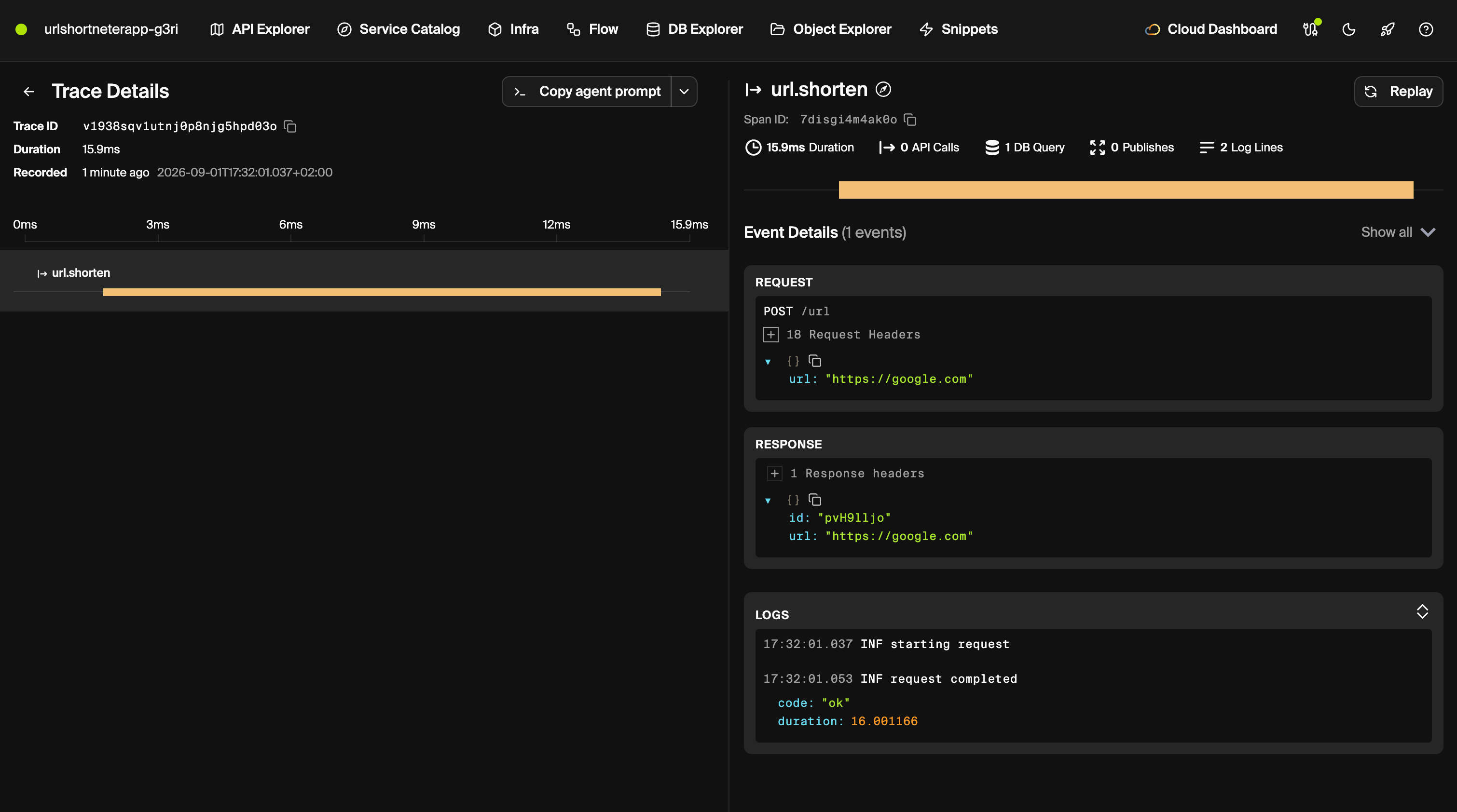
encore run prints a URL on localhost:9400 that serves the Encore Development Dashboard, and it logs a trace id with every request it serves. According to Encore's tracing docs, traces are captured automatically in local development as well as in deployed environments, and include API calls, database queries and structured logs. For an agent, the database queries are the useful part: they show whether a turn called search_notes or answered from nothing.
Deploy to your own AWS or GCP account
Set the production key and push:
In the Encore dashboard, connect your AWS or GCP account and create an environment on it. Each environment gets its own database and secret values.

When the environment is created, Encore provisions what the code declares. For this app, that is one Postgres database for the agent service and one secret: RDS and Secrets Manager on AWS, Cloud SQL and Secret Manager on GCP. Encore provisions an IAM role for the service. The service runs as a container built on Encore's default base image for TypeScript apps, node:24-trixie.
The app has no authentication, so anyone who finds the URL can spend the key. Add an auth handler before deploying it anywhere public, or require the X-Cursor-Key header so each user spends their own key.
Related guides
Frequently asked questions
How do I deploy a Cursor SDK agent to AWS or GCP?
You build a TypeScript API that runs a Cursor SDK agent and stores its conversations and notes in Postgres, so the agent remembers earlier turns. It runs in your own AWS or GCP account, and Encore provisions the database and the API key secret there when you push.
Where does a local Cursor SDK agent keep its conversation?
By default a local agent stores its state in SQLite under its working directory. The SDK accepts a custom LocalAgentStore through the local.store option, and a store backed by Postgres lets any instance resume a thread.
Can a Cursor SDK agent run without shell or file access?
Yes. Passing tools: ["mcp"] limits the agent to MCP tools, and local.customTools adds your own functions to that set. The agent in this guide can only save and search notes.
Which Node.js version does @cursor/sdk need?
The package declares node >=22.13 in its engines field, so the container base image has to be Node 22.13 or newer.
How do I let each user bring their own Cursor API key?
Accept the key in a request header, such as X-Cursor-Key, and pass it as apiKey to Agent.create and Agent.resume for that request only. Do not log it or store it, and fall back to an app key from a secret only if you want the service to pay for users without one.
Deploy to your cloud on AWS and Google Cloud
without managing infrastructure
Encore lets developers and agents define application infrastructure directly in code, then automatically provisions it from local development to production in your AWS or GCP account.
