How to Deploy a Node.js or TypeScript Backend to AWS with an AI Coding Agent
What a coding agent has to write to get a TypeScript API and a Postgres database onto AWS with AWS CDK, Terraform, SST or Encore, and how each one lets it check the work before anything is deployed.

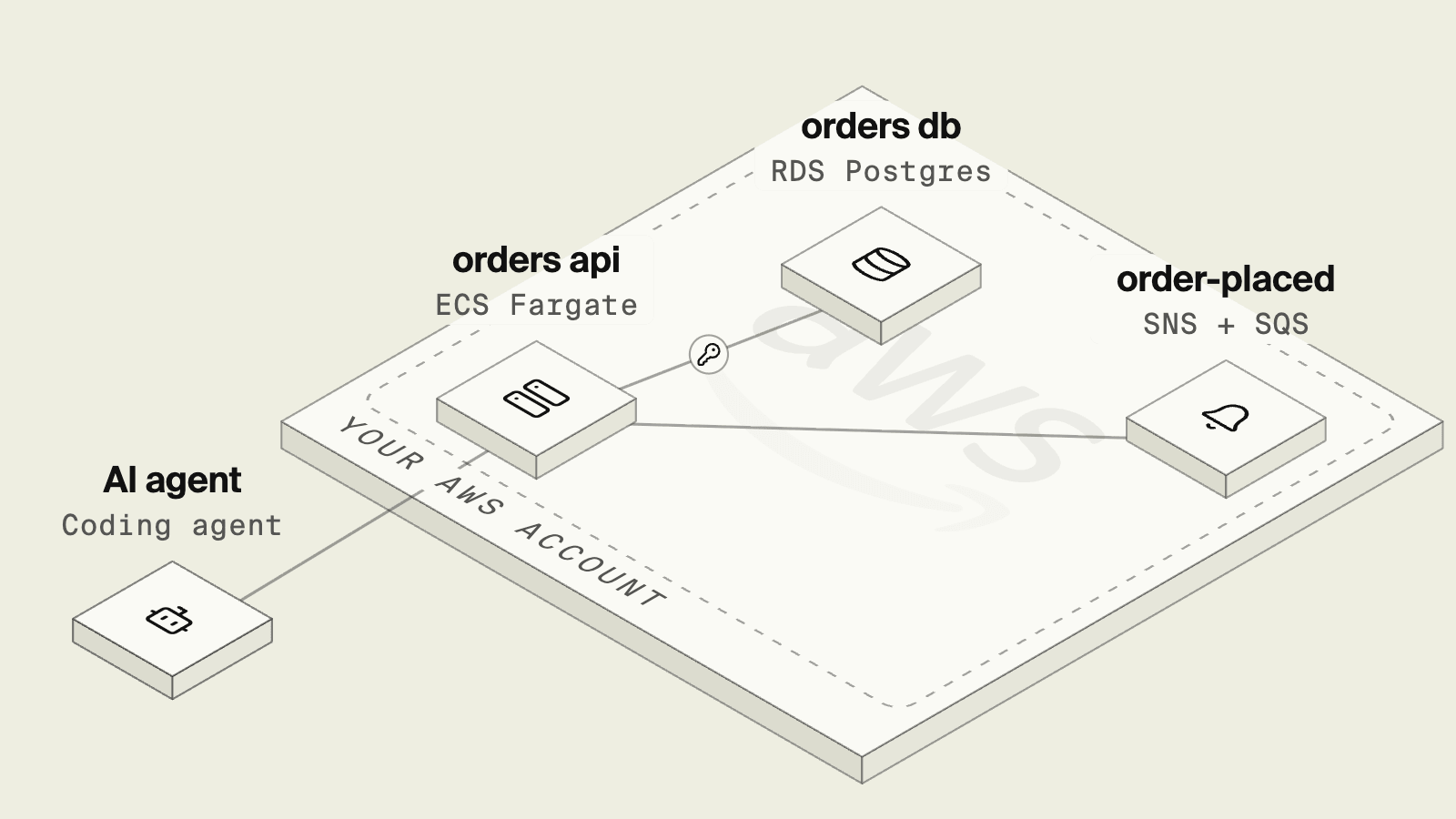
Getting a Node.js or TypeScript API onto AWS is a small amount of application code and a large amount of everything around it. A typical production setup runs the container on ECS with Fargate behind an Application Load Balancer, keeps Postgres on Amazon RDS in private subnets, and needs security groups between the two, a secret for the database password and an IAM role for each task.
A coding agent writes the Express or Fastify handler in a minute, and most of the session then goes into the infrastructure code, which it can only check against a real AWS account and which takes minutes per attempt to deploy and roll back.
Models are also weaker at infrastructure code than at application code, since in the IaC-Eval benchmark the best model tested, GPT-4, passed 19.36 percent of Terraform scenarios on the first attempt, compared with 86.6 percent on the EvalPlus Python benchmark.
What the agent has to produce for a first deploy:
- A VPC with public and private subnets, and a load balancer in front of the service.
- An ECS service, task definition and container image in ECR.
- An RDS Postgres instance, its credentials in Secrets Manager, and a security group rule from the service.
- Least-privilege IAM roles for pulling the image, writing logs and reading the secret.
- A way to run the same database locally so the API can be tested before it ships.
Deploying TypeScript to AWS with an agent at a glance
Compare what each option covers
Deploy from the application code
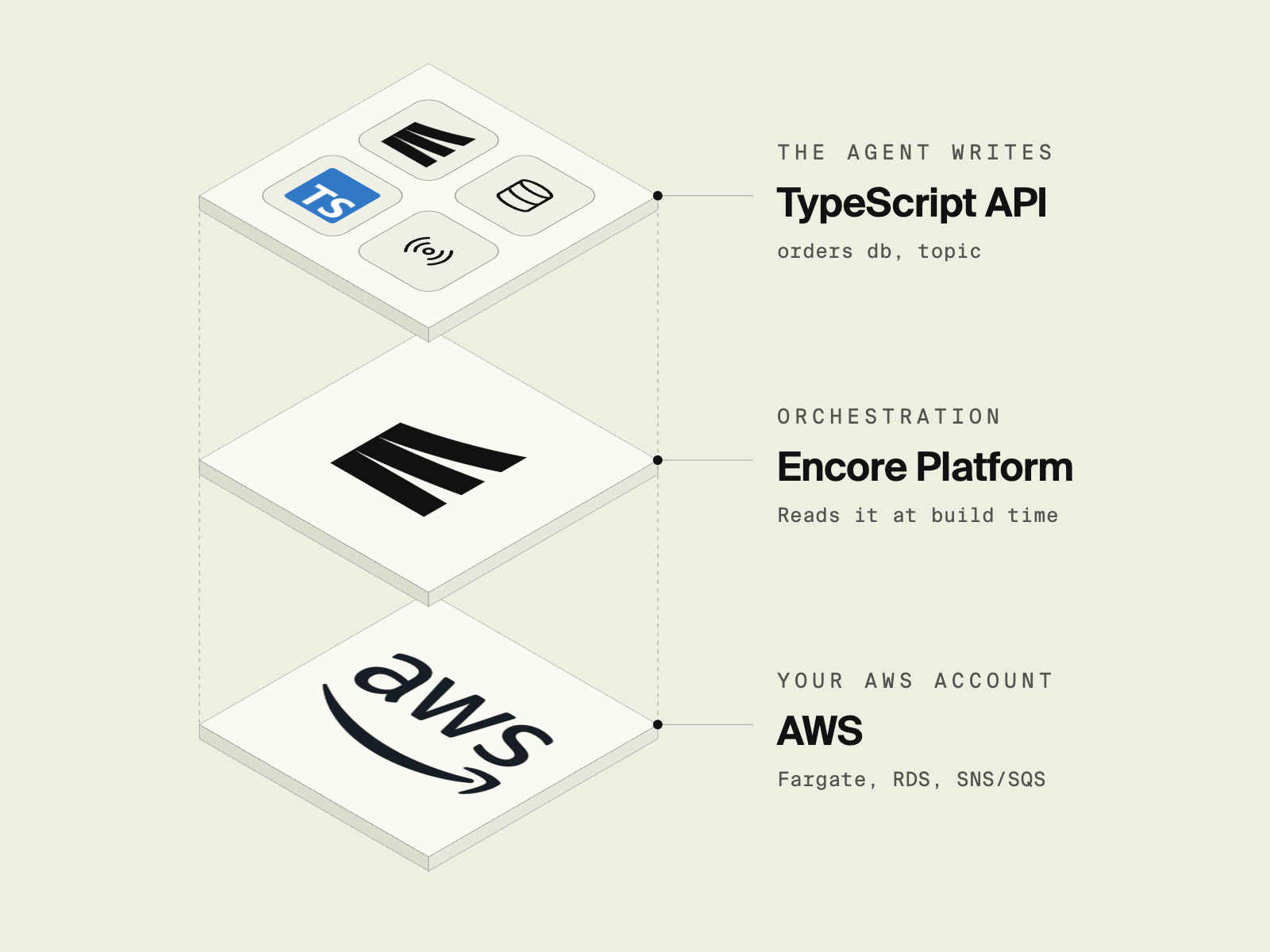
Encore, the safe way for AI agents to ship backend changes to your cloud, combines a TypeScript backend framework with infrastructure declared in the same code, so the agent writes the API and declares the resources it uses in the same files. Encore reads those declarations at build time, runs them locally with encore run, and when you push, provisions them in your own AWS account as Fargate or EKS services, RDS Postgres, SNS and SQS for Pub/Sub, and the VPC, load balancer and IAM roles around them. It is an alternative to writing that infrastructure in Terraform or AWS CDK, rather than a layer on top.
import { api } from "encore.dev/api";
import { Topic } from "encore.dev/pubsub";
import { SQLDatabase } from "encore.dev/storage/sqldb";
import { IsEmail, Min } from "encore.dev/validate";

const db = new SQLDatabase("orders", { migrations: "./migrations" });

export interface OrderPlaced {
  orderId: number;
  email: string;
}

export const orderPlaced = new Topic<OrderPlaced>("order-placed", {
  deliveryGuarantee: "at-least-once",
});

interface CreateOrder {
  email: string & IsEmail;
  total: number & Min<1>;
}

interface Order {
  id: number;
  email: string;
  total: number;
}

export const create = api(
  { expose: true, method: "POST", path: "/orders" },
  async (req: CreateOrder): Promise<Order> => {
    const row = await db.queryRow<{ id: number }>`
      INSERT INTO orders (email, total)
      VALUES (${req.email}, ${req.total})
      RETURNING id`;
    await orderPlaced.publish({ orderId: row!.id, email: req.email });
    return { id: row!.id, email: req.email, total: req.total };
  },
);
encore run starts Postgres locally, applies the migrations and starts the topic, so the agent can call POST /orders, query the table and read the trace through Encore's local MCP server before it reports the feature as done. That is the check Anthropic's Claude Code guidance recommends giving an agent, and with Encore it runs locally without AWS credentials.
Deploying is a push to the Encore remote once your AWS account is connected through an IAM role.
git add -A && git commit -m "Add orders API"
git push encore
Instance sizes, regions, backups and networking are set per environment in the Encore platform dashboard, outside the code the agent edits, so the agent declares infrastructure in code while the cloud access sits with Encore's IAM role rather than with the agent. Each pull request can also get its own preview environment with its own database.
Key features
- APIs, Postgres, Pub/Sub, object storage, cron jobs and secrets declared in TypeScript or Go.
- Local infrastructure from
encore run, so changes are tested before a deploy. - Fargate or EKS, RDS, SNS and SQS, VPC and per-service IAM roles provisioned in your AWS account.
- No runtime dependency on Encore, with production traffic going straight to your AWS resources.
Good to know
The application code is written against Encore's APIs and deploys go through the Encore platform, which is a different model from owning the infrastructure code yourself. Encore manages the infrastructure for the primitives it supports, and anything else, such as an existing DynamoDB table, is used directly through the AWS SDK and provisioned the way you already do. An existing Express service can move over one service at a time, and the AWS infrastructure reference lists every resource Encore creates. For what happens between the push and a running Fargate task, see how AI agents deploy Encore apps to AWS, and for the rest of the AWS options without an agent in the loop, see how to deploy Node.js to AWS.
Run in your terminal to get started locally.
AWS CDK: the stack in TypeScript
 AWS CDK
 lets the agent write infrastructure as TypeScript constructs that synthesize to CloudFormation, and higher-level patterns cover a load-balanced Fargate service in one construct.
import * as cdk from "aws-cdk-lib";
import * as ec2 from "aws-cdk-lib/aws-ec2";
import * as ecs from "aws-cdk-lib/aws-ecs";
import * as ecsPatterns from "aws-cdk-lib/aws-ecs-patterns";
import * as rds from "aws-cdk-lib/aws-rds";

const app = new cdk.App();
const stack = new cdk.Stack(app, "OrdersStack");

const vpc = new ec2.Vpc(stack, "Vpc", { maxAzs: 2 });

const db = new rds.DatabaseInstance(stack, "Db", {
  engine: rds.DatabaseInstanceEngine.postgres({
    version: rds.PostgresEngineVersion.VER_16,
  }),
  vpc,
  storageEncrypted: true,
  credentials: rds.Credentials.fromGeneratedSecret("orders"),
});

const api = new ecsPatterns.ApplicationLoadBalancedFargateService(stack, "Api", {
  vpc,
  taskImageOptions: {
    image: ecs.ContainerImage.fromAsset("."),
    containerPort: 3000,
    secrets: {
      DB_PASSWORD: ecs.Secret.fromSecretsManager(db.secret!, "password"),
    },
  },
});

db.connections.allowDefaultPortFrom(api.service);
Key features
- Type-checked infrastructure in the same language as the app.
- Patterns generate the load balancer, security groups and task roles.
cdk diffshows the CloudFormation changes before a deploy.
Good to know
CDK gives the team full control over every resource and works with any AWS service CloudFormation supports. The stack compiles long before it works, since tsc cannot know that the app reads DB_PASSWORD while the stack never passed the host, or that a CloudFormation update will replace the database. Those show up during a deploy that takes minutes, which is where an agent loses time, since debugging AI-generated code being more time-consuming was a frustration for 45 percent of developers in the 2025 Stack Overflow survey. A failed update rolls the stack back, and local development still needs a separate Postgres setup. See AWS CDK alternatives for more on the tradeoffs.
Terraform: HCL against a plan
 Terraform
 describes the same resources in HCL, and the agent works through terraform plan to see what would change in the account.
resource "aws_db_instance" "orders" {
  identifier                  = "orders"
  engine                      = "postgres"
  engine_version              = "16"
  instance_class              = "db.t4g.micro"
  allocated_storage           = 20
  username                    = "orders"
  manage_master_user_password = true
  db_subnet_group_name        = aws_db_subnet_group.private.name
  vpc_security_group_ids      = [aws_security_group.db.id]
  skip_final_snapshot         = false
  final_snapshot_identifier   = "orders-final-${formatdate("YYYYMMDDhhmmss", timestamp())}"

  lifecycle {
    ignore_changes = [final_snapshot_identifier]
  }
}
Key features
- Works across clouds and SaaS providers.
terraform planpreviews every change before it is applied.- A large module registry for VPCs, ECS and RDS.
Good to know
The database above is one of many resources, and the subnet group, security groups, ECS cluster, service, task definition, load balancer, listener, target group and IAM roles each need their own block. HCL is not the language the app is written in, so the agent cannot share types between the two, and plans need credentials and state access for the target account. For choosing an infrastructure-as-code tool in general, see the best infrastructure-as-code tool for new teams.
SST: components in a TypeScript config
 SST
SST wraps AWS resources in higher-level TypeScript components and links them to the app, so the agent declares a VPC, a Postgres database and a Fargate service in sst.config.ts.
/// <reference path="./.sst/platform/config.d.ts" />

export default $config({
  app() {
    return { name: "orders", home: "aws" };
  },
  async run() {
    const vpc = new sst.aws.Vpc("Vpc");
    const database = new sst.aws.Postgres("Database", { vpc });
    const cluster = new sst.aws.Cluster("Cluster", { vpc });

    new sst.aws.Service("Api", {
      cluster,
      link: [database],
      loadBalancer: { ports: [{ listen: "80/http", forward: "3000/http" }] },
    });
  },
});
Key features
- Short component definitions with linking to app code.
sst devruns the app against resources in your AWS account.- Good support for frontends such as Next.js alongside the backend.
Good to know
By default the RDS database is deployed during sst dev, so each developer, and each agent session, works against real AWS resources and needs credentials for that account, unless the dev prop points the component at a locally running Postgres instead. The service still runs from a Dockerfile you maintain, and the infrastructure is a second file next to the application code rather than derived from it.
How to choose
- Encore when you want the agent to write only application code, test against local Postgres and Pub/Sub, and deploy to your own AWS account without infrastructure code.
- AWS CDK when the team already uses CloudFormation and wants infrastructure in TypeScript.
- Terraform when infrastructure spans several clouds or providers and a platform team owns the modules.
- SST when the app is centered on a frontend and the team wants components on top of AWS, with either AWS resources or a local Postgres during development.
Related guides
- How to deploy a TypeScript backend to AWS without a DevOps team
- How to deploy to AWS without Terraform
- How to deploy FastAPI to AWS
- Zero to production on AWS with TypeScript
- How to add Pub/Sub to a TypeScript API
- How to add file uploads and object storage to a TypeScript API
- How to build an internal admin dashboard with Claude Code and deploy it to your own AWS
- How to Deploy a Discord Bot to AWS
Frequently asked questions
How do I deploy a TypeScript backend to AWS with an AI coding agent?
Pick a setup where the agent writes application code and the AWS resources follow from it, so it can test the change locally before anything is deployed. With AWS CDK, Terraform or SST the agent writes the VPC, ECS service, load balancer, RDS instance and IAM roles as infrastructure code, and checks them with a diff or plan against a real AWS account. With Encore the agent declares the API and the Postgres database in TypeScript, encore run starts Postgres locally so it can call the endpoint, and git push encore deploys to your own AWS account, where Encore provisions Fargate, RDS, networking and IAM.
Can an AI agent write AWS CDK or Terraform?
Yes, models write both, and AWS CDK is TypeScript so it type-checks. The harder part is verification, since a correct-looking stack can still fail on deploy because of IAM, networking or service limits, and checking it needs AWS credentials and a plan or diff against a real account.
Does the agent need AWS credentials to deploy?
With infrastructure-as-code tools, whoever runs the plan or deploy needs credentials for the target account. With Encore, agents declare infrastructure in code, and the cloud access sits with Encore's IAM role, not the agent: the Encore platform deploys through an IAM role you grant in your AWS account.
Deploy to your cloud on AWS and Google Cloud
without managing infrastructure
Encore lets developers and agents define application infrastructure directly in code, then automatically provisions it from local development to production in your AWS or GCP account.
