Introducing Encore × Bird
Build messaging workflows and test backend changes end-to-end locally.

Bird provides the communications infrastructure businesses use to reach customers over SMS, email, and WhatsApp. Using its SMS API, we'll build an appointment reminder service with Encore that schedules messages, tracks reminder state, and reacts to delivery events, then test the complete workflow locally.
Building the reminder service
We'll store appointments and reminder state in PostgreSQL, then use a scheduled job to find reminders that are due and publish them to a pub/sub topic, where a subscriber will pick them up and call Bird.
We'll define the database, topic, and scheduled job in application code using Encore's infrastructure primitives, keeping the resources around Bird in the same codebase as the reminder logic rather than in a separate layer of infrastructure configuration.
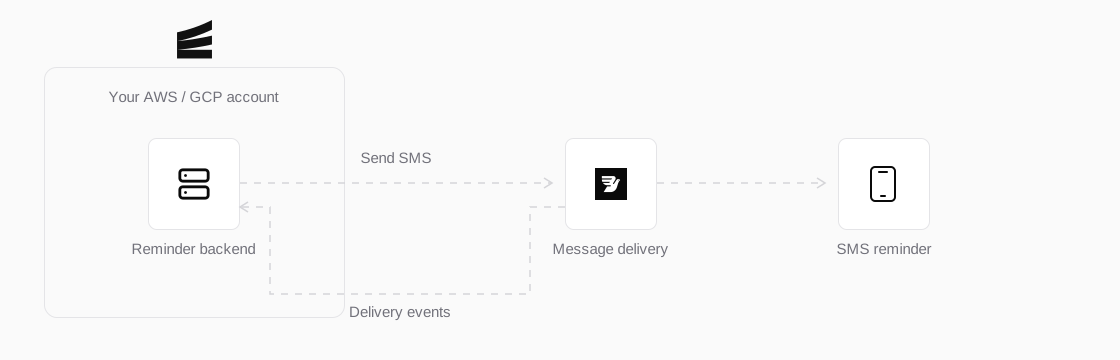
The reminder backend runs with Encore in your own cloud, using Bird to send SMS and receive delivery updates.
The application declares its database and pub/sub topic, with the Bird API key and SMS sender kept in Encore secrets:
import { SQLDatabase } from "encore.dev/storage/sqldb";
import { Topic } from "encore.dev/pubsub";
import { secret } from "encore.dev/config";

const db = new SQLDatabase("reminders", {
  migrations: "./migrations",
});

interface ReminderDue {
  reminderID: string;
}

const remindersDue = new Topic<ReminderDue>("reminders-due", {
  deliveryGuarantee: "at-least-once",
});

const birdAPIKey = secret("BirdAPIKey");
const birdSMSSender = secret("BirdSMSSender");
The declarations form Encore's application model, which encore run uses to start the APIs and local infrastructure together without a separate Docker Compose setup. Production configuration lives in the Encore dashboard or the team's existing AWS/GCP tooling.

Encore starts these resources locally and provisions them in your AWS or GCP account for production.
Sending reminders through Bird
To send the reminders, we'll add a dispatch API that loads the due reminders from PostgreSQL and publishes each one for processing, with an Encore cron job calling the same endpoint every five minutes:
import { api } from "encore.dev/api";
import { CronJob } from "encore.dev/cron";

export const dispatch = api(
  { expose: true, method: "POST", path: "/reminders/dispatch" },
  async (): Promise<void> => {
    for (const reminder of await loadDueReminders()) {
      await remindersDue.publish({ reminderID: reminder.id });
    }
  },
);

const reminderSchedule = new CronJob("dispatch-reminders", {
  title: "Dispatch appointment reminders",
  every: "5m",
  endpoint: dispatch,
});
Before calling Bird, the subscriber checks the booking one more time and skips the send if the appointment was cancelled or rescheduled after the reminder entered the queue. The scheduled check only has to publish the due reminders; the subscriber calls Bird and stores the accepted message ID alongside the reminder:
import { BirdClient } from "@messagebird/sdk";

const bird = new BirdClient({ apiKey: birdAPIKey() });

const message = await bird.sms.send(
  {
    from: birdSMSSender(),
    to: reminder.phone,
    text: formatReminder(reminder),
    category: "transactional",
    metadata: { reminder_id: reminder.id },
  },
  { idempotencyKey: `appointment-reminder:${reminder.id}` },
);
Both the scheduled API and the pub/sub subscriber use a stable reminder ID for retries, checking its current send state in PostgreSQL before any work continues. Every request to Bird carries the same idempotency key during Bird's retention window, and PostgreSQL keeps the long-term record afterward.
Bird sends each delivery outcome to a webhook. Before updating the reminder, the handler verifies the signature against the raw request body and checks whether the event has already been recorded, so retrying the same webhook does not apply the update twice.
Verifying the reminder flow
encore run starts the APIs, PostgreSQL, and pub/sub locally. From there, we'll create a booking with a due reminder, cancel the appointment, call the dispatch API, and inspect the database and request trace. A passing check leaves the appointment cancelled and the reminder skipped, without a request being sent to Bird.
An agent can carry out the same loop through the Encore MCP server, calling the APIs, reading the database, and opening the trace to verify the behavior of the running application. The included tests exercise the Bird SDK request and webhook verifier as well, including retries on both sides of the integration.
Cron jobs do not fire automatically in local or preview environments, so call the dispatch API directly during verification to exercise the same handler used by the deployed schedule.
We can extend that check to a live SMS once Bird credentials, a configured sender and enabled destination, and a publicly reachable HTTPS endpoint are available. The same dispatch flow will then store Bird's accepted message ID and process the delivery outcome through the webhook.
Try it today
You can run the complete example, start with an existing Encore application, or follow the TypeScript quickstart to create one, then give an agent the prompt below to build the reminder service:
Read about sending SMS with Bird for the messaging setup, and Encore's application model to see how the same infrastructure declarations work across local development and deployment.
Recent articles

Introducing Encore × SurrealDB
Combine vector search and graph relationships with a backend agents can build and verify end-to-end.
 Ivan Cernja
Encore for Rust
An early look at Encore for Rust, entering beta soon.
Ivan Cernja
Introducing Encore × E2B
Give coding agents an isolated sandbox with a complete backend inside it — and keep both in your own cloud.
Ivan Cernja