EventBridge Scheduler with Terraform: Cron, One-Time Schedules, IAM and Retries
Terraform for EventBridge Scheduler: a schedule group, an execution role with confused deputy protection, cron and rate schedules in a time zone, flexible time windows, Lambda and SQS targets, retries and a dead-letter queue, one-time at() schedules, and how Encore runs scheduled jobs from code.

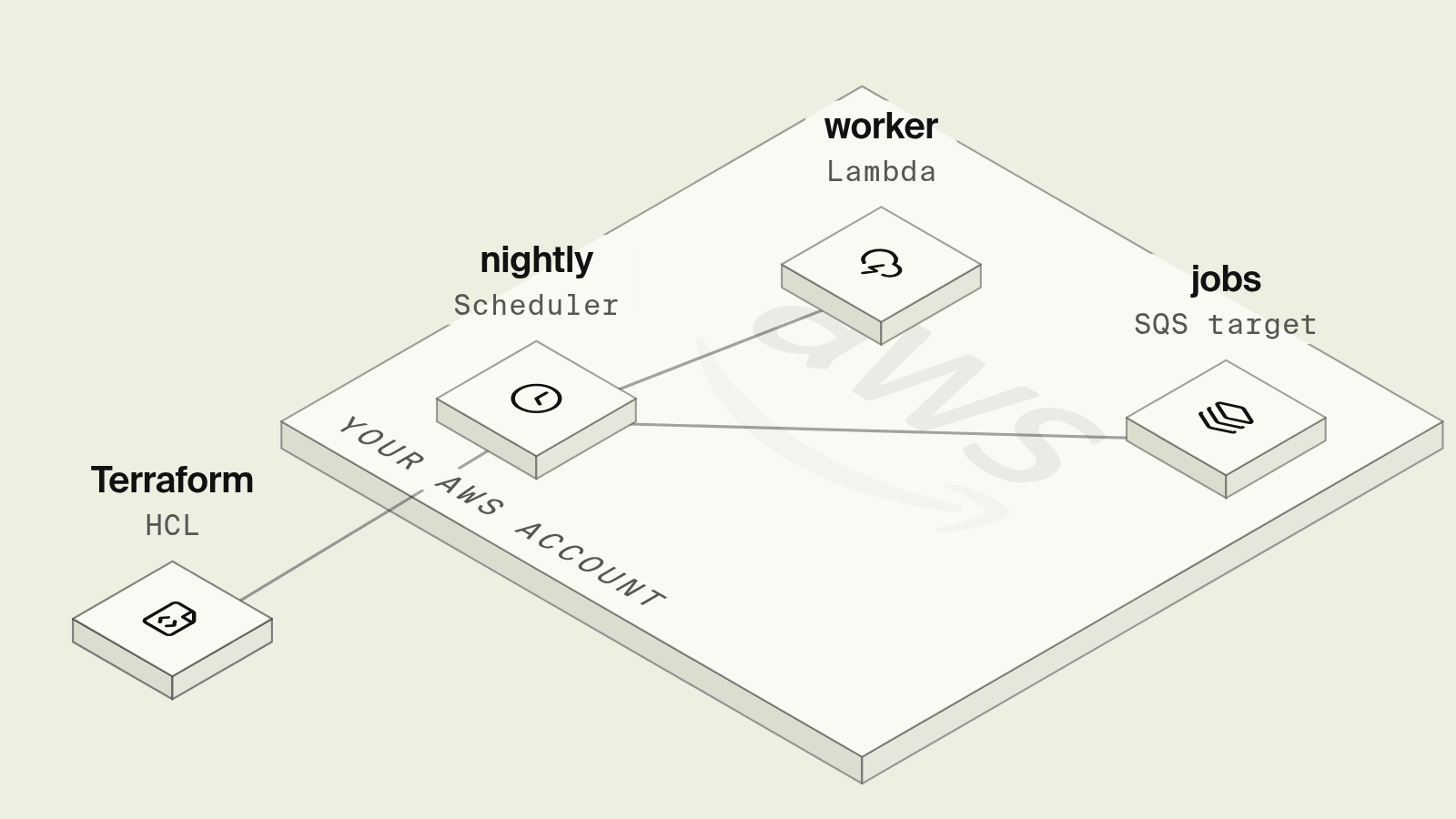
EventBridge Scheduler is the AWS service built for running something on a timetable, from a nightly Lambda to a message dropped on a queue every hour, with time zones, one-time schedules and retries that scheduled rules on an event bus never had. In Terraform each schedule is a small resource, but around it sit an execution role, a trust policy with conditions most examples leave out, a retry policy, a dead-letter queue and decisions about time zones and windows that only show up the first time daylight saving time changes.
This guide builds a schedule group with three schedules using the AWS provider 6.x, and then shows how Encore handles scheduled jobs from code.
What an EventBridge Scheduler Terraform setup needs
The group and the queues
terraform {
  required_providers {
    aws = {
      source  = "hashicorp/aws"
      version = "~> 6.0"
    }
  }
}

provider "aws" {
  region = "eu-central-1"
}

data "aws_caller_identity" "current" {}

variable "report_function_arn" {
  type        = string
  description = "Lambda function that builds the nightly usage report"
}

# Groups scope IAM and tags, and are what aws:SourceArn can match on.
resource "aws_scheduler_schedule_group" "billing" {
  name = "billing"
}

resource "aws_sqs_queue" "jobs" {
  name                       = "billing-jobs"
  visibility_timeout_seconds = 300
  sqs_managed_sse_enabled    = true
}

# Invocations that fail after the retry policy land here.
resource "aws_sqs_queue" "scheduler_dlq" {
  name                      = "billing-scheduler-dlq"
  message_retention_seconds = 1209600
  sqs_managed_sse_enabled   = true
}
An execution role with confused deputy protection
data "aws_iam_policy_document" "scheduler_trust" {
  statement {
    actions = ["sts:AssumeRole"]
    principals {
      type        = "Service"
      identifiers = ["scheduler.amazonaws.com"]
    }
    # Confused deputy protection: only schedules in this account and group.
    condition {
      test     = "StringEquals"
      variable = "aws:SourceAccount"
      values   = [data.aws_caller_identity.current.account_id]
    }
    condition {
      test     = "ArnEquals"
      variable = "aws:SourceArn"
      values   = [aws_scheduler_schedule_group.billing.arn]
    }
  }
}

resource "aws_iam_role" "scheduler" {
  name               = "billing-scheduler"
  assume_role_policy = data.aws_iam_policy_document.scheduler_trust.json
}

data "aws_iam_policy_document" "scheduler_targets" {
  statement {
    actions   = ["lambda:InvokeFunction"]
    resources = [var.report_function_arn]
  }
  statement {
    actions   = ["sqs:SendMessage"]
    resources = [aws_sqs_queue.jobs.arn, aws_sqs_queue.scheduler_dlq.arn]
  }
}

resource "aws_iam_role_policy" "scheduler_targets" {
  role   = aws_iam_role.scheduler.id
  policy = data.aws_iam_policy_document.scheduler_targets.json
}
Most examples give scheduler.amazonaws.com a bare sts:AssumeRole. AWS recommends adding aws:SourceAccount and aws:SourceArn conditions, and its confused deputy guidance states that aws:SourceArn must be a schedule group ARN rather than a single schedule, which is the main reason to create a group instead of using default. The role also needs sqs:SendMessage on the dead-letter queue, since Scheduler writes failed invocations there with the same role.
Cron, rate and one-time schedules
# Nightly report at 03:30 Vienna time, outside the hour clocks change in,
# invoked at any point in the following 15 minutes.
resource "aws_scheduler_schedule" "usage_report" {
  name       = "nightly-usage-report"
  group_name = aws_scheduler_schedule_group.billing.name

  schedule_expression          = "cron(30 3 * * ? *)"
  schedule_expression_timezone = "Europe/Vienna"

  flexible_time_window {
    mode                      = "FLEXIBLE"
    maximum_window_in_minutes = 15
  }

  target {
    arn      = var.report_function_arn
    role_arn = aws_iam_role.scheduler.arn
    input    = jsonencode({ report = "usage", window = "previous-day" })

    retry_policy {
      maximum_retry_attempts       = 3
      maximum_event_age_in_seconds = 3600
    }
    dead_letter_config {
      arn = aws_sqs_queue.scheduler_dlq.arn
    }
  }
}

# Every hour, drop a sync job on the queue for the worker service.
resource "aws_scheduler_schedule" "hourly_sync" {
  name       = "hourly-usage-sync"
  group_name = aws_scheduler_schedule_group.billing.name

  schedule_expression = "rate(1 hour)"

  flexible_time_window {
    mode = "OFF"
  }

  target {
    arn      = aws_sqs_queue.jobs.arn
    role_arn = aws_iam_role.scheduler.arn
    input    = jsonencode({ job = "sync-usage" })

    dead_letter_config {
      arn = aws_sqs_queue.scheduler_dlq.arn
    }
  }
}

# One-time: end a trial at a fixed moment, then delete the schedule.
resource "aws_scheduler_schedule" "trial_end" {
  name       = "trial-end-acct-4821"
  group_name = aws_scheduler_schedule_group.billing.name

  schedule_expression          = "at(2026-12-01T09:00:00)"
  schedule_expression_timezone = "Europe/Vienna"
  action_after_completion      = "DELETE"

  flexible_time_window {
    mode = "OFF"
  }

  target {
    arn      = aws_sqs_queue.jobs.arn
    role_arn = aws_iam_role.scheduler.arn
    input    = jsonencode({ job = "end-trial", account_id = "acct_4821" })
  }
}
A few behaviors worth knowing before relying on these:
- Time zones and daylight saving time.
schedule_expression_timezonemakes the cron expression follow local time. When clocks go forward, a time that does not exist that night is skipped, and when they go back, the schedule runs once rather than twice, per the schedule types docs. A job at 02:30 in a European time zone would therefore be skipped once a year, which is why the report above runs at 03:30. - Flexible windows.
FLEXIBLEwith a 15-minute window lets Scheduler invoke the target anywhere in that window, which spreads load when many schedules share a time, as the flexible time window docs describe. WithOFF, invocations land within the scheduled minute. - Retries and the DLQ.
retry_policybounds how many times and for how long Scheduler retries a failed call, and once retries are exhausted the event goes to the queue indead_letter_config, as described in the dead-letter queue docs. A schedule without one drops the failed invocation. - Templated targets. Lambda and SQS take the target ARN and
inputdirectly. Other AWS API actions use a universal target ARN of the formarn:aws:scheduler:::aws-sdk:service:action.
The one-time at() schedule with action_after_completion = "DELETE" removes itself after it fires, and the next terraform plan then wants to create it again. One-time schedules that belong to application data, such as a trial ending for one account, are usually created by the application through the Scheduler API instead, which moves that IAM permission into the service's role. The configuration passes terraform validate with Terraform 1.13 and the AWS provider 6.x.
What still takes work after the first apply
- The target code lives elsewhere: the Lambda function or the queue consumer has its own deployment, and a schedule pointing at a renamed function fails at the next invocation.
- Idempotency is up to the target, because retries and flexible windows mean a run can arrive late or more than once.
- Local development has no scheduler, so the job is tested by invoking the function or sending the message by hand.
- Quotas are generous, 10 million schedules per region by default per the Scheduler quotas page, but invocations are throttled at 1,000 per second by default in the main regions, which matters when many per-account schedules share a time.
How does Encore run scheduled jobs on AWS from code?

Encore brings infrastructure from code to TypeScript and Go backends, and a scheduled job is a CronJob declared next to the private endpoint it calls. Cron jobs are managed by the Encore platform and need no extra cloud infrastructure: according to the AWS infrastructure docs, each run is an authenticated, cryptographically signed API request to your service, and the service checks that the request came from the Encore platform. The bucket and database the job uses are provisioned in your own AWS account as S3 and RDS.

Set up the app
Run in your terminal to get started locally.
The billing directory is a service, declared in its encore.service.ts:
import { Service } from "encore.dev/service";
export default new Service("billing");
The nightly report and the trial expiry from the Terraform version become two endpoints and two cron declarations:
// billing/jobs.ts
import { api } from "encore.dev/api";
import { CronJob } from "encore.dev/cron";
import log from "encore.dev/log";
import { Bucket } from "encore.dev/storage/objects";
import { SQLDatabase } from "encore.dev/storage/sqldb";

const db = new SQLDatabase("billing", { migrations: "./migrations" });
const reports = new Bucket("usage-reports");

// Writes yesterday's usage per account. Same day, same key, same content,
// so a repeated call overwrites the file with identical data.
export const usageReport = api({ expose: false }, async (): Promise<void> => {
  const day = new Date(Date.now() - 86_400_000).toISOString().slice(0, 10);
  const lines = ["account_id,units"];
  const rows = db.query<{ account_id: string; units: number }>`
    SELECT account_id, SUM(units)::bigint AS units FROM usage
    WHERE recorded_at::date = ${day}::date
    GROUP BY account_id ORDER BY account_id
  `;
  for await (const r of rows) lines.push(`${r.account_id},${r.units}`);
  await reports.upload(`daily/${day}.csv`, Buffer.from(lines.join("\n")), {
    contentType: "text/csv",
  });
});

// Ends trials whose time is up. The WHERE clause makes it safe to run often
// and safe to run twice, and replaces one one-time schedule per account.
export const endDueTrials = api({ expose: false }, async (): Promise<void> => {
  const ended = db.query<{ id: string }>`
    UPDATE accounts SET plan = 'free'
    WHERE plan = 'trial' AND trial_ends_at <= now()
    RETURNING id
  `;
  for await (const a of ended) log.info("trial ended", { accountID: a.id });
});

// Both schedules are managed by the Encore platform and run in UTC.
const _report = new CronJob("usage-report", {
  title: "Nightly usage report",
  schedule: "30 1 * * *",
  endpoint: usageReport,
});

const _trials = new CronJob("end-due-trials", {
  title: "End expired trials",
  every: "10m",
  endpoint: endDueTrials,
});
The one-time trial schedules turn into a trial_ends_at column and a sweep every ten minutes, so ending a trial early or extending it is an UPDATE rather than a schedule to delete and recreate. Encore cron schedules use UTC, every intervals must divide 24 hours evenly, and endpoints called by cron take no parameters, as the cron jobs docs describe, which also recommend idempotent endpoints because a run can be repeated. Each run shows up in the Encore dashboard with its result.
Cron jobs do not run locally or in preview environments, so both endpoints are called from the local development dashboard, with Postgres started locally and the bucket stored on disk, before anything reaches AWS. A coding agent that adds a third job declares it in this file, calls it locally to check the output, and the schedule exists in every environment after the next deploy with no role or trust policy to extend. The object storage docs cover the bucket API used for the report.
Best fit: TypeScript and Go teams on AWS who want recurring jobs defined next to the code they run, with the schedule managed by the Encore platform and the job's resources in their own account.
Good to know
- Schedules are evaluated with 60-second precision, so sub-minute timing needs a different approach, such as a worker that sleeps.
state = "DISABLED"pauses a schedule without deleting it, which is useful during an incident on the target.- Setting
kms_key_arnon a schedule replaces the AWS owned key with a customer managed key, which also means managing that key's policy, per the encryption at rest docs.
Related guides
Frequently asked questions
How do I create an EventBridge Scheduler schedule in Terraform?
Use aws_scheduler_schedule with a schedule_expression such as cron(30 3 * * ? *) or rate(1 hour), a flexible_time_window block, and a target block with the target ARN, an execution role ARN and an input payload. The role must trust scheduler.amazonaws.com and allow the action on the target, such as lambda:InvokeFunction or sqs:SendMessage.
What does flexible_time_window do in EventBridge Scheduler?
With mode = "FLEXIBLE" and maximum_window_in_minutes, EventBridge Scheduler invokes the target at some point within that window after the scheduled time instead of exactly on it, which spreads invocations out. With mode = "OFF" the target is invoked at the scheduled time, with 60-second precision.
How do I scope the EventBridge Scheduler role against confused deputy attacks?
Add aws:SourceAccount and aws:SourceArn conditions to the role's trust policy. AWS requires aws:SourceArn to be a schedule group ARN, not an individual schedule, so put related schedules in an aws_scheduler_schedule_group and match on its ARN.
How do I define a scheduled job for AWS in TypeScript code?
With Encore, declare new CronJob("usage-report", { schedule: "30 1 * * *", endpoint: usageReport }) next to a private API endpoint in TypeScript. Cron jobs are managed by the Encore platform and need no extra cloud infrastructure, and the platform calls the endpoint on schedule in your AWS environment.
Deploy to your cloud on AWS and Google Cloud
without managing infrastructure
Encore lets developers and agents define application infrastructure directly in code, then automatically provisions it from local development to production in your AWS or GCP account.
