Cloud Run Jobs vs Services: Batch Work or Request Serving?
How Cloud Run jobs and Cloud Run services differ on triggers, timeouts, retries, parallelism, scaling and billing, which one fits batch work, scheduled tasks and APIs, and how Encore runs scheduled batches on Cloud Run services with cron and Pub/Sub.

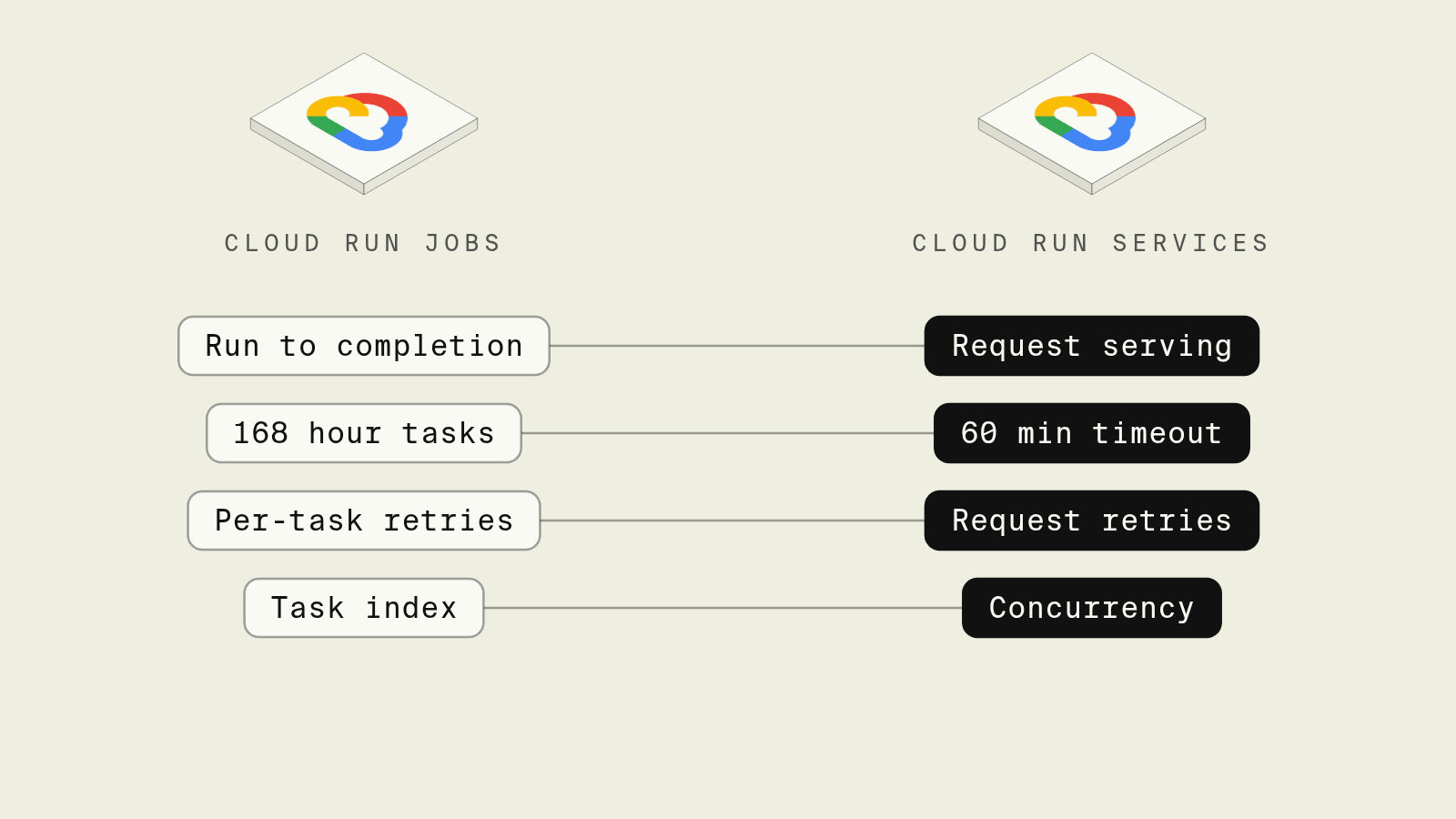
Cloud Run started as a way to run containers that answer HTTP requests, and Cloud Run jobs were added later for containers that do a piece of work and exit. Both use the same images, regions and service accounts, so a team that already runs an API on Cloud Run often reaches for a job the first time a nightly export or a backfill needs to run, and then finds it needs its own trigger, its own retry model and its own way of splitting work.
This guide compares jobs and services on the points that decide which one a task belongs in, and shows how Encore handles scheduled batch work on Cloud Run services with a cron job and a Pub/Sub topic declared in Go.
Cloud Run jobs vs services at a glance
How does Encore run batch work on Cloud Run services?

Encore applies infrastructure from code to TypeScript and Go backends on Google Cloud: the schedule, the topic and the database a batch needs are declared next to the code that uses them, and on deploy each service runs on Cloud Run with its own service account, per the GCP infrastructure docs. Encore does not create Cloud Run jobs, so batch work is shaped as a short scheduled endpoint that queues items and a subscriber that processes them, which keeps a large run from depending on one container finishing.

Set up the app
Run in your terminal to get started locally.
Monthly invoicing is the kind of task that often becomes a Cloud Run job with one task per shard of accounts. Here the cron job queues one message per account, and a subscription builds each invoice:
// billing/billing.go
package billing

import (
	"context"
	"time"

	"encore.dev/cron"
	"encore.dev/pubsub"
	"encore.dev/storage/sqldb"
)

var db = sqldb.NewDatabase("billing", sqldb.DatabaseConfig{Migrations: "./migrations"})

type InvoiceDue struct {
	AccountID string `json:"account_id"`
	Period    string `json:"period"` // e.g. "2026-11"
}

// One message per account, so the batch spreads across instances.
var Due = pubsub.NewTopic[*InvoiceDue]("invoice-due", pubsub.TopicConfig{
	DeliveryGuarantee: pubsub.AtLeastOnce,
})

// Runs at 02:00 UTC on the 1st, triggered by the Encore platform.
var _ = cron.NewJob("monthly-invoices", cron.JobConfig{
	Title:    "Queue monthly invoices",
	Schedule: "0 2 1 * *",
	Endpoint: QueueInvoices,
})

// QueueInvoices finds every active account and publishes one message each.
// It returns quickly, so it fits well inside a request timeout.
//
//encore:api private
func QueueInvoices(ctx context.Context) error {
	period := time.Now().UTC().AddDate(0, -1, 0).Format("2006-01")
	rows, err := db.Query(ctx, `SELECT id FROM accounts WHERE active`)
	if err != nil {
		return err
	}
	defer rows.Close()
	for rows.Next() {
		var id string
		if err := rows.Scan(&id); err != nil {
			return err
		}
		if _, err := Due.Publish(ctx, &InvoiceDue{AccountID: id, Period: period}); err != nil {
			return err
		}
	}
	return rows.Err()
}

var _ = pubsub.NewSubscription(Due, "build-invoice",
	pubsub.SubscriptionConfig[*InvoiceDue]{
		Handler: buildInvoice,
		RetryPolicy: &pubsub.RetryPolicy{
			MaxRetries: 10, // then the message moves to the dead-letter topic
		},
	},
)

// Idempotent: (account_id, period) is unique, so a redelivery or a second
// cron run for the same month inserts nothing new.
func buildInvoice(ctx context.Context, e *InvoiceDue) error {
	_, err := db.Exec(ctx, `
		INSERT INTO invoices (account_id, period, total_cents)
		SELECT $1, $2, COALESCE(SUM(amount_cents), 0)
		FROM usage
		WHERE account_id = $1 AND to_char(recorded_at, 'YYYY-MM') = $2
		ON CONFLICT (account_id, period) DO NOTHING
	`, e.AccountID, e.Period)
	return err
}
On GCP the topic becomes Google Cloud Pub/Sub with a dead-letter topic, and the Pub/Sub docs cover retry policies and the ack deadline that bounds each handler. A failing account is retried on its own and eventually dead-lettered without holding up the rest, which is the per-item retry a job only offers per task. The cron job is managed by the Encore platform, which calls QueueInvoices with signed requests on the schedule, and the cron jobs docs note that cron endpoints should be idempotent because they can be called more than once.
Cron jobs do not run locally or in preview environments, so the batch is tested by calling QueueInvoices from the local development dashboard and watching each subscriber run in the trace. A coding agent changing how invoices are calculated edits the handler, runs it against local Postgres, and ships the change with the code that schedules it, with no separate job image or scheduler entry to update. Connecting a project is covered in the own cloud guide.
Best fit: TypeScript and Go teams on GCP who want scheduled and batch work to live in the same Cloud Run services as their APIs, retried per item and defined in one codebase.
Cloud Run jobs
 Cloud Run jobs
A Cloud Run job runs a container that does not listen for requests: it executes its tasks and exits, as Google's job creation docs put it. A job can be one task or up to 10,000 independent tasks running in parallel, each told its position through the CLOUD_RUN_TASK_INDEX environment variable, so splitting a backfill means mapping that index to a slice of the data yourself.
Each task runs for up to 10 minutes by default, configurable up to 168 hours, according to the task timeout docs. A failed task restarts up to 3 times by default and up to 10, and the max retries docs are explicit that the setting applies per task, not per job, so a task that processes 5,000 rows and fails on row 4,999 runs all 5,000 again unless the code tracks progress.
A job has no schedule of its own, so running one nightly means a Cloud Scheduler job that calls the Cloud Run Admin API with a service account allowed to execute it, as described in executing jobs on a schedule, and that scheduler entry, the job definition and its image are three things to keep in step with the service code that shares the same database.
Best fit: Database migrations, one-off backfills, long exports and other work with a clear end that may run for hours, especially when parallel tasks can split it by index.
Cloud Run services
Cloud Run servicesA Cloud Run service is a container listening on $PORT that scales instances with incoming requests and can scale to zero. Requests time out after 5 minutes by default and can be extended to 60 minutes, per the request timeout docs, and Google recommends retries and reconnect handling for anything beyond 15 minutes.
Services handle event-driven work as well as APIs: Pub/Sub push subscriptions and Eventarc deliver events as HTTP requests, and Cloud Scheduler can call an authenticated endpoint on a schedule with an OIDC token. Work that runs after the response is sent needs instance-based billing, because with request-based billing the instance is only charged, and given CPU, while it processes requests.
Using a service for batch work means sizing each unit to fit a request, which is usually a good constraint: a monthly run broken into one message per account retries the account that failed, not the whole month.
Best fit: APIs, webhooks and event handlers, plus scheduled or batch work that can be split into request-sized pieces.
How to choose
Pick Encore when your batch work belongs to TypeScript or Go services on GCP and you want the schedule, the queue and the handlers declared in code, tested locally and deployed as Cloud Run services in your own project. Pick a Cloud Run job when the work has to run for longer than an hour in one piece, such as a migration or a large export, or when an existing container image already does the job. Pick a plain Cloud Run service with Cloud Scheduler when you manage Cloud Run directly and the task fits inside one request.
Related guides
Frequently asked questions
What is the difference between a Cloud Run job and a Cloud Run service?
A Cloud Run service listens on a port and serves requests, scaling instances with traffic. A Cloud Run job does not listen for requests: it runs one or more tasks to completion and exits, with each task retried up to 3 times by default and able to run for up to 168 hours.
When should I use a Cloud Run job instead of a service?
Use a job for work that has a clear end and no caller waiting for a response, such as a database migration, a nightly export or a large backfill split across parallel tasks. Use a service for APIs, webhooks and push-based event handlers, and for any work that fits inside a request of up to 60 minutes.
How do I schedule a Cloud Run job?
Create a Cloud Scheduler job that calls the Cloud Run Admin API to execute the job on a cron schedule, using a service account with permission to run it. The job itself has no built-in schedule.
How do I run a monthly batch on Cloud Run services with Encore?
Declare a cron job with cron.NewJob pointing at a private endpoint that publishes one Pub/Sub message per item, and process each message in a pubsub.NewSubscription handler that is safe to run twice. Encore deploys the services to Cloud Run in your GCP project, and the Encore platform triggers the cron job without a Cloud Scheduler resource.
Deploy to your cloud on AWS and Google Cloud
without managing infrastructure
Encore lets developers and agents define application infrastructure directly in code, then automatically provisions it from local development to production in your AWS or GCP account.
