Cloud Run vs App Engine: Which Should You Use on Google Cloud?
How Google's two serverless platforms differ on runtimes, scaling, timeouts, background work and bundled services, when App Engine still makes sense, and what a move to Cloud Run involves.

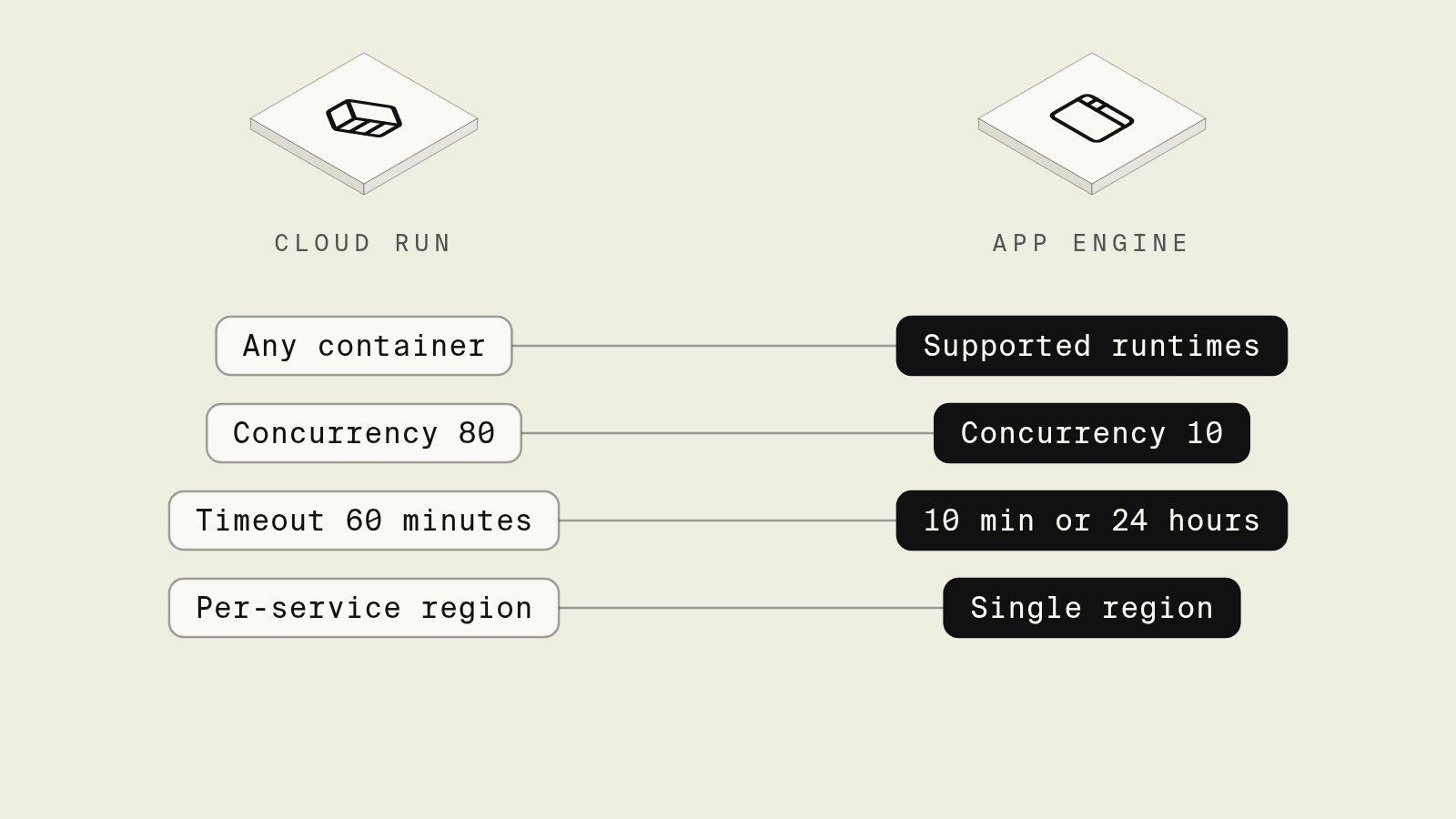
App Engine was Google Cloud's original way to run a web app without managing servers, and a lot of production code still runs on it. Cloud Run arrived later as a container platform, and Google now describes it as "the latest evolution of Google Cloud Serverless" in its App Engine to Cloud Run comparison. Choosing between them for a new service is mostly settled, while deciding whether to move an existing App Engine app depends on which App Engine features it leans on.
This guide compares the two on the points that change how you build and run a backend, covers the cases where App Engine is still a reasonable home, and outlines what a migration involves.
Cloud Run vs App Engine at a glance
The figures come from Google's comparison page linked above.
How the runtime model differs
App Engine standard runs your code inside a Google-managed runtime for a specific language version. You describe the app in app.yaml, and App Engine builds and runs it. Settings that are missing from app.yaml fall back to defaults on every deploy, so dropping instance_class: F4 from the file quietly moves the next version back to an F1 instance.
Cloud Run takes a container image, or builds one from source with Google Cloud's buildpacks. Any language and any system library works as long as the container listens on $PORT. Configuration is sticky: a deploy without flags keeps the previous revision's settings, and revisions are immutable, so a configuration change creates a new revision on the same image.
App Engine flexible sits between the two: it runs containers on Compute Engine VMs, which gives it more CPU and memory headroom than Cloud Run, at the price of slow scaling, no scale to zero and a minimum of one running instance.
Scaling, timeouts and background work
App Engine standard sends at most 10 concurrent requests to an instance by default, and Cloud Run sends 80, so an I/O-bound Node.js or Go API on Cloud Run usually needs fewer instances for the same traffic. Those defaults, and the request timeouts in the table above, come from Google's comparison of App Engine and Cloud Run. Google's migration advice on that page is to start from the Cloud Run default of 80 and load test downward, because copying the App Engine value of 10 can leave instances under-used and raise the bill.
App Engine can come out ahead on request timeouts, as basic and manual scaling on App Engine standard allow requests of up to 24 hours, which some apps use for long batch work behind an HTTP call. Cloud Run caps a request at 60 minutes, so that work moves to a Cloud Run job or a queue.
Background threads also behave differently: App Engine keeps CPU available to an instance between requests, while Cloud Run with request-based billing throttles CPU to nearly zero once the response is sent. Code that flushes metrics or processes work after responding needs instance-based billing on Cloud Run, or a move to Pub/Sub.
Legacy bundled services
Older App Engine standard apps often call Memcache, Datastore through the App Engine SDK, Task Queues, the Users API or Mail. These bundled services exist only inside App Engine standard, and they are the main reason a migration takes weeks rather than an afternoon. Each one maps to a standalone product: Memorystore for Memcache, the Firestore in Datastore mode client library for Datastore, Cloud Tasks for push queues and Pub/Sub for pull queues. An app that already uses Cloud Client Libraries can move without code changes to its data access, because those libraries work the same on both platforms.
When App Engine still makes sense
- An existing app that depends heavily on bundled services, has no performance problems and has no planned rewrite.
- Requests that need to run for hours through basic or manual scaling, where splitting the work into jobs is not worth the effort yet.
- Static file handlers declared in
app.yaml, which App Engine serves without hitting your instances. On Cloud Run the files come from the container or from Cloud Storage.
For a new backend, Cloud Run is the better default, and Google's comparison lists per-service regions, sidecars, GPUs and committed use discounts on its side only.
Moving an App Engine app to Cloud Run
- Replace bundled service calls with Cloud Client Libraries, one service at a time, while still on App Engine.
- Add a
Procfileor a Dockerfile so the app has an explicit entrypoint. Python buildpacks, for example, fail without one. - Translate scaling settings:
max_concurrent_requeststo container concurrency,min_instancesto--min-instancesandmanual_scalingto Cloud Run's manual scaling mode. - Swap
GAE_SERVICEandGAE_VERSIONforK_SERVICEandK_REVISION, and read the project ID from the metadata server. - Deploy each App Engine service as a Cloud Run service, put both behind a load balancer and shift traffic gradually.
How does Encore deploy to Cloud Run?

Encore works as infrastructure from code for TypeScript and Go: a service declares the databases, buckets and scheduled jobs it uses, and the Encore platform creates them in your own AWS or GCP account when you deploy. On GCP, each service runs on Cloud Run with its own service account, as described in the GCP infrastructure docs, and the deploy needs no app.yaml, Dockerfile or gcloud run deploy script.

Set up the app
Run in your terminal to get started locally.
A nightly export is a common App Engine pattern, usually built from a cron.yaml entry that calls a handler which writes to Cloud Storage. The same job in Encore declares the database, the bucket and the schedule next to the code:
// reports/reports.ts
import { api } from "encore.dev/api";
import { CronJob } from "encore.dev/cron";
import { Bucket } from "encore.dev/storage/objects";
import { SQLDatabase } from "encore.dev/storage/sqldb";

// Cloud SQL and Cloud Storage on GCP; local Postgres and local files with `encore run`.
const db = new SQLDatabase("reports", { migrations: "./migrations" });
const exports = new Bucket("report-exports");

interface ExportResult {
  key: string;
  rows: number;
}

// Writes yesterday's orders to a CSV in the bucket. Safe to run twice:
// the same date always produces the same object key and contents.
export const exportDaily = api(
  { expose: false },
  async (): Promise<ExportResult> => {
    const day = new Date(Date.now() - 86_400_000).toISOString().slice(0, 10);
    const lines = ["id,total_cents"];
    const rows = db.query<{ id: number; total_cents: number }>`
      SELECT id, total_cents FROM orders WHERE created_at::date = ${day}::date
    `;
    for await (const r of rows) lines.push(`${r.id},${r.total_cents}`);
    const key = `daily/${day}.csv`;
    await exports.upload(key, Buffer.from(lines.join("\n")), { contentType: "text/csv" });
    return { key, rows: lines.length - 1 };
  },
);

// Managed by the Encore platform: no Cloud Scheduler job to create.
const _ = new CronJob("export-daily", {
  title: "Export yesterday's orders",
  schedule: "15 1 * * *",
  endpoint: exportDaily,
});
encore run starts Postgres locally and stores bucket objects on disk, so the export can be called and inspected from the local development dashboard. Cron jobs do not fire locally or in preview environments, and in the cloud the Encore platform triggers them on the UTC schedule, as the cron jobs docs explain. On deploy, the database becomes Cloud SQL with daily backups and point-in-time recovery, as the GCP infrastructure docs describe, and the bucket becomes a Cloud Storage bucket with permissions granted to the reports service, per the object storage docs.
When a coding agent adds a second export or a new bucket, the change is ordinary code in a pull request, and the resources it needs are created by the next deploy rather than by a console change nobody recorded. The GCP setup guide covers connecting a project.
Best fit: TypeScript and Go teams moving off App Engine who want Cloud Run, Cloud SQL and Cloud Storage in their own GCP project, set up from the code that uses them.
Good to know
- App Engine apps live in one region per project, and that region cannot be changed later. Cloud Run services in the same project can sit in different regions.
- Cloud Run exposes only the service URL by default, so testing a specific revision needs a traffic tag, while App Engine exposes every version URL automatically.
- Health checks on Cloud Run are startup and liveness probes you configure, instead of App Engine's automatic readiness and liveness checks.
Related guides
Frequently asked questions
Is App Engine being replaced by Cloud Run?
Google has not announced an end date for App Engine, but its own comparison page recommends Cloud Run as the preferred option for new Google Cloud users and for modernizing existing apps. New features such as GPUs, sidecars and Direct VPC egress land in Cloud Run first or only.
What is the main difference between Cloud Run and App Engine standard?
App Engine standard runs your code on a fixed set of language runtimes configured through app.yaml, while Cloud Run runs any container image. Cloud Run also allows 80 concurrent requests per instance by default instead of 10, request timeouts up to 60 minutes instead of 10 minutes under automatic scaling, and services in different regions within one project.
Can App Engine flexible scale to zero?
The flexible environment cannot scale to zero, because it runs on Compute Engine VMs and keeps at least one instance running, with a default minimum of two, so it bills continuously. App Engine standard and Cloud Run both scale to zero.
How do I deploy a TypeScript or Go service to Cloud Run from application code?
With Encore, you declare APIs, databases, buckets and cron jobs in TypeScript or Go, and connecting a GCP project deploys each service to Cloud Run with its own service account, alongside Cloud SQL and Cloud Storage that Encore provisions in that project.
Deploy to your cloud on AWS and Google Cloud
without managing infrastructure
Encore lets developers and agents define application infrastructure directly in code, then automatically provisions it from local development to production in your AWS or GCP account.
