How to Let an AI Coding Agent Add Infrastructure to an Existing AWS Project
When Claude Code or Cursor works inside a repo that already runs on AWS, it has to fit new resources next to databases, topics and buckets someone else owns. Here is how to do that by hand, and how Encore lets the agent add new services without touching the old ones.

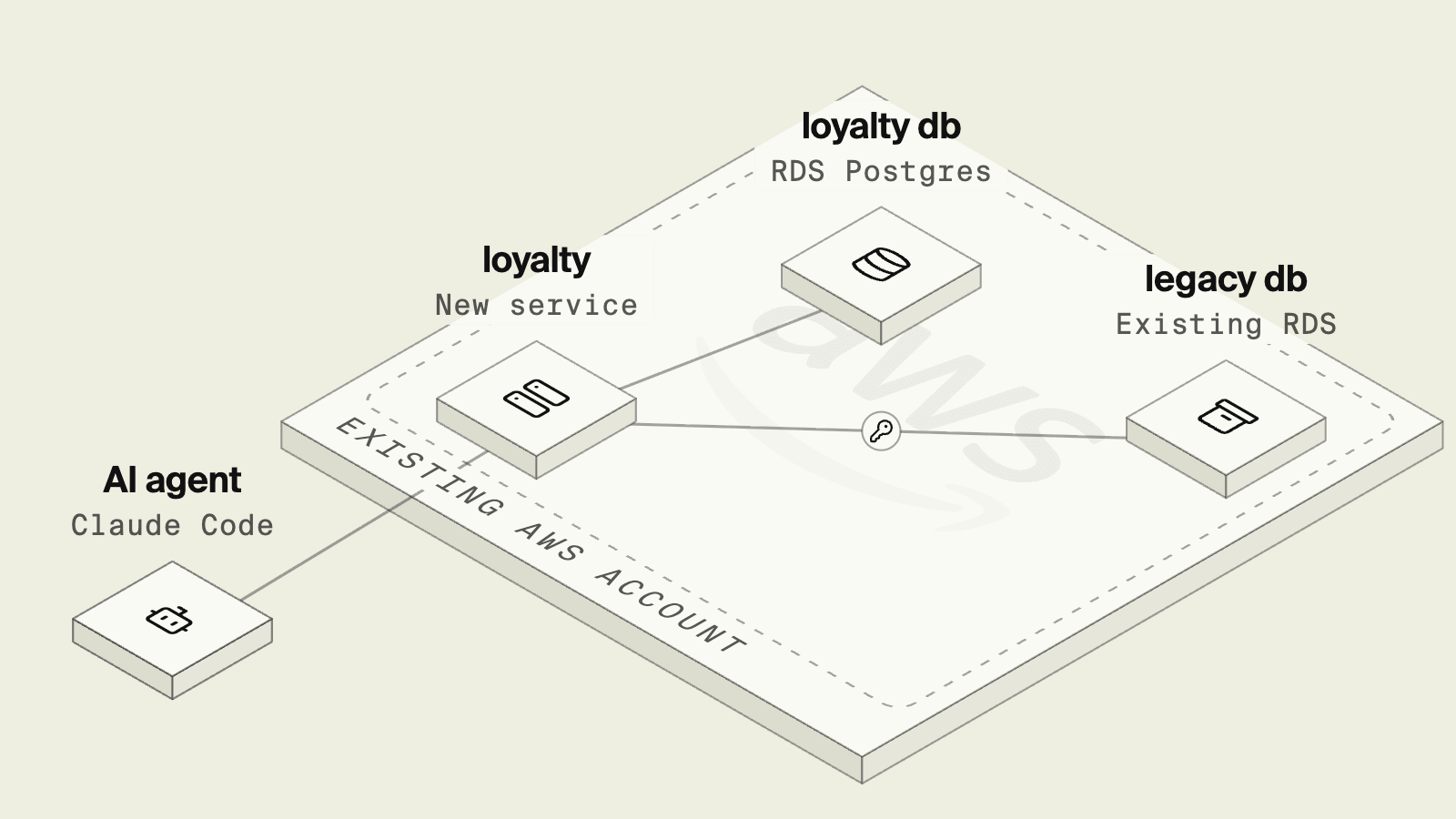
Most teams that point a coding agent at their backend are not starting from an empty repo. The AWS account already has an RDS database that several services read, along with a folder of infrastructure code that has its own review process.
A request like "add a loyalty points service with its own table" sounds small, and the risk lies less in the new table than in the agent editing shared infrastructure code to get there, or reaching for credentials that can change resources it was never asked to touch.
OWASP lists excessive agency as a top risk for LLM applications, describing an agent with more functionality or permissions than the task needs. In an existing AWS project the practical version is that the agent should be able to add what the new feature needs, and nothing it does should be able to modify the database the rest of the company runs on.
Two ways to add a service to an existing AWS project
Editing the existing infrastructure code
The standard route is to add the new database and service definition to the infrastructure code the team already has, and to give the new service the connection string through an environment variable or secret. The application code itself stays ordinary:
import pg from "pg";

const loyalty = new pg.Pool({ connectionString: process.env.LOYALTY_DATABASE_URL });
const legacy = new pg.Pool({ connectionString: process.env.LEGACY_DATABASE_URL });
This keeps one source of truth for the account, and a platform team can review every resource. The difficulty for an agent is that the new RDS instance with its networking rules, along with the IAM permissions for the task role all land in a file that also describes production resources. A plan shows the diff, but producing a plan needs read access to the real account and state, and a confident-looking change to a shared security group can affect services the agent never opened. Many teams handle this by letting the agent write the change and requiring a human to run the plan and apply it, which is careful but slow.
Encore: new services alongside what you already run

Encore, the safe way for AI agents to ship backend changes to your cloud, combines an open source SDK for declaring infrastructure in application code with a platform that provisions those resources in your own AWS account, and it can be adopted one service at a time. The new loyalty service is an Encore service whose own database is declared in code, while the existing company database is used as an external dependency with its connection string kept in an Encore secret:
import { api } from "encore.dev/api";
import { secret } from "encore.dev/config";
import { SQLDatabase } from "encore.dev/storage/sqldb";
import pg from "pg";

// The database the rest of the company already runs on RDS, used as an external dependency.
const legacyDatabaseUrl = secret("LegacyDatabaseUrl");
const legacy = new pg.Pool({ connectionString: legacyDatabaseUrl() });

// A new database for the new service, provisioned by Encore.
const db = new SQLDatabase("loyalty", { migrations: "./migrations" });

interface BalanceRequest {
  customerId: string;
}

interface Balance {
  email: string | null;
  points: number;
}

export const balance = api(
  { expose: true, method: "GET", path: "/loyalty/:customerId" },
  async ({ customerId }: BalanceRequest): Promise<Balance> => {
    const { rows } = await legacy.query<{ email: string }>(
      "SELECT email FROM customers WHERE id = $1",
      [customerId],
    );
    const row = await db.queryRow<{ points: number }>`
      SELECT points FROM balances WHERE customer_id = ${customerId}`;
    return { email: rows[0]?.email ?? null, points: row?.points ?? 0 };
  },
);
encore run starts Postgres locally for the loyalty database and applies its migrations, so the agent can build and test the new table without a shared staging database. For the legacy side, the local secret can point at a copy or a read replica. Secrets are set per environment with the secrets manager, so the production connection string never sits in the repo.
When an existing resource should become part of the Encore application rather than an external dependency, Encore can import an existing RDS or Aurora database when an environment is created. An imported server stays yours: Encore adds the roles and databases the application declares and does not delete or reconfigure the server. SNS topics and S3 buckets can be imported in a similar way.
Here the agent's diff is a new service directory. It does not edit the shared infrastructure folder, and cloud access sits with Encore's IAM role, not the agent. New resources show up for review, and only admins can approve infrastructure provisioning. Instance sizes, networking, backups and scaling are configured per environment outside the code the agent edits.
Good to know
Encore manages the resources it supports, which on AWS covers RDS Postgres, SNS and SQS, S3, ElastiCache, Secrets Manager and cron. Services written without Encore keep running as they are, and the Encore services call them over HTTP like any other client. The trade is that the new services are written against Encore's SDK, while the old ones keep their current deploy pipeline until you choose to move them.
Run in your terminal to get started locally.
How to choose
- Encore when you want agents to add new services and their infrastructure without editing shared infrastructure code, and to test locally before anything reaches AWS.
- Existing infrastructure code when every resource in the account must live in one repo under one review process, and a human applies each plan.
Related guides
Frequently asked questions
How do I let an AI agent add infrastructure to an existing AWS project?
Give the agent a boundary it can work inside. One way is a separate module in the existing infrastructure code that a human reviews and applies. Another is to adopt Encore for the new service only: the agent declares the new database or topic in TypeScript or Go, encore run starts Postgres locally for testing, and Encore provisions it in the same AWS account, while existing resources are reached as external dependencies or imported into Encore.
Can Encore use an RDS database or SNS topic we already have?
Yes. Encore can import an existing RDS for PostgreSQL instance or Aurora PostgreSQL cluster when an environment is created, and it can point a declared Pub/Sub topic at an existing SNS topic. Anything else, such as a DynamoDB table, is used directly through the AWS SDK.
Does the agent get access to our AWS account?
It does not need to for this workflow. The agent edits application code and runs it locally, and cloud access sits with Encore's IAM role, not the agent. The role is connected by an admin and can be revoked from the AWS account.
Deploy to your cloud on AWS and Google Cloud
without managing infrastructure
Encore lets developers and agents define application infrastructure directly in code, then automatically provisions it from local development to production in your AWS or GCP account.
