How to Add Cron Jobs to an Axum App
Scheduling recurring work for a Rust Axum service with Encore, tokio-cron-scheduler, a Tokio interval loop or a cloud scheduler, and keeping jobs from running once per replica.

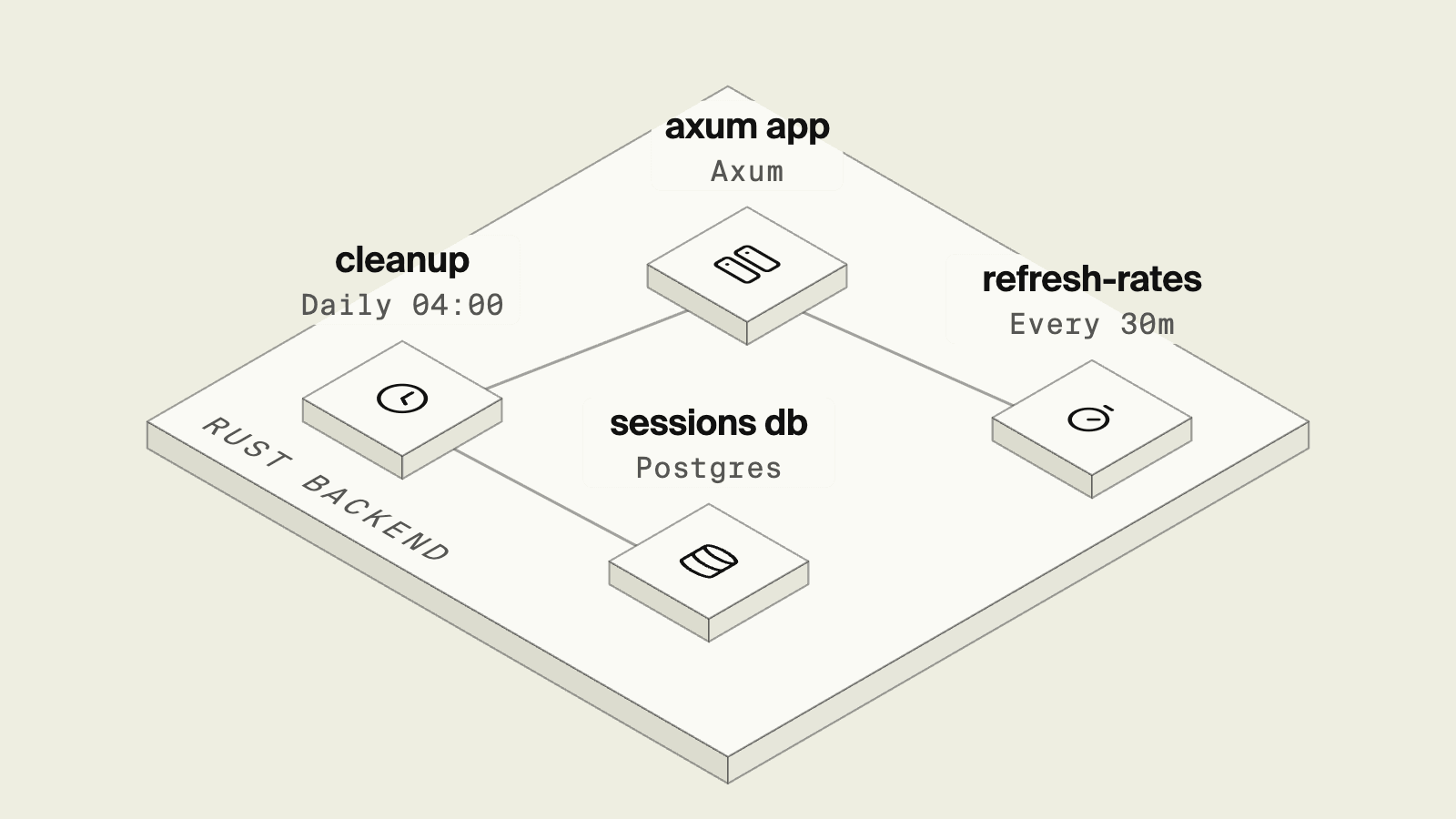
Axum routes requests and leaves recurring work, such as cleaning expired sessions or refreshing a cache, to you. In Rust the quick answer is a task spawned on the Tokio runtime, which works until the service runs on more than one replica and each one runs the job. This guide compares Encore, tokio-cron-scheduler, a plain interval loop and a cloud scheduler that calls a route.
The 2024 State of Rust Survey found Rust especially popular for server backends, web and networking services and cloud technologies.
What you need to decide:
- Whether the schedule lives in the process or outside it.
- How you make sure one run happens per schedule across replicas.
- How a failed or slow run is noticed.
- How you trigger a job by hand while developing.
Scheduling options for Axum at a glance
Encore: cron jobs as Axum routes

Encore combines the schedule and the Axum route it calls into declarations in the crate you already have. A job is a static with a name, a path and a schedule, and when it is due Encore sends a POST for the path to the service that declares it, so declaring the route from the job keeps the two in step. Jobs sit next to databases and other resources in the same Rust SDK, which works alongside Axum.
use axum::{http::StatusCode, routing::post, Router};
use encore::cron::{Job, Schedule};
use encore::storage::postgres::Database;

static DB: Database = Database::new("sessions").migrations("./migrations");

/// Removes sessions that expired more than a day ago, at 04:00 UTC.
static CLEANUP: Job = Job::new(
    "cleanup-sessions",
    "/internal/cleanup-sessions",
    Schedule::Cron("0 4 * * *"),
)
.title("Remove expired sessions");

/// Refreshes cached exchange rates every 30 minutes.
static REFRESH_RATES: Job =
    Job::new("refresh-rates", "/internal/refresh-rates", Schedule::Every("30m"));

async fn cleanup_sessions() -> StatusCode {
    match DB
        .execute(
            "DELETE FROM sessions WHERE expires_at < now() - interval '1 day'",
            &[],
        )
        .await
    {
        Ok(_) => StatusCode::OK,
        Err(_) => StatusCode::INTERNAL_SERVER_ERROR,
    }
}

async fn refresh_rates() -> StatusCode {
    // Fetch and store the latest rates here.
    StatusCode::OK
}

#[tokio::main]
async fn main() {
    encore::initialize();
    let app = Router::new()
        .route(CLEANUP.path(), post(cleanup_sessions))
        .route(REFRESH_RATES.path(), post(refresh_rates));
    let addr = std::env::var("ENCORE_LISTEN_ADDR").unwrap_or("0.0.0.0:8080".into());
    let listener = tokio::net::TcpListener::bind(addr).await.unwrap();
    axum::serve(listener, app)
        .with_graceful_shutdown(encore::shutdown::signal())
        .await
        .unwrap();
    std::process::exit(encore::shutdown::drained().await.code());
}
Schedule::Cron takes five fields in UTC, while Schedule::Every lays runs out over the day from midnight UTC, so the interval has to divide 24 hours evenly: "45m" and "8h" work, "50m" and "7h" do not. Names and paths are string literals because Encore reads them from the source.
Nothing is scheduled by encore run or encore test, so in development you send POST /internal/cleanup-sessions to the local server or call the handler from a test. In a deployed environment, Encore provisions the infrastructure in the cloud account you connect, and when the job is due Encore sends a POST request for the path to the service.
Those schedules live in your own cloud account, and when an agent adds a job, the declaration and the route arrive in one diff, and the agent checks the job by calling its route under encore run before the change is reviewed.
Without Encore
Without Encore the job either runs inside the binary, as in the next two sections, or the schedule lives in AWS and calls a route you secure yourself.
Good to know
A job route is an ordinary Axum route, so make it safe to run twice, for example by deleting by condition, in case a run is retried or overlaps the next one.
tokio-cron-scheduler
tokio-cron-scheduler runs cron-style jobs on the Tokio runtime next to the server. Its cron expressions include a seconds field:
use tokio_cron_scheduler::{Job, JobScheduler};

#[tokio::main]
async fn main() -> Result<(), Box<dyn std::error::Error>> {
    let sched = JobScheduler::new().await?;
    sched
        .add(Job::new_async("0 0 4 * * *", |_id, _sched| {
            Box::pin(async move {
                // delete expired sessions
            })
        })?)
        .await?;
    sched.start().await?;

    let app = axum::Router::new();
    let listener = tokio::net::TcpListener::bind("0.0.0.0:8080").await?;
    axum::serve(listener, app).await?;
    Ok(())
}
Good to know
Every replica runs its own scheduler, and a Postgres advisory lock taken with pg_try_advisory_lock at the start of each job lets one replica proceed and the others skip.
A tokio::time::interval loop
For a fixed interval with no cron expression, a spawned loop is enough:
use std::time::Duration;

fn spawn_refresh() {
    tokio::spawn(async {
        let mut ticker = tokio::time::interval(Duration::from_secs(30 * 60));
        loop {
            ticker.tick().await;
            // refresh cached rates
        }
    });
}
Good to know
Call spawn_refresh() once in main before axum::serve, since nothing runs until it is called. The first tick completes immediately, so the job runs at startup and then on the interval, and every deploy or restart resets the timing, with the same per-replica problem as any in-process scheduler.
A cloud scheduler calling a route
EventBridge Scheduler can invoke an HTTP target on a cron or rate expression, so one run happens per schedule regardless of replicas. It provides at-least-once delivery, so the route should tolerate repeats, the same advice the Kubernetes CronJob docs give for idempotent jobs, and since the route is reachable over HTTP it needs authentication. The schedule and its IAM role are resources you create and keep in sync with the code.
How to choose
- Encore if you want schedules declared next to the routes they call and run once per schedule in your AWS or GCP account.
- tokio-cron-scheduler for cron expressions inside a single instance, or with a lock.
- tokio::time::interval for a simple fixed interval where a run at startup is fine.
- A cloud scheduler if you already manage AWS resources and want the schedule outside the binary.
Rust support in Encore is in beta, and you can sign up for access to try it with your Axum app.
Related guides
Frequently asked questions
How do I run a cron job in an Axum app?
Axum has no scheduler. You can spawn tokio-cron-scheduler or a tokio::time::interval loop before axum::serve, or let an external scheduler call a route. With Encore you declare a static cron::Job with a path and a Schedule, serve that path with an Axum route, and Encore sends a POST request to it when the job is due in a deployed environment.
How do I stop a Rust scheduled task from running on every replica?
An in-process scheduler runs in each replica. Take a Postgres advisory lock at the start of the job so only one replica proceeds, run the scheduler in a single dedicated instance, or move the schedule outside the app so it calls one instance.
What schedule formats does Encore support for Rust cron jobs?
Schedule::Cron takes a five-field cron expression in UTC, such as "0 4 * * *". Schedule::Every takes an interval in hours and minutes, such as "30m" or "6h", which must divide 24 hours evenly.
Do Encore cron jobs run under encore run?
No. Nothing is scheduled by encore run or encore test, and jobs run where the app is deployed. To exercise a job locally, send a POST request to its path or call the handler from a test.
Deploy to your cloud on AWS and Google Cloud
without managing infrastructure
Encore lets developers and agents define application infrastructure directly in code, then automatically provisions it from local development to production in your AWS or GCP account.
