
Authentication is one of those things every backend needs but nobody wants to build from scratch. Session management, password hashing, account recovery, OAuth flows - it adds up fast. Ory is an open-source identity platform that handles all of this, with a managed cloud offering that removes the operational burden.
In this tutorial, we'll build a backend that uses Ory Network for user authentication. You'll learn how to verify sessions, protect API endpoints, and store user data in a PostgreSQL database that Encore provisions automatically.
Want to jump straight to a running app? Clone this starter and deploy it to your own cloud.
What is Ory?
Ory is an open-source identity infrastructure provider. Ory Network is their managed cloud offering, which gives you:
- Account Experience - A hosted login, registration, and account management UI
- Session Management - Secure session tokens verified via API
- Multiple Auth Methods - Email/password, social logins, passwordless, and passkeys
- Identity Management - Flexible identity schemas with custom traits
- Self-hosting Option - Run the full stack yourself with Ory Kratos, Hydra, and Keto
Unlike JWT-based providers, Ory verifies sessions through a remote API call. This means sessions can be revoked instantly and you always get the latest identity data.
What we're building
We'll create a backend with complete user authentication:
- Session verification for API requests using Ory's session tokens
- Protected endpoints that require authentication
- User profile access with type-safe data
- Auto-provisioned PostgreSQL database for storing user preferences
The backend will verify Ory sessions, provide authenticated user context to your endpoints, and store user data in a database that Encore manages for you.
Getting started
Prefer to skip the setup? Use encore app create --example=ts/ory to start with a complete working example. This tutorial walks through building it from scratch to understand each component.
First, install Encore if you haven't already:
# macOS
brew install encoredev/tap/encore

# Linux
curl -L https://encore.dev/install.sh | bash

# Windows
iwr https://encore.dev/install.ps1 | iex
Create a new Encore application. This will prompt you to create a free Encore account if you don't have one (required for secret management):
encore app create ory-app --example=ts/hello-world
cd ory-app
Setting up Ory
Creating your Ory project
- Go to console.ory.sh and sign up for a free account
- Create a new project
- Copy your project slug from the project settings - this is the subdomain in your Ory URL (e.g.
your-slugfromhttps://your-slug.projects.oryapis.com)
Tip: Ory's free tier includes 25,000 monthly active users.
Installing the Ory SDK
Install the Ory client SDK:
npm install @ory/client
Backend implementation
Creating the auth service
Every Encore service starts with a service definition file (encore.service.ts). Services let you divide your application into logical components. At deploy time, you can decide whether to colocate them in a single process or deploy them as separate microservices, without changing a single line of code:
// auth/encore.service.ts
import { Service } from "encore.dev/service";

export default new Service("auth");
Configuring the Ory client
To verify sessions with Ory's API, you need your project slug. Encore provides built-in secrets management to securely store sensitive values:
// auth/ory.ts
import { Configuration, FrontendApi } from "@ory/client";
import { secret } from "encore.dev/config";

// secret() references a value stored outside your code.
// Encore injects it at runtime, both locally and in production.
export const oryProjectSlug = secret("OryProjectSlug");

export const ory = new FrontendApi(
  new Configuration({
    basePath: `https://${oryProjectSlug()}.projects.oryapis.com`,
  })
);
The secret() function creates a reference to a secret value that's stored securely outside your code. Set your Ory project slug for your local development environment:
# Development
encore secret set --dev OryProjectSlug

# Production
encore secret set --prod OryProjectSlug
Creating an auth handler
To protect endpoints and enable authentication across your application, create an auth handler. The auth handler verifies Ory session tokens and makes authenticated user data available to protected endpoints:
// auth/handler.ts
import { APIError, Gateway, Header } from "encore.dev/api";
import { authHandler } from "encore.dev/auth";
import { ory } from "./ory";

// AuthParams defines what Encore extracts from incoming requests.
interface AuthParams {
  authorization: Header<"Authorization">;
}

// AuthData is what protected endpoints receive via getAuthData().
export interface AuthData {
  userID: string;
  email: string;
  name?: string;
}

// The auth handler runs before any endpoint with auth: true.
// It verifies the Ory session token and returns user data.
const handler = authHandler<AuthParams, AuthData>(async (params) => {
  const token = params.authorization?.replace("Bearer ", "");

  if (!token) {
    throw APIError.unauthenticated("missing session token");
  }

  try {
    // Verify the session token with Ory's API.
    const { data: session } = await ory.toSession({
      xSessionToken: token,
    });

    const userID = session.identity?.id;
    if (!userID) {
      throw new Error("No identity in session");
    }

    return {
      userID,
      email: session.identity?.traits?.email || "",
      name: session.identity?.traits?.name || undefined,
    };
  } catch (err: any) {
    console.error("Session verification failed:", err?.message || err);
    throw APIError.unauthenticated("invalid session token");
  }
});

// The gateway applies this auth handler to all incoming requests.
export const gateway = new Gateway({ authHandler: handler });
This auth handler:
- Extracts the session token from the
Authorizationheader - Calls
ory.toSession()to verify it against Ory's API - Extracts identity data from the session (ID, email, name)
- Returns authenticated user data that any protected endpoint can access
Because Ory uses a remote API call rather than local JWT verification, sessions can be revoked server-side and take effect immediately.
Setting up the database
While Ory handles authentication, you'll often want to store additional user data in your own database. With Encore, you can create a PostgreSQL database by simply defining it in code. The framework automatically provisions the infrastructure locally using Docker.
Create the database instance:
// user/db.ts
import { SQLDatabase } from "encore.dev/storage/sqldb";

// Encore provisions and manages this database automatically.
// Locally it uses Docker; in the cloud it creates managed instances (RDS, Cloud SQL, etc).
// Migrations in ./migrations are applied on startup.
export const db = new SQLDatabase("user", {
  migrations: "./migrations",
});
Create the migration file to define your user profile table:
-- user/migrations/1_create_user_profile.up.sql
CREATE TABLE user_profile (
  ory_user_id TEXT PRIMARY KEY,
  theme TEXT DEFAULT 'light',
  notifications BOOLEAN DEFAULT true,
  bio TEXT,
  created_at TIMESTAMP NOT NULL DEFAULT CURRENT_TIMESTAMP,
  updated_at TIMESTAMP NOT NULL DEFAULT CURRENT_TIMESTAMP
);
Encore automatically handles applying migrations when your application starts.
Protected endpoints
Now create protected endpoints that require authentication. Start with a user service:
// user/encore.service.ts
import { Service } from "encore.dev/service";

export default new Service("user");
Add an endpoint to get the current user's profile, combining Ory identity data with your database:
// user/profile.ts
import { api } from "encore.dev/api";
import { getAuthData } from "~encore/auth";
import { db } from "./db";

interface ProfileResponse {
  userId: string;
  email: string;
  name?: string;
  theme?: string;
  notifications?: boolean;
  bio?: string;
}

// expose: true makes this endpoint publicly accessible.
// auth: true means Encore runs the auth handler before this endpoint.
export const getProfile = api(
  { expose: true, method: "GET", path: "/user/profile", auth: true },
  async (): Promise<ProfileResponse> => {
    // getAuthData() returns the AuthData from the auth handler (userID, email, name).
    const auth = getAuthData()!;

    // Get user preferences from database
    let profile = await db.queryRow<{
      theme: string;
      notifications: boolean;
      bio: string | null;
    }>`
      SELECT theme, notifications, bio
      FROM user_profile
      WHERE ory_user_id = ${auth.userID}
    `;

    // Create profile with defaults if it doesn't exist
    if (!profile) {
      await db.exec`
        INSERT INTO user_profile (ory_user_id, theme, notifications)
        VALUES (${auth.userID}, 'light', true)
      `;
      profile = { theme: "light", notifications: true, bio: null };
    }

    return {
      userId: auth.userID,
      email: auth.email,
      name: auth.name,
      theme: profile.theme,
      notifications: profile.notifications,
      bio: profile.bio || undefined,
    };
  }
);
The auth: true flag tells Encore this endpoint requires authentication. The getAuthData() function provides type-safe access to the authenticated user's information.
Updating user preferences
Add an endpoint to update user preferences:
// user/profile.ts (continued)
interface UpdatePreferencesRequest {
  theme?: "light" | "dark";
  notifications?: boolean;
  bio?: string;
}

interface UpdatePreferencesResponse {
  success: boolean;
}

// Upsert user preferences (create or update if already exists)
export const updatePreferences = api(
  { expose: true, method: "POST", path: "/user/preferences", auth: true },
  async (req: UpdatePreferencesRequest): Promise<UpdatePreferencesResponse> => {
    const auth = getAuthData()!;

    await db.exec`
      INSERT INTO user_profile (ory_user_id, theme, notifications, bio, updated_at)
      VALUES (${auth.userID}, ${req.theme || "light"}, ${req.notifications ?? true}, ${req.bio || null}, NOW())
      ON CONFLICT (ory_user_id)
      DO UPDATE SET
        theme = COALESCE(${req.theme}, user_profile.theme),
        notifications = COALESCE(${req.notifications}, user_profile.notifications),
        bio = COALESCE(${req.bio}, user_profile.bio),
        updated_at = NOW()
    `;

    return { success: true };
  }
);
This endpoint stores user preferences in your PostgreSQL database using an upsert, so it works for both first-time and returning users.
Login info endpoint
The frontend needs to know your Ory project URL to call the self-service APIs. Add an endpoint that exposes it:
// auth/login.ts
import { api } from "encore.dev/api";
import { oryProjectSlug } from "./ory";

interface LoginInfoResponse {
  oryUrl: string;
}

// Returns the Ory project URL so the frontend can call
// Ory's self-service APIs directly for registration and login.
export const loginInfo = api(
  { expose: true, method: "GET", path: "/auth/login-info", auth: false },
  async (): Promise<LoginInfoResponse> => {
    return { oryUrl: `https://${oryProjectSlug()}.projects.oryapis.com` };
  }
);
Testing locally
Ory doesn't allow localhost as a CORS origin. For local development, you need to run Ory Tunnel which proxies Ory's API through localhost:
# Install the Ory CLI if you haven't already
brew install ory/tap/ory

# Run the tunnel (adjust the port to match your Encore app)
ory tunnel http://localhost:4000 --project your-slug
Start your backend (make sure Docker is running for the local PostgreSQL instance):
encore run
Encore starts PostgreSQL, runs your migrations, and serves the API on localhost:4000. You also get a local development dashboard at localhost:9400 with API docs, distributed tracing, and a database explorer.
To test the protected endpoints, you need a valid Ory session token. The simplest approach is to sign in through your Ory Account Experience URL (https://{your-slug}.projects.oryapis.com/ui/login) and extract the session token from the ory_session cookie. Alternatively, use the Ory CLI:
# Install the Ory CLI
brew install ory/tap/ory

# Authenticate and get a session token
ory auth --project your-slug
With a session token, you can call the protected profile endpoint:
curl http://localhost:4000/user/profile \
  -H "Authorization: Bearer <your-ory-session-token>"
{
  "userId": "a1b2c3d4-e5f6-7890-abcd-ef1234567890",
  "email": "user@example.com",
  "name": "John Doe",
  "theme": "light",
  "notifications": true
}
You can also update preferences. The profile is created with defaults on first access, so this works immediately after your first request:
curl -X POST http://localhost:4000/user/preferences \
  -H "Authorization: Bearer <your-ory-session-token>" \
  -H "Content-Type: application/json" \
  -d '{"theme":"dark","notifications":true}'
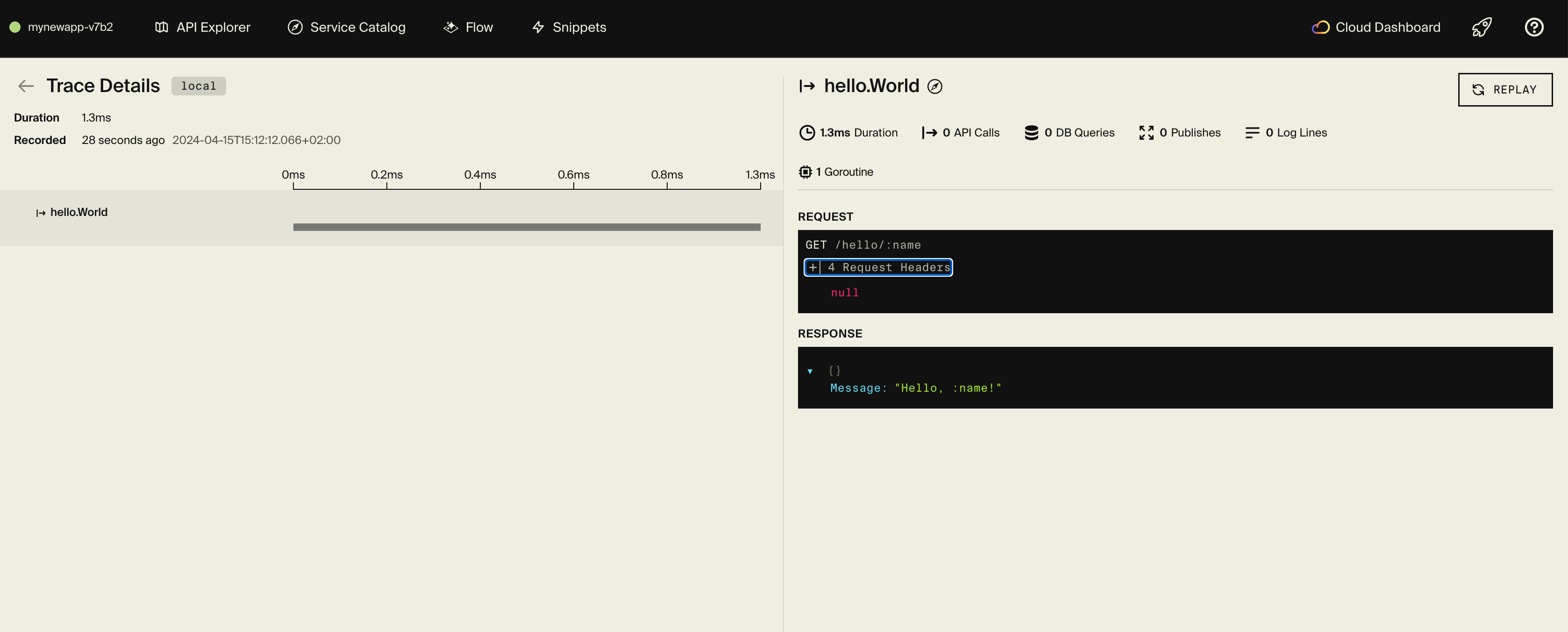
Every request generates a trace in the local dashboard showing the Ory session verification call, database queries, and endpoint execution. This is useful for verifying that the session check is working and seeing exactly what's happening on each request.
Frontend integration
Ory provides Account Experience, a hosted UI for login, registration, and account management. Your frontend redirects users there, then receives a session token back.
For a React application:
import { Configuration, FrontendApi } from "@ory/client";

const ory = new FrontendApi(
  new Configuration({
    basePath: "https://your-slug.projects.oryapis.com",
    baseOptions: { withCredentials: true },
  })
);

// Check for existing session
const session = await ory.toSession();

// If no session, redirect to login
window.location.href =
  "https://your-slug.projects.oryapis.com/ui/login?return_to=" +
  encodeURIComponent(window.location.href);
Call your Encore backend with the session token:
async function fetchProfile(sessionToken: string) {
  const response = await fetch("https://your-api-url.com/user/profile", {
    headers: { Authorization: `Bearer ${sessionToken}` },
  });
  return response.json();
}
For complete frontend integration guides, see the Ory documentation and the Encore frontend integration docs.
Deployment
Self-hosting
See the self-hosting instructions for how to use encore build docker to create a Docker image and configure it.
The Encore platform Platform
Deploy your application to a staging environment using git push encore:
git add -A .
git commit -m "Add Ory authentication"
git push encore
Set your production secret:
encore secret set --prod OryProjectSlug
Note: the Encore platform is great for prototyping and development with fair use limits (100k requests/day, 1GB database). For production workloads, you can connect your AWS or GCP account and Encore will provision and deploy infrastructure directly in your cloud account.
Next steps
- Configure social logins (Google, GitHub, etc.)
- Enable multi-factor authentication
- Set up account recovery and email verification
- Customize your identity schema with additional traits
- Explore Ory Permissions for fine-grained access control
If you found this tutorial helpful, consider starring Encore on GitHub to help others discover it.
Recent articles

Introducing Encore × SurrealDB
Combine vector search and graph relationships with a backend agents can build and verify end-to-end.
 Ivan Cernja
Introducing Encore × Bird
Build messaging workflows and test backend changes end-to-end locally.
Ivan Cernja
Encore for Rust
An early look at Encore for Rust, entering beta soon.
Ivan Cernja