How to Set Up a Queue on AWS with an AI Coding Agent
What Claude Code or Cursor has to build when you ask for a queue on AWS, from SQS and SNS wiring to the worker that drains it, and how the agent can test it before anything is deployed.

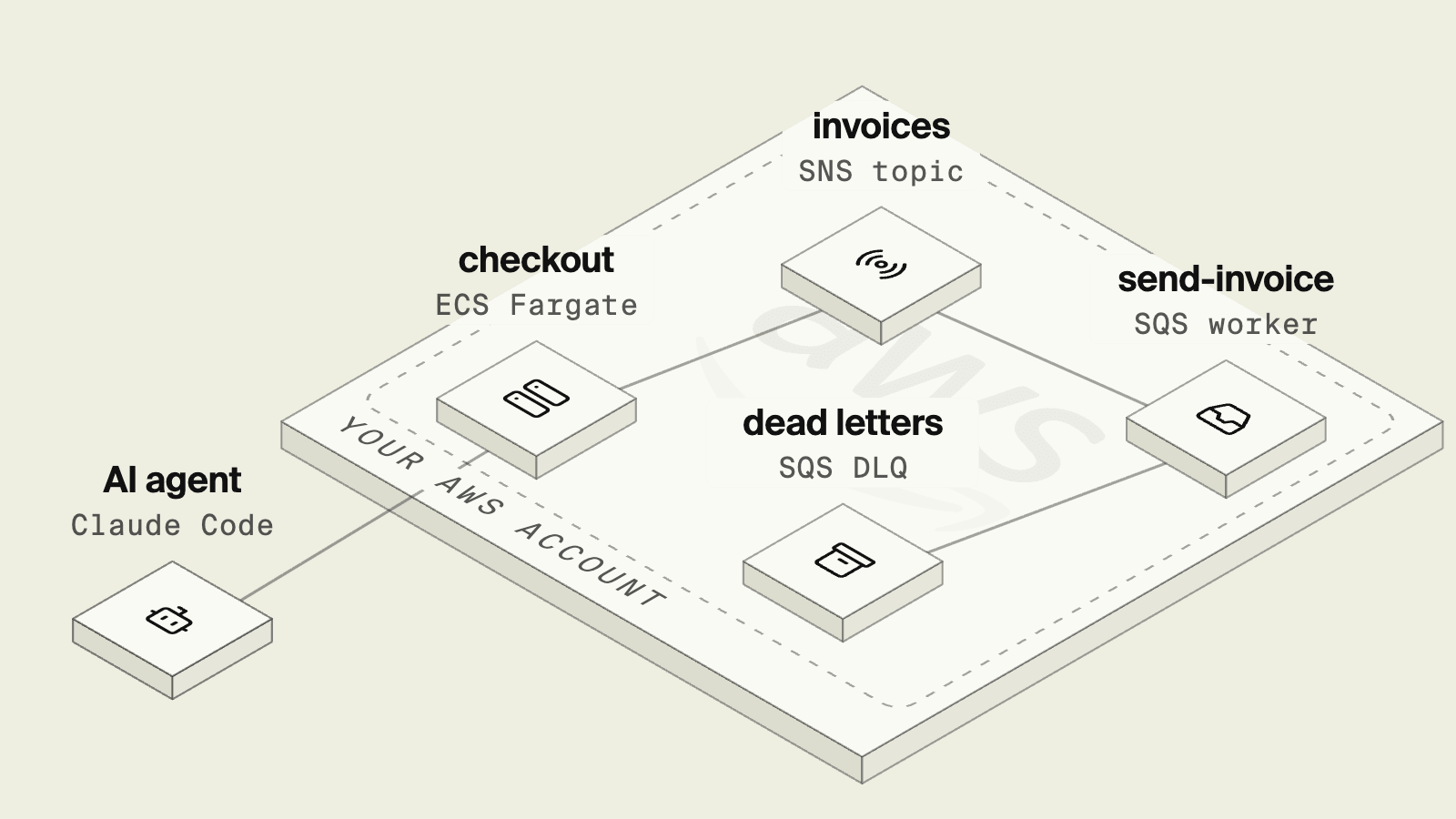
"Set up a queue on AWS" is a short prompt for an agent and a long task. The application side is one function that sends a message and another that handles it.
The AWS side is an SQS queue, usually an SNS topic in front of it so more than one consumer can listen, a dead-letter queue for messages that keep failing, IAM permissions for whoever publishes and whoever consumes, and a worker process that polls and deletes messages. Each of those has settings that decide whether a message is lost or processed twice.
This guide goes through the route an agent takes on plain AWS, then the route with Encore, using the same invoice example in TypeScript.
What a working queue needs on AWS
Plain AWS: SQS and SNS with a worker
Writing the queue by hand gives the team full control of every setting, and it is the right choice when the queue is shared with systems outside the application. The publishing side with the AWS SDK for JavaScript is short:
import {
  DeleteMessageCommand,
  ReceiveMessageCommand,
  SendMessageCommand,
  SQSClient,
} from "@aws-sdk/client-sqs";

const sqs = new SQSClient({});
const QueueUrl = process.env.INVOICE_QUEUE_URL!;

interface InvoiceRequested {
  orderId: string;
  email: string;
}

export async function enqueueInvoice(event: InvoiceRequested): Promise<void> {
  await sqs.send(new SendMessageCommand({ QueueUrl, MessageBody: JSON.stringify(event) }));
}

// Runs in a separate worker process. A message that is not deleted before the
// visibility timeout expires is delivered again.
export async function pollInvoices(): Promise<never> {
  for (;;) {
    const { Messages = [] } = await sqs.send(
      new ReceiveMessageCommand({ QueueUrl, MaxNumberOfMessages: 10, WaitTimeSeconds: 20 }),
    );
    for (const message of Messages) {
      const event: InvoiceRequested = JSON.parse(message.Body!);
      await sendInvoice(event.orderId, event.email);
      await sqs.send(new DeleteMessageCommand({ QueueUrl, ReceiptHandle: message.ReceiptHandle! }));
    }
  }
}

async function sendInvoice(orderId: string, email: string): Promise<void> {
  console.log("sending invoice", orderId, "to", email);
}
The code is the easy part, and the agent also has to create the queue with a visibility timeout longer than the slowest handler, or SQS hands the same message to a second worker while the first is still sending the invoice. If a second consumer appears later, the usual move is the SNS fan-out pattern, which adds a topic with one subscription per queue, plus a queue policy that lets SNS write to SQS. The worker needs its own process and container definition, along with an IAM role allowed to receive and delete, while the API needs a role allowed to send.
The agent slows down at testing, since nothing in the TypeScript compiler knows whether INVOICE_QUEUE_URL points at a queue that exists, so the first real check is a deploy to an AWS account and a message pushed through it. SQS delivers at least once, which means the handler must cope with duplicates either way, and the idempotent receiver pattern is the standard way to make a repeat delivery harmless.
The queue as part of the application

Encore, the safe way for AI agents to ship backend changes to your cloud, combines an open source SDK, where the application declares the topics and subscriptions it uses, with a platform that provisions them in your own AWS account and runs them locally during development. The agent writes the publisher and the subscriber in the same service file, and the Pub/Sub primitive takes care of the wiring between them.
import { api } from "encore.dev/api";
import { Subscription, Topic } from "encore.dev/pubsub";

export interface InvoiceRequested {
  orderId: string;
  email: string;
}

// Backed by SNS and SQS in AWS, and by a local broker under encore run.
export const invoiceRequested = new Topic<InvoiceRequested>("invoice-requested", {
  deliveryGuarantee: "at-least-once",
});

interface CheckoutRequest {
  orderId: string;
  email: string;
}

interface CheckoutResponse {
  queued: boolean;
}

export const checkout = api(
  { expose: true, method: "POST", path: "/orders/:orderId/checkout" },
  async ({ orderId, email }: CheckoutRequest): Promise<CheckoutResponse> => {
    await invoiceRequested.publish({ orderId, email });
    return { queued: true };
  },
);

// Failed deliveries are retried with backoff before they land in a dead-letter queue.
const _ = new Subscription(invoiceRequested, "send-invoice", {
  handler: async (event) => {
    await sendInvoice(event.orderId, event.email);
  },
  maxConcurrency: 10,
  retryPolicy: { minBackoff: "1s", maxBackoff: "1m", maxRetries: 5 },
});

async function sendInvoice(orderId: string, email: string): Promise<void> {
  console.log("sending invoice", orderId, "to", email);
}
Encore validates these declarations at build time, so a duration written as a number instead of a string such as "1s" fails the build before the agent runs anything. Under encore run the topic and subscription run against a local broker. The agent can call POST /orders/o1/checkout, see the subscriber log the invoice and read the trace for both the request and the delivery through the local MCP server.
An agent asked to "add a queue for invoices" ends up with one diff to review, where the topic and its handler appear in the same diff as the endpoint that publishes, instead of an application change plus an infrastructure change in a second tool.
On deploy, Encore provisions an SNS topic, an SQS queue per subscription and a dead-letter queue in your AWS account, with IAM permissions scoped so each service can publish or consume only what it declares. The agent declares the queue in code, and cloud access sits with Encore's IAM role, not the agent. If the company already has an SNS topic that other systems publish to, the Encore topic can be pointed at the existing topic instead of a new one.
Good to know
Encore supports the queue patterns most backends use: fan-out, retries with backoff, dead letters, concurrency limits and ordered topics. Exactly-once delivery is available as a topic setting with provider throughput limits, and a queue consumed by a non-Encore system is still used through the AWS SDK. On AWS that limit is 300 messages per second for the topic, in line with the SQS message quotas. Handlers should be idempotent in both routes, since delivery is at least once by default and a message can still be redelivered in rare cases with exactly-once delivery.
Run in your terminal to get started locally.
How to choose
- Encore when the queue belongs to the application and you want the agent to add it and test it locally before it ships to your AWS account in one change.
- Plain SQS and SNS when the queue is shared infrastructure owned by another team, or needs settings outside what the application declares.
Related guides
Frequently asked questions
How do I set up a queue on AWS with Claude Code or Cursor?
With Encore, ask the agent to declare a Topic and a Subscription in the service that needs the queue. encore run starts a local broker so the agent can publish a message and read the trace through the local MCP server, and on deploy Encore provisions SNS and SQS with a dead-letter queue in your AWS account. Without Encore, the agent writes the SQS queue, the SNS topic and subscription, the IAM policies for publisher and consumer, and a polling worker, then deploys them to an AWS account to test.
Should an AI agent use SQS or SNS?
SQS is a queue with one consumer group per queue. SNS fans a message out to several subscribers, usually SQS queues. Most event-driven backends end up with SNS in front of one SQS queue per consumer, which is the layout Encore provisions for each Topic and Subscription.
Does the agent need AWS credentials to add a queue?
To deploy queues with infrastructure-as-code tools, whoever runs the deploy needs credentials for the target account. With Encore the agent works against the local broker, and cloud access sits with Encore's IAM role, not the agent.
Deploy to your cloud on AWS and Google Cloud
without managing infrastructure
Encore lets developers and agents define application infrastructure directly in code, then automatically provisions it from local development to production in your AWS or GCP account.
