How to Deploy to GCP in 2026
The realistic ways to deploy a backend to Google Cloud, ranked by how much you set up yourself, with a worked NestJS deploy to Cloud Run with Cloud SQL and Pub/Sub.

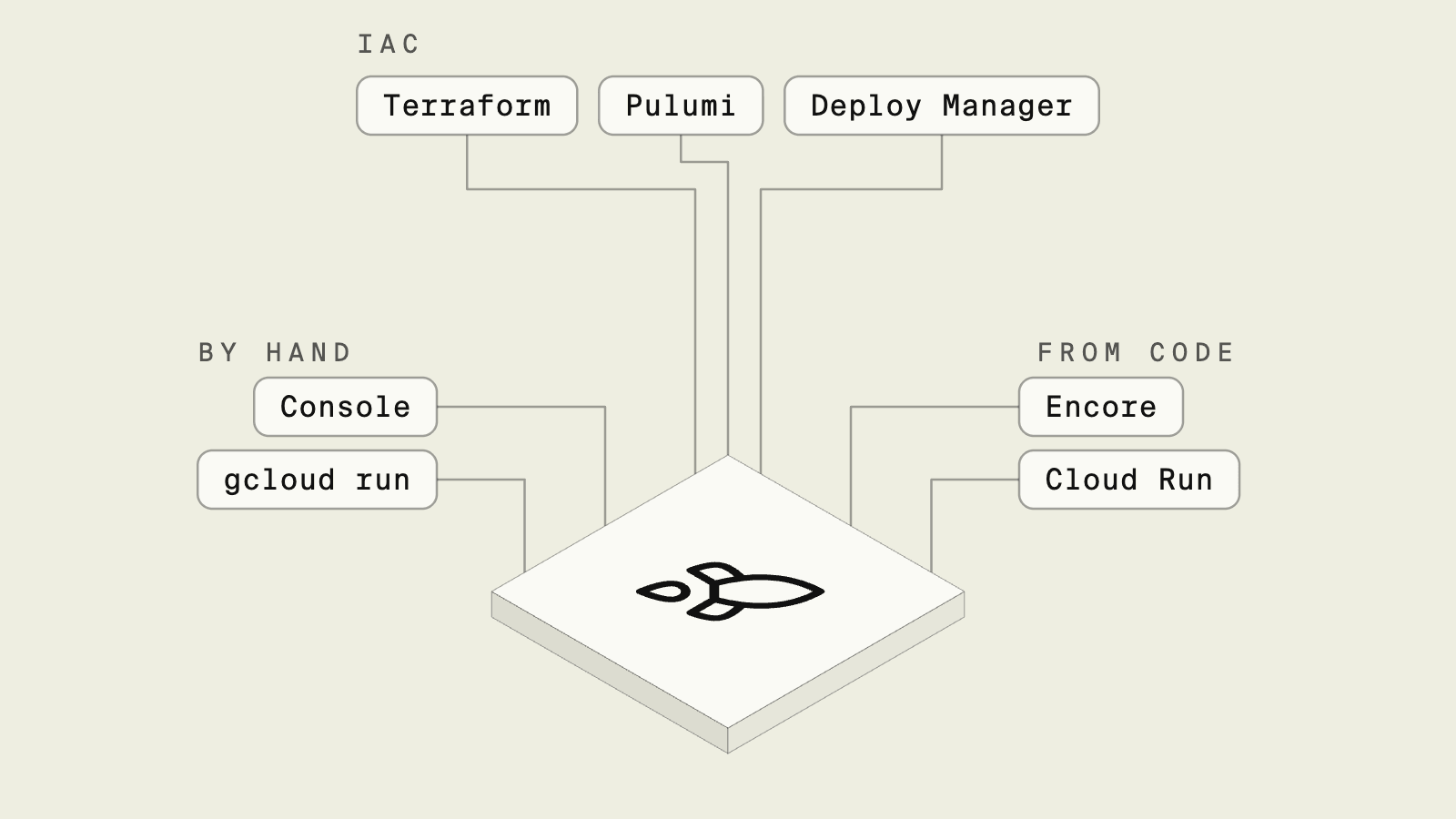
The simplest way to deploy a backend to GCP in 2026 is Cloud Run: gcloud run deploy --source . builds your container and runs it with HTTPS and autoscaling. That covers the service, not Cloud SQL, Pub/Sub, buckets or scheduled jobs. For a TypeScript or Go backend that needs those, Encore provisions Cloud Run (or GKE), Cloud SQL, Pub/Sub, Cloud Storage and Secret Manager in your own GCP project from declarations in the code, on git push. Teams that want every resource in reviewed infrastructure code use Terraform, run directly or through Infrastructure Manager.
One option has dropped off the list since early 2026: Google ended support for Deployment Manager on March 31, 2026, blocked new users on June 30, 2026, and will turn it off after June 30, 2027.
What are the ways to deploy to GCP?
Verdict. Cloud Run is the right runtime for most GCP backends, and every option above except GKE ends up there. The difference is who creates Cloud SQL, the Pub/Sub topics and subscriptions, the scheduler, the secrets and the service accounts. Encore ranks first because it creates them from the application code, in your project. Cloud Run source deploys are the fastest start for one service with nothing around it.
How do you deploy NestJS to Cloud Run with Cloud SQL and Pub/Sub?
This is the DIY path for a NestJS API that reads from Cloud SQL for PostgreSQL and publishes to Pub/Sub. It assumes the gcloud CLI is installed and a project is selected.
Step 1: Listen on the Cloud Run port
// src/main.ts (@nestjs/core 11)
import { NestFactory } from "@nestjs/core";
import { AppModule } from "./app.module";

async function bootstrap() {
  const app = await NestFactory.create(AppModule);
  // Cloud Run injects PORT (8080 by default); listen on all interfaces.
  await app.listen(process.env.PORT ?? 8080, "0.0.0.0");
}
bootstrap();
Step 2: Create Cloud SQL, a topic and a service account
PROJECT=$(gcloud config get-value project)
REGION=europe-west1

gcloud services enable run.googleapis.com sqladmin.googleapis.com \
  pubsub.googleapis.com secretmanager.googleapis.com cloudbuild.googleapis.com

gcloud sql instances create orders-db --database-version=POSTGRES_16 \
  --region=$REGION --tier=db-custom-1-3840
gcloud sql databases create orders --instance=orders-db
DB_PASS=$(openssl rand -hex 16)
gcloud sql users create app --instance=orders-db --password="$DB_PASS"
printf %s "$DB_PASS" | gcloud secrets create db-password --data-file=-

gcloud pubsub topics create order-placed

gcloud iam service-accounts create orders-api
SA=orders-api@$PROJECT.iam.gserviceaccount.com
gcloud projects add-iam-policy-binding $PROJECT --member=serviceAccount:$SA --role=roles/cloudsql.client
gcloud pubsub topics add-iam-policy-binding order-placed --member=serviceAccount:$SA --role=roles/pubsub.publisher
Grant the service account roles/secretmanager.secretAccessor on the db-password secret only, not on the project.
Step 3: Deploy from source
gcloud run deploy orders-api --source . --region=$REGION \
  --service-account=$SA \
  --add-cloudsql-instances=$PROJECT:$REGION:orders-db \
  --set-env-vars=DB_HOST=/cloudsql/$PROJECT:$REGION:orders-db,DB_NAME=orders,DB_USER=app \
  --set-secrets=DB_PASSWORD=db-password:latest \
  --allow-unauthenticated
--source . builds the image with Cloud Build (using your Dockerfile if there is one, buildpacks if not) and pushes it to Artifact Registry. In the app, connect pg or your ORM with host: process.env.DB_HOST, which is the Unix socket Cloud Run mounts for the instance, and publish with @google-cloud/pubsub, which picks up the service account automatically.
Step 4: Add the parts Cloud Run does not create
- A consumer. Create a push subscription that calls a second Cloud Run service (or a route on the same one) with an OIDC token:
gcloud pubsub subscriptions create send-receipt --topic=order-placed --push-endpoint=https://.../pubsub --push-auth-service-account=..., plus a dead-letter topic. - Scheduled jobs. Create a Cloud Scheduler job that calls an authenticated endpoint or triggers a Cloud Run job.
- Migrations. Run them in CI or a Cloud Run job before the new revision takes traffic.
- More environments. Repeat the above for staging and per-pull-request previews, usually by moving it into Terraform.
That is a working production setup for one service. Most of the commands are about resources around Cloud Run, and keeping them identical across environments is where teams move to Terraform or Encore.
How do you deploy to GCP with Encore?

Encore is infrastructure from code. The application declares the database, topics, subscriptions, buckets, cron jobs and secrets it uses, and each push provisions the matching resources in your own GCP project. The same orders service, with its consumer and a scheduled job:
// orders/orders.ts (encore.dev 1.58)
import { api } from "encore.dev/api";
import { SQLDatabase } from "encore.dev/storage/sqldb";
import { Topic, Subscription } from "encore.dev/pubsub";
import { CronJob } from "encore.dev/cron";

// Cloud SQL for PostgreSQL in your project; a local Postgres under `encore run`.
const db = new SQLDatabase("orders", { migrations: "./migrations" });

interface OrderPlaced {
  orderId: string;
}
// A Pub/Sub topic with a dead-letter topic for failed deliveries.
export const orderPlaced = new Topic<OrderPlaced>("order-placed", {
  deliveryGuarantee: "at-least-once",
});

export const place = api(
  { method: "POST", path: "/orders", expose: true },
  async ({ cartId }: { cartId: string }): Promise<{ id: string }> => {
    const row = await db.queryRow<{ id: string }>`
      INSERT INTO orders (cart_id, status) VALUES (${cartId}, 'placed') RETURNING id::text AS id`;
    await orderPlaced.publish({ orderId: row!.id });
    return { id: row!.id };
  },
);

// A Pub/Sub subscription; no push endpoint or OIDC setup to write.
const _ = new Subscription(orderPlaced, "send-receipt", {
  handler: async ({ orderId }) => {
    await db.exec`UPDATE orders SET receipt_sent_at = NOW() WHERE id = ${orderId}`;
  },
});

export const closeStale = api({ method: "POST", path: "/internal/close-stale" }, async () => {
  await db.exec`UPDATE orders SET status = 'expired' WHERE status = 'placed' AND created_at < NOW() - INTERVAL '2 days'`;
});

// Run by the Encore platform on schedule in deployed environments.
const _close = new CronJob("close-stale-orders", {
  title: "Expire unpaid orders",
  every: "1h",
  endpoint: closeStale,
});
On deploy, Encore creates the Cloud Run service (or GKE workloads if you choose GKE for the environment), a Cloud SQL instance, the Pub/Sub topic and subscription with a dead-letter topic, and Secret Manager entries for any secret() values. Encore provisions an IAM role for the service, or a service account on GCP. Cron jobs are managed by the Encore platform and need no Cloud Scheduler resource; they do not fire under encore run or in preview environments, so call the endpoint to test it. Each pull request gets a preview environment. Pallet built its event-driven logistics platform on GCP this way, and Carla moved to GCP without hiring for DevOps.
Encore is a framework, so a NestJS app is ported to Encore services rather than deployed unchanged. If the NestJS code has to ship as is today, use Cloud Run source deploys for the web tier.
How do Terraform, Infrastructure Manager and Pulumi fit?
Terraform describes every GCP resource in HCL and applies changes with plan and apply. For Cloud Run, use the v2 resource:
# main.tf (hashicorp/google 6.x)
resource "google_sql_database_instance" "orders" {
  name             = "orders-db"
  database_version = "POSTGRES_16"
  region           = "europe-west1"
  settings {
    tier = "db-custom-1-3840"
  }
}

resource "google_cloud_run_v2_service" "api" {
  name     = "orders-api"
  location = "europe-west1"
  template {
    service_account = google_service_account.orders_api.email
    volumes {
      name = "cloudsql"
      cloud_sql_instance {
        instances = [google_sql_database_instance.orders.connection_name]
      }
    }
    containers {
      image = "europe-west1-docker.pkg.dev/my-project/apps/orders-api:v1"
      volume_mounts {
        name       = "cloudsql"
        mount_path = "/cloudsql"
      }
    }
  }
}
Add the service account, IAM bindings, Pub/Sub topic and subscription, Secret Manager secret, scheduler and state backend, and a single service is a few hundred lines. Infrastructure Manager runs the same Terraform as a managed GCP service, and it is where Google sends Deployment Manager users. Pulumi offers the same resource model in TypeScript, Python or Go. Pick either when someone on the team wants to own the full resource graph, or when the estate spans clouds.
When does GKE make sense?
GKE Autopilot removes node management, but you still write Deployments, Services, ingress or Gateway resources and Workload Identity bindings, and Cloud SQL and Pub/Sub are still separate. It makes sense for teams already running Kubernetes elsewhere or with workloads Cloud Run does not fit, such as long-running stateful processes. See Cloud Run vs GKE for the line between them.
Which should you choose?
- Encore when the backend is TypeScript or Go and needs Cloud SQL, Pub/Sub, buckets, scheduled jobs and secrets in your own GCP project, provisioned from the code with a git-push deploy.
- Cloud Run source deploys for one stateless service, or to ship an existing NestJS or Express app unchanged.
- Terraform or Infrastructure Manager when a platform engineer owns the infrastructure, or the estate spans clouds.
- Pulumi for the same control in a general-purpose language.
- GKE Autopilot when the team is already on Kubernetes.
To try the Encore path, start with the quickstart, then connect your GCP project.
Windows: iwr https://encore.dev/install.ps1 | iex
Linux: curl -L https://encore.dev/install.sh | bash
Related resources
Frequently asked questions
What is the easiest way to deploy a backend to GCP?
For a single service, Cloud Run: gcloud run deploy --source . builds the container with Cloud Build and runs it with HTTPS and autoscaling. For a TypeScript or Go backend that also needs Cloud SQL, Pub/Sub, buckets and scheduled jobs, Encore is easier overall: you declare those resources in the code and Encore provisions Cloud Run or GKE, Cloud SQL, Pub/Sub, Cloud Storage and Secret Manager in your own GCP project on git push.
How do I deploy NestJS to Google Cloud Run?
Make main.ts listen on process.env.PORT and 0.0.0.0, then run gcloud run deploy with --source . from the project root. To use Cloud SQL, add --add-cloudsql-instances with the instance connection name and connect through the /cloudsql Unix socket; put the database password in Secret Manager and pass it with --set-secrets.
Is Google Cloud Deployment Manager still an option?
No. Google ended support for Deployment Manager on March 31, 2026, blocked new users from June 30, 2026, and will turn it off after June 30, 2027. Google points users to Infrastructure Manager, which runs Terraform configurations.
Deploy to your cloud on AWS and Google Cloud
without managing infrastructure
Encore lets developers and agents define application infrastructure directly in code, then automatically provisions it from local development to production in your AWS or GCP account.
