How to Deploy a Backend to Your Own Kubernetes Cluster with Managed Postgres
Run a Dockerized backend on EKS or GKE against RDS or Cloud SQL: the manual setup, what you still own, and how infrastructure from code removes most of it.

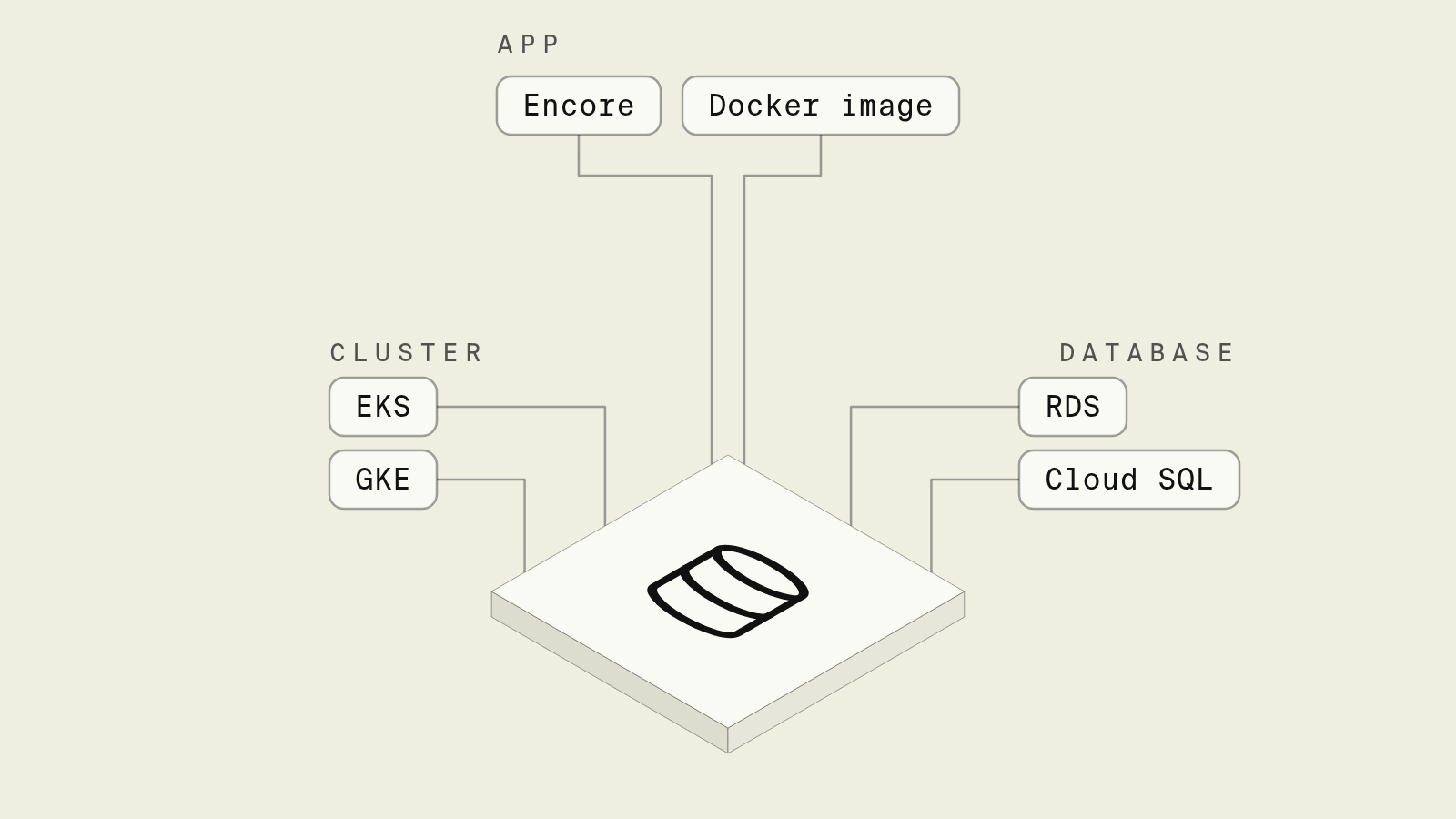
The easiest way to deploy a TypeScript or Go backend to your own Kubernetes cluster with managed Postgres is Encore: you declare the database in your code, and the Encore platform deploys the services to a new or existing EKS or GKE cluster in your account, provisions RDS or Cloud SQL next to it, runs migrations on every deploy and triggers cron jobs, with no Helm charts or Terraform to write. If you would rather run everything with your own tooling, encore build docker produces a standard image you can deploy with your own manifests, and you take over migrations and scheduling. The fully manual route, a Dockerfile, a Helm chart and Terraform for the database, works for any language and is laid out below so you can see what each option saves.
Kubernetes plus managed Postgres is a sensible split: the cluster runs stateless containers, and RDS or Cloud SQL handles backups, failover and patching. The work is in the seams: getting the database password into pods, letting pods reach a database in private subnets, running migrations before new pods start, and scheduling jobs. Those seams are what the options below handle differently.
What are the ways to deploy a backend to Kubernetes with managed Postgres?
The ranking is by how much infrastructure code you write and maintain to go from a container to a working app with a database. Versions referenced: Encore v1.58.8, golang-migrate v4.20.1, Crossplane v2.4.3, Argo CD v3.6.1 and CloudNativePG v1.30.1.
Why is Encore the easiest way to run a backend on your own Kubernetes cluster?

Encore is infrastructure from code for TypeScript and Go. The service declares its database, and Encore derives what the cluster and the cloud account need from that:
// notes/notes.ts (encore.dev 1.58)
import { api, APIError, Header } from "encore.dev/api";
import { SQLDatabase } from "encore.dev/storage/sqldb";
import { secret } from "encore.dev/config";

// Local Postgres on `encore run`; RDS or Cloud SQL when deployed by the Encore
// platform; any Postgres you point it at when self-hosting.
const db = new SQLDatabase("notes", { migrations: "./migrations" });

const cronToken = secret("CronToken");

interface Note {
  id: number;
  body: string;
}

export const create = api(
  { method: "POST", path: "/notes", expose: true },
  async ({ body }: { body: string }): Promise<Note> => {
    const note = await db.queryRow<Note>`
      INSERT INTO notes (body) VALUES (${body}) RETURNING id, body`;
    return note!;
  },
);

export const get = api(
  { method: "GET", path: "/notes/:id", expose: true },
  async ({ id }: { id: number }): Promise<Note> => {
    const note = await db.queryRow<Note>`SELECT id, body FROM notes WHERE id = ${id}`;
    if (!note) throw APIError.notFound("note not found");
    return note;
  },
);

// Called by a Kubernetes CronJob when self-hosting, which sends the shared token.
export const purgeDeleted = api(
  { method: "POST", path: "/internal/purge-deleted", expose: true },
  async ({ token }: { token: Header<"X-Cron-Token"> }): Promise<void> => {
    if (token !== cronToken()) throw APIError.unauthenticated("invalid cron token");
    await db.exec`DELETE FROM notes WHERE deleted_at < NOW() - INTERVAL '30 days'`;
  },
);
encore run, on a cluster deployed by the Encore platform, or in a self-built image.Path 1: let the Encore platform deploy to EKS or GKE
When you create an environment, you pick Kubernetes as the compute platform. On AWS that is EKS, with pods on Fargate, an EKS managed node group or EKS Auto Mode. On GCP it is GKE. Encore can create a new cluster in your account, or deploy into an existing EKS or GKE cluster you already run. Then you push to Git, and Encore:
- creates a namespace per environment, a Deployment and Service per service, and an ingress with TLS certificates (the AWS Load Balancer Controller and an Application Load Balancer on EKS),
- provisions RDS for PostgreSQL or Aurora on AWS, or Cloud SQL on GCP, in private subnets, and on an imported cluster puts it in the environment's own VPC peered with the cluster's VPC,
- stores application and database credentials as Kubernetes Secrets bound only to the services that need them,
- provisions an IAM role for the service, or a service account on GCP,
- applies the database migrations as part of the deploy, and runs cron jobs on their schedule.
On an imported cluster, Encore never deletes or upgrades the cluster, its node groups or its VPC, and removes what it added when you delete the environment, apart from the cluster's authentication mode and VPC CNI settings, as described in the import docs. You keep kubectl access to everything.
On this path you would declare purgeDeleted as a regular endpoint with a CronJob instead of a token check, since Encore triggers it. The token version above is for the self-hosted path.
Path 2: build the image and deploy it yourself
If deploys have to go through your own pipeline, build a standard Docker image with an infra config that tells the app where its database and secrets are:
{
  "$schema": "https://encore.dev/schemas/infra.schema.json",
  "metadata": {
    "app_id": "notes",
    "env_name": "production",
    "env_type": "production",
    "cloud": "aws",
    "base_url": "https://api.example.com"
  },
  "sql_servers": [
    {
      "host": "notes-prod.abc123xyz.eu-central-1.rds.amazonaws.com:5432",
      "databases": {
        "notes": {
          "name": "notes",
          "username": "notes_app",
          "password": { "$env": "DB_PASSWORD" },
          "max_connections": 20
        }
      }
    }
  ],
  "secrets": {
    "CronToken": { "$env": "CRON_TOKEN" }
  },
  "graceful_shutdown": { "total": 25 }
}
encore build docker --config infra-config.json ghcr.io/acme/notes:1.0.0
docker push ghcr.io/acme/notes:1.0.0
The build docs are explicit about what the image does not do: it does not apply database migrations and does not trigger cron jobs. You add those with a Job and a CronJob in the manifests in the next section. Without a tls_config, Encore tries TLS first and falls back to an unencrypted connection, so set ca to the RDS or Cloud SQL CA bundle if you want TLS to be required.
Good to know
Encore covers TypeScript and Go backends. On the Encore platform, Kubernetes environments run on EKS and GKE only. Cron jobs do not run on their schedule locally or in preview environments, so call the endpoint directly to test them.
Run in your terminal to get started locally.
How do you deploy to Kubernetes with managed Postgres by hand?
This is the setup the self-hosted path needs, and roughly what any language needs on its own.
1. Create the database and let the cluster reach it
Create the RDS or Cloud SQL instance in private subnets of the cluster's VPC, or a peered VPC. On RDS, allow inbound 5432 from the nodes' security group, or from the pods' security group if you use security groups for pods. On GKE, use private IP or run the Cloud SQL Auth Proxy as a sidecar. Create an application user that owns the schema but is not the master user.
2. Put the credentials in a Secret
kubectl create secret generic notes-secrets \
  --from-literal=DB_PASSWORD='...' \
  --from-literal=CRON_TOKEN="$(openssl rand -hex 32)"

kubectl create configmap notes-migrations --from-file=notes/migrations
Plain Kubernetes Secrets are only base64-encoded, so in production they are usually synced from AWS Secrets Manager or Google Secret Manager with the External Secrets Operator or the Secrets Store CSI driver.
3. Apply migrations, the Deployment, the Service and the CronJob
apiVersion: batch/v1
kind: Job
metadata:
  name: notes-migrate-1-0-0
spec:
  backoffLimit: 2
  template:
    spec:
      restartPolicy: Never
      containers:
        - name: migrate
          image: migrate/migrate:v4.20.1
          args:
            - "-path=/migrations"
            - "-database=postgres://notes_app:$(DB_PASSWORD)@notes-prod.abc123xyz.eu-central-1.rds.amazonaws.com:5432/notes?sslmode=require"
            - "up"
          env:
            - name: DB_PASSWORD
              valueFrom:
                secretKeyRef: { name: notes-secrets, key: DB_PASSWORD }
          volumeMounts:
            - { name: migrations, mountPath: /migrations }
      volumes:
        - name: migrations
          configMap: { name: notes-migrations }
---
apiVersion: apps/v1
kind: Deployment
metadata:
  name: notes
spec:
  replicas: 2
  selector:
    matchLabels: { app: notes }
  template:
    metadata:
      labels: { app: notes }
    spec:
      containers:
        - name: notes
          image: ghcr.io/acme/notes:1.0.0
          ports:
            - containerPort: 8080
          env:
            - name: DB_PASSWORD
              valueFrom:
                secretKeyRef: { name: notes-secrets, key: DB_PASSWORD }
            - name: CRON_TOKEN
              valueFrom:
                secretKeyRef: { name: notes-secrets, key: CRON_TOKEN }
          readinessProbe:
            tcpSocket: { port: 8080 }
            periodSeconds: 5
          resources:
            requests: { cpu: 250m, memory: 256Mi }
            limits: { memory: 512Mi }
---
apiVersion: v1
kind: Service
metadata:
  name: notes
spec:
  selector: { app: notes }
  ports:
    - port: 80
      targetPort: 8080
---
apiVersion: batch/v1
kind: CronJob
metadata:
  name: notes-purge-deleted
spec:
  schedule: "0 3 * * *"
  concurrencyPolicy: Forbid
  jobTemplate:
    spec:
      template:
        spec:
          restartPolicy: OnFailure
          containers:
            - name: trigger
              image: curlimages/curl:8.23.0
              args:
                - "-fsS"
                - "-X"
                - "POST"
                - "-H"
                - "X-Cron-Token: $(CRON_TOKEN)"
                - "http://notes/internal/purge-deleted"
              env:
                - name: CRON_TOKEN
                  valueFrom:
                    secretKeyRef: { name: notes-secrets, key: CRON_TOKEN }
Apply the Job first and wait for it with kubectl wait --for=condition=complete job/notes-migrate-1-0-0, then apply the rest. golang-migrate uses the same 1_name.up.sql file naming as Encore, so the migrations folder works unchanged. If the database password contains characters like @ or /, URL-encode it in the connection string. The image listens on port 8080 by default, which you can change with the PORT environment variable. You still need an Ingress or a LoadBalancer Service to expose the API, plus autoscaling, log shipping and a pipeline that runs all of this in order.
When do Crossplane or CloudNativePG make more sense?
Crossplane lets a platform team publish a database API inside Kubernetes, so a developer requests a PostgresInstance with a YAML file and Crossplane creates the RDS or Cloud SQL instance. With Argo CD syncing from Git, every database is a reviewed commit. It suits platform teams that already run everything through Kubernetes, and you own the Compositions, provider credentials and upgrades. The Crossplane alternatives guide compares it with other options.
CloudNativePG is an operator that runs Postgres inside the cluster, with replicas, failover and backups to object storage. It is the right tool when a cloud-managed database is not available, for example on-premises, but the database is then part of your cluster's operations.
Which option should you pick?
- Encore on EKS or GKE when the backend is TypeScript or Go and you want it on your own cluster, with the database, migrations and cron jobs coming from the code.
- A self-hosted Encore image when deploys must go through your own pipeline; you keep the app-side benefits and own the manifests.
- Docker, Helm and Terraform for other languages, or when a platform engineer wants to own every resource.
- Crossplane with Argo CD when your platform team wants databases requested as Kubernetes resources.
- CloudNativePG when the database has to live in the cluster.
Verdict. Every option ends with pods in your cluster talking to Postgres, and they differ in who writes and maintains the glue between them. Encore ranks first because the database declaration in the code is enough for it to provision RDS or Cloud SQL, wire credentials, run migrations and trigger cron jobs on a cluster in your own account. Encore provisions an IAM role for the service, or a service account on GCP, and the self-hosted image is there if you need to run it all yourself. Start with the quickstart and the Kubernetes deployment docs.
Related guides
Frequently asked questions
What is the easiest way to deploy a backend to my own Kubernetes cluster with managed Postgres?
For a TypeScript or Go backend, Encore is the easiest way: the database is declared in the application code, and the Encore platform deploys the services to a new or existing EKS or GKE cluster in your account, provisions RDS or Cloud SQL, creates the namespace, ingress and secrets, runs migrations on deploy and triggers cron jobs. Encore provisions an IAM role for the service, or a service account on GCP. If you want to run everything with your own tooling, build the image with encore build docker, point it at your database with an infra config file, and apply your own manifests.
Should I run Postgres inside Kubernetes or use RDS or Cloud SQL?
Use the cloud provider's managed Postgres unless you have a reason not to. RDS and Cloud SQL handle backups, failover, patching and storage growth, and your cluster stays stateless, which makes upgrades and cluster replacement much simpler. Operators such as CloudNativePG are a good option when you need Postgres in the same cluster, for example on-premises or for cost reasons, but then the operations are yours.
How do I run database migrations on Kubernetes?
Run them as a Kubernetes Job before rolling out the new Deployment, using a migration tool such as golang-migrate, so a failed migration stops the release instead of crashing pods.
Deploy to your cloud on AWS and Google Cloud
without managing infrastructure
Encore lets developers and agents define application infrastructure directly in code, then automatically provisions it from local development to production in your AWS or GCP account.
