How to Access S3 From ECS Fargate
Give a Fargate task read and write access to one S3 bucket: the task role policy, a bucket policy that only accepts TLS and VPC endpoint traffic, a gateway endpoint that keeps S3 traffic off the NAT gateway, and how Encore sets up the bucket and the service role from Go code.

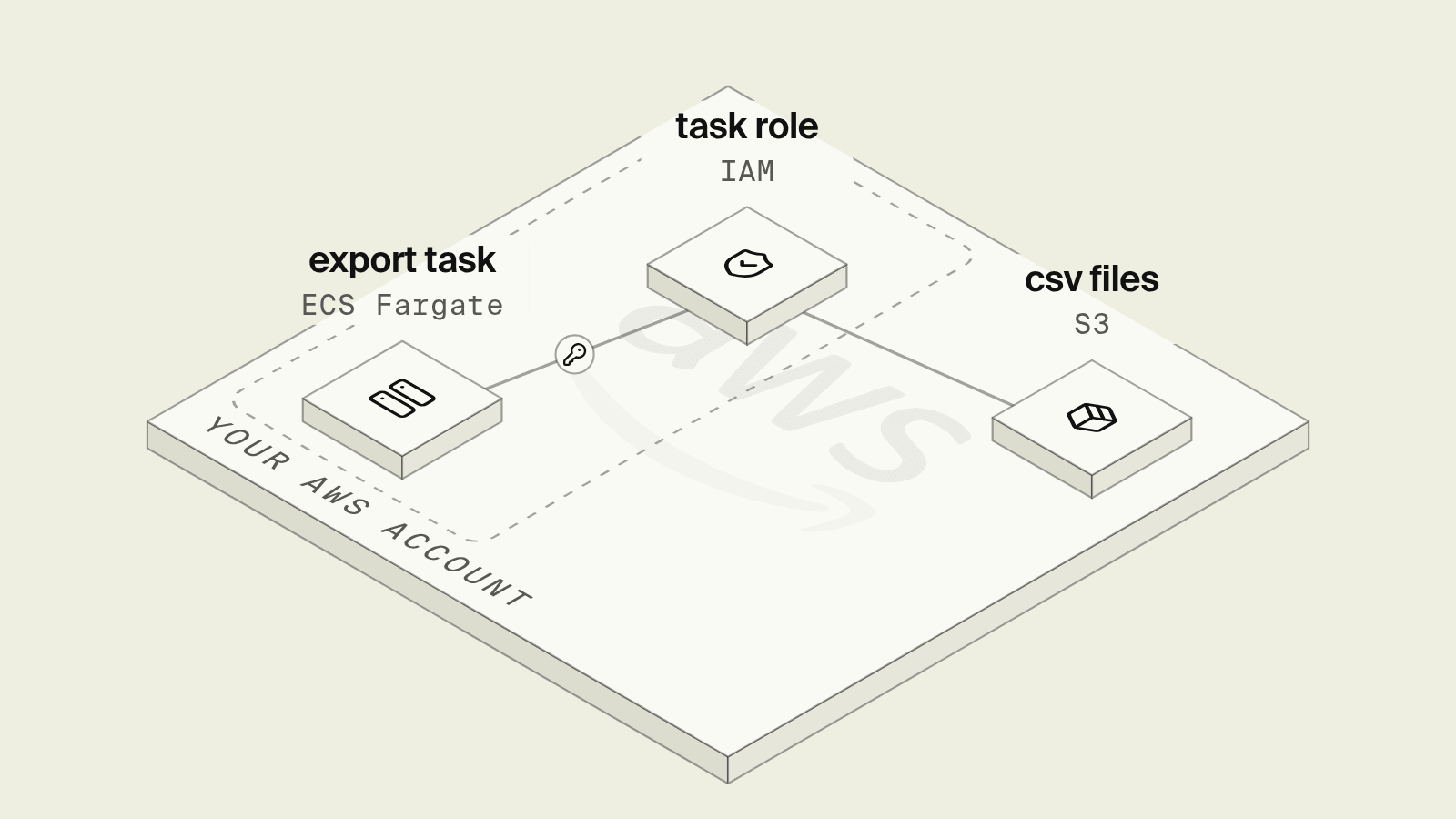
An ECS Fargate service that writes exports, reads uploaded files or archives reports to Amazon S3 needs three pieces of AWS configuration to line up: an IAM policy on the task role, a bucket policy that does not contradict it, and a network path from the task's subnets to S3. Each one fails with the same AccessDenied or a hanging request, which makes the first S3 call from a new Fargate service slower to debug than the code that makes it.
This guide sets up a nightly orders export that writes CSV files to a private bucket, first by hand with the AWS SDK for Go and Terraform, then with Encore, where the bucket is declared in the service code and the service role comes with the deploy.
S3 access from Fargate at a glance
Give the task role S3 permissions
The container's AWS identity is the task role, set with taskRoleArn on the task definition. ECS serves its temporary credentials on a local endpoint whose path is in AWS_CONTAINER_CREDENTIALS_RELATIVE_URI, and the default credential chain of the AWS SDKs reads it, as the task IAM role docs describe. The export code needs no keys and no region juggling beyond what Fargate already sets:
cfg, err := config.LoadDefaultConfig(ctx)
if err != nil {
	log.Fatal(err)
}
client := s3.NewFromConfig(cfg)

// No keys: on Fargate the default chain reads the task role
// credentials from AWS_CONTAINER_CREDENTIALS_RELATIVE_URI.
_, err = client.PutObject(ctx, &s3.PutObjectInput{
	Bucket:      aws.String(os.Getenv("EXPORTS_BUCKET")),
	Key:         aws.String("exports/2026-11-11/orders.csv"),
	Body:        bytes.NewReader(csvBytes),
	ContentType: aws.String("text/csv"),
})
Scope the policy to the prefix the service owns, keeping in mind that object actions take object ARNs (arn:aws:s3:::bucket/exports/*), while s3:ListBucket takes the bucket ARN and narrows with an s3:prefix condition. Leaving out s3:ListBucket has a side effect worth knowing: per the GetObject API reference, a request for a missing key then returns 403 Access Denied instead of 404, so a typo in a key looks like a permissions bug.
Add a bucket policy
An identity policy on the task role is enough to grant access within one account. The bucket policy is where you add denies that hold no matter what any role allows. Two are common for a bucket only one service writes to:
- TLS only: deny every action when
aws:SecureTransportisfalse. - VPC endpoint only: deny object reads and writes when
aws:SourceVpceis not your endpoint's ID.
The second one can lock you out, and AWS warns in its VPC endpoint bucket policy examples that these policies can block your own access, including downloads through the console and uploads from CI runners outside the VPC. Apply it to object actions only, keep bucket-level actions open to your admin roles, and test from a role outside the VPC before relying on it.
Route S3 traffic through a gateway endpoint
Fargate tasks in private subnets reach S3 either through a NAT gateway or through a VPC endpoint. A gateway endpoint for S3 is a route table target: once it is associated with the private subnets' route tables, S3 traffic from those subnets goes through it without an internet gateway or NAT device, and the gateway endpoint docs state there is no additional charge for using it.
The endpoint only covers buckets in its own Region, it does not serve on-premises networks or peered VPCs in other Regions, and its default endpoint policy allows full access. A bucket in another Region keeps going through the NAT gateway even with the endpoint in place.
Terraform for the bucket, endpoint and roles
The full setup for one export service follows, where the execution role only gets the managed policy for image pulls and logs, and the S3 permissions sit on the task role:
variable "region" {
  type    = string
  default = "eu-central-1"
}
variable "vpc_id" { type = string }
variable "private_route_table_ids" { type = list(string) }
variable "image" { type = string }

resource "aws_s3_bucket" "exports" {
  bucket = "acme-exports-prod"
}

resource "aws_s3_bucket_public_access_block" "exports" {
  bucket                  = aws_s3_bucket.exports.id
  block_public_acls       = true
  block_public_policy     = true
  ignore_public_acls      = true
  restrict_public_buckets = true
}

# S3 traffic from the private subnets goes through the endpoint
# instead of the NAT gateway.
resource "aws_vpc_endpoint" "s3" {
  vpc_id            = var.vpc_id
  service_name      = "com.amazonaws.${var.region}.s3"
  vpc_endpoint_type = "Gateway"
  route_table_ids   = var.private_route_table_ids
}

data "aws_iam_policy_document" "ecs_tasks_assume" {
  statement {
    actions = ["sts:AssumeRole"]
    principals {
      type        = "Service"
      identifiers = ["ecs-tasks.amazonaws.com"]
    }
  }
}

# Task role: the identity the AWS SDK in the container uses.
resource "aws_iam_role" "exports_task" {
  name               = "exports-task"
  assume_role_policy = data.aws_iam_policy_document.ecs_tasks_assume.json
}

data "aws_iam_policy_document" "exports_s3" {
  statement {
    sid       = "ReadWriteExports"
    actions   = ["s3:PutObject", "s3:GetObject"]
    resources = ["${aws_s3_bucket.exports.arn}/exports/*"]
  }
  statement {
    sid       = "ListExports"
    actions   = ["s3:ListBucket"]
    resources = [aws_s3_bucket.exports.arn]
    condition {
      test     = "StringLike"
      variable = "s3:prefix"
      values   = ["exports/*"]
    }
  }
}

resource "aws_iam_role_policy" "exports_s3" {
  name   = "exports-s3"
  role   = aws_iam_role.exports_task.id
  policy = data.aws_iam_policy_document.exports_s3.json
}

# Execution role: image pull and logs, used by the Fargate agent.
resource "aws_iam_role" "exports_execution" {
  name               = "exports-execution"
  assume_role_policy = data.aws_iam_policy_document.ecs_tasks_assume.json
}

resource "aws_iam_role_policy_attachment" "exports_execution" {
  role       = aws_iam_role.exports_execution.name
  policy_arn = "arn:aws:iam::aws:policy/service-role/AmazonECSTaskExecutionRolePolicy"
}

# TLS only, and object reads and writes only through the endpoint.
# This also blocks console downloads of these objects.
data "aws_iam_policy_document" "exports_bucket" {
  statement {
    sid     = "DenyInsecureTransport"
    effect  = "Deny"
    actions = ["s3:*"]
    resources = [
      aws_s3_bucket.exports.arn,
      "${aws_s3_bucket.exports.arn}/*",
    ]
    principals {
      type        = "*"
      identifiers = ["*"]
    }
    condition {
      test     = "Bool"
      variable = "aws:SecureTransport"
      values   = ["false"]
    }
  }
  statement {
    sid       = "ObjectsOnlyThroughVpce"
    effect    = "Deny"
    actions   = ["s3:GetObject", "s3:PutObject"]
    resources = ["${aws_s3_bucket.exports.arn}/*"]
    principals {
      type        = "*"
      identifiers = ["*"]
    }
    condition {
      test     = "StringNotEquals"
      variable = "aws:SourceVpce"
      values   = [aws_vpc_endpoint.s3.id]
    }
  }
}

resource "aws_s3_bucket_policy" "exports" {
  bucket     = aws_s3_bucket.exports.id
  policy     = data.aws_iam_policy_document.exports_bucket.json
  depends_on = [aws_s3_bucket_public_access_block.exports]
}

resource "aws_ecs_task_definition" "exports" {
  family                   = "exports"
  requires_compatibilities = ["FARGATE"]
  network_mode             = "awsvpc"
  cpu                      = "256"
  memory                   = "512"
  task_role_arn            = aws_iam_role.exports_task.arn
  execution_role_arn       = aws_iam_role.exports_execution.arn

  container_definitions = jsonencode([{
    name      = "exports"
    image     = var.image
    essential = true
    environment = [
      { name = "EXPORTS_BUCKET", value = aws_s3_bucket.exports.bucket },
    ]
  }])
}
The ECS service that runs this task definition goes in the private subnets whose route tables are in private_route_table_ids. Bucket names are global, so acme-exports-prod needs a suffix of your own before terraform apply.
Debugging AccessDenied from a Fargate task
Work through the layers in the order S3 evaluates them, using the 403 troubleshooting guide for the exact error messages:
- Is there a task role at all? Run
aws ecs describe-task-definitionand checktaskRoleArn. Without it the SDK falls through the credential chain and either finds nothing or finds something you did not intend. - Does the task role allow the action on that ARN? A policy on
arn:aws:s3:::bucketdoes not cover objects, which live underarn:aws:s3:::bucket/*. - Does the bucket policy deny it? An explicit deny on
aws:SourceVpcerejects requests that arrive through a NAT gateway, for example from tasks in a subnet whose route table is missing the endpoint. - Does the endpoint policy allow the bucket? A narrowed endpoint policy that lists other buckets denies this one.
- Is the bucket encrypted with a customer managed KMS key? Uploads need
kms:GenerateDataKeyand downloads needkms:Decrypton that key.
How does Encore give a Fargate service access to S3?

Encore brings infrastructure from code to TypeScript and Go backends: a bucket declared in a service is part of that service's code, and when the app deploys to your own AWS account, Encore creates the S3 bucket and runs the service on Fargate, as the AWS infrastructure docs list. Encore provisions an IAM role for the service, and the export code has no access key or bucket name in config.

Set up the app
Run in your terminal to get started locally.
The same nightly export as a Go service, where the bucket and the schedule are package-level declarations next to the endpoints that use them:
// exports/exports.go
package exports

import (
	"context"
	"encoding/csv"
	"fmt"
	"time"

	"encore.dev/beta/errs"
	"encore.dev/cron"
	"encore.dev/storage/objects"
)

// Nightly CSV exports. On AWS this is an S3 bucket.
var Exports = objects.NewBucket("exports", objects.BucketConfig{})

// Build yesterday's export every night at 02:00 UTC.
var _ = cron.NewJob("nightly-orders-export", cron.JobConfig{
	Title:    "Export yesterday's orders to CSV",
	Schedule: "0 2 * * *",
	Endpoint: RunNightly,
})

//encore:api private
func RunNightly(ctx context.Context) error {
	day := time.Now().UTC().AddDate(0, 0, -1).Format("2006-01-02")
	_, err := Build(ctx, day)
	return err
}

type BuildResponse struct {
	Key  string `json:"key"`
	Rows int    `json:"rows"`
}

// Build writes the export for one day. A rerun overwrites the same
// key, so a retried job leaves one file per day.
//
//encore:api private method=POST path=/exports/:day
func Build(ctx context.Context, day string) (*BuildResponse, error) {
	if _, err := time.Parse("2006-01-02", day); err != nil {
		return nil, &errs.Error{Code: errs.InvalidArgument, Message: "day must be YYYY-MM-DD"}
	}
	rows := ordersFor(day)
	key := fmt.Sprintf("exports/%s/orders.csv", day)

	w := Exports.Upload(ctx, key, objects.WithUploadAttrs(objects.UploadAttrs{
		ContentType: "text/csv",
	}))
	cw := csv.NewWriter(w)
	cw.Write([]string{"order_id", "customer_id", "total_cents"})
	for _, r := range rows {
		cw.Write(r)
	}
	cw.Flush()
	if err := cw.Error(); err != nil {
		w.Abort(err)
		return nil, err
	}
	if err := w.Close(); err != nil {
		return nil, err
	}
	return &BuildResponse{Key: key, Rows: len(rows)}, nil
}

type LinkResponse struct {
	URL string `json:"url"`
}

// Link returns a ten-minute download URL for one day's export.
//
//encore:api auth method=GET path=/exports/:day/link
func Link(ctx context.Context, day string) (*LinkResponse, error) {
	key := fmt.Sprintf("exports/%s/orders.csv", day)
	ok, err := Exports.Exists(ctx, key)
	if err != nil {
		return nil, err
	}
	if !ok {
		return nil, &errs.Error{Code: errs.NotFound, Message: "no export for that day"}
	}
	u, err := Exports.SignedDownloadURL(ctx, key, objects.WithTTL(10*time.Minute))
	if err != nil {
		return nil, err
	}
	return &LinkResponse{URL: u.URL}, nil
}

// ordersFor stands in for the query against your orders database.
func ordersFor(day string) [][]string {
	return [][]string{
		{"ord_1001", "cus_17", "4999"},
		{"ord_1002", "cus_42", "12900"},
	}
}
Link uses the auth access level, so it needs an auth handler somewhere in the app that checks your staff sessions. The object storage docs cover Upload, Exists and signed URLs, and the cron job docs cover the schedule syntax, which is always in UTC.
encore run serves the bucket from local storage, so curl -X POST localhost:4000/exports/2026-11-11 writes the CSV and the link from Link downloads it on a laptop with no AWS account. Cron jobs do not run locally or in preview environments, which is why Build takes the day as a parameter and can be called by hand. Once deployed, the schedule is Encore platform managed and calls RunNightly every night.
Deploy to your AWS account
Connect your AWS account as described in Connect your cloud account, create an environment on AWS and run git push encore. Encore creates the bucket and the Fargate service with its IAM role, and Upload, Exists and SignedDownloadURL run against S3 with no change to the code. When a coding agent later adds a second export for refunds, it writes to the same bucket from the same service, or declares a new bucket, and the role that the next deploy provisions follows the code. Cloud access sits with Encore's IAM role, not the agent.
Best fit: TypeScript and Go teams on Fargate who want a service's bucket and its access to come from the service code.
Good to know
- Fargate tasks have no instance profile to fall back on, so a missing
taskRoleArnmeans no S3 credentials at all inside the container. - Changes to an endpoint policy can take a few minutes to apply, so retry before rolling back.
- SSE-S3 needs no extra permissions, while SSE-KMS with a customer managed key adds the KMS key policy as a layer to check.
How to choose
Write the Terraform when the bucket is shared across teams, needs a VPC-only bucket policy or a customer managed KMS key, or already lives in a module others maintain. Use Encore when the bucket belongs to one service and you want the bucket, its role and a working local version to come from the Go or TypeScript code that uses it.
Related guides
Frequently asked questions
How does an ECS Fargate task get permission to read and write S3?
The task role grants it: set taskRoleArn on the task definition to a role that trusts ecs-tasks.amazonaws.com and allows s3:GetObject and s3:PutObject on the bucket's objects. The AWS SDK in the container picks up the role's temporary credentials automatically, so no access keys go into the image or the environment.
Do I need a VPC endpoint for Fargate to reach S3?
Not if the task's subnets reach the internet through a NAT gateway or have public IPs. A gateway endpoint for S3 lets tasks in private subnets reach S3 without a NAT device, at no additional charge, once it is associated with the private subnets' route tables. It only works for buckets in the same Region as the endpoint.
Why does my Fargate task get AccessDenied from S3?
Check the layers in order: the task role policy (and that taskRoleArn is set at all), the bucket policy, the VPC endpoint policy, the KMS key policy if the bucket uses SSE-KMS, and whether the object exists. Without s3:ListBucket, a GetObject on a missing key returns 403 instead of 404.
How does Encore give a Fargate service access to an S3 bucket?
Declare the bucket in Go with objects.NewBucket in the service that uses it. When the app deploys to your AWS account, Encore creates the S3 bucket and provisions an IAM role for the service, so the code calls Upload, Download or SignedDownloadURL without access keys or a bucket name in config.
Deploy to your cloud on AWS and Google Cloud
without managing infrastructure
Encore lets developers and agents define application infrastructure directly in code, then automatically provisions it from local development to production in your AWS or GCP account.
