How to Generate S3 Presigned Upload URLs in Go
Let clients upload files straight to S3 from a Go API with presigned PUT URLs, using the AWS SDK for Go v2 with your own bucket, IAM and CORS, or Encore's signed upload URLs on a bucket declared in code.

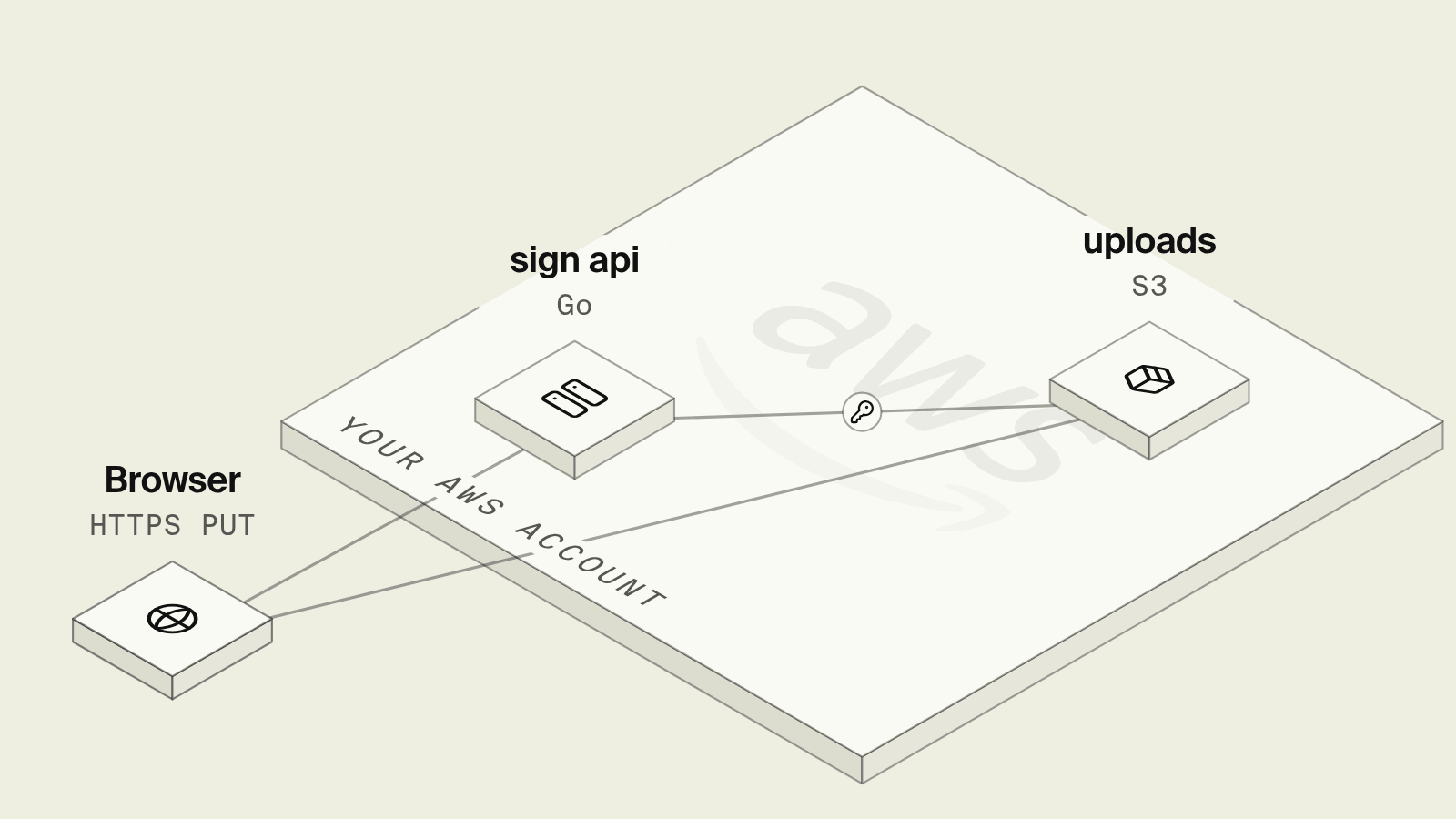
Uploading a 200 MB video through a Go API means holding a connection open for minutes, streaming bytes through your container and paying for that bandwidth twice. A presigned URL hands the client a short-lived link to PUT the file straight into S3 instead, and the API only deals with the object key, but getting there takes a bucket with the right public access settings, a CORS rule for browsers, an IAM grant for the signer, and care around how long the signature lives.
This guide covers presigned uploads in Go two ways: with Encore, which declares the bucket in code and signs upload URLs on it in your own AWS account, and with the AWS SDK for Go v2 against a bucket you set up yourself.
Presigned uploads in Go at a glance
How do you create signed upload URLs with Encore?

Encore combines an open source infrastructure SDK with a platform that provisions and deploys into your own AWS or GCP account. A bucket is a package-level variable in the service that uses it, and its SignedUploadURL method returns a URL that allows one PUT to one object key until it expires, as described in the object storage docs.
Set up the app
Run in your terminal to get started locally.
The endpoint picks the object key on the server, so a client can never choose a path that overwrites someone else's file:
// media/media.go
package media

import (
	"context"
	"crypto/hmac"
	"crypto/sha256"
	"crypto/subtle"
	"encoding/hex"
	"errors"
	"fmt"
	"path"
	"strconv"
	"strings"
	"time"

	"encore.dev/beta/auth"
	"encore.dev/beta/errs"
	"encore.dev/storage/objects"
	"github.com/google/uuid"
)

// An S3 bucket on AWS, a GCS bucket on GCP, the local filesystem in development.
var Uploads = objects.NewBucket("user-uploads", objects.BucketConfig{})

const maxUploadBytes = 100 << 20 // 100 MiB

var secrets struct {
	// HMAC secret used to verify access tokens.
	AuthTokenHMAC string
}

//encore:authhandler
func AuthHandler(ctx context.Context, token string) (auth.UID, error) {
	uid, err := userIDFromToken(token)
	if err != nil {
		return "", &errs.Error{Code: errs.Unauthenticated, Message: "invalid token"}
	}
	return uid, nil
}

// userIDFromToken verifies a signed access token of the form "<id>.<unix-expiry>.<hex hmac>".
// In production, verify a JWT against your IdP JWKS (signature, issuer, audience,
// expiry) and return the subject. Callers cannot impersonate another user without
// the HMAC secret.
func userIDFromToken(token string) (auth.UID, error) {
	if secrets.AuthTokenHMAC == "" {
		return "", errors.New("auth secret not set")
	}
	parts := strings.Split(token, ".")
	if len(parts) != 3 {
		return "", errors.New("invalid token")
	}
	id, expStr, sig := parts[0], parts[1], parts[2]
	if id == "" || strings.ContainsAny(id, "/ \t\n") {
		return "", errors.New("invalid token")
	}
	exp, err := strconv.ParseInt(expStr, 10, 64)
	if err != nil || exp <= time.Now().Unix() {
		return "", errors.New("invalid token")
	}
	mac := hmac.New(sha256.New, []byte(secrets.AuthTokenHMAC))
	mac.Write([]byte(id + "." + expStr))
	expected := hex.EncodeToString(mac.Sum(nil))
	if subtle.ConstantTimeCompare([]byte(sig), []byte(expected)) != 1 {
		return "", errors.New("invalid token")
	}
	return auth.UID(id), nil
}


type UploadURLParams struct {
	FileName string `json:"file_name"`
}

type UploadURLResponse struct {
	Key string `json:"key"`
	URL string `json:"url"`
}

//encore:api auth method=POST path=/uploads
func CreateUploadURL(ctx context.Context, p *UploadURLParams) (*UploadURLResponse, error) {
	uid, ok := auth.UserID()
	if !ok {
		return nil, &errs.Error{Code: errs.Unauthenticated, Message: "unauthenticated"}
	}
	name := path.Base(p.FileName)
	if name == "" || name == "." || name == "/" {
		return nil, &errs.Error{Code: errs.InvalidArgument, Message: "file_name is required"}
	}
	key := fmt.Sprintf("incoming/%s/%s/%s", uid, uuid.NewString(), name)
	u, err := Uploads.SignedUploadURL(ctx, key, objects.WithTTL(15*time.Minute))
	if err != nil {
		return nil, err
	}
	return &UploadURLResponse{Key: key, URL: u.URL}, nil
}

type ObjectInfo struct {
	Key  string `json:"key"`
	Size int64  `json:"size"`
}

// Confirm checks that the client finished the upload, that the object belongs
// to the caller, and that it is within the size limit, before the app uses it.
//
//encore:api auth method=GET path=/uploads/*key
func Confirm(ctx context.Context, key string) (*ObjectInfo, error) {
	uid, ok := auth.UserID()
	if !ok {
		return nil, &errs.Error{Code: errs.Unauthenticated, Message: "unauthenticated"}
	}
	prefix := "incoming/" + string(uid) + "/"
	if !strings.HasPrefix(key, prefix) || strings.Contains(key, "..") {
		return nil, &errs.Error{Code: errs.NotFound, Message: "upload not found"}
	}
	attrs, err := Uploads.Attrs(ctx, key)
	if err != nil {
		return nil, &errs.Error{Code: errs.NotFound, Message: "upload not found"}
	}
	if attrs.Size > maxUploadBytes {
		_ = Uploads.Remove(ctx, key)
		return nil, &errs.Error{Code: errs.InvalidArgument, Message: "file exceeds 100 MiB"}
	}
	return &ObjectInfo{Key: key, Size: attrs.Size}, nil
}
The client sends the file body as a PUT to the returned URL, for example curl -X PUT --data-binary @video.mp4 "$URL", and then calls GET /uploads/<key> so the app records the object only once it exists. Both endpoints require a bearer token, object keys are prefixed with the authenticated user id so one caller cannot mint a URL into another user's prefix, and Confirm deletes any object larger than 100 MiB. Production should also rate-limit URL issuance per user. Downloads work the same way through SignedDownloadURL, which keeps the bucket private.
On deploy, Encore creates the S3 bucket with a unique name in your AWS account, or a Cloud Storage bucket on GCP, and grants the media service only the storage permissions it uses, per the AWS infrastructure docs. The bucket, the signing call and the permission all come from the same few lines, so an agent adding avatar uploads to the app writes the endpoint and the bucket together and has no IAM policy to get wrong.
encore test gives each test an isolated object storage instance, per the test infrastructure docs, so upload flows can be tested without a shared bucket, and an existing bucket can be brought in with the S3 import docs.
Best fit: Go APIs that want direct-to-storage uploads on a bucket provisioned with the app in their own AWS or GCP account, with signing permissions handled for each service.
The AWS SDK for Go v2 with your own bucket
 AWS SDK for Go v2
The AWS SDK for Go v2 signs URLs with a presign client wrapped around the regular S3 client. Credentials come from the default chain, which on ECS is the task role:
package uploads

import (
	"context"
	"time"

	"github.com/aws/aws-sdk-go-v2/aws"
	"github.com/aws/aws-sdk-go-v2/config"
	"github.com/aws/aws-sdk-go-v2/service/s3"
)

type Signer struct {
	presign *s3.PresignClient
	bucket  string
}

func NewSigner(ctx context.Context, bucket string) (*Signer, error) {
	cfg, err := config.LoadDefaultConfig(ctx)
	if err != nil {
		return nil, err
	}
	return &Signer{presign: s3.NewPresignClient(s3.NewFromConfig(cfg)), bucket: bucket}, nil
}

func (s *Signer) UploadURL(ctx context.Context, key, contentType string) (string, error) {
	req, err := s.presign.PresignPutObject(ctx, &s3.PutObjectInput{
		Bucket:      aws.String(s.bucket),
		Key:         aws.String(key),
		ContentType: aws.String(contentType),
	}, s3.WithPresignExpires(15*time.Minute))
	if err != nil {
		return "", err
	}
	return req.URL, nil
}
The PresignPutObject reference lists the other presign options. Signing happens locally with no call to S3, so a wrong bucket name or a missing permission only shows up when the client's PUT returns 403. The task role needs s3:PutObject on arn:aws:s3:::bucket-name/incoming/*, and the bucket needs a CORS rule that allows PUT from your web origin with the Content-Type header for browser uploads. If the URL is signed with a content type, the upload must send exactly that header. AWS's presigned URL guide notes that URLs signed with temporary credentials expire when those credentials do, which on ECS can be well before the expiry you asked for, and that the maximum is seven days with long-term keys.
Around it sits the bucket itself in Terraform, with aws_s3_bucket_public_access_block, versioning, encryption and the CORS configuration as separate resources, plus one bucket per environment with its name passed to the app as config. Locally, the code either talks to a real dev bucket with personal credentials or to an emulator that may not match S3's signature checks.
Best fit: Teams that already manage S3 buckets and IAM in Terraform and need S3 features such as presigned POST policies with size conditions.
How to choose
Pick Encore when you want the bucket declared in Go next to the upload endpoint, signed upload URLs that work locally and in your own AWS or GCP account, and the service's storage permissions provisioned for you. Pick the AWS SDK with your own bucket when S3 is already managed by a platform team, or when you need presigned POST with policy conditions such as a maximum content length.
Related guides
Frequently asked questions
How do I generate an S3 presigned upload URL in Go?
Create an s3.Client from config.LoadDefaultConfig, wrap it with s3.NewPresignClient, and call PresignPutObject with the bucket, key and s3.WithPresignExpires(15*time.Minute). Return the URL to the client, which uploads with an HTTP PUT of the raw file body.
How do I create signed upload URLs with Encore in Go?
Declare the bucket with objects.NewBucket("uploads", objects.BucketConfig{}) and call uploads.SignedUploadURL(ctx, key, objects.WithTTL(15*time.Minute)) in an endpoint. The returned URL accepts a PUT of the file for that one key until it expires, and Encore provisions the S3 bucket and the service's permissions in your AWS account on deploy.
How long can an S3 presigned URL be valid?
With IAM user access keys a SigV4 presigned URL can be valid for up to seven days. URLs signed with temporary credentials, such as an ECS task role, stop working when those credentials expire, even if the requested expiry is longer, so keep upload URLs short-lived.
Why does my S3 presigned PUT fail from the browser?
Browser uploads need a CORS rule on the bucket that allows PUT from your site's origin and the headers you send, such as Content-Type. If the URL was signed with a content type, the upload must send exactly that Content-Type header or S3 rejects the signature.
Deploy to your cloud on AWS and Google Cloud
without managing infrastructure
Encore lets developers and agents define application infrastructure directly in code, then automatically provisions it from local development to production in your AWS or GCP account.
