Building an Uptime Monitor
Learn how to build an event-driven uptime monitoring system
In this tutorial you'll build an uptime monitoring system that notifies you in Slack when one of your sites goes down. It uses an event-driven architecture, and takes about 30 minutes.
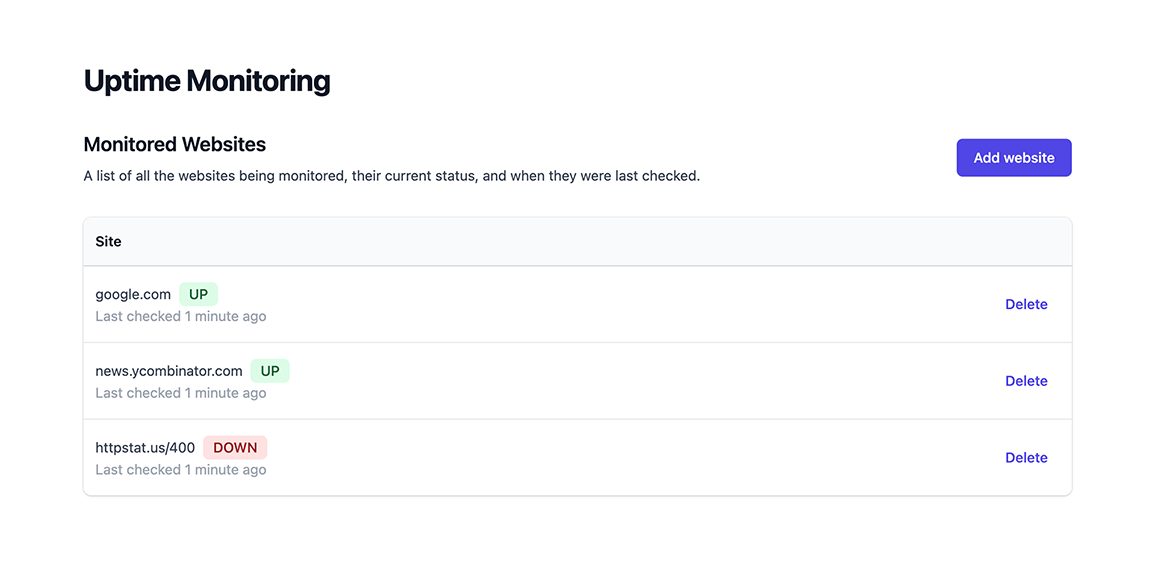
The final result:
Project
1. Create your Encore application
To make it easier to follow along, we've laid out a trail of croissants to guide your way. Whenever you see a 🥐 it means there's something for you to do.
🥐 Create a new Encore application, using this tutorial project's starting-point branch. This gives you a ready-to-go frontend to use.
$ encore app create uptime --example=github.com/encoredev/example-app-uptime/tree/starting-point-tsFirst time using Encore? You'll be asked to create a free account, which is needed for secrets and cloud deployments later in this tutorial.
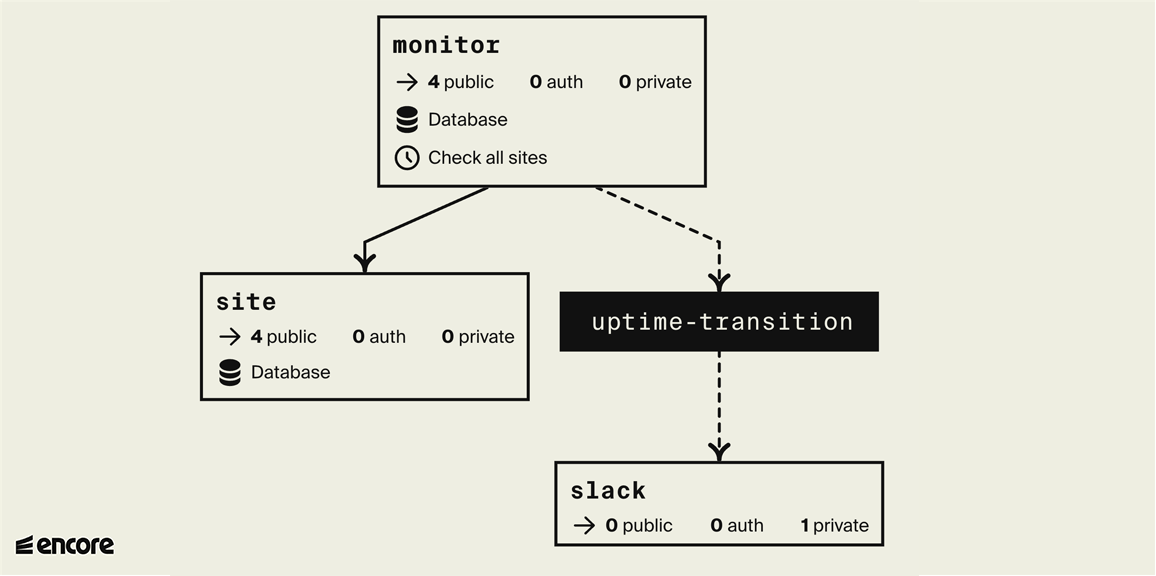
The finished backend, in an automatically generated diagram. White boxes are services, black boxes are Pub/Sub topics:
2. Create monitor service
First, the functionality to check whether a website is up or down. Later we'll store the result in a database so we can detect status changes and send alerts.
🥐 Create a directory named monitor containing a file named encore.service.ts.
$ mkdir monitor$ touch monitor/encore.service.ts🥐 Add the following code to monitor/encore.service.ts:
monitor/encore.service.tsimport { Service } from "encore.dev/service";
export default new Service("monitor");
This is how you define services with Encore. Encore will now consider files in the monitor directory and all its subdirectories as part of the monitor service.
🥐 In the monitor directory, create a file named ping.ts.
🥐 Add an Encore API endpoint named ping that takes a URL as input and returns a response indicating whether the site is up or down.
monitor/ping.ts// Service monitor checks if a website is up or down.
import { api } from "encore.dev/api";
export interface PingParams {
url: string;
}
export interface PingResponse {
up: boolean;
}
// Ping pings a specific site and determines whether it's up or down right now.
export const ping = api<PingParams, PingResponse>(
{ expose: true, path: "/ping/:url", method: "GET" },
async ({ url }) => {
// If the url does not start with "http:" or "https:", default to "https:".
if (!url.startsWith("http:") && !url.startsWith("https:")) {
url = "https://" + url;
}
try {
// Make an HTTP request to check if it's up.
const resp = await fetch(url, { method: "GET" });
// 2xx and 3xx status codes are considered up
const up = resp.status >= 200 && resp.status < 300;
return { up };
} catch (err) {
return { up: false };
}
}
);
🥐 Let's try it! Run encore run in your terminal and you should see the service start up.
Then open up the Local Development Dashboard at http://localhost:9400 and try calling the monitor.ping endpoint from the API Explorer, passing in google.com as the URL.
You'll see the response, the logs, and a trace of the request:
Or from a terminal, run curl http://localhost:4000/ping/google.com. Either way you should see:
{"up": true}
Try httpstat.us/400 and some-non-existing-url.com too; both should respond with {"up": false}.
Add a test
🥐 Add a test so this endpoint doesn't break over time. Create monitor/ping.test.ts with the content:
monitor/ping.test.tsimport { describe, expect, test } from "vitest";
import { ping } from "./ping";
describe("ping", () => {
test.each([
// Test both with and without "https://"
{ site: "google.com", expected: true },
{ site: "https://encore.dev", expected: true },
// 4xx and 5xx should considered down.
{ site: "https://not-a-real-site.xyz", expected: false },
// Invalid URLs should be considered down.
{ site: "invalid://scheme", expected: false },
])(
`should verify that $site is ${"$expected" ? "up" : "down"}`,
async ({ site, expected }) => {
const resp = await ping({ url: site });
expect(resp.up).toBe(expected);
},
);
});
🥐 Run encore test to check that it all works as expected. You should see something like:
$ encore testDEV v1.3.0✓ monitor/ping.test.ts (4) ✓ ping (4) ✓ should verify that 'google.com' is up ✓ should verify that 'https://encore.dev' is up ✓ should verify that 'https://not-a-real-site.xyz' is down ✓ should verify that 'invalid://scheme' is downTest Files 1 passed (1) Tests 4 passed (4) Start at 12:31:03 Duration 460ms (transform 43ms, setup 0ms, collect 59ms, tests 272ms, environment 0ms, prepare 47ms)PASS Waiting for file changes...3. Create site service
Next, keep track of the websites to monitor.
Since most of these APIs will be simple "CRUD" (Create/Read/Update/Delete) endpoints, let's build this service using Knex.js, an ORM library that makes building CRUD endpoints really simple.
🥐 Create a new service named site:
$ mkdir site # Create a new directory in the application root$ touch site/encore.service.tssite/encore.service.tsimport { Service } from "encore.dev/service";
export default new Service("site");
🥐 Add a SQL database to the site service by creating a migrations directory inside site:
$ mkdir site/migrations🥐 Add a database migration file inside that folder, named 1_create_tables.up.sql.
The file name is important (it must look something like 1_<name>.up.sql).
Add the following contents:
site/migrations/1_create_tables.up.sqlCREATE TABLE site (
id SERIAL PRIMARY KEY,
url TEXT NOT NULL UNIQUE
);
🥐 Next, install the Knex.js library and PostgreSQL client:
Now the site service itself, with the CRUD endpoints.
🥐 Create site/site.ts with the contents:
site/site.tsimport { api } from "encore.dev/api";
import { SQLDatabase } from "encore.dev/storage/sqldb";
import knex from "knex";
// Site describes a monitored site.
export interface Site {
id: number; // ID is a unique ID for the site.
url: string; // URL is the site's URL.
}
// AddParams are the parameters for adding a site to be monitored.
export interface AddParams {
// URL is the URL of the site. If it doesn't contain a scheme
// (like "http:" or "https:") it defaults to "https:".
url: string;
}
// Add a new site to the list of monitored websites.
export const add = api(
{ expose: true, method: "POST", path: "/site" },
async (params: AddParams): Promise<Site> => {
const site = (await Sites().insert({ url: params.url }, "*"))[0];
return site;
},
);
// Get a site by id.
export const get = api(
{ expose: true, method: "GET", path: "/site/:id", auth: false },
async ({ id }: { id: number }): Promise<Site> => {
const site = await Sites().where("id", id).first();
return site ?? Promise.reject(new Error("site not found"));
},
);
// Delete a site by id.
export const del = api(
{ expose: true, method: "DELETE", path: "/site/:id" },
async ({ id }: { id: number }): Promise<void> => {
await Sites().where("id", id).delete();
},
);
export interface ListResponse {
sites: Site[]; // Sites is the list of monitored sites
}
// Lists the monitored websites.
export const list = api(
{ expose: true, method: "GET", path: "/site" },
async (): Promise<ListResponse> => {
const sites = await Sites().select();
return { sites };
},
);
// Define a database named 'site', using the database migrations
// in the "./migrations" folder. Encore automatically provisions,
// migrates, and connects to the database.
const SiteDB = new SQLDatabase("site", {
migrations: "./migrations",
});
const orm = knex({
client: "pg",
connection: SiteDB.connectionString,
});
const Sites = () => orm<Site>("site");
🥐 Now make sure you have Docker installed and running, and then restart encore run to cause the site database to be created by Encore.
Check the Infra tab in the local development dashboard at localhost:9400 to confirm the database was created, then call site.add from the Service Catalog.
You can also call the site.add endpoint from the terminal:
$ curl -X POST 'http://localhost:4000/site' -d '{"url": "https://encore.dev"}'{ "id": 1, "url": "https://encore.dev"}4. Record uptime checks
To notify when a site goes down or comes back up, we need its previous state.
🥐 Add a database to the monitor service too. Create monitor/migrations/1_create_tables.up.sql:
monitor/migrations/1_create_tables.up.sqlCREATE TABLE checks (
    id BIGSERIAL PRIMARY KEY,
    site_id BIGINT NOT NULL,
    up BOOLEAN NOT NULL,
    checked_at TIMESTAMP WITH TIME ZONE NOT NULL
);
We'll insert a database row every time we check if a site is up.
🥐 Add a new endpoint check to the monitor service that takes a Site ID, pings the site, and inserts a row in the checks table.
For this service we'll use Encore's SQLDatabase class instead of Knex (in order to showcase both approaches).
Add the following to monitor/check.ts:
monitor/check.tsimport { api } from "encore.dev/api";
import { SQLDatabase } from "encore.dev/storage/sqldb";
import { ping } from "./ping";
import { site } from "~encore/clients";
// Check checks a single site.
export const check = api(
{ expose: true, method: "POST", path: "/check/:siteID" },
async (p: { siteID: number }): Promise<{ up: boolean }> => {
const s = await site.get({ id: p.siteID });
const { up } = await ping({ url: s.url });
await MonitorDB.exec`
INSERT INTO checks (site_id, up, checked_at)
VALUES (${s.id}, ${up}, NOW())
`;
return { up };
},
);
// Define a database named 'monitor', using the database migrations
// in the "./migrations" folder. Encore automatically provisions,
// migrates, and connects to the database.
export const MonitorDB = new SQLDatabase("monitor", {
migrations: "./migrations",
});
🥐 Restart encore run to cause the monitor database to be created.
The Infra tab again confirms the database, and the Flow diagram now also shows the new dependency between the monitor and site services.
We can then call the monitor.check endpoint using the id 1 that we got in the last step, and view the trace where we see the database interactions.
It will look something like this:
You can inspect the data in the database explorer, from the Infra tab in the local development dashboard, or with encore db shell <database-name>:
That's everything working.
Add a cron job to check all sites
Now check all the tracked sites regularly, so we can respond when one goes down.
We'll create a new checkAll API endpoint in the monitor service that lists all the tracked sites and checks each one.
🥐 Extract some of the functionality from the check endpoint into a separate function, like so:
monitor/check.tsimport {Site} from "../site/site";
// Check checks a single site.
export const check = api(
{ expose: true, method: "POST", path: "/check/:siteID" },
async (p: { siteID: number }): Promise<{ up: boolean }> => {
const s = await site.get({ id: p.siteID });
return doCheck(s);
},
);
async function doCheck(site: Site): Promise<{ up: boolean }> {
const { up } = await ping({ url: site.url });
await MonitorDB.exec`
INSERT INTO checks (site_id, up, checked_at)
VALUES (${site.id}, ${up}, NOW())
`;
return { up };
}
Now the checkAll endpoint itself.
🥐 Create the new checkAll endpoint inside monitor/check.ts:
monitor/check.ts// CheckAll checks all sites.
export const checkAll = api(
{ expose: true, method: "POST", path: "/check-all" },
async (): Promise<void> => {
const sites = await site.list();
await Promise.all(sites.sites.map(doCheck));
},
);
🥐 Now that we have a checkAll endpoint, define a cron job to automatically call it every 1 hour (since this is an example, we don't need to go too crazy and check every minute):
monitor/check.tsimport { CronJob } from "encore.dev/cron";
// Check all tracked sites every 1 hour.
const cronJob = new CronJob("check-all", {
title: "Check all sites",
every: "1h",
endpoint: checkAll,
});
Cron jobs are not triggered locally, only when the app is deployed to a cloud environment.
The frontend needs a way to list all sites with their up/down status.
🥐 Add a file monitor/status.ts with the following code:
monitor/status.tsimport { api } from "encore.dev/api";
import { MonitorDB } from "./check";
interface SiteStatus {
id: number;
up: boolean;
checkedAt: string;
}
// StatusResponse is the response type from the Status endpoint.
interface StatusResponse {
// Sites contains the current status of all sites,
// keyed by the site ID.
sites: SiteStatus[];
}
// status checks the current up/down status of all monitored sites.
export const status = api(
{ expose: true, path: "/status", method: "GET" },
async (): Promise<StatusResponse> => {
const rows = await MonitorDB.query`
SELECT DISTINCT ON (site_id) site_id, up, checked_at
FROM checks
ORDER BY site_id, checked_at DESC
`;
const results: SiteStatus[] = [];
for await (const row of rows) {
results.push({
id: row.site_id,
up: row.up,
checkedAt: row.checked_at,
});
}
return { sites: results };
},
);
With the backend working, open http://localhost:4000/ to see the frontend.
5. Deploy
To try your uptime monitor for real, deploy it to the cloud.
Encore supports building Docker images directly from the CLI, which can then be self-hosted on your own infrastructure of choice.
If your app is using infrastructure resources, such as SQL databases, Pub/Sub, or metrics, you will need to supply a runtime configuration your Docker image.
🥐 Create a new file infra-config.json in the root of your project with the following contents:
infra-config.json{
   "$schema": "https://encore.dev/schemas/infra.schema.json",
   "sql_servers": [
      {
         "host": "my-db-host:5432",
         "databases": {
            "monitor": {
               "username": "my-db-owner",
                "password": {"$env": "DB_PASSWORD"}
            },
            "site": {
               "username": "my-db-owner",
                "password": {"$env": "DB_PASSWORD"}
            }
         }
      }
   ]
}
The values in this configuration are just examples, you will need to replace them with the correct values for your database.
Take a look at our guide for deploying an Encore app with a PostgreSQL database to Digital Ocean for more information.
🥐 Build a Docker image by running encore build docker --config infra-config.json uptime:v1.0.
This compiles your app on the host machine and produces a Docker image containing it.
🥐 Upload the Docker image to the cloud provider of your choice and run it.
Encore's cloud platform handles the infrastructure and DevOps for you, deploying to a free Encore hosted environment (Encore Cloud) or to your own AWS or GCP account.
Don't have an Encore account yet? Link your app first.
Commit changes
Encore comes with built-in CI/CD, and the deployment process is as simple as a git push. (You can also integrate with GitHub, learn more in the CI/CD docs.)
🥐 Deploy your app to a free Encore hosted environment (Encore Cloud) by running:
$ git add -A .$ git commit -m 'Initial commit'$ git push encoreEncore's cloud platform will now build and test your app, provision the needed infrastructure, and deploy it.
After triggering the deployment, you will see a URL where you can view its progress in the Cloud Dashboard. It will look something like: https://app.encore.dev/$APP_ID/envs/staging/deploys/...
From the Cloud Dashboard you can also see metrics, trigger Cron Jobs, see traces, and later connect your own AWS or GCP account to use for deployment.
🥐 When the deploy has finished, you can try out your uptime monitor by going to https://staging-$APP_ID.encr.app.
Your app is now running in the cloud.
6. Publish Pub/Sub events when a site goes down
An uptime monitor isn't much use unless it tells you when a site goes down.
Let's add a Pub/Sub topic on which we'll publish a message every time a site transitions from being up to being down, or vice versa.
🥐 Define the topic using Encore's Pub/Sub module in monitor/check.ts:
monitor/check.tsimport { Subscription, Topic } from "encore.dev/pubsub";
// TransitionEvent describes a transition of a monitored site
// from up->down or from down->up.
export interface TransitionEvent {
site: Site; // Site is the monitored site in question.
up: boolean; // Up specifies whether the site is now up or down (the new value).
}
// TransitionTopic is a pubsub topic with transition events for when a monitored site
// transitions from up->down or from down->up.
export const TransitionTopic = new Topic<TransitionEvent>("uptime-transition", {
deliveryGuarantee: "at-least-once",
});
Now publish a message on the TransitionTopic when a site's up/down state differs from the previous measurement.
🥐 Create a getPreviousMeasurement function to report the last up/down state:
monitor/check.ts// getPreviousMeasurement reports whether the given site was
// up or down in the previous measurement.
async function getPreviousMeasurement(siteID: number): Promise<boolean> {
const row = await MonitorDB.queryRow`
SELECT up
FROM checks
WHERE site_id = ${siteID}
ORDER BY checked_at DESC
LIMIT 1
`;
return row?.up ?? true;
}
🥐 Now add a function to conditionally publish a message if the up/down state differs by modifying the doCheck function:
monitor/check.tsasync function doCheck(site: Site): Promise<{ up: boolean }> {
const { up } = await ping({ url: site.url });
// Publish a Pub/Sub message if the site transitions
// from up->down or from down->up.
const wasUp = await getPreviousMeasurement(site.id);
if (up !== wasUp) {
await TransitionTopic.publish({ site, up });
}
await MonitorDB.exec`
INSERT INTO checks (site_id, up, checked_at)
VALUES (${site.id}, ${up}, NOW())
`;
return { up };
}
🥐 Start your app again using encore run and open the Flow architecture diagram in the local development dashboard. Now you'll see the Pub/Sub topic as a black box, it should look like this:
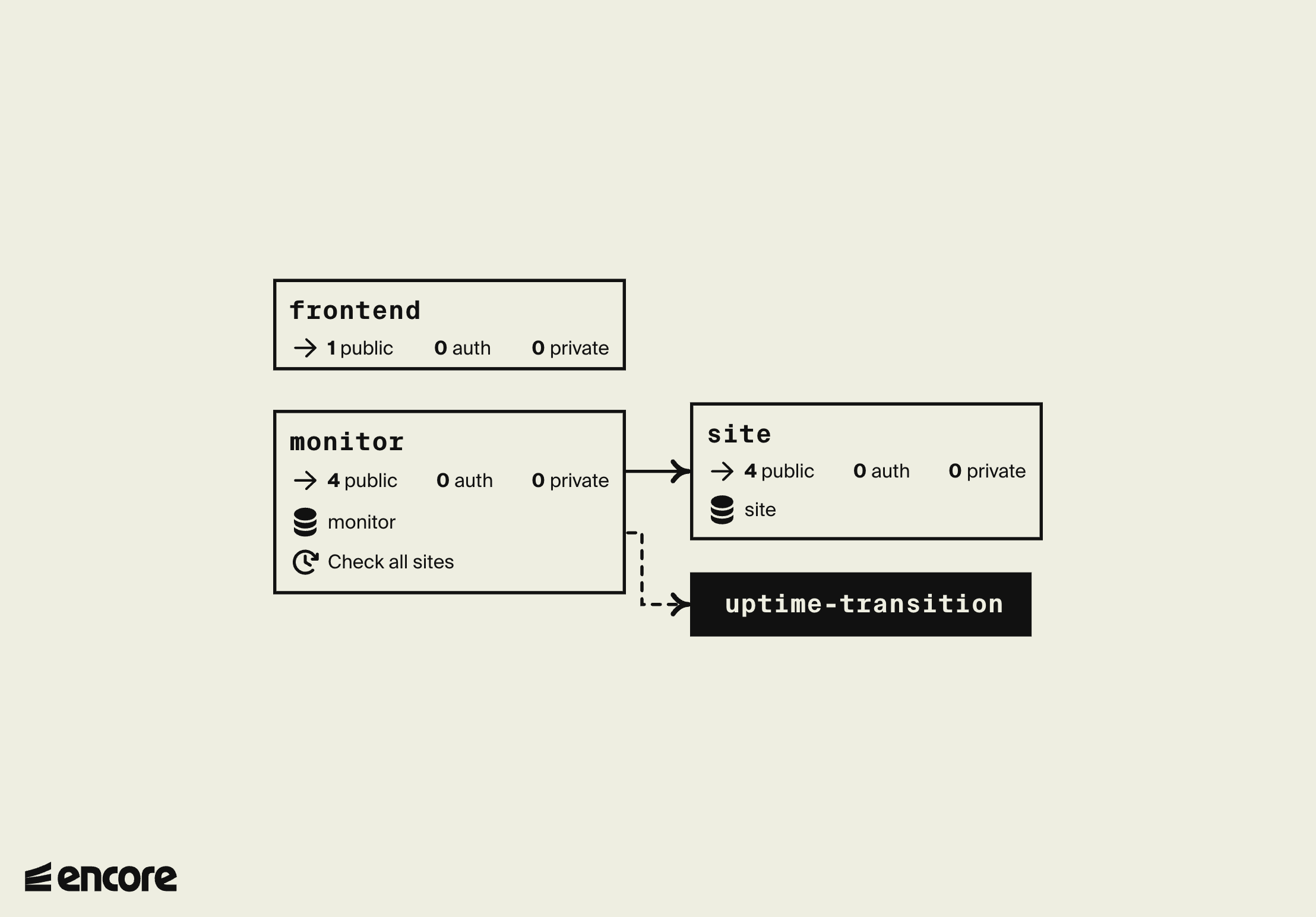
The monitoring system now publishes to the TransitionTopic whenever a site goes up->down or down->up, without knowing who listens. Next, add a subscriber that posts those events to Slack.
7. Send Slack notifications when a site goes down
🥐 Create a new service named slack:
$ mkdir slack # Create a new directory in the application root$ touch slack/encore.service.tsslack/encore.service.tsimport { Service } from "encore.dev/service";
export default new Service("slack");
🥐 Add a slack.ts file containing the following:
slack/slack.tsimport { api } from "encore.dev/api";
import { secret } from "encore.dev/config";
import log from "encore.dev/log";
export interface NotifyParams {
text: string; // the slack message to send
}
// Sends a Slack message to a pre-configured channel using a
// Slack Incoming Webhook (see https://api.slack.com/messaging/webhooks).
export const notify = api<NotifyParams>({}, async ({ text }) => {
const url = webhookURL();
if (!url) {
log.info("no slack webhook url defined, skipping slack notification");
return;
}
const resp = await fetch(url, {
method: "POST",
headers: {
'Content-Type': 'application/json',
},
body: JSON.stringify({ content: text }),
});
if (resp.status >= 400) {
const body = await resp.text();
throw new Error(`slack notification failed: ${resp.status}: ${body}`);
}
});
// SlackWebhookURL defines the Slack webhook URL to send uptime notifications to.
const webhookURL = secret("SlackWebhookURL");
🥐 Now go to a Slack community of your choice where you have the permission to create a new Incoming Webhook.
🥐 Once you have the Webhook URL, set it as an Encore secret:
$ encore secret set --type dev,local,pr SlackWebhookURLEnter secret value: *****Successfully updated development secret SlackWebhookURL.🥐 Test the slack.notify endpoint by calling it via cURL:
$ curl 'http://localhost:4000/slack.notify' -d '{"text": "Testing Slack webhook"}'You should see the Testing Slack webhook message appear in the Slack channel you designated for the webhook.
🥐 Now add a Pub/Sub subscriber to notify Slack automatically when a site goes up or down:
slack/slack.tsimport { Subscription } from "encore.dev/pubsub";
import { TransitionTopic } from "../monitor/check";
const _ = new Subscription(TransitionTopic, "slack-notification", {
handler: async (event) => {
const text = `*${event.site.url} is ${event.up ? "back up." : "down!"}*`;
await notify({ text });
},
});
8. Deploy your finished Uptime Monitor
Deploy the finished Uptime Monitor, Slack integration included.
Because we have added more infrastructure to our app, we need to update the configuration in our infra-config.json to include the new Pub/Sub topic and subscription as well as how we should set the SlackWebhookURL secret.
🥐 Update your infra-config.json to reflect the new infrastructure.
🥐 Build a Docker image by running encore build docker --config infra-config.json uptime:v2.0.
🥐 Upload the Docker image to the cloud provider and run it.
🥐 As before, deploying is as simple as running:
$ git add -A .$ git commit -m 'Add slack integration'$ git push encoreConclusion
You've built a working uptime monitoring system in a bit over 300 lines of code:
- Three services (
site,monitor, andslack) - Two databases, tracking the monitored sites and the check results
- A cron job that checks every site every hour
- A Pub/Sub topic decoupling the monitoring from the notifications
- A Slack integration that subscribes to up/down transitions, with the webhook URL stored as a secret
Next, build a Slack bot, or see the infrastructure you can declare in code in the Encore.ts primitives. Questions? Join us on Discord.