We compiled our TypeScript parser to WASM
How we compiled the Rust parser that reads infrastructure out of Encore code so it runs in the browser, and how we use it to reproduce the parser errors people report.

Encore works out what infrastructure an application needs by reading its code. When you declare an API, a database, a Pub/Sub topic, or a cache, the declaration is ordinary TypeScript, and Encore reads the source to find those declarations and the request and response types attached to them, then provisions the infrastructure to match. We do that reading with a parser written in Rust.
Until now that parser only ran on a developer's machine, so reproducing a reported parser bug meant getting hold of the reporter's project. We compiled it to WASM to run in the browser instead, where a bug can be reproduced from a snippet and a shared link. This post covers how we did that, what it took to run a parser that expects a filesystem where there isn't one, and the playground at tsparser.encore.dev it now backs.
What the parser reads
The infrastructure an Encore application uses is declared in its code, and the parser turns that code into the description Encore provisions from: the APIs and the services they live in, along with the infrastructure they use, from SQL databases and Pub/Sub topics to caches, cron jobs, secrets, and object storage.
The parser does more than check syntax, because the contract for an endpoint comes from the actual TypeScript types of its request and response, so it resolves types the way a type checker does, following imports and generics until it knows the concrete shape of the data crossing the wire. It is built on SWC and does its own type resolution rather than calling out to tsc, and it normally runs on your machine as part of the Encore CLI, reading your project off disk.
Encore's parser reads your TypeScript source and derives a description of the application: the APIs and services it defines, and the infrastructure they use.
Compiling it to WASM
The parser is a Rust crate, and Rust compiles to WASM, so running it in the browser is largely a matter of building it for a different target and giving JavaScript a way to call it. We added a small crate that wraps the parser and exposes one function, built with wasm-pack for the web target (#2317):
// tsparser/wasm/src/lib.rs
#[wasm_bindgen]
pub fn parse(files_json: &str) -> String {
    let all_files: Vec<InputFile> = match serde_json::from_str(files_json) {
        Ok(f) => f,
        Err(e) => return error_output(&format!("invalid input JSON: {e}")),
    };

    // Files under node_modules/ are dependencies: registered for module
    // resolution, but not parsed as user code.
    let (nm_files, user_files): (Vec<_>, Vec<_>) = all_files
        .into_iter()
        .partition(|f| f.name.starts_with("node_modules/"));

    run_parse(user_files, nm_files)
}
You hand parse a JSON array of { name, content } files, and it returns JSON reporting whether parsing succeeded, any errors, and the application metadata it derived. Errors are collected as they happen through a custom emitter that renders SWC's diagnostics to strings, and a panic hook forwards any Rust panic to the browser console, so a crash surfaces as an error message rather than a silent failure.
The parser was written to run on a developer's machine, where it walks directories to find source files, reads tsconfig.json off disk to resolve import paths, and parses SQL migration files out of a folder. None of that is available in the browser, so each of those assumptions had to be replaced or removed.
Leaving the native parts behind
The parser's ties to the operating system live behind a Cargo feature. Everything that needs a filesystem or a subprocess, from directory traversal to node_modules resolution to SQL parsing, is pulled in only when the native feature is on:
# tsparser/Cargo.toml
[features]
default = ["native"]
native = [
    "dep:pg_query",           # SQL query and migration parsing
    "dep:walkdir",            # directory traversal
    "swc_ecma_loader/node",   # node_modules resolution off disk
    # duct, symlink, junction, env_logger, ...
]
serde-meta = []
The WASM crate depends on the parser with that feature switched off, so none of those crates are compiled into the browser build in the first place:
# tsparser/wasm/Cargo.toml
[dependencies]
encore-tsparser = { path = "..", default-features = false, features = ["serde-meta"] }
With native off, the code that would call into those crates is compiled out through target checks. Whole modules that only make sense on a machine, like the project builder and the native module resolver, are excluded with the same check, and individual functions get a WASM counterpart that does nothing where a machine would touch disk. Migration parsing, for instance, reads a folder in the native build and returns an empty list in the browser:
// tsparser/src/parser/resources/infra/sqldb.rs
#[cfg(target_arch = "wasm32")]
fn parse_migrations(...) -> ParseResult<Vec<DBMigration>> {
    // Migration file parsing requires filesystem access,
    // unavailable in WASM builds.
    Ok(vec![])
}
Faking the filesystem
What remains still expects to look files up by path, so the browser build answers those lookups from memory instead of disk. The files the caller passed in are handed to an in-memory resolver that resolves relative imports, encore.dev imports, and bare package names against that set, and each package.json is registered with it so a bare import finds its entry point the way it would in a real node_modules.
The SDK is the one part not taken from the input. Every Encore app imports from encore.dev, and the parser is tied to a specific version of it, so rather than trust whatever a caller sends, the build bakes the SDK's TypeScript files into the binary and the parser uses those:
// tsparser/wasm/src/lib.rs
// Drop any user-provided encore.dev files and use the bundled SDK instead,
// since the parser is coupled to a specific SDK version.
nm_files.retain(|f| !f.name.starts_with("node_modules/encore.dev/"));
for &(name, content) in ENCORE_DEV_FILES {
    nm_files.push(InputFile { name: name.into(), content: content.into() });
}
ENCORE_DEV_FILES is generated at build time by a script that walks the SDK and emits an include_str! for every .ts file and its package.json, so the SDK travels inside the .wasm binary and the browser never has to fetch it.
A playground for parse errors
The WASM build runs at tsparser.encore.dev, where you paste TypeScript in, add more files if you need them, and run the parser to see exactly what it makes of the code, the same output you would get on your machine.
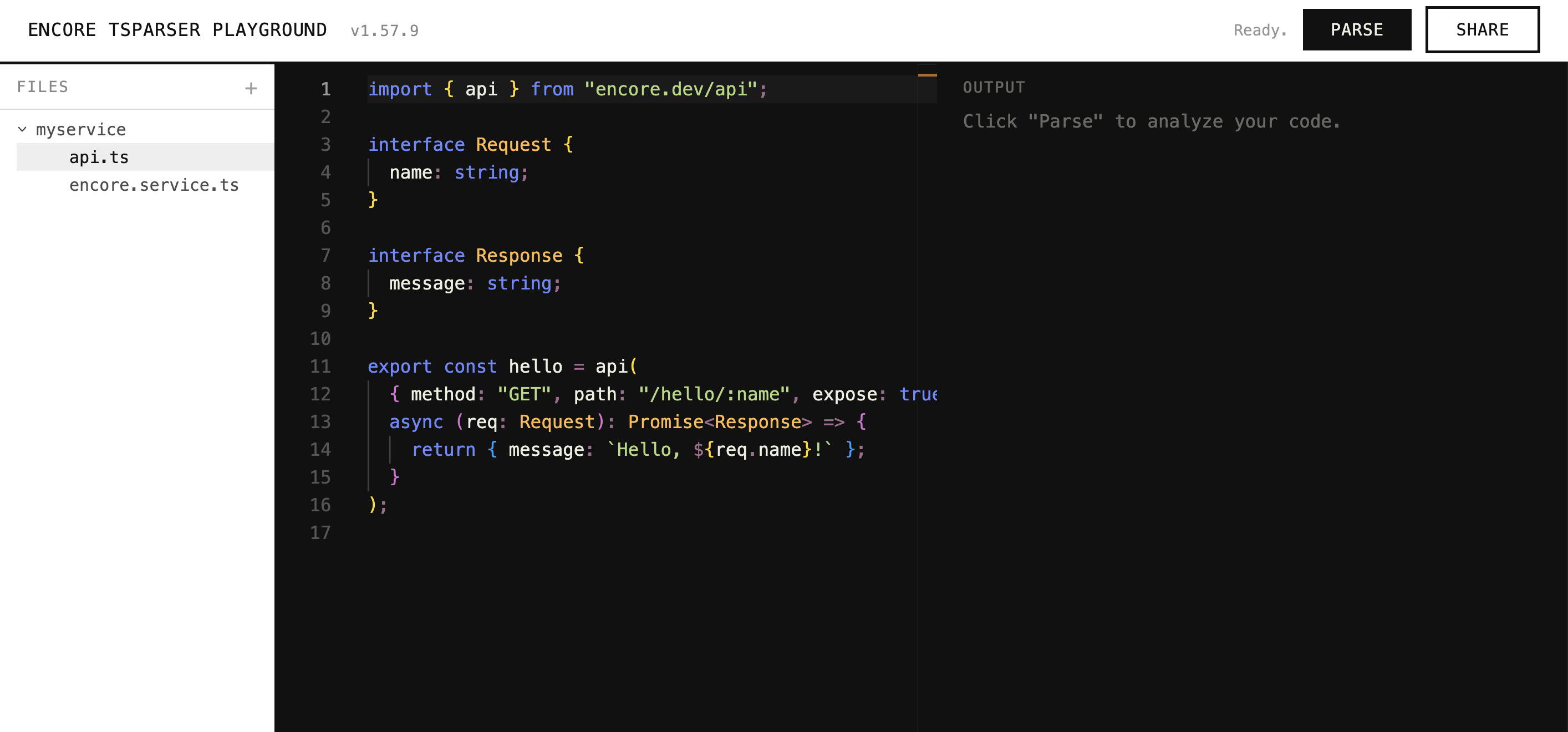
The playground is most useful for reproducing parser errors. When someone hits a case where the parser rejects code it should accept, the hard part of looking into it is usually getting the code that triggers it, which can mean their whole project. The playground lets them cut the example down until it still shows the problem and send a link, and we run the same parser build against the same input.
Because the parser only ever works from a set of files, the playground can use npm-in-browser to install an example's dependencies in the browser and pass their type definitions in alongside the source, so code that imports a package resolves the way it would locally rather than failing on an import the parser cannot find.
One parser in every place it runs
Compiling to WASM, rather than writing a second parser in JavaScript for the browser, means there is only ever one parser. The playground runs the same build that runs in the CLI and in CI, so what it shows you is what Encore actually does with your code, with nothing to drift out of sync.
That build is also something we can drop in wherever we already show code. The code view in the dev dashboard could run it against an edit and show what Encore makes of the result, without a round trip to a machine running the CLI.
You can try it at tsparser.encore.dev. To go deeper, the docs cover how Encore provisions infrastructure from your code, and the parser is open source in the Encore repository.
Recent articles

Introducing Encore × SurrealDB
Combine vector search and graph relationships with a backend agents can build and verify end-to-end.
 Ivan Cernja
Introducing Encore × Bird
Build messaging workflows and test backend changes end-to-end locally.
Ivan Cernja
Encore for Rust
An early look at Encore for Rust, entering beta soon.
Ivan Cernja