# Building an Uptime Monitor
> Learn how to build an event-driven uptime monitoring system
In this tutorial you'll build an uptime monitoring system that notifies you in Slack when one of your sites goes down. It uses an event-driven architecture, and takes about 30 minutes.
The final result:
**Encore.ts:**
_[Interactive editor showing the finished `uptimeTS` app — open this page in a browser to see it.]_
**Encore.go:**
_[Interactive editor showing the finished `uptime` app — open this page in a browser to see it.]_
## 1. Create your Encore application
> **Note**
>
> To make it easier to follow along, we've laid out a trail of croissants to guide your way.
> Whenever you see a 🥐 it means there's something for you to do.
🥐 Create a new Encore application, using this tutorial project's starting-point branch. This gives you a ready-to-go frontend to use.
**Encore.ts:**
```shell
$ encore app create uptime --example=github.com/encoredev/example-app-uptime/tree/starting-point-ts
```
**Encore.go:**
```shell
$ encore app create uptime --example=github.com/encoredev/example-app-uptime/tree/starting-point
```
First time using Encore? You'll be asked to create a free account, which is needed for secrets and cloud deployments later in this tutorial.
**Encore.ts:**
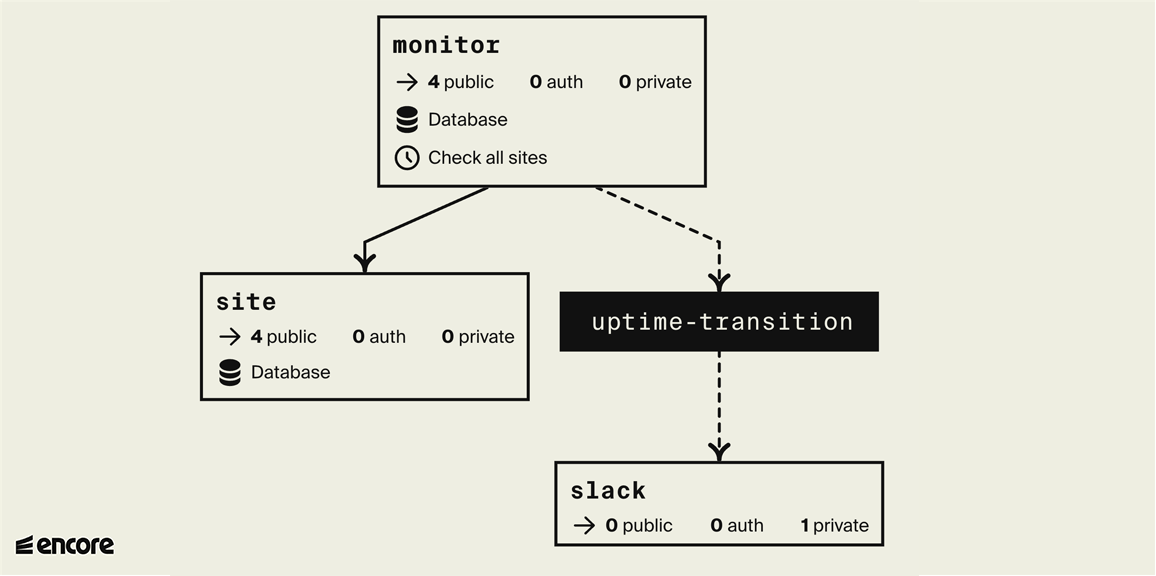
The finished backend, in an [automatically generated diagram](/docs/ts/observability/encore-flow). White boxes are services, black boxes are Pub/Sub topics:
**Encore.go:**
The finished backend, in an [automatically generated diagram](/docs/flow). White boxes are services, black boxes are Pub/Sub topics:
## 2. Create monitor service
First, the functionality to check whether a website is up or down. Later we'll store the result in a database so we can detect status changes and send alerts.
**Encore.ts:**
🥐 Create a directory named `monitor` containing a file named `encore.service.ts`.
```shell
$ mkdir monitor
$ touch monitor/encore.service.ts
```
🥐 Add the following code to `monitor/encore.service.ts`:
```ts
-- monitor/encore.service.ts --
import { Service } from "encore.dev/service";
export default new Service("monitor");
```
This is how you define services with Encore. Encore will now consider files in the `monitor` directory and all its subdirectories as part of the `monitor` service.
🥐 In the `monitor` directory, create a file named `ping.ts`.
🥐 Add an Encore API endpoint named `ping` that takes a URL as input and returns a response indicating whether the site is up or down.
**Encore.go:**
🥐 Create an Encore service named `monitor` containing a file named `ping.go`.
```shell
$ mkdir monitor
$ touch monitor/ping.go
```
🥐 Add an Encore API endpoint named `Ping` that takes a URL as input and returns a response indicating whether the site is up or down.
**Encore.ts:**
```ts
-- monitor/ping.ts --
// Service monitor checks if a website is up or down.
import { api } from "encore.dev/api";
export interface PingParams {
url: string;
}
export interface PingResponse {
up: boolean;
}
// Ping pings a specific site and determines whether it's up or down right now.
export const ping = api(
{ expose: true, path: "/ping/:url", method: "GET" },
async ({ url }) => {
// If the url does not start with "http:" or "https:", default to "https:".
if (!url.startsWith("http:") && !url.startsWith("https:")) {
url = "https://" + url;
}
try {
// Make an HTTP request to check if it's up.
const resp = await fetch(url, { method: "GET" });
// 2xx and 3xx status codes are considered up
const up = resp.status >= 200 && resp.status < 300;
return { up };
} catch (err) {
return { up: false };
}
}
);
```
**Encore.go:**
```go
-- monitor/ping.go --
// Service monitor checks if a website is up or down.
package monitor
import (
"context"
"net/http"
"strings"
)
// PingResponse is the response from the Ping endpoint.
type PingResponse struct {
Up bool `json:"up"`
}
// Ping pings a specific site and determines whether it's up or down right now.
//
//encore:api public path=/ping/*url
func Ping(ctx context.Context, url string) (*PingResponse, error) {
// If the url does not start with "http:" or "https:", default to "https:".
if !strings.HasPrefix(url, "http:") && !strings.HasPrefix(url, "https:") {
url = "https://" + url
}
// Make an HTTP request to check if it's up.
req, err := http.NewRequestWithContext(ctx, "GET", url, nil)
if err != nil {
return nil, err
}
resp, err := http.DefaultClient.Do(req)
if err != nil {
return &PingResponse{Up: false}, nil
}
resp.Body.Close()
// 2xx and 3xx status codes are considered up
up := resp.StatusCode < 400
return &PingResponse{Up: up}, nil
}
```
🥐 Let's try it! Run `encore run` in your terminal and you should see the service start up.
Then open up the Local Development Dashboard at [http://localhost:9400](http://localhost:9400) and try calling the `monitor.ping` endpoint from the API Explorer, passing in `google.com` as the URL.
**Encore.ts:**
You'll see the response, the logs, and a trace of the request:
**Encore.go:**
You'll see the response, the logs, and a trace of the request:
**Encore.ts:**
Or from a terminal, run `curl http://localhost:4000/ping/google.com`. Either way you should see:
**Encore.go:**
Or from a terminal, run `curl http://localhost:4000/ping/google.com`. Either way you should see:
```json
{"up": true}
```
Try `httpstat.us/400` and `some-non-existing-url.com` too; both should respond with `{"up": false}`.
### Add a test
**Encore.ts:**
🥐 Add a test so this endpoint doesn't break over time. Create `monitor/ping.test.ts` with the content:
**Encore.go:**
🥐 Add a test so this endpoint doesn't break over time. Create `monitor/ping_test.go` with the content:
**Encore.ts:**
```ts
-- monitor/ping.test.ts --
import { describe, expect, test } from "vitest";
import { ping } from "./ping";
describe("ping", () => {
test.each([
// Test both with and without "https://"
{ site: "google.com", expected: true },
{ site: "https://encore.dev", expected: true },
// 4xx and 5xx should considered down.
{ site: "https://not-a-real-site.xyz", expected: false },
// Invalid URLs should be considered down.
{ site: "invalid://scheme", expected: false },
])(
`should verify that $site is ${"$expected" ? "up" : "down"}`,
async ({ site, expected }) => {
const resp = await ping({ url: site });
expect(resp.up).toBe(expected);
},
);
});
```
🥐 Run `encore test` to check that it all works as expected. You should see something like:
```shell
$ encore test
DEV v1.3.0
✓ monitor/ping.test.ts (4)
✓ ping (4)
✓ should verify that 'google.com' is up
✓ should verify that 'https://encore.dev' is up
✓ should verify that 'https://not-a-real-site.xyz' is down
✓ should verify that 'invalid://scheme' is down
Test Files 1 passed (1)
Tests 4 passed (4)
Start at 12:31:03
Duration 460ms (transform 43ms, setup 0ms, collect 59ms, tests 272ms, environment 0ms, prepare 47ms)
PASS Waiting for file changes...
```
**Encore.go:**
```go
-- monitor/ping_test.go --
package monitor
import (
"context"
"testing"
)
func TestPing(t *testing.T) {
ctx := context.Background()
tests := []struct {
URL string
Up bool
}{
{"encore.dev", true},
{"google.com", true},
// Test both with and without "https://"
{"httpbin.org/status/200", true},
{"https://httpbin.org/status/200", true},
// 4xx and 5xx should considered down.
{"httpbin.org/status/400", false},
{"https://httpbin.org/status/500", false},
// Invalid URLs should be considered down.
{"invalid://scheme", false},
}
for _, test := range tests {
resp, err := Ping(ctx, test.URL)
if err != nil {
t.Errorf("url %s: unexpected error: %v", test.URL, err)
} else if resp.Up != test.Up {
t.Errorf("url %s: got up=%v, want %v", test.URL, resp.Up, test.Up)
}
}
}
```
🥐 Run `encore test ./...` to check that it all works as expected. You should see something like:
```shell
$ encore test ./...
9:38AM INF starting request endpoint=Ping service=monitor test=TestPing
9:38AM INF request completed code=ok duration=71.861792 endpoint=Ping http_code=200 service=monitor test=TestPing
[... lots more lines ...]
PASS
ok encore.app/monitor 1.660
```
And if you open the local development dashboard at [localhost:9400](http://localhost:9400), you can also see traces for the tests.
## 3. Create site service
Next, keep track of the websites to monitor.
**Encore.ts:**
Since most of these APIs will be simple "CRUD" (Create/Read/Update/Delete) endpoints, let's build this service using [Knex.js](https://knexjs.org/), an ORM library that makes building CRUD endpoints really simple.
🥐 Create a new service named `site`:
```shell
$ mkdir site # Create a new directory in the application root
$ touch site/encore.service.ts
```
```ts
-- site/encore.service.ts --
import { Service } from "encore.dev/service";
export default new Service("site");
```
🥐 Add a SQL database to the `site` service by creating a `migrations` directory inside `site`:
```shell
$ mkdir site/migrations
```
**Encore.go:**
Since most of these APIs will be simple "CRUD" (Create/Read/Update/Delete) endpoints, let's build this service using [GORM](https://gorm.io/), an ORM
library that makes building CRUD endpoints really simple.
🥐 Create a new service named `site` with a SQL database: a `site` directory in the application root, with a `migrations` folder inside it:
```shell
$ mkdir site
$ mkdir site/migrations
```
🥐 Add a database migration file inside that folder, named `1_create_tables.up.sql`.
The file name is important (it must look something like `1_.up.sql`).
Add the following contents:
**Encore.ts:**
```sql
-- site/migrations/1_create_tables.up.sql --
CREATE TABLE site (
id SERIAL PRIMARY KEY,
url TEXT NOT NULL UNIQUE
);
```
🥐 Next, install the Knex.js library and PostgreSQL client:
```shell
$ npm i knex pg
```
Now the `site` service itself, with the CRUD endpoints.
🥐 Create `site/site.ts` with the contents:
```ts
-- site/site.ts --
import { api } from "encore.dev/api";
import { SQLDatabase } from "encore.dev/storage/sqldb";
import knex from "knex";
// Site describes a monitored site.
export interface Site {
id: number; // ID is a unique ID for the site.
url: string; // URL is the site's URL.
}
// AddParams are the parameters for adding a site to be monitored.
export interface AddParams {
// URL is the URL of the site. If it doesn't contain a scheme
// (like "http:" or "https:") it defaults to "https:".
url: string;
}
// Add a new site to the list of monitored websites.
export const add = api(
{ expose: true, method: "POST", path: "/site" },
async (params: AddParams): Promise => {
const site = (await Sites().insert({ url: params.url }, "*"))[0];
return site;
},
);
// Get a site by id.
export const get = api(
{ expose: true, method: "GET", path: "/site/:id", auth: false },
async ({ id }: { id: number }): Promise => {
const site = await Sites().where("id", id).first();
return site ?? Promise.reject(new Error("site not found"));
},
);
// Delete a site by id.
export const del = api(
{ expose: true, method: "DELETE", path: "/site/:id" },
async ({ id }: { id: number }): Promise => {
await Sites().where("id", id).delete();
},
);
export interface ListResponse {
sites: Site[]; // Sites is the list of monitored sites
}
// Lists the monitored websites.
export const list = api(
{ expose: true, method: "GET", path: "/site" },
async (): Promise => {
const sites = await Sites().select();
return { sites };
},
);
// Define a database named 'site', using the database migrations
// in the "./migrations" folder. Encore automatically provisions,
// migrates, and connects to the database.
const SiteDB = new SQLDatabase("site", {
migrations: "./migrations",
});
const orm = knex({
client: "pg",
connection: SiteDB.connectionString,
});
const Sites = () => orm("site");
```
**Encore.go:**
```sql
-- site/migrations/1_create_tables.up.sql --
CREATE TABLE sites (
id BIGSERIAL PRIMARY KEY,
url TEXT NOT NULL
);
```
🥐 Next, install the GORM library and PostgreSQL driver:
```shell
$ go get -u gorm.io/gorm gorm.io/driver/postgres
```
Now let's create the `site` service itself. To do this we'll use Encore's support for [dependency injection](https://encore.dev/docs/go/how-to/dependency-injection) to inject the GORM database connection.
🥐 Create `site/service.go` with the contents:
```go
-- site/service.go --
// Service site keeps track of which sites to monitor.
package site
import (
"encore.dev/storage/sqldb"
"gorm.io/driver/postgres"
"gorm.io/gorm"
)
//encore:service
type Service struct {
db *gorm.DB
}
// Define a database named 'site', using the database migrations
// in the "./migrations" folder. Encore automatically provisions,
// migrates, and connects to the database.
var db = sqldb.NewDatabase("site", sqldb.DatabaseConfig{
Migrations: "./migrations",
})
// initService initializes the site service.
// It is automatically called by Encore on service startup.
func initService() (*Service, error) {
db, err := gorm.Open(postgres.New(postgres.Config{
Conn: db.Stdlib(),
}))
if err != nil {
return nil, err
}
return &Service{db: db}, nil
}
```
🥐 Create the CRUD endpoints:
```go
-- site/get.go --
package site
import "context"
// Site describes a monitored site.
type Site struct {
// ID is a unique ID for the site.
ID int `json:"id"`
// URL is the site's URL.
URL string `json:"url"`
}
// Get gets a site by id.
//
//encore:api public method=GET path=/site/:siteID
func (s *Service) Get(ctx context.Context, siteID int) (*Site, error) {
var site Site
if err := s.db.Where("id = $1", siteID).First(&site).Error; err != nil {
return nil, err
}
return &site, nil
}
-- site/add.go --
package site
import "context"
// AddParams are the parameters for adding a site to be monitored.
type AddParams struct {
// URL is the URL of the site. If it doesn't contain a scheme
// (like "http:" or "https:") it defaults to "https:".
URL string `json:"url"`
}
// Add adds a new site to the list of monitored websites.
//
//encore:api public method=POST path=/site
func (s *Service) Add(ctx context.Context, p *AddParams) (*Site, error) {
site := &Site{URL: p.URL}
if err := s.db.Create(site).Error; err != nil {
return nil, err
}
return site, nil
}
-- site/list.go --
package site
import "context"
type ListResponse struct {
// Sites is the list of monitored sites.
Sites []*Site `json:"sites"`
}
// List lists the monitored websites.
//
//encore:api public method=GET path=/site
func (s *Service) List(ctx context.Context) (*ListResponse, error) {
var sites []*Site
if err := s.db.Find(&sites).Error; err != nil {
return nil, err
}
return &ListResponse{Sites: sites}, nil
}
-- site/delete.go --
package site
import "context"
// Delete deletes a site by id.
//
//encore:api public method=DELETE path=/site/:siteID
func (s *Service) Delete(ctx context.Context, siteID int) error {
return s.db.Delete(&Site{ID: siteID}).Error
}
```
🥐 Now make sure you have [Docker](https://docker.com) installed and running, and then restart `encore run` to cause the `site` database to be created by Encore.
**Encore.ts:**
Check the **Infra** tab in the local development dashboard at [localhost:9400](http://localhost:9400) to confirm the database was created, then call `site.add` from the Service Catalog.
You can also call the `site.add` endpoint from the terminal:
**Encore.go:**
Check the **Infra** tab in the local development dashboard at [localhost:9400](http://localhost:9400) to confirm the database was created, then call `site.Add` from the Service Catalog.
Or you can call `site.Add` from the terminal:
```shell
$ curl -X POST 'http://localhost:4000/site' -d '{"url": "https://encore.dev"}'
{
"id": 1,
"url": "https://encore.dev"
}
```
## 4. Record uptime checks
To notify when a site goes down or comes back up, we need its previous state.
🥐 Add a database to the `monitor` service too. Create `monitor/migrations/1_create_tables.up.sql`:
```sql
-- monitor/migrations/1_create_tables.up.sql --
CREATE TABLE checks (
id BIGSERIAL PRIMARY KEY,
site_id BIGINT NOT NULL,
up BOOLEAN NOT NULL,
checked_at TIMESTAMP WITH TIME ZONE NOT NULL
);
```
We'll insert a database row every time we check if a site is up.
**Encore.ts:**
🥐 Add a new endpoint `check` to the `monitor` service that takes a Site ID, pings the site, and inserts a row in the `checks` table.
**Encore.go:**
🥐 Add a new endpoint `Check` to the `monitor` service that takes a Site ID, pings the site, and inserts a row in the `checks` table.
**Encore.ts:**
For this service we'll use Encore's [`SQLDatabase` class](https://encore.dev/docs/ts/primitives/databases#querying-data) instead of Knex (in order to showcase both approaches).
Add the following to `monitor/check.ts`:
**Encore.go:**
For this service we'll use Encore's [`sqldb` package](https://encore.dev/docs/go/primitives/databases#querying-databases)
instead of GORM (in order to showcase both approaches).
```go
-- monitor/check.go --
package monitor
import (
"context"
"encore.app/site"
"encore.dev/storage/sqldb"
)
// Check checks a single site.
//
//encore:api public method=POST path=/check/:siteID
func Check(ctx context.Context, siteID int) error {
site, err := site.Get(ctx, siteID)
if err != nil {
return err
}
result, err := Ping(ctx, site.URL)
if err != nil {
return err
}
_, err = db.Exec(ctx, `
INSERT INTO checks (site_id, up, checked_at)
VALUES ($1, $2, NOW())
`, site.ID, result.Up)
return err
}
// Define a database named 'monitor', using the database migrations
// in the "./migrations" folder. Encore automatically provisions,
// migrates, and connects to the database.
var db = sqldb.NewDatabase("monitor", sqldb.DatabaseConfig{
Migrations: "./migrations",
})
```
**Encore.ts:**
```ts
-- monitor/check.ts --
import { api } from "encore.dev/api";
import { SQLDatabase } from "encore.dev/storage/sqldb";
import { ping } from "./ping";
import { site } from "~encore/clients";
// Check checks a single site.
export const check = api(
{ expose: true, method: "POST", path: "/check/:siteID" },
async (p: { siteID: number }): Promise<{ up: boolean }> => {
const s = await site.get({ id: p.siteID });
const { up } = await ping({ url: s.url });
await MonitorDB.exec`
INSERT INTO checks (site_id, up, checked_at)
VALUES (${s.id}, ${up}, NOW())
`;
return { up };
},
);
// Define a database named 'monitor', using the database migrations
// in the "./migrations" folder. Encore automatically provisions,
// migrates, and connects to the database.
export const MonitorDB = new SQLDatabase("monitor", {
migrations: "./migrations",
});
```
🥐 Restart `encore run` to cause the `monitor` database to be created.
The **Infra** tab again confirms the database, and the Flow diagram now also shows the new dependency between the `monitor` and `site` services.
**Encore.ts:**
We can then call the `monitor.check` endpoint using the id `1` that we got in the last step, and view the trace where we see the database interactions.
**Encore.go:**
We can then call the `monitor.Check` endpoint using the id `1` that we got in the last step, and view the trace where we see the database interactions.
It will look something like this:
**Encore.ts:**
You can inspect the data in the database explorer, from the **Infra** tab in the local development dashboard, or with `encore db shell `:
**Encore.go:**
🥐 Check the data in the database explorer, from the **Infra** tab in the local development dashboard, or with `encore db shell `:
```shell
$ encore db shell monitor
psql (14.4, server 14.2)
Type "help" for help.
monitor=> SELECT * FROM checks;
id | site_id | up | checked_at
----+---------+----+-------------------------------
1 | 1 | t | 2022-10-21 09:58:30.674265+00
```
**Encore.ts:**
That's everything working.
**Encore.go:**
That's everything working.
### Add a cron job to check all sites
Now check all the tracked sites regularly, so we can respond when one goes down.
**Encore.ts:**
We'll create a new `checkAll` API endpoint in the `monitor` service that lists all the tracked sites and checks each one.
**Encore.go:**
We'll create a new `CheckAll` API endpoint in the `monitor` service that lists all the tracked sites and checks each one.
**Encore.ts:**
🥐 Extract some of the functionality from the `check` endpoint into a separate function, like so:
```ts
-- monitor/check.ts --
import {Site} from "../site/site";
// Check checks a single site.
export const check = api(
{ expose: true, method: "POST", path: "/check/:siteID" },
async (p: { siteID: number }): Promise<{ up: boolean }> => {
const s = await site.get({ id: p.siteID });
return doCheck(s);
},
);
async function doCheck(site: Site): Promise<{ up: boolean }> {
const { up } = await ping({ url: site.url });
await MonitorDB.exec`
INSERT INTO checks (site_id, up, checked_at)
VALUES (${site.id}, ${up}, NOW())
`;
return { up };
}
```
Now the `checkAll` endpoint itself.
🥐 Create the new `checkAll` endpoint inside `monitor/check.ts`:
```ts
-- monitor/check.ts --
// CheckAll checks all sites.
export const checkAll = api(
{ expose: true, method: "POST", path: "/check-all" },
async (): Promise => {
const sites = await site.list();
await Promise.all(sites.sites.map(doCheck));
},
);
```
🥐 Now that we have a `checkAll` endpoint, define a [cron job](https://encore.dev/docs/ts/primitives/cron-jobs) to automatically call it every 1 hour (since this is an example, we don't need to go too crazy and check every minute):
```ts
-- monitor/check.ts --
import { CronJob } from "encore.dev/cron";
// Check all tracked sites every 1 hour.
const cronJob = new CronJob("check-all", {
title: "Check all sites",
every: "1h",
endpoint: checkAll,
});
```
**Encore.go:**
🥐 Extract some of the functionality from the `Check` endpoint into a separate function, like so:
```go
-- monitor/check.go --
// Check checks a single site.
//
//encore:api public method=POST path=/check/:siteID
func Check(ctx context.Context, siteID int) error {
site, err := site.Get(ctx, siteID)
if err != nil {
return err
}
return check(ctx, site)
}
func check(ctx context.Context, site *site.Site) error {
result, err := Ping(ctx, site.URL)
if err != nil {
return err
}
_, err = db.Exec(ctx, `
INSERT INTO checks (site_id, up, checked_at)
VALUES ($1, $2, NOW())
`, site.ID, result.Up)
return err
}
```
Now the `CheckAll` endpoint itself.
🥐 Create the new `CheckAll` endpoint inside `monitor/check.go`:
```go
-- monitor/check.go --
import "golang.org/x/sync/errgroup"
// CheckAll checks all sites.
//
//encore:api public method=POST path=/checkall
func CheckAll(ctx context.Context) error {
// Get all the tracked sites.
resp, err := site.List(ctx)
if err != nil {
return err
}
// Check up to 8 sites concurrently.
g, ctx := errgroup.WithContext(ctx)
g.SetLimit(8)
for _, site := range resp.Sites {
site := site // capture for closure
g.Go(func() error {
return check(ctx, site)
})
}
return g.Wait()
}
```
This uses [an errgroup](https://pkg.go.dev/golang.org/x/sync/errgroup) to check up to 8 sites concurrently, aborting early if
we encounter any error. (Note that a website being down is
not treated as an error.)
🥐 Run `go get golang.org/x/sync/errgroup` to install that dependency.
🥐 Now that we have a `CheckAll` endpoint, define a [cron job](https://encore.dev/docs/go/primitives/cron-jobs) to automatically call it every 1 hour (since this is an example, we don't need to go too crazy and check every minute):
```go
-- monitor/check.go --
import "encore.dev/cron"
// Check all tracked sites every 1 hour.
var _ = cron.NewJob("check-all", cron.JobConfig{
Title: "Check all sites",
Endpoint: CheckAll,
Every: 1 * cron.Hour,
})
```
> **Note**
>
> **Encore.ts:**
>
> Cron jobs are not triggered locally, only when the app is deployed to a cloud environment.
>
> **Encore.go:**
>
> Cron jobs are not triggered locally, only when the app is deployed to a cloud environment.
The frontend needs a way to list all sites with their up/down status.
**Encore.ts:**
🥐 Add a file `monitor/status.ts` with the following code:
```ts
-- monitor/status.ts --
import { api } from "encore.dev/api";
import { MonitorDB } from "./check";
interface SiteStatus {
id: number;
up: boolean;
checkedAt: string;
}
// StatusResponse is the response type from the Status endpoint.
interface StatusResponse {
// Sites contains the current status of all sites,
// keyed by the site ID.
sites: SiteStatus[];
}
// status checks the current up/down status of all monitored sites.
export const status = api(
{ expose: true, path: "/status", method: "GET" },
async (): Promise => {
const rows = await MonitorDB.query`
SELECT DISTINCT ON (site_id) site_id, up, checked_at
FROM checks
ORDER BY site_id, checked_at DESC
`;
const results: SiteStatus[] = [];
for await (const row of rows) {
results.push({
id: row.site_id,
up: row.up,
checkedAt: row.checked_at,
});
}
return { sites: results };
},
);
```
With the backend working, open [http://localhost:4000/](http://localhost:4000/) to see the frontend.
**Encore.go:**
🥐 Add a file in the `monitor` service and name it `status.go`. Add the following code:
```go
-- monitor/status.go --
package monitor
import (
"context"
"time"
)
// SiteStatus describes the current status of a site
// and when it was last checked.
type SiteStatus struct {
Up bool `json:"up"`
CheckedAt time.Time `json:"checked_at"`
}
// StatusResponse is the response type from the Status endpoint.
type StatusResponse struct {
// Sites contains the current status of all sites,
// keyed by the site ID.
Sites map[int]SiteStatus `json:"sites"`
}
// Status checks the current up/down status of all monitored sites.
//
//encore:api public method=GET path=/status
func Status(ctx context.Context) (*StatusResponse, error) {
rows, err := db.Query(ctx, `
SELECT DISTINCT ON (site_id) site_id, up, checked_at
FROM checks
ORDER BY site_id, checked_at DESC
`)
if err != nil {
return nil, err
}
defer rows.Close()
result := make(map[int]SiteStatus)
for rows.Next() {
var siteID int
var status SiteStatus
if err := rows.Scan(&siteID, &status.Up, &status.CheckedAt); err != nil {
return nil, err
}
result[siteID] = status
}
if err := rows.Err(); err != nil {
return nil, err
}
return &StatusResponse{Sites: result}, nil
}
```
Visit http://localhost:4000/frontend again. You should now see a working frontend listing all sites and their current status.
## 5. Deploy
To try your uptime monitor for real, deploy it to the cloud.
### Self-hosting
Encore supports building Docker images directly from the CLI, which can then be self-hosted on your own infrastructure of choice.
If your app is using infrastructure resources, such as SQL databases, Pub/Sub, or metrics, you will need to supply a [runtime configuration](/docs/self-host/configure-infra) your Docker image.
🥐 Create a new file `infra-config.json` in the root of your project with the following contents:
```json
-- infra-config.json --
{
"$schema": "https://encore.dev/schemas/infra.schema.json",
"sql_servers": [
{
"host": "my-db-host:5432",
"databases": {
"monitor": {
"username": "my-db-owner",
"password": {"$env": "DB_PASSWORD"}
},
"site": {
"username": "my-db-owner",
"password": {"$env": "DB_PASSWORD"}
}
}
}
]
}
```
The values in this configuration are just examples, you will need to replace them with the correct values for your database.
**Encore.ts:**
Take a look at our guide for [deploying an Encore app with a PostgreSQL database to Digital Ocean](/docs/self-host/deploy-digitalocean) for more information.
🥐 Build a Docker image by running `encore build docker uptime:v1.0`.
This compiles your app on the host machine and produces a Docker image containing it.
🥐 Upload the Docker image to the cloud provider of your choice and run it.
Encore's cloud platform handles the infrastructure and DevOps for you, deploying to a free Encore Cloud environment or to your own AWS or GCP account.
Don't have an Encore account yet? [Link your app first](/docs/platform/deploy/deploying#already-have-a-local-app).
### Commit changes
**Encore.ts:**
Encore comes with built-in CI/CD, and the deployment process is as simple as a `git push`. (You can also integrate with GitHub, learn more in the [CI/CD docs](/docs/platform/deploy/deploying).)
🥐 Deploy your app to a free Encore Cloud environment by running:
**Encore.go:**
Encore comes with built-in CI/CD, and the deployment process is as simple as a `git push`.
(You can also integrate with GitHub to activate per Pull Request Preview Environments, learn more in the [CI/CD docs](/docs/platform/deploy/deploying).)
🥐 Deploy your app to a free Encore Cloud environment by running:
```shell
$ git add -A .
$ git commit -m 'Initial commit'
$ git push encore
```
Encore's cloud platform will now build and test your app, provision the needed infrastructure, and deploy it.
After triggering the deployment, you will see a URL where you can view its progress in the [Cloud Dashboard](https://app.encore.dev). It will look something like: `https://app.encore.dev/$APP_ID/deploys/...`
From the Cloud Dashboard you can also see metrics, trigger Cron Jobs, see traces, and later connect your own AWS or GCP account to use for deployment.
**Encore.ts:**
🥐 When the deploy has finished, you can try out your uptime monitor by going to `https://staging-$APP_ID.encr.app`.
*Your app is now running in the cloud.*
**Encore.go:**
🥐 When the deploy has finished, you can try out your uptime monitor by going to `https://staging-$APP_ID.encr.app/frontend`.
*Your Uptime Monitor is now running in the cloud.*
## 6. Publish Pub/Sub events when a site goes down
**Encore.ts:**
An uptime monitor isn't much use unless it tells you when a site goes down.
Let's add a [Pub/Sub topic](https://encore.dev/docs/ts/primitives/pubsub) on which we'll publish a message every time a site transitions from being up to being down, or vice versa.
🥐 Define the topic using Encore's Pub/Sub module in `monitor/check.ts`:
```ts
-- monitor/check.ts --
import { Subscription, Topic } from "encore.dev/pubsub";
// TransitionEvent describes a transition of a monitored site
// from up->down or from down->up.
export interface TransitionEvent {
site: Site; // Site is the monitored site in question.
up: boolean; // Up specifies whether the site is now up or down (the new value).
}
// TransitionTopic is a pubsub topic with transition events for when a monitored site
// transitions from up->down or from down->up.
export const TransitionTopic = new Topic("uptime-transition", {
deliveryGuarantee: "at-least-once",
});
```
**Encore.go:**
An uptime monitor isn't much use unless it tells you when a site goes down.
Let's add a [Pub/Sub topic](https://encore.dev/docs/go/primitives/pubsub) on which we'll publish a message every time a site transitions from being up to being down, or vice versa.
🥐 Define the topic using Encore's Pub/Sub package in a new file, `monitor/alerts.go`:
```go
-- monitor/alerts.go --
package monitor
import "encore.dev/pubsub"
// TransitionEvent describes a transition of a monitored site
// from up->down or from down->up.
type TransitionEvent struct {
// Site is the monitored site in question.
Site *site.Site `json:"site"`
// Up specifies whether the site is now up or down (the new value).
Up bool `json:"up"`
}
// TransitionTopic is a pubsub topic with transition events for when a monitored site
// transitions from up->down or from down->up.
var TransitionTopic = pubsub.NewTopic[*TransitionEvent]("uptime-transition", pubsub.TopicConfig{
DeliveryGuarantee: pubsub.AtLeastOnce,
})
```
Now publish a message on the `TransitionTopic` when a site's up/down state differs from the previous measurement.
🥐 Create a `getPreviousMeasurement` function to report the last up/down state:
**Encore.ts:**
```ts
-- monitor/check.ts --
// getPreviousMeasurement reports whether the given site was
// up or down in the previous measurement.
async function getPreviousMeasurement(siteID: number): Promise {
const row = await MonitorDB.queryRow`
SELECT up
FROM checks
WHERE site_id = ${siteID}
ORDER BY checked_at DESC
LIMIT 1
`;
return row?.up ?? true;
}
```
🥐 Now add a function to conditionally publish a message if the up/down state differs by modifying the `doCheck` function:
```ts
-- monitor/check.ts --
async function doCheck(site: Site): Promise<{ up: boolean }> {
const { up } = await ping({ url: site.url });
// Publish a Pub/Sub message if the site transitions
// from up->down or from down->up.
const wasUp = await getPreviousMeasurement(site.id);
if (up !== wasUp) {
await TransitionTopic.publish({ site, up });
}
await MonitorDB.exec`
INSERT INTO checks (site_id, up, checked_at)
VALUES (${site.id}, ${up}, NOW())
`;
return { up };
}
```
🥐 Start your app again using `encore run` and open the Flow architecture diagram in the local development dashboard. Now you'll see the Pub/Sub topic as a black box, it should look like this:
**Encore.go:**
```go
-- monitor/alerts.go --
import (
"encore.dev/storage/sqldb"
"errors"
"context"
)
// getPreviousMeasurement reports whether the given site was
// up or down in the previous measurement.
func getPreviousMeasurement(ctx context.Context, siteID int) (up bool, err error) {
err = db.QueryRow(ctx, `
SELECT up FROM checks
WHERE site_id = $1
ORDER BY checked_at DESC
LIMIT 1
`, siteID).Scan(&up)
if errors.Is(err, sqldb.ErrNoRows) {
// There was no previous ping; treat this as if the site was up before
return true, nil
} else if err != nil {
return false, err
}
return up, nil
}
```
🥐 Now add a function to conditionally publish a message if the up/down state differs:
```go
-- monitor/alerts.go --
import "encore.app/site"
func publishOnTransition(ctx context.Context, site *site.Site, isUp bool) error {
wasUp, err := getPreviousMeasurement(ctx, site.ID)
if err != nil {
return err
}
if isUp == wasUp {
// Nothing to do
return nil
}
_, err = TransitionTopic.Publish(ctx, &TransitionEvent{
Site: site,
Up: isUp,
})
return err
}
```
🥐 Finally modify the `check` function to call this function:
```go
-- monitor/check.go --
func check(ctx context.Context, site *site.Site) error {
result, err := Ping(ctx, site.URL)
if err != nil {
return err
}
// Publish a Pub/Sub message if the site transitions
// from up->down or from down->up.
if err := publishOnTransition(ctx, site, result.Up); err != nil {
return err
}
_, err = db.Exec(ctx, `
INSERT INTO checks (site_id, up, checked_at)
VALUES ($1, $2, NOW())
`, site.ID, result.Up)
return err
}
```
The monitoring system now publishes to the `TransitionTopic` whenever a site goes up->down or down->up, without knowing who listens. Next, add a subscriber that posts those events to Slack.
## 7. Send Slack notifications when a site goes down
**Encore.ts:**
🥐 Create a new service named `slack`:
```shell
$ mkdir slack # Create a new directory in the application root
$ touch slack/encore.service.ts
```
```ts
-- slack/encore.service.ts --
import { Service } from "encore.dev/service";
export default new Service("slack");
```
🥐 Add a `slack.ts` file containing the following:
```ts
-- slack/slack.ts --
import { api } from "encore.dev/api";
import { secret } from "encore.dev/config";
import log from "encore.dev/log";
export interface NotifyParams {
text: string; // the slack message to send
}
// Sends a Slack message to a pre-configured channel using a
// Slack Incoming Webhook (see https://api.slack.com/messaging/webhooks).
export const notify = api({}, async ({ text }) => {
const url = webhookURL();
if (!url) {
log.info("no slack webhook url defined, skipping slack notification");
return;
}
const resp = await fetch(url, {
method: "POST",
headers: {
'Content-Type': 'application/json',
},
body: JSON.stringify({ content: text }),
});
if (resp.status >= 400) {
const body = await resp.text();
throw new Error(`slack notification failed: ${resp.status}: ${body}`);
}
});
// SlackWebhookURL defines the Slack webhook URL to send uptime notifications to.
const webhookURL = secret("SlackWebhookURL");
```
🥐 Now go to a Slack community of your choice where you have the permission to create a new Incoming Webhook.
**Encore.go:**
🥐 Create a Slack service containing the following:
```go
-- slack/slack.go --
package slack
import (
"bytes"
"context"
"encoding/json"
"fmt"
"io"
"net/http"
)
type NotifyParams struct {
// Text is the Slack message text to send.
Text string `json:"text"`
}
// Notify sends a Slack message to a pre-configured channel using a
// Slack Incoming Webhook (see https://api.slack.com/messaging/webhooks).
//
//encore:api private
func Notify(ctx context.Context, p *NotifyParams) error {
reqBody, err := json.Marshal(p)
if err != nil {
return err
}
req, err := http.NewRequestWithContext(ctx, "POST", secrets.SlackWebhookURL, bytes.NewReader(reqBody))
if err != nil {
return err
}
resp, err := http.DefaultClient.Do(req)
if err != nil {
return err
}
defer resp.Body.Close()
if resp.StatusCode >= 400 {
body, _ := io.ReadAll(resp.Body)
return fmt.Errorf("notify slack: %s: %s", resp.Status, body)
}
return nil
}
var secrets struct {
// SlackWebhookURL defines the Slack webhook URL to send
// uptime notifications to.
SlackWebhookURL string
}
```
🥐 Now go to a Slack community of your choice where you have the permission
to create a new Incoming Webhook.
🥐 Once you have the Webhook URL, set it as an Encore secret:
```shell
$ encore secret set --type dev,local,pr SlackWebhookURL
Enter secret value: *****
Successfully updated development secret SlackWebhookURL.
```
**Encore.ts:**
🥐 Test the `slack.notify` endpoint by calling it via cURL:
```shell
$ curl 'http://localhost:4000/slack.notify' -d '{"text": "Testing Slack webhook"}'
```
**Encore.go:**
🥐 Test the `slack.Notify` endpoint by calling it via cURL:
```shell
$ curl 'http://localhost:4000/slack.Notify' -d '{"Text": "Testing Slack webhook"}'
```
You should see the *Testing Slack webhook* message appear in the Slack channel you designated for the webhook.
🥐 Now add a Pub/Sub subscriber to notify Slack automatically when a site goes up or down:
**Encore.ts:**
```ts
-- slack/slack.ts --
import { Subscription } from "encore.dev/pubsub";
import { TransitionTopic } from "../monitor/check";
const _ = new Subscription(TransitionTopic, "slack-notification", {
handler: async (event) => {
const text = `*${event.site.url} is ${event.up ? "back up." : "down!"}*`;
await notify({ text });
},
});
```
**Encore.go:**
```go
-- slack/slack.go --
import (
"encore.dev/pubsub"
"encore.app/monitor"
)
var _ = pubsub.NewSubscription(monitor.TransitionTopic, "slack-notification", pubsub.SubscriptionConfig[*monitor.TransitionEvent]{
Handler: func(ctx context.Context, event *monitor.TransitionEvent) error {
// Compose our message.
msg := fmt.Sprintf("*%s is down!*", event.Site.URL)
if event.Up {
msg = fmt.Sprintf("*%s is back up.*", event.Site.URL)
}
// Send the Slack notification.
return Notify(ctx, &NotifyParams{Text: msg})
},
})
```
## 8. Deploy your finished Uptime Monitor
Deploy the finished Uptime Monitor, Slack integration included.
### Self-hosting
Because we have added more infrastructure to our app, we need to [update the configuration](/docs/self-host/configure-infra) in our `infra-config.json` to include the new Pub/Sub topic and subscription as well as how we should set the `SlackWebhookURL` secret.
🥐 Update your `ìnfra-config.json` to reflect the new infrastructure.
🥐 Build a Docker image by running `encore build docker uptime:v2.0`.
🥐 Upload the Docker image to the cloud provider and run it.
🥐 As before, deploying is as simple as running:
```shell
$ git add -A .
$ git commit -m 'Add slack integration'
$ git push encore
```
## Conclusion
You've built a working uptime monitoring system in a bit over 300 lines of code:
* Three services (`site`, `monitor`, and `slack`)
* Two databases, tracking the monitored sites and the check results
* A cron job that checks every site every hour
* A Pub/Sub topic decoupling the monitoring from the notifications
* A Slack integration that subscribes to up/down transitions, with the webhook URL stored as a secret
Next, build a [Slack bot](/docs/tutorials/slack-bot), or see the infrastructure you can declare in code in the **Encore.ts:**
[Encore.ts primitives](/docs/ts/primitives)**Encore.go:**
[Encore.go primitives](/docs/go/primitives). Questions? Join us on [Discord](/discord).
 ## 2. Create monitor service
First, the functionality to check whether a website is up or down. Later we'll store the result in a database so we can detect status changes and send alerts.
**Encore.ts:**
🥐 Create a directory named `monitor` containing a file named `encore.service.ts`.
```shell
$ mkdir monitor
$ touch monitor/encore.service.ts
```
🥐 Add the following code to `monitor/encore.service.ts`:
```ts
-- monitor/encore.service.ts --
import { Service } from "encore.dev/service";
export default new Service("monitor");
```
This is how you define services with Encore. Encore will now consider files in the `monitor` directory and all its subdirectories as part of the `monitor` service.
🥐 In the `monitor` directory, create a file named `ping.ts`.
🥐 Add an Encore API endpoint named `ping` that takes a URL as input and returns a response indicating whether the site is up or down.
**Encore.go:**
🥐 Create an Encore service named `monitor` containing a file named `ping.go`.
```shell
$ mkdir monitor
$ touch monitor/ping.go
```
🥐 Add an Encore API endpoint named `Ping` that takes a URL as input and returns a response indicating whether the site is up or down.
**Encore.ts:**
```ts
-- monitor/ping.ts --
// Service monitor checks if a website is up or down.
import { api } from "encore.dev/api";
export interface PingParams {
url: string;
}
export interface PingResponse {
up: boolean;
}
// Ping pings a specific site and determines whether it's up or down right now.
export const ping = api
## 2. Create monitor service
First, the functionality to check whether a website is up or down. Later we'll store the result in a database so we can detect status changes and send alerts.
**Encore.ts:**
🥐 Create a directory named `monitor` containing a file named `encore.service.ts`.
```shell
$ mkdir monitor
$ touch monitor/encore.service.ts
```
🥐 Add the following code to `monitor/encore.service.ts`:
```ts
-- monitor/encore.service.ts --
import { Service } from "encore.dev/service";
export default new Service("monitor");
```
This is how you define services with Encore. Encore will now consider files in the `monitor` directory and all its subdirectories as part of the `monitor` service.
🥐 In the `monitor` directory, create a file named `ping.ts`.
🥐 Add an Encore API endpoint named `ping` that takes a URL as input and returns a response indicating whether the site is up or down.
**Encore.go:**
🥐 Create an Encore service named `monitor` containing a file named `ping.go`.
```shell
$ mkdir monitor
$ touch monitor/ping.go
```
🥐 Add an Encore API endpoint named `Ping` that takes a URL as input and returns a response indicating whether the site is up or down.
**Encore.ts:**
```ts
-- monitor/ping.ts --
// Service monitor checks if a website is up or down.
import { api } from "encore.dev/api";
export interface PingParams {
url: string;
}
export interface PingResponse {
up: boolean;
}
// Ping pings a specific site and determines whether it's up or down right now.
export const ping = api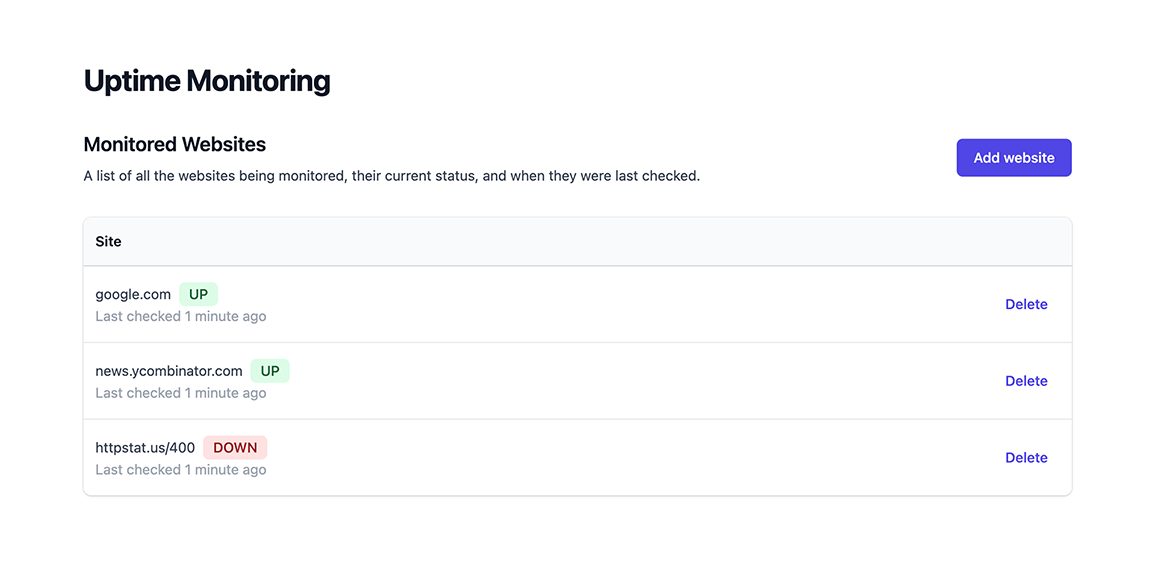 **Encore.go:**
🥐 Add a file in the `monitor` service and name it `status.go`. Add the following code:
```go
-- monitor/status.go --
package monitor
import (
"context"
"time"
)
// SiteStatus describes the current status of a site
// and when it was last checked.
type SiteStatus struct {
Up bool `json:"up"`
CheckedAt time.Time `json:"checked_at"`
}
// StatusResponse is the response type from the Status endpoint.
type StatusResponse struct {
// Sites contains the current status of all sites,
// keyed by the site ID.
Sites map[int]SiteStatus `json:"sites"`
}
// Status checks the current up/down status of all monitored sites.
//
//encore:api public method=GET path=/status
func Status(ctx context.Context) (*StatusResponse, error) {
rows, err := db.Query(ctx, `
SELECT DISTINCT ON (site_id) site_id, up, checked_at
FROM checks
ORDER BY site_id, checked_at DESC
`)
if err != nil {
return nil, err
}
defer rows.Close()
result := make(map[int]SiteStatus)
for rows.Next() {
var siteID int
var status SiteStatus
if err := rows.Scan(&siteID, &status.Up, &status.CheckedAt); err != nil {
return nil, err
}
result[siteID] = status
}
if err := rows.Err(); err != nil {
return nil, err
}
return &StatusResponse{Sites: result}, nil
}
```
Visit http://localhost:4000/frontend again. You should now see a working frontend listing all sites and their current status.
## 5. Deploy
To try your uptime monitor for real, deploy it to the cloud.
### Self-hosting
Encore supports building Docker images directly from the CLI, which can then be self-hosted on your own infrastructure of choice.
If your app is using infrastructure resources, such as SQL databases, Pub/Sub, or metrics, you will need to supply a [runtime configuration](/docs/self-host/configure-infra) your Docker image.
🥐 Create a new file `infra-config.json` in the root of your project with the following contents:
```json
-- infra-config.json --
{
"$schema": "https://encore.dev/schemas/infra.schema.json",
"sql_servers": [
{
"host": "my-db-host:5432",
"databases": {
"monitor": {
"username": "my-db-owner",
"password": {"$env": "DB_PASSWORD"}
},
"site": {
"username": "my-db-owner",
"password": {"$env": "DB_PASSWORD"}
}
}
}
]
}
```
The values in this configuration are just examples, you will need to replace them with the correct values for your database.
**Encore.ts:**
Take a look at our guide for [deploying an Encore app with a PostgreSQL database to Digital Ocean](/docs/self-host/deploy-digitalocean) for more information.
🥐 Build a Docker image by running `encore build docker uptime:v1.0`.
This compiles your app on the host machine and produces a Docker image containing it.
🥐 Upload the Docker image to the cloud provider of your choice and run it.
Encore's cloud platform handles the infrastructure and DevOps for you, deploying to a free Encore Cloud environment or to your own AWS or GCP account.
Don't have an Encore account yet? [Link your app first](/docs/platform/deploy/deploying#already-have-a-local-app).
### Commit changes
**Encore.ts:**
Encore comes with built-in CI/CD, and the deployment process is as simple as a `git push`. (You can also integrate with GitHub, learn more in the [CI/CD docs](/docs/platform/deploy/deploying).)
🥐 Deploy your app to a free Encore Cloud environment by running:
**Encore.go:**
Encore comes with built-in CI/CD, and the deployment process is as simple as a `git push`.
(You can also integrate with GitHub to activate per Pull Request Preview Environments, learn more in the [CI/CD docs](/docs/platform/deploy/deploying).)
🥐 Deploy your app to a free Encore Cloud environment by running:
```shell
$ git add -A .
$ git commit -m 'Initial commit'
$ git push encore
```
Encore's cloud platform will now build and test your app, provision the needed infrastructure, and deploy it.
After triggering the deployment, you will see a URL where you can view its progress in the [Cloud Dashboard](https://app.encore.dev). It will look something like: `https://app.encore.dev/$APP_ID/deploys/...`
From the Cloud Dashboard you can also see metrics, trigger Cron Jobs, see traces, and later connect your own AWS or GCP account to use for deployment.
**Encore.ts:**
🥐 When the deploy has finished, you can try out your uptime monitor by going to `https://staging-$APP_ID.encr.app`.
*Your app is now running in the cloud.*
**Encore.go:**
🥐 When the deploy has finished, you can try out your uptime monitor by going to `https://staging-$APP_ID.encr.app/frontend`.
*Your Uptime Monitor is now running in the cloud.*
## 6. Publish Pub/Sub events when a site goes down
**Encore.ts:**
An uptime monitor isn't much use unless it tells you when a site goes down.
Let's add a [Pub/Sub topic](https://encore.dev/docs/ts/primitives/pubsub) on which we'll publish a message every time a site transitions from being up to being down, or vice versa.
🥐 Define the topic using Encore's Pub/Sub module in `monitor/check.ts`:
```ts
-- monitor/check.ts --
import { Subscription, Topic } from "encore.dev/pubsub";
// TransitionEvent describes a transition of a monitored site
// from up->down or from down->up.
export interface TransitionEvent {
site: Site; // Site is the monitored site in question.
up: boolean; // Up specifies whether the site is now up or down (the new value).
}
// TransitionTopic is a pubsub topic with transition events for when a monitored site
// transitions from up->down or from down->up.
export const TransitionTopic = new Topic
**Encore.go:**
🥐 Add a file in the `monitor` service and name it `status.go`. Add the following code:
```go
-- monitor/status.go --
package monitor
import (
"context"
"time"
)
// SiteStatus describes the current status of a site
// and when it was last checked.
type SiteStatus struct {
Up bool `json:"up"`
CheckedAt time.Time `json:"checked_at"`
}
// StatusResponse is the response type from the Status endpoint.
type StatusResponse struct {
// Sites contains the current status of all sites,
// keyed by the site ID.
Sites map[int]SiteStatus `json:"sites"`
}
// Status checks the current up/down status of all monitored sites.
//
//encore:api public method=GET path=/status
func Status(ctx context.Context) (*StatusResponse, error) {
rows, err := db.Query(ctx, `
SELECT DISTINCT ON (site_id) site_id, up, checked_at
FROM checks
ORDER BY site_id, checked_at DESC
`)
if err != nil {
return nil, err
}
defer rows.Close()
result := make(map[int]SiteStatus)
for rows.Next() {
var siteID int
var status SiteStatus
if err := rows.Scan(&siteID, &status.Up, &status.CheckedAt); err != nil {
return nil, err
}
result[siteID] = status
}
if err := rows.Err(); err != nil {
return nil, err
}
return &StatusResponse{Sites: result}, nil
}
```
Visit http://localhost:4000/frontend again. You should now see a working frontend listing all sites and their current status.
## 5. Deploy
To try your uptime monitor for real, deploy it to the cloud.
### Self-hosting
Encore supports building Docker images directly from the CLI, which can then be self-hosted on your own infrastructure of choice.
If your app is using infrastructure resources, such as SQL databases, Pub/Sub, or metrics, you will need to supply a [runtime configuration](/docs/self-host/configure-infra) your Docker image.
🥐 Create a new file `infra-config.json` in the root of your project with the following contents:
```json
-- infra-config.json --
{
"$schema": "https://encore.dev/schemas/infra.schema.json",
"sql_servers": [
{
"host": "my-db-host:5432",
"databases": {
"monitor": {
"username": "my-db-owner",
"password": {"$env": "DB_PASSWORD"}
},
"site": {
"username": "my-db-owner",
"password": {"$env": "DB_PASSWORD"}
}
}
}
]
}
```
The values in this configuration are just examples, you will need to replace them with the correct values for your database.
**Encore.ts:**
Take a look at our guide for [deploying an Encore app with a PostgreSQL database to Digital Ocean](/docs/self-host/deploy-digitalocean) for more information.
🥐 Build a Docker image by running `encore build docker uptime:v1.0`.
This compiles your app on the host machine and produces a Docker image containing it.
🥐 Upload the Docker image to the cloud provider of your choice and run it.
Encore's cloud platform handles the infrastructure and DevOps for you, deploying to a free Encore Cloud environment or to your own AWS or GCP account.
Don't have an Encore account yet? [Link your app first](/docs/platform/deploy/deploying#already-have-a-local-app).
### Commit changes
**Encore.ts:**
Encore comes with built-in CI/CD, and the deployment process is as simple as a `git push`. (You can also integrate with GitHub, learn more in the [CI/CD docs](/docs/platform/deploy/deploying).)
🥐 Deploy your app to a free Encore Cloud environment by running:
**Encore.go:**
Encore comes with built-in CI/CD, and the deployment process is as simple as a `git push`.
(You can also integrate with GitHub to activate per Pull Request Preview Environments, learn more in the [CI/CD docs](/docs/platform/deploy/deploying).)
🥐 Deploy your app to a free Encore Cloud environment by running:
```shell
$ git add -A .
$ git commit -m 'Initial commit'
$ git push encore
```
Encore's cloud platform will now build and test your app, provision the needed infrastructure, and deploy it.
After triggering the deployment, you will see a URL where you can view its progress in the [Cloud Dashboard](https://app.encore.dev). It will look something like: `https://app.encore.dev/$APP_ID/deploys/...`
From the Cloud Dashboard you can also see metrics, trigger Cron Jobs, see traces, and later connect your own AWS or GCP account to use for deployment.
**Encore.ts:**
🥐 When the deploy has finished, you can try out your uptime monitor by going to `https://staging-$APP_ID.encr.app`.
*Your app is now running in the cloud.*
**Encore.go:**
🥐 When the deploy has finished, you can try out your uptime monitor by going to `https://staging-$APP_ID.encr.app/frontend`.
*Your Uptime Monitor is now running in the cloud.*
## 6. Publish Pub/Sub events when a site goes down
**Encore.ts:**
An uptime monitor isn't much use unless it tells you when a site goes down.
Let's add a [Pub/Sub topic](https://encore.dev/docs/ts/primitives/pubsub) on which we'll publish a message every time a site transitions from being up to being down, or vice versa.
🥐 Define the topic using Encore's Pub/Sub module in `monitor/check.ts`:
```ts
-- monitor/check.ts --
import { Subscription, Topic } from "encore.dev/pubsub";
// TransitionEvent describes a transition of a monitored site
// from up->down or from down->up.
export interface TransitionEvent {
site: Site; // Site is the monitored site in question.
up: boolean; // Up specifies whether the site is now up or down (the new value).
}
// TransitionTopic is a pubsub topic with transition events for when a monitored site
// transitions from up->down or from down->up.
export const TransitionTopic = new Topic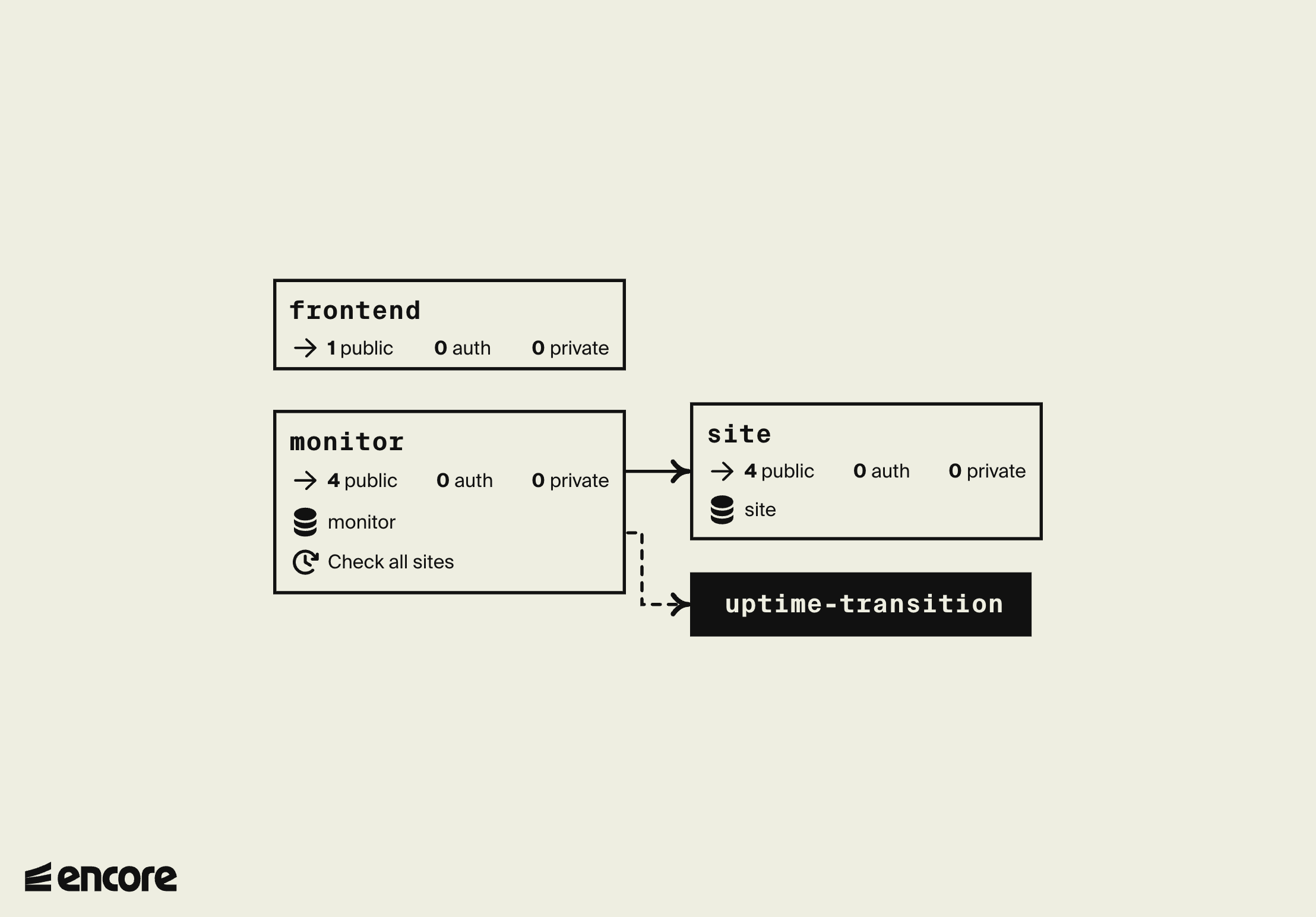 **Encore.go:**
```go
-- monitor/alerts.go --
import (
"encore.dev/storage/sqldb"
"errors"
"context"
)
// getPreviousMeasurement reports whether the given site was
// up or down in the previous measurement.
func getPreviousMeasurement(ctx context.Context, siteID int) (up bool, err error) {
err = db.QueryRow(ctx, `
SELECT up FROM checks
WHERE site_id = $1
ORDER BY checked_at DESC
LIMIT 1
`, siteID).Scan(&up)
if errors.Is(err, sqldb.ErrNoRows) {
// There was no previous ping; treat this as if the site was up before
return true, nil
} else if err != nil {
return false, err
}
return up, nil
}
```
🥐 Now add a function to conditionally publish a message if the up/down state differs:
```go
-- monitor/alerts.go --
import "encore.app/site"
func publishOnTransition(ctx context.Context, site *site.Site, isUp bool) error {
wasUp, err := getPreviousMeasurement(ctx, site.ID)
if err != nil {
return err
}
if isUp == wasUp {
// Nothing to do
return nil
}
_, err = TransitionTopic.Publish(ctx, &TransitionEvent{
Site: site,
Up: isUp,
})
return err
}
```
🥐 Finally modify the `check` function to call this function:
```go
-- monitor/check.go --
func check(ctx context.Context, site *site.Site) error {
result, err := Ping(ctx, site.URL)
if err != nil {
return err
}
// Publish a Pub/Sub message if the site transitions
// from up->down or from down->up.
if err := publishOnTransition(ctx, site, result.Up); err != nil {
return err
}
_, err = db.Exec(ctx, `
INSERT INTO checks (site_id, up, checked_at)
VALUES ($1, $2, NOW())
`, site.ID, result.Up)
return err
}
```
The monitoring system now publishes to the `TransitionTopic` whenever a site goes up->down or down->up, without knowing who listens. Next, add a subscriber that posts those events to Slack.
## 7. Send Slack notifications when a site goes down
**Encore.ts:**
🥐 Create a new service named `slack`:
```shell
$ mkdir slack # Create a new directory in the application root
$ touch slack/encore.service.ts
```
```ts
-- slack/encore.service.ts --
import { Service } from "encore.dev/service";
export default new Service("slack");
```
🥐 Add a `slack.ts` file containing the following:
```ts
-- slack/slack.ts --
import { api } from "encore.dev/api";
import { secret } from "encore.dev/config";
import log from "encore.dev/log";
export interface NotifyParams {
text: string; // the slack message to send
}
// Sends a Slack message to a pre-configured channel using a
// Slack Incoming Webhook (see https://api.slack.com/messaging/webhooks).
export const notify = api
**Encore.go:**
```go
-- monitor/alerts.go --
import (
"encore.dev/storage/sqldb"
"errors"
"context"
)
// getPreviousMeasurement reports whether the given site was
// up or down in the previous measurement.
func getPreviousMeasurement(ctx context.Context, siteID int) (up bool, err error) {
err = db.QueryRow(ctx, `
SELECT up FROM checks
WHERE site_id = $1
ORDER BY checked_at DESC
LIMIT 1
`, siteID).Scan(&up)
if errors.Is(err, sqldb.ErrNoRows) {
// There was no previous ping; treat this as if the site was up before
return true, nil
} else if err != nil {
return false, err
}
return up, nil
}
```
🥐 Now add a function to conditionally publish a message if the up/down state differs:
```go
-- monitor/alerts.go --
import "encore.app/site"
func publishOnTransition(ctx context.Context, site *site.Site, isUp bool) error {
wasUp, err := getPreviousMeasurement(ctx, site.ID)
if err != nil {
return err
}
if isUp == wasUp {
// Nothing to do
return nil
}
_, err = TransitionTopic.Publish(ctx, &TransitionEvent{
Site: site,
Up: isUp,
})
return err
}
```
🥐 Finally modify the `check` function to call this function:
```go
-- monitor/check.go --
func check(ctx context.Context, site *site.Site) error {
result, err := Ping(ctx, site.URL)
if err != nil {
return err
}
// Publish a Pub/Sub message if the site transitions
// from up->down or from down->up.
if err := publishOnTransition(ctx, site, result.Up); err != nil {
return err
}
_, err = db.Exec(ctx, `
INSERT INTO checks (site_id, up, checked_at)
VALUES ($1, $2, NOW())
`, site.ID, result.Up)
return err
}
```
The monitoring system now publishes to the `TransitionTopic` whenever a site goes up->down or down->up, without knowing who listens. Next, add a subscriber that posts those events to Slack.
## 7. Send Slack notifications when a site goes down
**Encore.ts:**
🥐 Create a new service named `slack`:
```shell
$ mkdir slack # Create a new directory in the application root
$ touch slack/encore.service.ts
```
```ts
-- slack/encore.service.ts --
import { Service } from "encore.dev/service";
export default new Service("slack");
```
🥐 Add a `slack.ts` file containing the following:
```ts
-- slack/slack.ts --
import { api } from "encore.dev/api";
import { secret } from "encore.dev/config";
import log from "encore.dev/log";
export interface NotifyParams {
text: string; // the slack message to send
}
// Sends a Slack message to a pre-configured channel using a
// Slack Incoming Webhook (see https://api.slack.com/messaging/webhooks).
export const notify = api