# Use Auth0 with your app


In this guide you will learn how to set up an Encore [auth handler](/docs/go/develop/auth#the-auth-handler) that makes use of
[Auth0](https://auth0.com/) in order to add a seamless signup and login experience to your web app.

For all the code and instructions of how to clone and run this example locally, see the [Auth0 Example](https://github.com/encoredev/examples/tree/main/auth0) in our examples repo.

## Communicate with Auth0

In your Encore app, install two modules:

```shell
$ go get github.com/coreos/go-oidc/v3/oidc golang.org/x/oauth2
```

Create a folder and naming it `auth`, this is where our authentication related backend code will live.

Next, let's set up the Auth0 `Authenticator` that will be used by our auth handler. The `Authenticator` has a method to configure and return [OAuth2](https://pkg.go.dev/golang.org/x/oauth2?utm_source=godoc) and [oidc](https://pkg.go.dev/github.com/coreos/go-oidc?utm_source=godoc) clients, and another one to verify an ID Token. 

Create `auth/authenticator.go` and paste the following:

```go
package auth

import (
	"context"
	"crypto/rand"
	"encoding/base64"
	"encore.dev/config"
	"errors"
	"github.com/coreos/go-oidc/v3/oidc"
	"golang.org/x/oauth2"
)

type Auth0Config struct {
	ClientID    config.String
	Domain      config.String
	CallbackURL config.String
	LogoutURL   config.String
}

var cfg = config.Load[*Auth0Config]()

var secrets struct {
	Auth0ClientSecret string
}

// Authenticator is used to authenticate our users.
type Authenticator struct {
	*oidc.Provider
	oauth2.Config
}

// New instantiates the *Authenticator.
func New() (*Authenticator, error) {
	provider, err := oidc.NewProvider(
		context.Background(),
		"https://"+cfg.Domain()+"/",
	)
	if err != nil {
		return nil, err
	}

	conf := oauth2.Config{
		ClientID:     cfg.ClientID(),
		ClientSecret: secrets.Auth0ClientSecret,
		RedirectURL:  cfg.CallbackURL(),
		Endpoint:     provider.Endpoint(),
		Scopes:       []string{oidc.ScopeOpenID, "profile", "email"},
	}

	return &Authenticator{
		Provider: provider,
		Config:   conf,
	}, nil
}

// VerifyIDToken verifies that an *oauth2.Token is a valid *oidc.IDToken.
func (a *Authenticator) VerifyIDToken(ctx context.Context, token *oauth2.Token) (*oidc.IDToken, error) {
	rawIDToken, ok := token.Extra("id_token").(string)
	if !ok {
		return nil, errors.New("no id_token field in oauth2 token")
	}

	oidcConfig := &oidc.Config{
		ClientID: a.ClientID,
	}

	return a.Verifier(oidcConfig).Verify(ctx, rawIDToken)
}

func generateRandomState() (string, error) {
	b := make([]byte, 32)
	_, err := rand.Read(b)
	if err != nil {
		return "", err
	}

	state := base64.StdEncoding.EncodeToString(b)

	return state, nil
}
```

## Set up the auth handler

It's time to define your [auth handler](/docs/go/develop/auth) and the endpoints needed for the login and logout flow.

Create the `auth/auth.go` file and paste the following:

```go
package auth

import (
	"context"
	"net/url"

	"encore.dev/beta/auth"
	"encore.dev/beta/errs"
	"github.com/coreos/go-oidc/v3/oidc"
)

// Service struct definition.
// Learn more: encore.dev/docs/primitives/services-and-apis/service-structs
//
//encore:service
type Service struct {
	auth *Authenticator
}

// initService is automatically called by Encore when the service starts up.
func initService() (*Service, error) {
	authenticator, err := New()
	if err != nil {
		return nil, err
	}
	return &Service{auth: authenticator}, nil
}

type LoginResponse struct {
	State       string `json:"state"`
	AuthCodeURL string `json:"auth_code_url"`
}

//encore:api public method=POST path=/auth/login
func (s *Service) Login(ctx context.Context) (*LoginResponse, error) {
	state, err := generateRandomState()
	if err != nil {
		return nil, &errs.Error{
			Code:    errs.Internal,
			Message: err.Error(),
		}
	}

	return &LoginResponse{
		State: state,
		// add the audience to the auth code url
		AuthCodeURL: s.auth.AuthCodeURL(state),
	}, nil
}

type CallbackRequest struct {
	Code string `json:"code"`
}

type CallbackResponse struct {
	Token string `json:"token"`
}

//encore:api public method=POST path=/auth/callback
func (s *Service) Callback(
	ctx context.Context,
	req *CallbackRequest,
) (*CallbackResponse, error) {

	// Exchange an authorization code for a token.
	token, err := s.auth.Exchange(ctx, req.Code)
	if err != nil {
		return nil, &errs.Error{
			Code:    errs.PermissionDenied,
			Message: "Failed to convert an authorization code into a token.",
		}
	}

	idToken, err := s.auth.VerifyIDToken(ctx, token)
	if err != nil {
		return nil, &errs.Error{
			Code:    errs.Internal,
			Message: "Failed to verify ID Token.",
		}
	}

	var profile map[string]interface{}
	if err := idToken.Claims(&profile); err != nil {
		return nil, &errs.Error{
			Code:    errs.Internal,
			Message: err.Error(),
		}
	}

	return &CallbackResponse{
		Token: token.Extra("id_token").(string),
	}, nil
}

type LogoutResponse struct {
	RedirectURL string `json:"redirect_url"`
}

//encore:api public method=GET path=/auth/logout
func (s *Service) Logout(ctx context.Context) (*LogoutResponse, error) {
	logoutUrl, err := url.Parse("https://" + cfg.Domain() + "/v2/logout")
	if err != nil {
		return nil, &errs.Error{
			Code:    errs.Internal,
			Message: err.Error(),
		}
	}

	returnTo, err := url.Parse(cfg.LogoutURL())
	if err != nil {
		return nil, &errs.Error{
			Code:    errs.Internal,
			Message: err.Error(),
		}
	}

	parameters := url.Values{}
	parameters.Add("returnTo", returnTo.String())
	parameters.Add("client_id", cfg.ClientID())
	logoutUrl.RawQuery = parameters.Encode()

	return &LogoutResponse{
		RedirectURL: logoutUrl.String(),
	}, nil
}

type ProfileData struct {
	Email   string `json:"email"`
	Picture string `json:"picture"`
}

// The `encore:authhandler` annotation tells Encore to run this function for all 
// incoming API call that requires authentication.
// Learn more: encore.dev/docs/develop/auth#the-auth-handler
//
//encore:authhandler
func (s *Service) AuthHandler(
	ctx context.Context,
	token string,
) (auth.UID, *ProfileData, error) {
	oidcConfig := &oidc.Config{
		ClientID: s.auth.ClientID,
	}

	t, err := s.auth.Verifier(oidcConfig).Verify(ctx, token)
	if err != nil {
		return "", nil, &errs.Error{
			Code:    errs.Unauthenticated,
			Message: "invalid token",
		}
	}

	var profile map[string]interface{}
	if err := t.Claims(&profile); err != nil {
		return "", nil, &errs.Error{
			Code:    errs.Internal,
			Message: err.Error(),
		}
	}

	// Extract profile data returned from the identity provider.
	// auth0.com/docs/manage-users/user-accounts/user-profiles/user-profile-structure
	profileData := &ProfileData{
		Email:   profile["email"].(string),
		Picture: profile["picture"].(string),
	}

	return auth.UID(profile["sub"].(string)), profileData, nil
}

// Endpoints annotated with `auth` are public and requires authentication
// Learn more: encore.dev/docs/primitives/apis#access-controls
//
//encore:api auth method=GET path=/profile
func GetProfile(ctx context.Context) (*ProfileData, error) {
	return auth.Data().(*ProfileData), nil
}
```

## Auth0 settings

The `Authenticator` class requires some values that are specific your Auth0 application, namely the `ClientID`, `ClientSecret`, `Domain`, `CallbackURL` and `LogoutURL`.

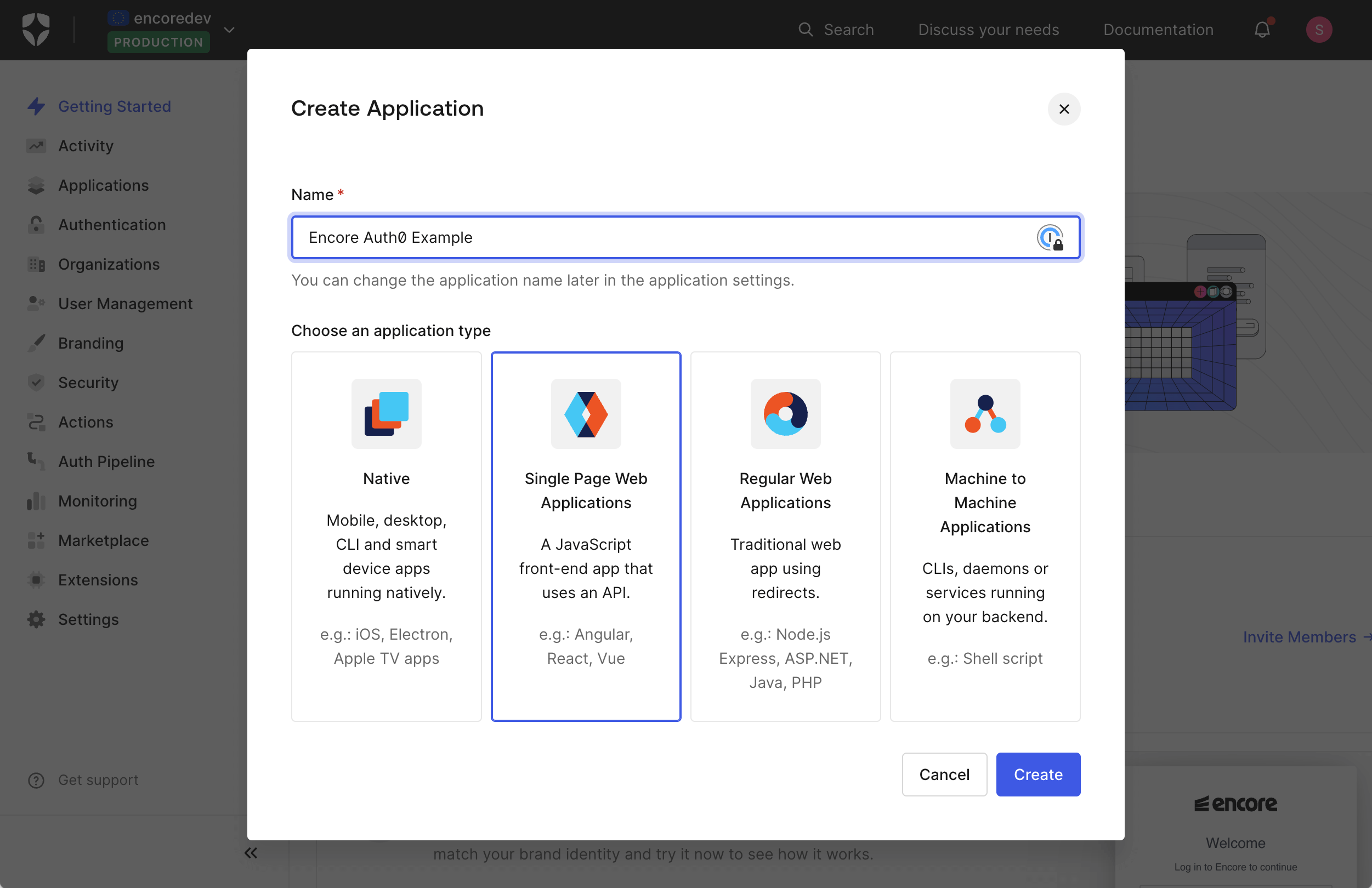
Create an Auth0 account if you haven't already. Then, in the Auth0 dashboard, create a new *Single Page Web Applications*.

<img src="/assets/docs/auth0-create-app.png" title="Create Auth0 application"/>

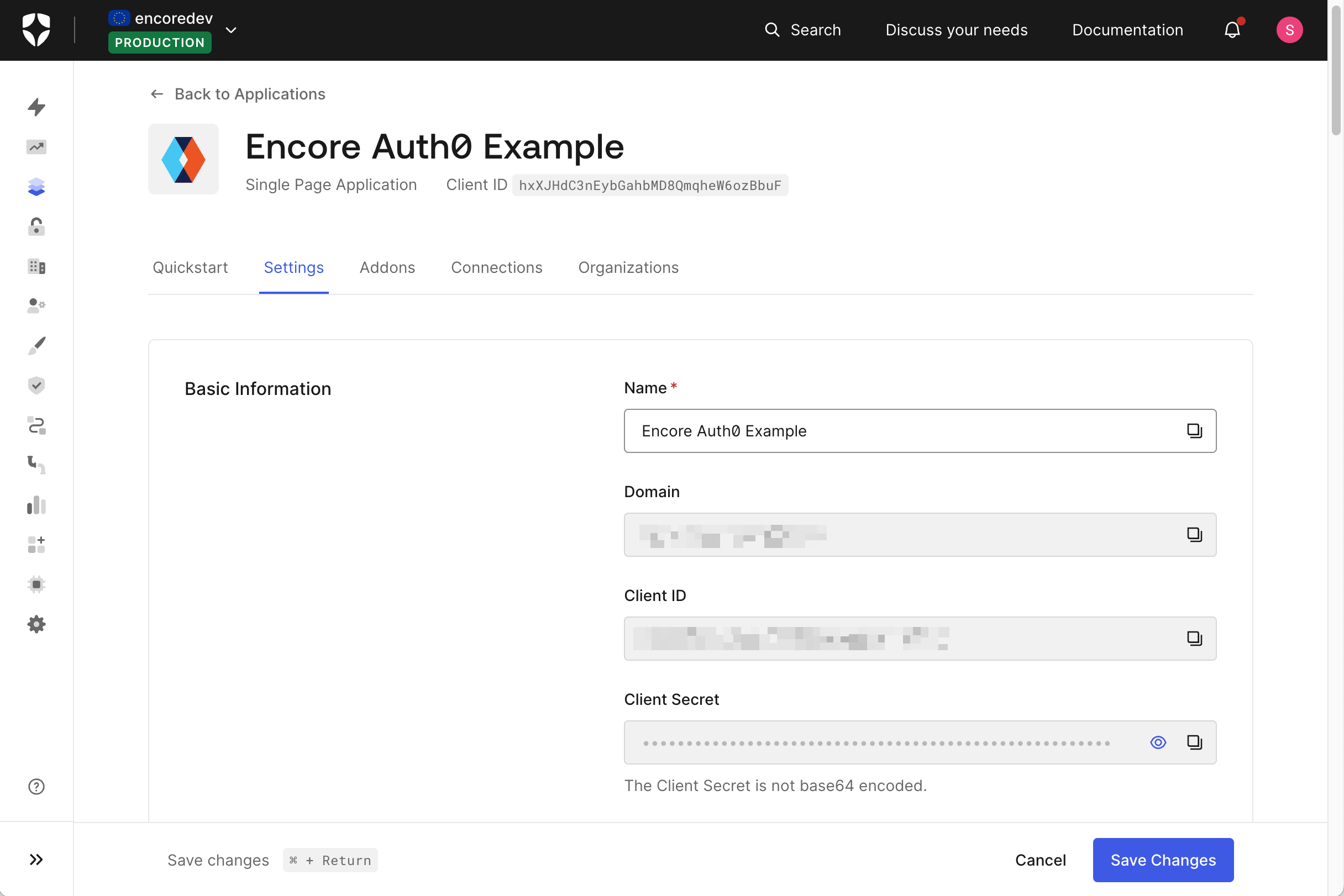
Next, go to the *Application Settings* section. There you will find the `Domain`, `Client ID`, and `Client Secret` that you need to communicate with Auth0. 
Copy these values, we will need them shortly.
<img src="/assets/docs/auth0-basic-info.png" title="Auth0 basic information"/>

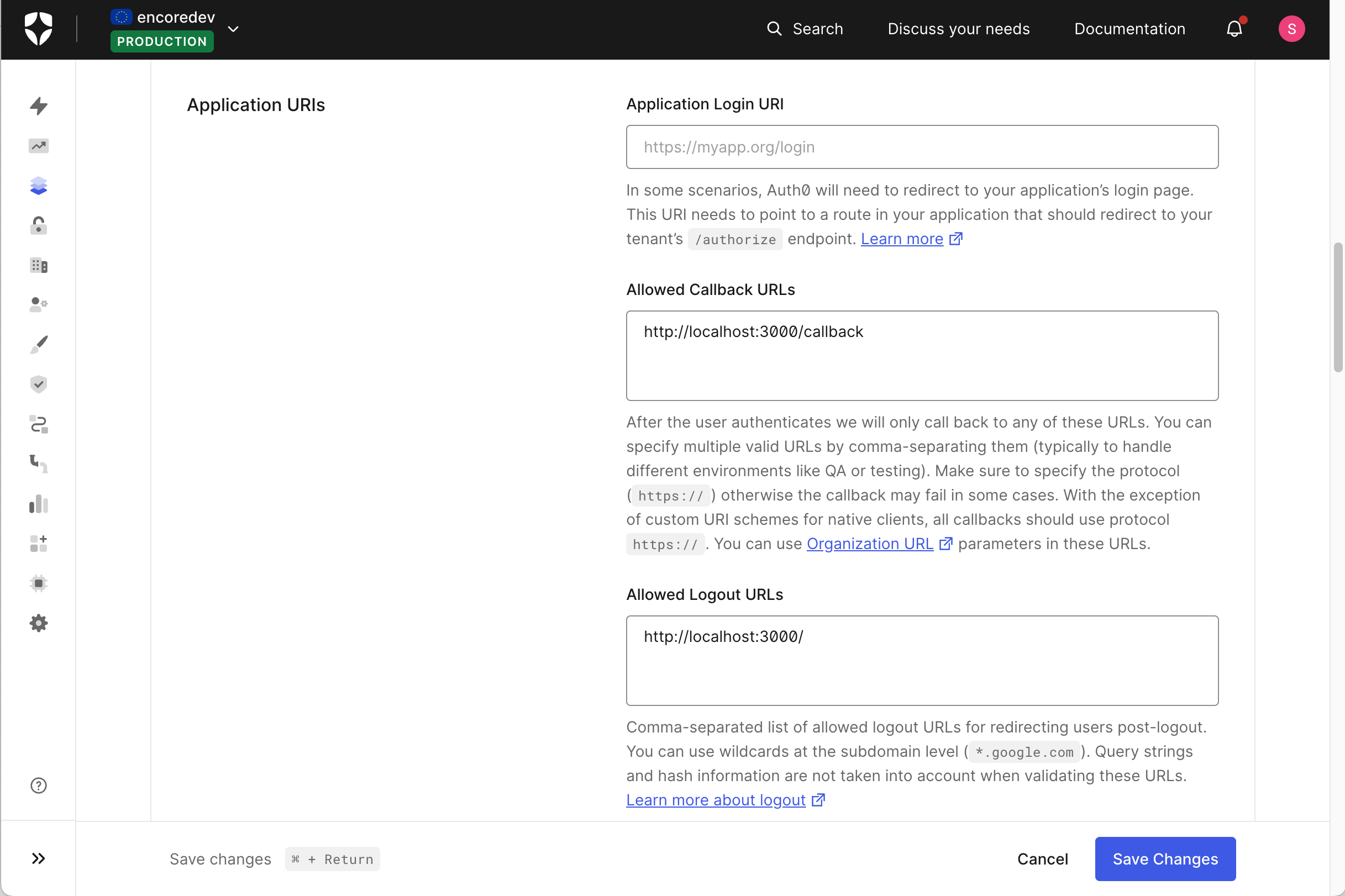
A callback URL is where Auth0 redirects the user after they have been authenticated. 
Add `http://localhost:3000/callback` to the *Allowed Callback URLs*. 
You will need to add more URLs to this list when you have a production or staging environments. 

The same goes for the logout URL (were the user will get redirected after logout). Add `http://localhost:3000/` to the *Allowed Logout URLs*. 
<img src="/assets/docs/auth0-app-uris.png" title="Auth0 application URIs"/>


## Config and secrets

Create a [configuration file](/docs/go/develop/config) in the `auth` service and name it `auth-config.cue`. Add the following:

```cue
ClientID: "<your client_id from above>"
Domain: "<your domain from above>"

// An application running locally
if #Meta.Environment.Type == "development" && #Meta.Environment.Cloud == "local" {
	CallbackURL: "http://localhost:3000/callback"
	LogoutURL: "http://localhost:3000/"
}
```

Replace the values for the `ClientID` and `Domain` that you got from the Auth0 dashboard.

The `ClientSecret` is especially sensitive and should not be hardcoded in your code/config. Instead, you should store that as an [Encore secret](/docs/go/primitives/secrets).

From your terminal (inside your Encore app directory), run:

```shell
$ encore secret set --prod Auth0ClientSecret
```

Now you should do the same for the development secret. The most secure way is to set up a different Auth0 application and use that for development.
Depending on your security requirements you could also use the same secret for development and production.

Once you have a client secret for development, set it similarly to before:

```shell
$ encore secret set --dev Auth0ClientSecret
```

That's it! Encore will run your auth handler and validate the token against Auth0.

## Frontend

Now that the backend is set up, we can create a frontend application that uses the login flow.

Here's an example using [React](https://react.dev/) together with [React Router](https://reactrouter.com/). This example 
also makes use of a Encores ability to [generate request clients](/docs/go/cli/client-generation) to make the communication 
with our backend simple and typesafe.

```tsx
-- App.tsx --
import { PropsWithChildren } from "react";
import {
  createBrowserRouter,
  Link,
  Outlet,
  redirect,
  RouterProvider,
  useRouteError,
} from "react-router-dom";
import { Auth0Provider } from "./lib/auth";
import AdminDashboard from "./components/AdminDashboard.tsx";

import IndexPage from "./components/IndexPage.tsx";
import "./App.css";
import LoginStatus from "./components/LoginStatus.tsx";

// Application routes
const router = createBrowserRouter([
  {
    id: "root",
    path: "/",
    Component: Layout,
    errorElement: (
      <Layout>
        <ErrorBoundary />
      </Layout>
    ),
    children: [
      {
        Component: Outlet,
        children: [
          {
            index: true,
            Component: IndexPage,
          },
          {
            // Login route
            path: "login",
            loader: async ({ request }) => {
              const url = new URL(request.url);
              const searchParams = new URLSearchParams(url.search);
              const returnToURL = searchParams.get("returnTo") ?? "/";

              if (Auth0Provider.isAuthenticated()) return redirect(returnToURL);

              try {
                const returnURL = await Auth0Provider.login(returnToURL);
                return redirect(returnURL);
              } catch (error) {
                throw new Error("Login failed");
              }
            },
          },
          {
            // Callback route, redirected to from Auth0 after login
            path: "callback",
            loader: async ({ request }) => {
              const url = new URL(request.url);
              const searchParams = new URLSearchParams(url.search);
              const state = searchParams.get("state");
              const code = searchParams.get("code");

              if (!state || !code) throw new Error("Login failed");

              try {
                const redirectURL = await Auth0Provider.validate(state, code);
                return redirect(redirectURL);
              } catch (error) {
                throw new Error("Login failed");
              }
            },
          },
          {
            // Logout route
            path: "logout",
            loader: async () => {
              try {
                const redirectURL = await Auth0Provider.logout();
                return redirect(redirectURL);
              } catch (error) {
                throw new Error("Logout failed");
              }
            },
          },
          {
            element: <Outlet />,
            // Redirect to /login if not authenticated
            loader: async ({ request }) => {
              if (!Auth0Provider.isAuthenticated()) {
                const params = new URLSearchParams();
                params.set("returnTo", new URL(request.url).pathname);
                return redirect("/login?" + params.toString());
              }
              return null;
            },
            // Protected routes
            children: [
              {
                path: "admin-dashboard",
                Component: AdminDashboard,
              },
            ],
          },
        ],
      },
    ],
  },
]);

export default function App() {
  return <RouterProvider router={router} fallbackElement={<p>Loading...</p>} />;
}

function Layout({ children }: PropsWithChildren) {
  return (
    <div>
      <header>
        <nav className="nav">
          <div className="navLinks">
            <Link to="/">Home</Link>
            <Link to="/admin-dashboard">Admin Dashboard</Link>
          </div>

          <LoginStatus />
        </nav>
      </header>

      <main className="main">{children ?? <Outlet />}</main>
    </div>
  );
}

function ErrorBoundary() {
  const error = useRouteError() as Error;
  return (
    <div>
      <h1>Something went wrong</h1>
      <p>{error.message || JSON.stringify(error)}</p>
    </div>
  );
}
-- lib/auth.ts --
import Cookies from "js-cookie";
import getRequestClient from "./getRequestClient.ts";

type RedirectURL = string;

/**
 * Handles the backend communication for the authentication flow.
 */
export const Auth0Provider = {
  client: getRequestClient(),
  isAuthenticated: () => !!Cookies.get("auth-token"),

  async login(returnTo: RedirectURL): Promise<RedirectURL> {
    const response = await this.client.auth.Login();
    Cookies.set("state", response.state);
    sessionStorage.setItem(response.state, returnTo);
    return response.auth_code_url;
  },

  async logout(): Promise<RedirectURL> {
    const response = await this.client.auth.Logout();

    Cookies.remove("auth-token");
    Cookies.remove("state");

    return response.redirect_url;
  },

  async validate(state: string, authCode: string): Promise<RedirectURL> {
    if (state != Cookies.get("state")) throw new Error("Invalid state");

    const response = await this.client.auth.Callback({ code: authCode });
    Cookies.set("auth-token", response.token);
    const returnURL = sessionStorage.getItem(state) ?? "/";
    sessionStorage.removeItem(state);
    return returnURL;
  },
};
-- components/LoginStatus.tsx --
import getRequestClient from "../lib/getRequestClient.ts";
import { useFetcher } from "react-router-dom";
import { useEffect, useState } from "react";
import { auth } from "../lib/client.ts";
import { Auth0Provider } from "../lib/auth.ts";

/**
 * Component displaying login/logout button and basic user information if logged in.
 */
function LoginStatus() {
  const client = getRequestClient();
  const fetcher = useFetcher();
  const [profile, setProfile] = useState<auth.ProfileData>();
  const [loading, setLoading] = useState(true);

  // Fetch profile data if user is authenticated
  useEffect(() => {
    const getProfile = async () => {
      setProfile(await client.auth.GetProfile());
      setLoading(false);
    };
    if (Auth0Provider.isAuthenticated()) getProfile();
    else setLoading(false);
  }, []);

  if (loading) return null;

  if (profile) {
    return (
      <div className="authStatus">
        <img src={profile.picture} />
        <fetcher.Form method="GET" action="/logout">
          <button type="submit">Sign out {profile.email}</button>
        </fetcher.Form>
      </div>
    );
  }

  const params = new URLSearchParams();
  params.set("returnTo", window.location.pathname);
  return (
    <div className="authStatus">
      <fetcher.Form method="GET" action={"/login?" + params.toString()}>
        <button type="submit">
          {fetcher.state !== "idle" ? "Signing in..." : "Sign in"}
        </button>
      </fetcher.Form>
    </div>
  );
}

export default LoginStatus;
-- lib/getRequestClient.ts --
import Client, { Environment, Local } from "./client.ts";
import Cookies from "js-cookie";

/**
 * Returns the generated Encore request client for either the local or staging environment.
 * If we are running the frontend locally (development) we assume that our Encore
 * backend is also running locally.
 */
const getRequestClient = () => {
  const token = Cookies.get("auth-token");
  const env = import.meta.env.DEV ? Local : Environment("staging");

  return new Client(env, {
    auth: token,
  });
};

export default getRequestClient;
```

## Auth0 Social Identity Providers

Auth0 supports multiple [social identity providers](https://auth0.com/docs/authenticate/identity-providers/social-identity-providers) (like Google and GitHub) for web applications out of the box.