# AI Tools Integration
> Supercharge your development with AI-powered coding assistants
Encore is built for AI-assisted development. Encore-specific rules and [MCP](/docs/go/ai-integration#mcp-server) integration let AI understand your architecture and generate type-safe code that follows your patterns. Run `encore run` to start your app; Encore provisions local infrastructure automatically.
For production, [self-host](/docs/go/self-host/build) or use [Encore Cloud](/docs/platform) to provision infrastructure in your own AWS or GCP account.
## What AI Enables
Encore's declarative APIs and infrastructure primitives give AI a clear model to work with. AI can add databases, pub/sub topics, and other resources with built-in guardrails, and use MCP to introspect your app—services, APIs, databases, and traces—so it can suggest accurate, pattern-consistent code.
## Enabling AI for Your Project
There are two ways to set up AI support:
- [Method 1: Using the CLI](#method-1-using-the-cli) (recommended)
- [Method 2: Using Encore Skills](#method-2-using-encore-skills)
### Method 1: Using the CLI
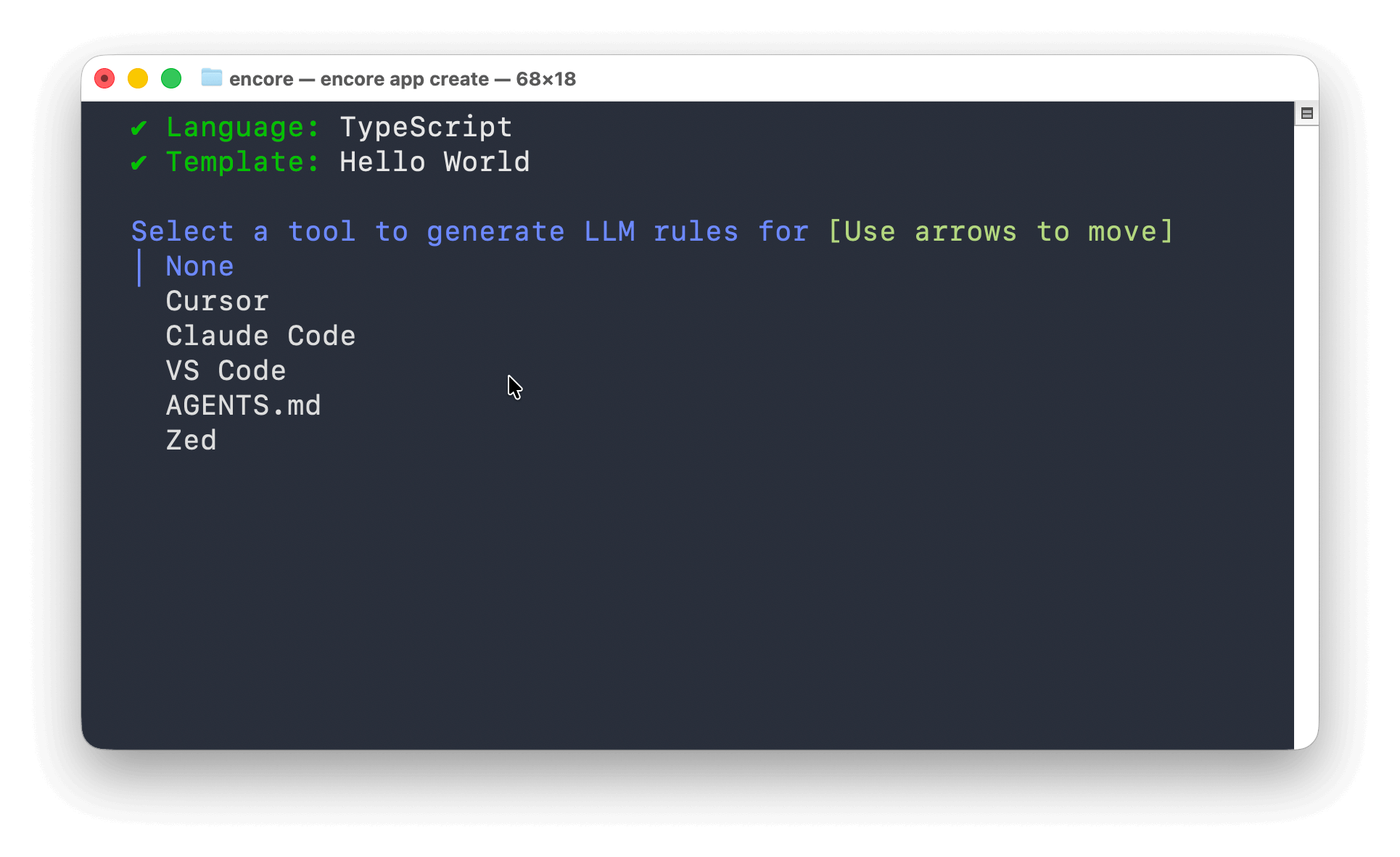
**New projects:** When you run `encore app create`, you'll be prompted to select an AI tool. Encore generates the appropriate configuration files for your chosen tool.
**Existing projects:** Run `encore llm-rules init` to add AI support:
```bash
encore llm-rules init
```
This prompts you to select a tool and generates the appropriate configuration file (`.cursorrules`, `CLAUDE.md`, etc.).
Both commands also set up MCP server configuration for tools that support it (Cursor, Claude Code). If you want to set up MCP manually, see [MCP Server](#mcp-server) below.
Supported tools: Cursor, Claude Code, VS Code, AGENTS.md, and Zed.
### Method 2: Using Encore Skills
Use the [Encore skills package](https://github.com/encoredev/skills) which works with Cursor, Claude Code, GitHub Copilot, and 10+ other AI agents:
```bash
npx add-skill encoredev/skills
```
You can also install specific skills or target specific agents:
```bash
# List available skills
npx add-skill encoredev/skills --list
# Install to specific agents
npx add-skill encoredev/skills -a cursor -a claude-code
```
The skills package includes a migration skill that can automatically migrate your existing backend to Encore Go. See the [Migrate using AI agent](/docs/go/migration/ai-migration) guide to learn more.
## MCP Server
Encore's [Model Context Protocol (MCP)](https://modelcontextprotocol.io/introduction) server gives AI agents deep introspection into your application: querying databases, calling APIs, inspecting services, and analyzing traces.
### Start the Server
From your Encore app directory:
```bash
encore mcp start
```
This displays connection information. Keep it running while using your AI tools.
### Connect Cursor
**Quick setup:** Use this button (update `your-app-id` to your actual app ID):
**Manual setup:** Create `.cursor/mcp.json`:
```json
{
"mcpServers": {
"encore-local": {
"command": "encore",
"args": ["mcp", "run", "--app=your-app-id"]
}
}
}
```
Find your app ID in the `encore.app` file or in the [Encore dashboard](https://app.encore.dev).
### Connect Claude Code
From your Encore app directory:
```bash
claude mcp add --transport stdio encore-local -- encore mcp run --app=your-app-id
```
Verify with `claude mcp list`. You should see `encore-local` in the list.
## What AI Can Do
With Encore skills and MCP connected, AI can:
- **Define infrastructure in code** - AI declares databases, pub/sub, cron jobs, buckets, and other [primitives](/docs/go/primitives)
- **Generate type-safe APIs** - code that follows your patterns and passes validation
- **Understand architecture** - inspect services and how they connect via MCP
- **Query databases** - introspect schema and data to generate accurate queries
- **Debug with tracing** - view request traces, timing, and span details to pinpoint issues
- **Test instantly** - run `encore run` to test with real infrastructure, not mocks
### In Practice
#### Smarter Debugging with Tracing
AI can access Encore's distributed tracing via MCP to debug issues intelligently. Instead of guessing, AI can view actual request traces, analyze timing across services, and inspect span details to pinpoint exactly where things went wrong. This creates a powerful feedback loop: generate code, test it, analyze the traces, and iterate.
#### Database Introspection
AI can query your actual database schema and data via MCP. This means AI understands your real data model and can generate accurate queries, suggest schema changes, and debug data issues by inspecting actual records.
#### Instant Validation with Real Infrastructure
When you run `encore run`, Encore provisions real local infrastructure (databases, pub/sub, etc.). AI can generate code and immediately test it against real services, catching issues early and ensuring the code works before you deploy.
Example prompts:
- "Add an endpoint that publishes to a pub/sub topic, call it and verify in traces"
- "Query the users database and show accounts created in the last week"
- "Create a new service with CRUD endpoints connected to PostgreSQL"
## Learn More
- [MCP Server Documentation](/docs/go/cli/mcp) - Complete MCP reference
- [Encore Skills Repository](https://github.com/encoredev/skills) - Available skills and installation
- [Quick Start Guide](/docs/go/quick-start) - Build your first Encore app

 **Existing projects:** Run `encore llm-rules init` to add AI support:
```bash
encore llm-rules init
```
This prompts you to select a tool and generates the appropriate configuration file (`.cursorrules`, `CLAUDE.md`, etc.).
Both commands also set up MCP server configuration for tools that support it (Cursor, Claude Code). If you want to set up MCP manually, see [MCP Server](#mcp-server) below.
Supported tools: Cursor, Claude Code, VS Code, AGENTS.md, and Zed.
### Method 2: Using Encore Skills
Use the [Encore skills package](https://github.com/encoredev/skills) which works with Cursor, Claude Code, GitHub Copilot, and 10+ other AI agents:
```bash
npx add-skill encoredev/skills
```
You can also install specific skills or target specific agents:
```bash
# List available skills
npx add-skill encoredev/skills --list
# Install to specific agents
npx add-skill encoredev/skills -a cursor -a claude-code
```
The skills package includes a migration skill that can automatically migrate your existing backend to Encore Go. See the [Migrate using AI agent](/docs/go/migration/ai-migration) guide to learn more.
## MCP Server
Encore's [Model Context Protocol (MCP)](https://modelcontextprotocol.io/introduction) server gives AI agents deep introspection into your application: querying databases, calling APIs, inspecting services, and analyzing traces.
### Start the Server
From your Encore app directory:
```bash
encore mcp start
```
This displays connection information. Keep it running while using your AI tools.
### Connect Cursor
**Quick setup:** Use this button (update `your-app-id` to your actual app ID):
**Existing projects:** Run `encore llm-rules init` to add AI support:
```bash
encore llm-rules init
```
This prompts you to select a tool and generates the appropriate configuration file (`.cursorrules`, `CLAUDE.md`, etc.).
Both commands also set up MCP server configuration for tools that support it (Cursor, Claude Code). If you want to set up MCP manually, see [MCP Server](#mcp-server) below.
Supported tools: Cursor, Claude Code, VS Code, AGENTS.md, and Zed.
### Method 2: Using Encore Skills
Use the [Encore skills package](https://github.com/encoredev/skills) which works with Cursor, Claude Code, GitHub Copilot, and 10+ other AI agents:
```bash
npx add-skill encoredev/skills
```
You can also install specific skills or target specific agents:
```bash
# List available skills
npx add-skill encoredev/skills --list
# Install to specific agents
npx add-skill encoredev/skills -a cursor -a claude-code
```
The skills package includes a migration skill that can automatically migrate your existing backend to Encore Go. See the [Migrate using AI agent](/docs/go/migration/ai-migration) guide to learn more.
## MCP Server
Encore's [Model Context Protocol (MCP)](https://modelcontextprotocol.io/introduction) server gives AI agents deep introspection into your application: querying databases, calling APIs, inspecting services, and analyzing traces.
### Start the Server
From your Encore app directory:
```bash
encore mcp start
```
This displays connection information. Keep it running while using your AI tools.
### Connect Cursor
**Quick setup:** Use this button (update `your-app-id` to your actual app ID):